Tag: Customer Engagement

  • Renewed Dynamics 365 Licensing Guide for October 2020

    Renewed Dynamics 365 Licensing Guide for October 2020

    On the first business day of each month, I have one routine that I’ve been following for quite some time now: check the latest Licensing Guides that Microsoft has published. I have two short URLs that I use for quickly downloading them:

    I also have a habit of storing each historical version of these documents (and other licensing materials from MS) onto my OneDrive. I’ve found this to be the only way you can actually keep track of what’s going on in the rapidly moving world of BizApps licensing. Well, these days there is also the GitHub history of commits made on Microsoft Docs pages covering licensing (like this one), if you’re into comparing the diffs of each change made in the detailed wording.

    Fresh new look for October 2020

    This time the latest PDF for Dynamics 365 Licensing Guide offered quite significant changes, which are clearly visible right from opening the document:
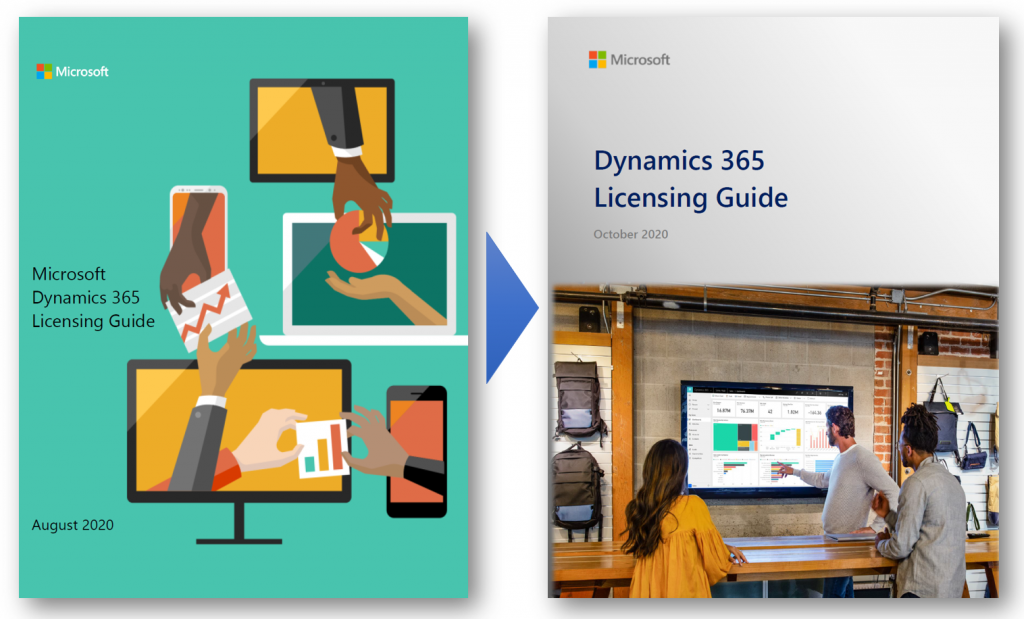
    “Big deal, just another cover page update like they do with Release Plans.” This time there’s more to it, though. Here’s what MS says:

    The Dynamics 365 Licensing Guide has been reformatted and renewed for October 2020. We hope you will find it consistent and easier to consume. Applications are presented in alphabetical order, and each section covers the full story including licensing model, additional applications, and user rights. Dynamics 365 Business Central and Mixed Reality offers are now included in this guide and duplicative information has been removed. Product licensing information that is legally binding is presented in the Product Terms and Online Services Terms (OST). Power Platform licensing information is referenced in Power Platform licensing documents.

    Previously Business Central was excluded from the Dynamics 365 Licensing Guide, which of course sounded a bit strange. After all, the historical plans for having separate Business Edition and Enterprise Edition product tiers for Dynamics 365 were scrapped before these products ever launched, so preserving such division in the licensing documentation did not seem justified.

    This was not the only division that existed in the earlier Dynamics 365 Licensing Guide, though. For old time’s sake, here’s how the last August 2020 version of the Guide illustrated the different types of Base and Attach licenses available:
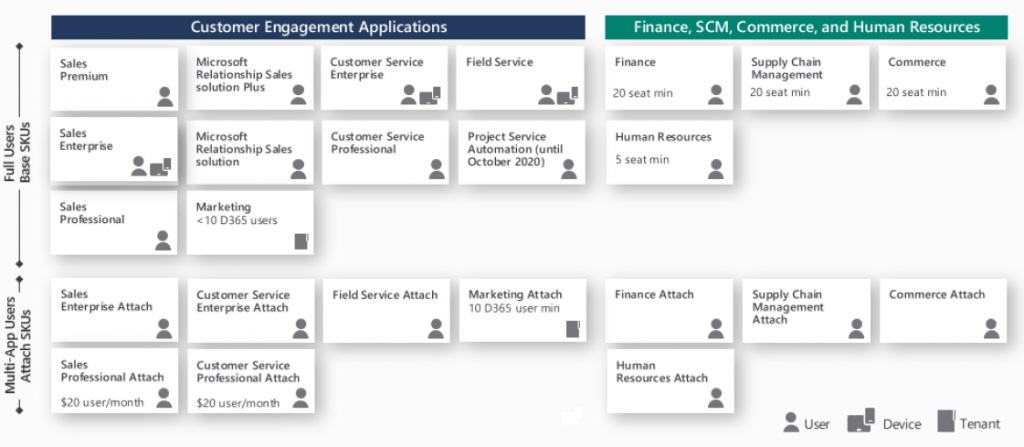
    We had a split between “Customer Engagement Applications” and “Finance, SCM, Commerce and Human Resources”. Go back a full year and the right side said “Finance and Operations, Retail, and Talent” – because it’s apparently a great idea to change software product names at least as often as their licensing model… Anyway, the logical grouping was still the same, meaning we had the XRM/CRM apps on the left and AX/ERP on the right.

    This wasn’t exactly the way Microsoft would like to present their Dynamics 365 suite of products, as instead of CRM on one side and ERP on the other it should be one seamless plaform. Related to this, MS had stated in October 2019 already that they would no longer be using the term “Dynamics 365 for Customer Engagement apps” to refer to any cloud services, leaving CE as the term for legacy on-prem versions only. Despite of this, up until the August 2020 version the Licensing Guide for these cloud apps still had 47 occurrences of the term “Customer Engagement” in it.

    Customer Engagement is gone for good

    Now in the lastest Licensing Guide version we have a truly flat list of all the different Dynamics 365 apps presented in an alphabetical order. If you didn’t know the origin of each application and what technical platform it actually runs on, there wouldn’t be anything in the Licensing Guide to highlight this.
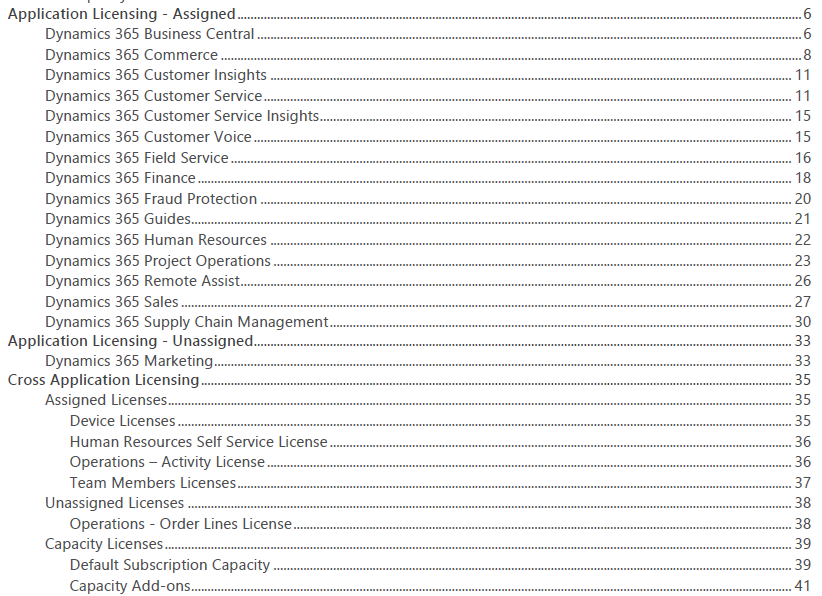
    From a commercial perspective this makes a lot of sense. The whole idea behind Dynamics 365 today is that instead of subscribing to a “plan” that opens on set of apps that share a common server origin, your organization’s users could subscribe to any combination of apps that suit the needs of a particular subset of your users. The Base/Attach licensing model makes the cost of additional apps an attractive option to explore. While not all data might be in the same physical place for each app, this may not even be an issue for unrelated business processes like Sales and Human Resources.

    From a technical perspective, things aren’t necessarily getting any easier to grasp by this removal of a familiar layer like CE (or CRM). Yet on a factual level the Dynamics 365 suite hasn’t been about the combination of CRM and ERP for a while anymore.

    Think about Customer Insights, for example. That’s a service built to ingest data from multiple different systems (like CRM or ERP) and manage it on Azure Data Lake. Or how about Customer Voice. It was born from the feature set of Microsoft Forms, then merged with the legacy of now-deprecated Voice of the Customer. The resulting product isn’t exactly pure XRM nor is it an extended Office app.

    We can expect most new Dynamics 365 products to be hybrids built out of multiple technologies. In the process it’s becoming difficult to assign them into buckets based on established enterprise systems.

    What’s my name again…?

    People with a Dynamics CRM background have fairly broadly adopted CE as the descriptor to identify which part of Dynamics 365 they specialize in. As Microsoft erases the last instances of Customer Engagement from their terminology, this can cause some further identify crisis for long time professionals who are experienced with XRM yet can’t quite place themselves on the long list of current Dynamics 365 app names.

    The way I see it, there isn’t any need for a new replacement term to cover what used to be CE, and XRM before that. It’s just simply Power Apps! All of the common features of the platform are essentially included under the Power Apps umbrella, and there’s a data platform called Common Data Service as one key element of it. Everything up from there is the app specific layer where the Dynamics 365 X product team has implemented functionality with a business process in mind. CE isn’t such a useful concept here anymore, because knowing about Sales doesn’t guarantee you’re fluent in Marketing or Field Service apps.

    So that things wouldn’t be all too simple, Power Apps does of course cover a wide array of functionality that CE professionals may not be familiar with. For starters, alongside the Model-driven apps there are Canvas apps and Portals – each with very specific logic that could be compared to CRM vs. ERP. Power Automate as the candidate for replacing traditional CE process automation is a fair bit wider than just workflows. If you’d then expand beyond Power Apps and call yourself a Power Platform specialist, would that indicate fluency in Power Virtual Agents and Power BI, too?

    Licensing just Dynamics 365 ain’t enough

    The extensive list of apps and their pricing elements in the current Dynamics 365 Licensing Guide is a bit like the Terms & Conditions of any online service: no one is going to read through it all. At the same time, though, it doesn’t go deep enough in explaining how the first-party Dynamics 365 apps relate to the platform capabilities licensed via Power Apps. Unfortunately there is no single Power Platform Licensing Guide document to provide answers, because no such product is actually being sold by Microsoft. You license various pieces of it and then assemble them into your own unique structures.

    The trickiest questions around business applications licensing aren’t usually about the app specific details that you can read from the Dynamics 365 Licensing Guide. It’s about those scenarios which involve using the Power Platform as the means to customize, extend and integrate Dynamics 365 apps. On this front nothing has really changed nor improved, as Microsoft continues to treat these two sides as separate products (see my blog post on why Power Platform licensing is complex). Often you’re left between browsing the two separate Licensing Guides, digging through FAQ answers and sometimes tracing the underlying intent of the licensing model into something that a MS representative has informally stated in an interview.
    As it just so happens, I’ll be speaking at the CDS Saturday event on October 24th about Making Sense of CDS Licensing. This will be a live event with no recording to catch later so be sure to sign up and be there if you’re interested in diving deeper into the key aspects of licensing Dynamics 365 & Power Apps when building CDS based solutions.

  • End of Dynamics 365 Customer Engagement Online

    End of Dynamics 365 Customer Engagement Online

    I always prefer to use precise terminology when talking about the technologies that are part of my trade. Some might consider me a pedantic guy who’s always correcting some insignificant details in documents or presentations that cover Microsoft technologies but aren’t using their correct names. Yeah, the customers reading them probably wouldn’t notice the difference, but if you let go of your standards then sooner or later the lazy writing will lead to unnecessary confusion. Since I don’t write any actual computer code for a living, I guess this is my way of “debugging” the deliverables that I actually ship.

    Like with actual coding, sometimes there are breaking changes introduced into the concepts that are used in technical writing, too. This happens when the product branding gets updated by Microsoft as part of their evolving commercial offering, or when existing technologies are realigned to be used in a new context. You could think of it as a new API version that MS product marketing releases, which means you need to perform updates to your “code” to keep its API references compatible with the surrounding reality. A slide deck created by Microsoft in 2016 for the Dynamics product offering would hardly pass the code validation today – yet you still see some partners out there just happily using these legacy materials in customer dialogue. Yes, I cringe a lot when seeing those.

    The actual topic of this post is about what the title says: Dynamics 365 Customer Engagement is now officially gone from the Microsoft cloud. That is all. Thanks for coming, have a save ride home!

    Wait, WHAT?

    Oh, alright then. Let’s dive a bit deeper into the what, starting with a look back at what has happened in our earlier episodes of Microsoft business applications branding.

    In the beginning there was CRM…

    …And then suddenly there wasn’t. Yes, you’ll still find the term “CRM” all over my blog. I’ve had trouble deciding on what comes after it – and sticks around for longer than a year or two. Anyway, in 2016 Microsoft decided to let go of the Dynamics CRM brand and replace it with Dynamics 365 instead. There was a popular article written on LinkedIn at that time about it:

    Deprecating the term “CRM” was probably a good move, but replacing it with something that didn’t specify if the technology underneath was ex-CRM or ex-AX (the enterprise ERP product) caused a bit of a mess. From that mess, the term Dynamics 365 Customer Engagement rose from the ashes of Dynamics CRM in the first half of 2017, to reference the platform that was XRM under the hood but wasn’t allowed to be called that.

    A year went by and it was time to reimagine things again, with the merging of PowerApps and XRM. The platform was given the name Common Data Service, which had actually already been given to a completely different platform a bit earlier in the pre-merger world of PowerApps. Since in the cloud there are no version numbers, let’s not refer to “v1” or “v2” here either then. There can only be one CDS!

    (Well, actually there were 2 after this merger still: “CDS for Apps” and “CDS for Analytics”, in short “CDS-T” and “CDS-A”, but then…) OH SHUT UP ALREADY you pedantic geek!

    Summer 2018 saw the Power Platform brand emerge, and we’ve been hearing quite a lot from it since. You could say it’s been stealing the show from the previous business applications primary brand that was Dynamics 365. It would be foolish to think that we’re anywhere near the end of this Power wave that’s sweeping across the MS cloud offering.

    Dynamics 365 CE Online vs. On-premises: the game is over

    As part of the October 2019 updates coming in the form of Release Wave 2, there have been some subtle changes to product branding for Microsoft Business Applications. For starters, MS is dropping “for” from the product names, so what used to be “Dynamics 365 for Sales” is now just “Dynamics 365 Sales”. Certification and exam names have already changed, next we’ll wait and see when the official SKU names in MS price lists will reflect this.

    Another visual change you’ll see when visiting the documentation site for Dynamics 365 is that many of the apps received shiny new icons. Woo-hoo!

    Then when we scroll down the page, there’s this small section with no bold graphics, dedicated to the on-premises products:

    Let’s click on it, if only for old times sake. Hey, hold on! There’s actually something interesting here right on the Overview page for on-prem:

    Effective October 2019, the Dynamics 365 for Customer Engagement SKU/license plan is no longer available for “online” customers. More information: Dynamics 365 Licensing Update

    With this change for online customers, we are no longer using the term “Dynamics 365 for Customer Engagement apps” to refer to the collection of following apps and its related services:
    * Dynamics 365 Sales
    * Dynamics 365 Customer Service
    * Dynamics 365 Marketing
    * Dynamics 365 Field Service
    * Dynamics 365 Project Service Automation


    For online customers, these apps are model-driven apps running on Common Data Service. You can build model-driven apps using PowerApps. More information: What are model-driven apps?

    For on-premises customers, “Dynamics 365 Customer Engagement (on-premises)” is the official name of the product that provides sales, service, and marketing features. Customer Engagement (on-premises) shares many features in common with Common Data Service and PowerApps.

    That’s it then. Customer Engagement is now exclusively the name of the old legacy product that you can deploy on the server infrastructure you manage. If you use anything called Dynamics 365 that’s coming from the actively developed Microsoft Cloud, then it’s not CE anymore. It’s “[Insert Dynamics 365 app name] running on Common Data Service”.

    Why?

    Even though some of you might feel that Microsoft keeps renaming things simply because that’s what they always do, there is a justification for the axing of the Customer Engagement brand. For those of you that work with configuring and developing solutions for the platform, you will have noticed that the cloud version resembles the old server product less and less every day. Environment administration tasks have been moving over to Power Platform Admin Center, the solution configuration work is done under make.powerapps.com, the new editors for forms, views and everything new is being introduced only to the Power side.

    None of these new investments into admin and customizer tools are such that you could easily port them over to the on-premises world. There isn’t a Power Platform you could install locally, so the gap between these 2 worlds cannot ever be bridged. From a training and documentation perspective you can’t claim that “it’s all just CE, don’t worry about the small things” when the architecture of one platform no longer physically aligns with the other. CDS, PowerApps, Flow, Connectors etc. aren’t just extra pieces in the cloud, they’re an altogether different puzzle that requires new skills and fresh thinking.

    (more…)
  • From MS CRM to Dynamics 365 Customer Engagement

    From MS CRM to Dynamics 365 Customer Engagement

    Last year when Microsoft officially launched their Dynamics 365 commercial offering, it marked the end of the Dynamics CRM brand. Initially launched as “Microsoft CRM” in 2003 and then rebranded as “Microsoft Dynamics CRM” in 2005 (see the first 10 years of the platform’s history in this blog post), the acronym “CRM” had become a big part of the identity for the ecosystem surrounding the software product. Nevertheless, there were fair arguments for why those three letters had gradually become a bit of a liability for the rapidly expanding cloud business applications platform that now reaches far beyond the familiar CRM grounds. My point of view can be found from the post “The End of CRM as (Microsoft) Software”, which turned out to be one of my most popular writings in 2016.

    So, out with Dynamics CRM and in with Dynamics 365. Problem solved! Except that this time around the rebranding had a bit wider reaching impact, due to the fact that it covered not only CRM but also the ERP side of the house. And not just one but two ERP’s: AX and NAV. With the catchy names “Microsoft Dynamics 365, Business edition” and “Microsoft Dynamics 365, Enterprise edition”, MS has almost managed to hide the fact that each of the editions consists of two completely separate application platforms. A bit like what they did with Office 365, which seemed to have worked out very well for MS, so not a surprise we’re seeing the same playbook in action again.

    In this new world, we now have the concept of an “App”. You could, for example, license just “Dynamics 365 for Sales, Enterprise edition” if you don’t want to manage cases, or “Dynamics 365 for Customer Service, Enterprise Edition” if leads and opportunities are not on your radar. Financially the incentives for buying the complete “Plan 1” with all the Apps is quite strong, though, so the App model may not become a big part of the conversation after the customer has made the license acquisition and the real fun begins – as us “consultants formerly known as CRM consultants” surely are well aware of.

    The real question that remains is: what exactly do you have once you’ve bought the software license? Unless you opted for the full suite of Plan 2 and also acquired the ERP application called Operations (in the Enterprise edition), you’re dealing with a subset of Dynamics 365 that does not have any name. If you go XRM and create custom entities, they do not exist inside the walls of “Sales” or “Customer Service” specifically. They’re in “CRM”, just like 90% of the platform functionality exists across all the Apps.

    Why using the generic Dynamics 365 name can become confusing is that you can’t assume any text containing it to be about the ex-CRM part of it. It might as well be about ex-AX or ex-NAV. If you go and look at the SDK documentation on MSDN or the newer site at docs.microsoft.com, all they talk about is “Microsoft Dynamics 365”.

    As long as you have a long history of working with any of the three platforms, you’ll probably be able to identify what the text you’re reading refers to after a while. But what about all the newcomers that the Dynamics ecosystem needs to attract, in order to continue on its growth trajectory? How will they know what applies to which platform? As an example, here’s what the new MB2-715 certification exam page originally looked like:

    “Microsoft Dynamics 365 Online Deployment”. Mmm, yeah, so will this cover both CRM and AX? If you would ignore the CRM old logo with the “Sails” that have actually been discontinued since WPC 2015 announcement already (and can still found in some Microsoft sites & services), the actual description text of the exam never once mentions if its about CRM or ERP. By scanning through the related course material on Dynamics Learning Portal, the word “CRM” is completely avoided in every place – even though it’s obviously all about our beloved platform. The reason of course being that there hasn’t been anything sensible available to replace CRM with, if you stick to the official MS branding guidance.

    This is just silly, and being the brutally honest consultant that I am, I also voiced my concern over on Twitter about this. In fact, there was already an earlier discussion I had with some of the community members about this lack of proper product names for us to use. Nick Doelman wrote a great blog post about this, so go and check it out for context. Yesterday, when I was again browsing through a list of the latest DLP materials, though, I came across a term that I had been expecting to see in public facing Microsoft sites for quite some time now. Here it is:

    Microsoft Dynamics 365 Customer Engagement. There we have it, folks! The MB2-715 exam description was updated not just with the new logo but also a name that properly describes which particular platform the exam is about. I’ve seen this term being unofficially used among MSFT personnel, but now we get a search engine hit for it that’s not just partner content.

    What do I think of the name? I believe it’s the right compromise to make, given that CRM must go and XRM is too technical for the wider audience. It’s most likely not a brand that Microsoft is too thrilled about promoting, but it’s a name that must exists – because there aren’t really any other good options around. The way I see it, Dynamics 365 Customer Engagement isn’t so much the result of a grand vision but rather it has been born out of necessity. And I for one am perfectly happy with starting to use it, if indeed this becomes the third name for the XRM platform. Not the Apps, but the thing that was MS CRM and Dynamics CRM back in the days.

    So, should I now rush out to buy a suitable domain name for “Surviving Customer Engagement”? Hmm, I think I’ll hold off from any rash decisions, since the kind of changes that we saw with the Dynamics 365 launch last year are maybe good for grabbing media attention but not the optimal approach if you just want to get your message across to the Dynamics community. CRM will be around for a while, even though we may gradually need to shift towards using a bit different vocabulary when talking about the business application platforms that we work with.