Tag: CRM 2016

  • A Million Voices: VoC Survey Results Analysis

    A Million Voices: VoC Survey Results Analysis

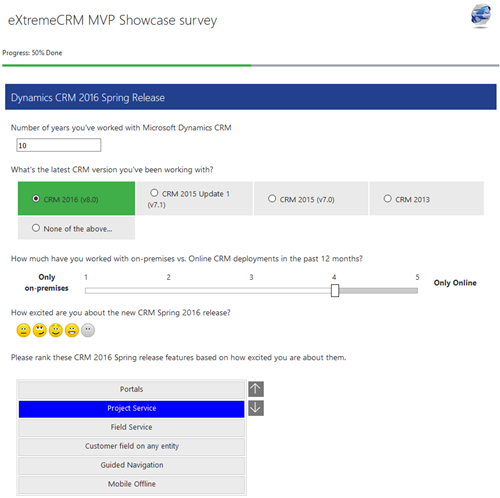
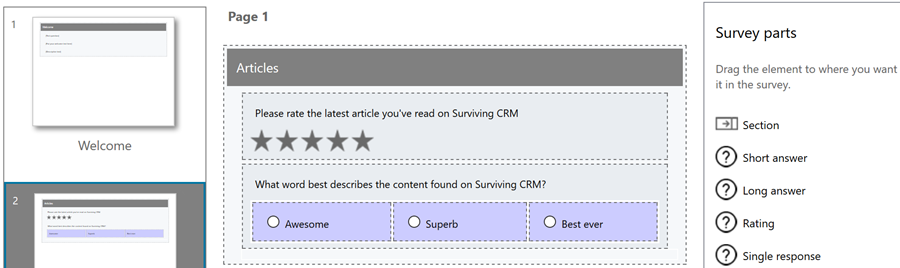
    A few weeks ago I launched a demo survey built on Voice of the Customer, the brand new survey tool from Microsoft. The goals I had for this exercise were twofold: 1) see how these type of interactive tools could be used in live events like eXtremeCRM 2016 Warsaw, and 2) gain some experience on what it is actually like to work with incoming survey response data inside Dynamics CRM. In this post I’ll mainly be focusing on the latter one, although the example data we’ll be looking at are the live answers you & other readers of this blog submitted via the eXtreme MVP Survey.
    VoC_survey_page

    As you may know, Voice of the Customer (or VoC as we’ll refer to it from now on) is a pure XRM solution. Although the actual customer facing survey forms are of course not presented via the Dynamics CRM client UI, everything that you use for configuring the survey questions and logic, as well as the incoming survey responses, is managed with CRM entities and stored into the CRM database. The reason this is such a big deal is that most of you will already possess the skills needed for leveraging such data via views, charts and dashboards as it’s just XRM all the way. Furthermore, you’re free to design business processes around the survey functionality with tools like real-time workflows or business rules. Naturally you’re also able to interact with the survey entities and records via the latest CRM Web API, should you come across some integration scenarios where data needs to either flow in or out to another system.

    The flip side of this coin is that VoC is unfortunately very XRM-ish to work with. If you compared it to dedicated survey apps that do nothing but questionnaire design (like SurveyMonkey, Surveypal and the likes), survey publishing and response data analysis, then there’s still quite a big gap for Microsoft to work on bridging when it comes to the end user experience of this tool. In a way this is quite understandable since the value proposition of VoC really is all about the tight integration with your customer data and the ability to send survey invitations automatically as a part of your customer facing processes; such as a survey link being emailed to a customer after a support case is closed in CRM, to gather quick ratings and design automatic escalation paths if the KPI’s are not met. Nevertheless, since VoC does also support creating pretty advanced surveys for collecting quantitative data from a broad target group in more traditional campaign style satisfaction surveys, as well as anonymous survey links presented on website, it’s good to understand what it’s like analyzing such data inside Dynamics CRM.
    VoC_Survey_Summary_report

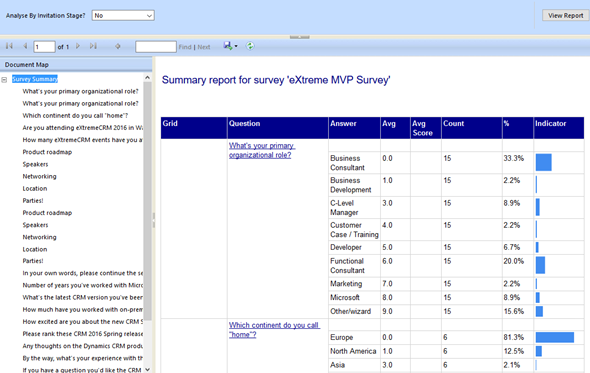
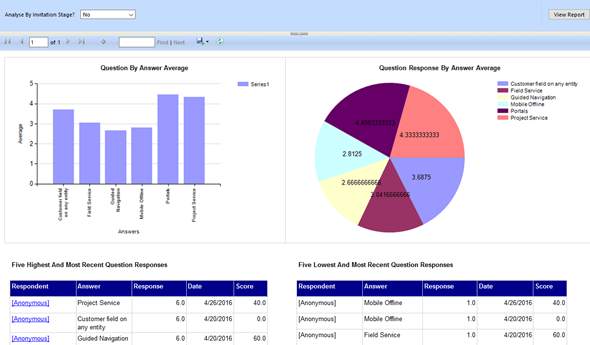
    There are a lot of components in the VoC solution right out of the box. First off, there are four SSRS reports: Survey Summary, Question Summary, Net Promoter Score and Survey Export. The first two are general purpose reports with tables and charts summarizing the data either across a single survey or a specific question, as illustrated in the screenshots shown here. The NPS report is naturally aimed for this particular survey type, whereas the export one is a single huge matrix for dumping out the raw survey response data into Excel for further manipulation.
    VoC_Question_Summary_report

    For more interactive data analysis there are eight dashboards in the VoC solution. However, these may not be all that useful for many real life scenarios, since they suffer from the same limitation as all Dynamics CRM dashboards: there are no global filters you can apply for all the dashboard components. Meaning, unlike with an SSRS report launched from CRM, you can’t set the context of the dashboard to be a specific survey. Yes, with the new “interactive experience dashboards” introduced in CRM 2016 you do get this type of filters, but since right now those features are limited to the Interactive Service Hub only (which in turn has a fair number of limitations for general use), it’s not exactly the kind of solution we’d need right here.

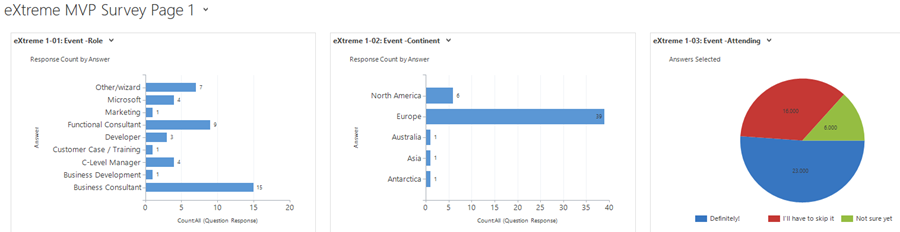
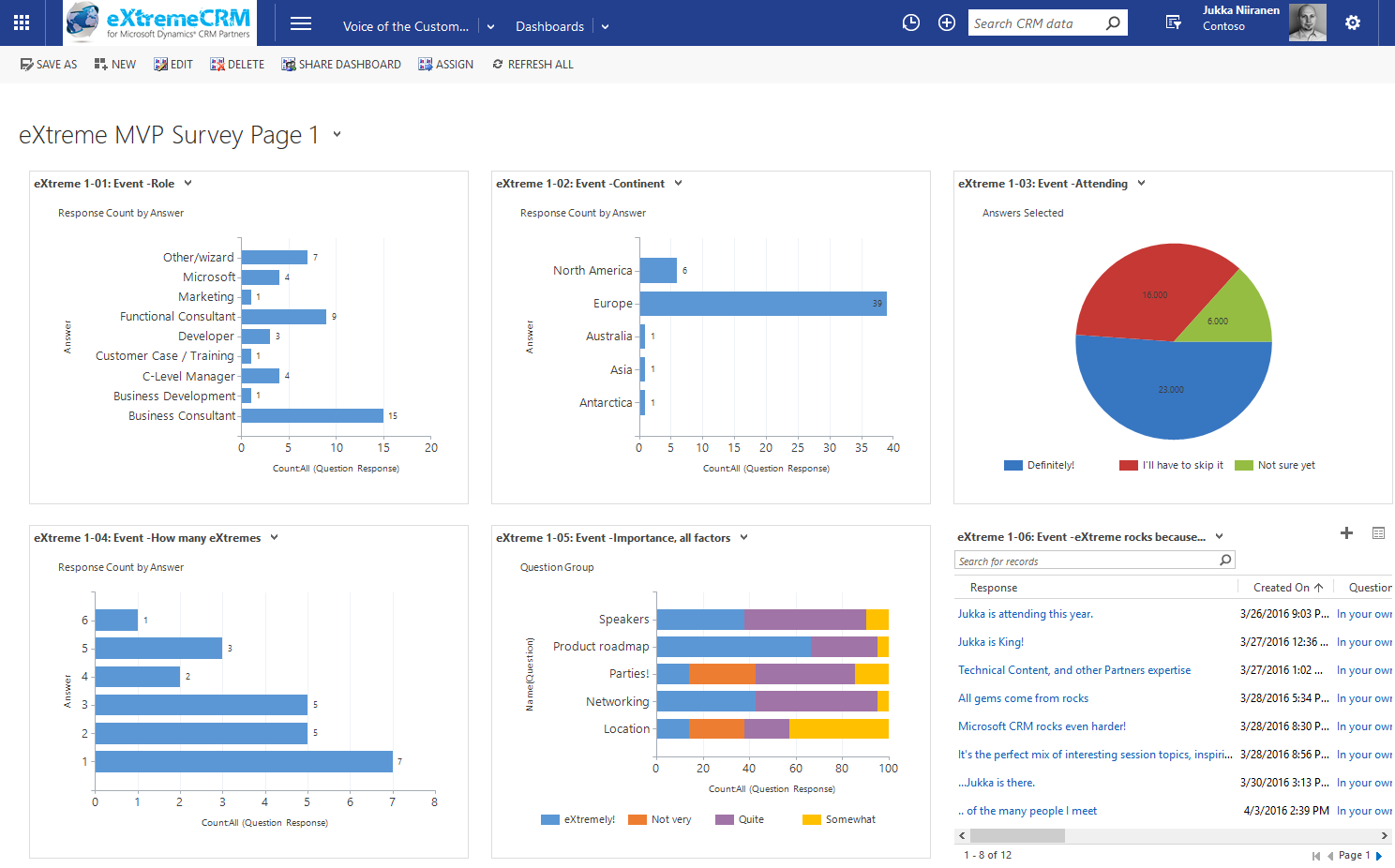
    That doesn’t mean we couldn’t build pretty dashboards to summarize our survey responses, though. I had a go at this with the eXtreme MVP Survey and it turned out pretty well. Have a look (click for a larger image):
    VoC_eXtremeMVP_dashboard_page_1_small

    In the survey form I had three pages full of questions and I constructed the corresponding pages as personal CRM dashboards. This allowed me to both monitor the incoming responses during the survey data collection period as well as present the results to the audience at the MVP Showcase session in eXtremeCRM. It looks good, it appears very familiar to existing CRM users and it gets the job done without having to resort to any complex report development. (more…)
  • Voice of the Customer: Conditional Questions

    Voice of the Customer: Conditional Questions

    My favorite podcast by far is CRM Audio. In fact, it’s the only podcast I regularly follow, since whenever I put my headphones on, quite often it will be for playing something from Spotify or Mixcloud to keep me from being distracted by people talking around me. Anyway, the podcasts that Joel, George and Shawn record about the latest news from the Dynamics CRM world together with their guest stars always provide some interesting insights that you can’t catch from the blogosphere. If you haven’t subscribed to it yet, I encourage you to give it a go.

    In episode 21 of CRM Audio, titled “That’s Not A Survey”, these CRM tipsters explored the brand new Voice of the Customer solution and discussed how to position it in relation to other tools like ClickDimensions Surveys and the likes. As you may have noticed from my previous blog post, I’ve also spent a bit of time playing around with VoC, since I see quite a lot of potential with this XRM based survey engine.

    One of the misconceptions around VoC that I’ve come across a few times before was also mentioned in the podcast was about conditional questions in a survey. It’s quite a basic requirement from any more advanced online surveys that the remaining questions should be adapted based on the earlier answers that the user has given. Call it “skip logic” or conditional show/hide, this would be something that a well designed survey would often need to apply, so that it adapts to the customer’s scenario being studied and can branch into different directions if parts of the questions are not relevant in a particular path. The misconception here is that in the Voice of the Customer survey designer UI there doesn’t appear to be a way to define such conditional logic. However, VoC does have this functionality already today.

    Being a very recent addition to Microsoft’s portfolio, and having been delayed from the original CRM 2016 release schedule, the features of VoC aren’t very well documented at the moment, nor is there much training material available for instructing users how to get familiar with the tool. The regular readers of Surviving CRM might recall that VoC was actually called Mojo Surveys when MS acquired it one year ago. This means that documentation does exist, but it just hasn’t been remade into Microsoft’s format yet. Here’s a little tip: Google for mojo surveys filetype:pdf and see what you’ll find…

    How the “skip logic” is done in VoC surveys is via a feature/entity called Response Routing. Found from the related records menu under a survey record, this is where you can define both the response conditions under which the routing  should take place as well as the response actions that should be carried out when the conditions are met (or not met). A condition would be associated with the response given to a particular question and evaluated via “equal/greater/less” type of operators. Below you see a simple example of a single condition per response routing, but you could also group multiple conditions together via AND/OR operator.

    VoC_Response_Routing

    The actions that you can take based on the conditions are split into two categories: client and server. As you may guess, the client side actions are performed during survey runtime, similar to client side scripts on CRM forms. Server actions are not performed until the survey response is submitted into the CRM database (like plugins), at which time it will be too late to affect what questions were presented to the user. So, the most interesting actions will be client side, which allow us to determine show/hide actions for questions or sections of a survey page, skip to a specific page, end the survey or even direct the user to a whole different survey.

    VoC_Response_Action_client

    In the example of the eXtremeCRM MVP Survey which I published together with my previous post, I added a Response Routing on the page 1 question “are  you attending eXtremeCRM 2016 in Warsaw”:

    VoC_Response_Action_demo_1

    If the user selects the answer option “Definitely!” then a further set of three questions will be revealed underneath that question on the same page. Similarly, because I also built response actions for the reversed scenario, if they change the answer value and click “I’ll have to skip it” then these additional questions are again hidden in real time on the survey page.

    VoC_Response_Action_demo_2

    As you can see, VoC does already contain quite nice functionality in the first version that’s been released now. There are many more features to discover, such as piping dynamic data fields into surveys, so let’s hope that Microsoft will publish tutorials that showcase the real potential of these VoC surveys – not to mention the possibilities of what you can do with the response data as it flows into your XRM environment!

    VoC_Piping_dynamics_fields

    One word of warning is in order here: currently there’s a known issue with the Voice of the Customer solution that will break the CRM v8.0 OData feeds (the new OData v4 endpoint) if you install it into your environment. If you then try to build a report with Power BI Desktop and want to use CRM Online as the data source, you may run into an error dialog saying “The field ‘regardingobjectid_msdyn_surveyresponse’ already exists in the record.” Microsoft is aware of this bug and is working on a fix, but if you are relying on Power BI for your production CRM Online reporting, then it’s maybe better not to deploy VoC outside of your sandbox environment just yet. (more…)

  • Everything as a Service – Not Just Your CRM

    Everything as a Service – Not Just Your CRM

    CRM_goldfishSpring is in the air, at least if the Dynamics CRM 2016 Spring Wave announcement is anything to go by. It’s pretty amazing that only 2 days after we were given the 2016 update for our CRM Online environment there’s already the next batch of updates to pay attention to. Now here I was thinking about spending some time experimenting with the new v8.0 functionality like the Interactive Service Hub or Knowledge Articles and OH, LOOK, A NEW RELEASE WAS ANNOUNCED! (Welcome to my goldfish bowl…)

    Another thing that further contributes to the growing inability to concentrate on just a single CRM version at a time is that, well, there aren’t really any proper versions anymore. Sure, there are still official announcements regarding the major (Fall) and minor (Spring) releases, but it’s not like there would be a single point in time when the product bits become available for you to download. To a certain extent they still do, for the type of software that’s shipped as bits on MSDN, but if you’ve been working with Dynamics CRM for a while you might have found yourself thinking “all the fun stuff’s in the cloud”. I certainly have, and I don’t even see anything wrong with this, because pulling off this type of continuously updated application delivery is in practice only really feasible for customers when it’s consumed purely as a service.

    By the time the CRM 2016 version became generally available, as in new CRM Online trial orgs were provisioned with v8.0, there was a slight feeling of “meh” when you discovered that most of the coolest new features touted in the Release Preview Guide were actually not yet there. No Mobile Offline, no Voice of the Customer surveys, no Relevance Search, no External Party Access… Many of the features being developed didn’t appear to have made the release train of v8.0 and were instead moved to what seemed like a Plan B, meaning rolling them out in limited Previews rather than the big fanfare of the GA. This would have been quite controversial back in the days of “one release every three years”, but these days it’s not really such a big source of concern at the end of the day, because there is no “gold master” disc to signify an RTM product anymore.

    CRM_Roadmap_Site

    Recently Microsoft released an official Roadmap site for Dynamics CRM, which may be a small step for content management but a giant leap for the release policy around the CRM product. Following on the footsteps of many other MSFT product teams, like Office 365, this further moves Dynamics CRM into the service delivery model as the traditional product versioning gets pushed behind the scenes and the application functionality is brought to the forefront. Yes, the sysadmin will still need to be aware of the specific release that his or her CRM Online instance is running on, but from a business perspective this is becoming less and less relevant. New things will arrive in a continuous stream and the decisions for how to deploy a particular application functionality and what actions are needed for ensuring user adoption is an ongoing task for the persons in charge of making their workforce more productive and building customer facing processes that meet or exceed their ever going demands.

    I guess it’s fair to say the world of CRM software reflects the bigger picture of how we the individuals are also operating when it comes to acquiring the things we desire: as a service. Instead of making big upfront investments in gaining the full possession of physical goods or property, our consumption patterns are increasingly leaning towards making a few clicks in an electronic environment and gaining access to the missing piece that will fulfill the needs we’ve identified. Our magic wands with wireless connectivity can be used to conjure up pretty much anything that you can imagine via a “buy now” button somewhere, almost at the exact moment you’ve thought of it. The end product may still be a physical package that gets delivered to your door, but the experience that the customer receives from your company is increasingly being evaluated against not how well the physical gizmo has been crafted but rather how well the various interactions around the customer lifecycle stages of information acquisition, financial transaction and ownership/service consumption are in line with the expectations that the customer had when he or she embarked on this journey. (more…)

  • CRM 2016 Solution Segmentation for The Rest of Us

    CRM 2016 Solution Segmentation for The Rest of Us

    There’s been a significant enhancement to the Dynamics CRM solution framework in the 2016 release. Here’s what the TechNet article on CRM solution segmentation promises us:

    To gain tighter control over what you distribute in solutions and solution patches, use solution segmentation. With Microsoft Dynamics CRM solution segmentation, you can export solutions with selected entity assets, such as entity fields, forms, and views, rather than entire entities with all the assets. To create the segmented solutions and patches, you can use the CRM user interface, without writing code.

    Sounds pretty cool, doesn’t it? I’m sure there’s hardly a CRM customizer out there who wouldn’t have encountered the challenges with the lack of granularity when it comes to how Dynamics CRM defines some of the solution components to be inseparable from their parent entity. For example, if you just wanted to add a custom chart or modify a system view you always had to include the whole entity into your solution to distribute it from your development environment to other CRM orgs. With this type of “all or nothing” approach, it’s very easy to end up overwriting customizations in the target organization for components that you had no intention of modifying. The worst part really is that you can never be sure if you’ve done some damage after clicking on “publish solution”.

    The TechNet article immediately starts talking about concepts like patching and cloning solutions, so it’s important to note here that these really are mostly relevant only to people who ship managed solutions. If you’re an ISV developing an add-on product or work in a large enterprise developer team with automated release processes, this will surely be what you do all day everyday. If, on the other hand, your work is more focused on customizing and configuring Dynamics CRM environments in projects that don’t contain a large amount of custom code and only target a single customer specific production instance, I bet you’re dealing a lot with unmanaged solutions. I know I am, since the price you pay for deploying unmanaged solutions is most often a lot lower than what you’d face when committing to the path of the managed solutions (and crossing that scary point of no return while at it).

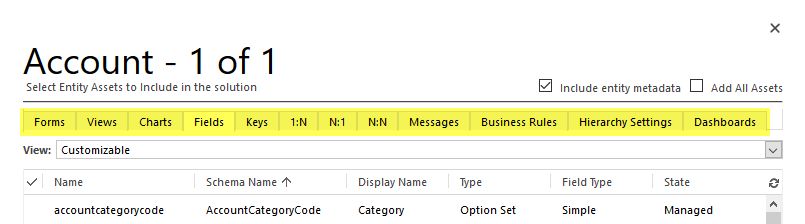
    What makes the new solution segmentation concept important to understand for any CRM customizer is that each and every one of you will come across it when adding default entities into your solution in CRM 2016 and beyond. After you select an entity like the opportunity, for instance, you’ll be presented with a brand new screen asking you to “select entity assets to include in the solution”:

    CRM_2016_solution_segmentation_01

    This is where you now can pick just the components that you wish to ship with your solution once you export it out from the development environment. You could choose just a specific set of fields, for example, or go to the views tab and click the top left corner of the grid to mark all the assets of type “view” to be included in the solution. Want to see how it can be used in practice? Okay, let’s go ahead and pick from the opportunity entity just the Sales Pipeline chart into our solution, so we can modify it.

    Let’s say we want to change the pipeline chart to use weighted revenue instead of estimated revenue values. So, where do we get those fields? You create them! CRM doesn’t ship with a weighted revenue field OoB but instead it contains the tools for building it, thanks to the great calculated fields feature introduced in CRM 2015. We’ll therefore need to create a new currency field and set its formula as “estimated revenue * (probability / 100)”. Even though we’re referencing other fields in the formula, there’s no requirement to include them in our solution, as these system fields will be in place in the target environment regardless of our actions. What we might want to pay attention to is something that the solution segmentation engine doesn’t worry about, which is including the system generated “Weighted Revenue (Base)” field into the solution, as that’s where the base currency version of our calculation will be automatically stored. Better safe than sorry! Furthermore, the new solution segmentation model means we can remove any individual component from the solution if we later deem it unnecessary (as shown below).

    CRM_2016_solution_segmentation_02

    Now that we’ve got our Weighted Revenue field, we can update the Sales Pipeline chart to use this new value. To test the segmented solutions functionality in more depth, let’s also pick another system component into our package: the Sales Activity Social Dashboard. We’ll update the elements of this dashboard and see how they transfer into the target organization. Once we’re ready, let’s export the solution as an unmanaged package like we’ve always done. We’ll get the warnings on missing dependencies (again, like we always do), but since the whole exercise is about updating just selected pieces of the CRM puzzle, we don’t need to worry about any of those.

    Upon importing the solution .zip file into the target org, there are no differences to how things worked with non-segmented solutions. If we want to peek inside solution details before hitting publish, we’re only presented with the high level components, which means there’s no way to tell at this point if the package contains the entire opportunity entity or just a couple of fields from it. If I was importing an ISV solution received from an external source, I would actually like to know what’s included on a very detailed level, but for now we’ll just need to keep on trusting the publisher.

    CRM_2016_solution_segmentation_03

    Let’s see what happens to our updated dashboard now. As a starting point I have a CRM Online demo environment from my previous post regarding “preferred vendor solutions” offered by Microsoft. As you can see, one of these solutions (probably FieldOne) has turned the flat CRM 2016 funnel chart into a retro 2011 style 3D version. Yeah, that’s precisely why solution segmentation makes a big difference, as you no longer need to overwrite things just to add new things.

    CRM_2016_solution_segmentation_04

    Once we import our new solution and publish the changes, we’ll see that the funnel chart has now been restored to the flat version that we exported from another CRM 2016 org. More importantly, the stages are now different as we’re mapping the opportunities into the pipeline based on our custom field Weighted Revenue instead of Estimated Revenue. The Top Opportunities chart has also been replaced by another custom chart I included into the solution. Looks like our segmentation is working great so far!

    CRM_2016_solution_segmentation_05

    Picking the entity assets one by one is perfectly fine for a scenario where you are deploying a very specific change like the one presented here. However, when you aren’t just performing minor tweaks to an existing CRM environment but rather deploying a brand new CRM system for a customer, you’re likely going to be touching a very large number of components. For instance, this week I’ve been working on a deployment project where the current sprint focuses on sales process management functionality. The number of tweaks I’ve done during two straight days of CRM customization is pretty massive, when you start from an out-of-the-box Dynamics CRM environment and turn it into something that actually works the way the users expect. If I would have had to plan in advance which components I need to be touching, or alternatively adding them into the solution one by one as I realize they need to be customized, I would have probably spent ~20 days instead of 2 while waiting for the CRM Online customization dialog windows to open.

    What I’m saying is that while having the full granularity of solution components available to you is awesome, there are common scenarios where you actually may want to keep on working the way you’re used to – adding the whole big entity chunk into your solution. Let’s say I’m building a “base customizations” solution package in a development environment which should contain all the core data model and UI customizations for a new CRM org. I know I’ll be messing with the opportunity entity big time, so I want to ensure every change to the OoB configuration is covered. Instead of picking the individual assets, I can tick the box in the top right corner to “add all assets” into the solution at once.

    CRM_2016_solution_segmentation_07

    Nice, now I’ve got the best of both worlds! My base customizations package looks like things were before CRM 2016 so I’m comfortable with building the customer specific solution with it. So, with that I’ll conclude my feature overview of a CRM 2016 highlight…

    “Wait, hold on just a moment there! Are you telling me there’s not a single “gotcha” discussed in this blog post? This is Surviving CRM! You never do a happy path walkthrough of CRM features without finding some issues in them.” Okay, you got me. I wasn’t really going to stop there. Let’s keep exploring this segmentation path a little deeper, shall we? (more…)

  • Gentlemen Prefer Solutions: The Expanding Dynamics CRM Footprint

    Gentlemen Prefer Solutions: The Expanding Dynamics CRM Footprint

    If you haven’t worked with CRM Online using Office 365 Global Admin rights recently, you might have missed the new delivery mechanism that Microsoft has created for additional CRM functionality not included in a new Online org by default: preferred solutions. Unlike the traditional solution import mechanism under the CRM application’s Settings area, these preferred solutions are both installed as well as updated (upgraded) via a miniature “CRM app store” controlled by and reserved for Microsoft exclusively. To access these preferred solutions you need to go to the O365 Admin Portal, open the CRM Online Administration Center, choose an instance and click the edit icon next to “Solutions”. You’ll be presented with a list like this one:

    Preferred_solutions_manage

    OK, maybe not exactly like this one, unless you work in the United States. You see, these preferred solutions are also targeted to preferred customers, meaning in practice CRM Online customers who use a tenant located in North America. Let me point this preferred region out to you from the Office 365 and CRM Online datacenter map:

    O365_datacenter_map

    The current availability of the preferred solutions is as follows:

    • Insights for Microsoft Dynamics CRM Online: powered by InsideView, this service is free for CRM Online US customers only. Presumably due to the fact that their database wouldn’t have very good coverage of companies in other parts of the world. You could of course buy the service from InsideView directly if you really must have it.
    • FantasySalesTeam: acquired by MS in August 2015, this gamification solution is built on the concept of fantasy sports that’s apparently a huge industry in the US but less familiar in most other regions. Sales people all around the world surely are a competitive species but no one turns the competition into entertainment quite like the Americans do. Expanded availability of the preview is coming any day now.
    • Voice of the Customer: built in the UK and acquired by MS in March, the solution formerly known as Mojo Surveys has been launched in preview mode for US customers only. Ouch. Well, don’t worry, this feedback management solution will surely come to other geos quite quickly (or MS will need to deal with some customer feedback of their own…)
    • Office 365 Groups: not acquired from anywhere but rather an original Redmond design, this solution became available already back in CRM 2015 Update 1 (v7.1) time frame as a preview globally (yay!)and is now available in full production support mode to all CRM Online customers.
    • FieldOne Sky: only the sky’s the limit for this solution that’s available to CRM Online users with Professional licenses, no matter where your field service personnel may roam. Acquired in July 2015, FieldOne is running mostly on Microsoft’s XRM platform, but the mobile client still relies on Resco and allows only access to a subset of CRM default entities, so for broader mobile use you’ll still need to buy a separate Resco license.

    Although not a CRM solution in technical terms, it’s also worth mentioning that the CRM App for Outlook which was released as US only preview last summer is now available to all CRM Online users who are on CRM 2016 version. I haven’t seen any upgrade time slots being scheduled for existing CRM Online customers yet, so currently mostly newly provisioned orgs can access the Settings – CRM App for Outlook menu to enable users for this lightweight successor to the “heavyweight” Outlook client of the past. (more…)

  • First Glance At Dynamics CRM 2016

    First Glance At Dynamics CRM 2016

    Another year, another major Dynamics CRM release! What a time to be alive, eh? CRM 2016 has now been published for new Online trial instances globally and will be coming available as on-premises download within the next couple of weeks. If you haven’t yet explored what’s new with Dynamics CRM 2016 then I recommend starting from the following three links that I personally always refer to when discussing the latest version:

    Rather than just making it a “go and RTFM” type of post, here are a few notable features in the latest release that I personally think you should pay attention to.

    Start From The Top

    For folks upgrading their on-premises CRM environments, this is definitely a sizable release, as the features from CRM Online 2015 Update 1 (v7.1) are only now becoming available to them. Working mostly with CRM Online environments these days, it does really feel painful whenever I have to go back to the pre-7.1 Nav Bar, so the new navigation experience should definitely cheer up your users who are now spared from the game of sideways scrolling accuracy Olympics. I’ve yet to find a single thing that the new navigation would be worse for than the old one released in CRM 2013. Don’t forget to configure a custom theme & logo for your CRM while visiting the customizations menu! Oh, and remember to leverage this Theme Generator, since MS apparently had to cut the development budget when it came to “nice to have” things like color pickers instead of hex codes.

    Experience_it_now

    Moving from 7.1 to 8.0 may not deliver any immediately visible changes to you, as Microsoft has largely decided not to introduce anything dramatic in the look & feel of the familiar web client. One thing you may notice, though, is a yellow notification bar telling you something about an “interactive service hub” and asking you to “experience it now”. Hmm, sounds interesting, so maybe I’ll click on it and… Whoa, what’s happening?! Why am I seeing the same customization download screen as on the tablet client? And where did half of my menu items from the Nav Bar go all of a sudden?

    CRM_2016_interactive_service_hub_account

    So you thought there’s not much new in the CRM 2016 UI, huh? There definitely is a lot of new investments to be found here, ranging from brand new “interactive experience dashboards” to updated form layouts with embedded cards, revised components like Timeline (ex Social Pane) and new concepts like the Reference Panel (“Related”). It’s all built on top of the MoCA framework, and it gives you a taste of how the Dynamics CRM application of the future will behave: less like a web page and more like an app.

    Why do I say “the future” if it’s in fact already available in CRM 2016, for both Online and on-prem customers? Well, if you’re an existing Dynamics CRM user, the chances are that you’re not going to deploy this into production use quite yet. For starters, it only supports a limited set of the core CRM entities like account, contact, activity and case. Sales opportunities, leads, marketing lists or campaigns aren’t within the scope of this release. While you can show custom entities in the Interactive Service Hub, you’ll not be able to perform many of the more advanced customization tasks that the traditional Dynamics CRM web client supports, like embedding web resources or Iframes to forms.

    CRM_2016_interactive_service_hub_dashboard_filters

    There’s a lot to like about the new user experience that this “interactive” web client presents us with. The new dashboards especially appear to address many of the requests that CRM users typically have, like the ability to apply global filters to all the charts. The method of presenting related records and streams of activities is definitely more in line with the way modern mobile apps work, even if the experience itself feels a bit too mobile for a full size monitor in terms of information density. Still, in its current state it remains more of an experimental release that’s not meant for wider adoption yet. Much like the infamous Polaris release prior to CRM 2013, this Interactive Service Hub will be best used for learning about and preparing for the direction of future Dynamics CRM web clients.

    Explaining this grand scheme of things to the customers will be tricky, as it was with Polaris. For example, in order to leverage the new Knowledge Articles you have to access them via The Hub, presumably because Microsoft hasn’t wanted to build a rich text editor UI for the old web client anymore but has rather focused their investments on MoCA. Within the right feature scope you can probably do cool stuff with this client already, it’s going to required setting the right expectation level right from the start. Oh well, I guess that’s what us consultants are there for…

    CRM Via The Apps

    CRM_2016_visual_controlsOn the mobile apps there is now the ability include new types of visual controls for the mobile forms that can make CRM data both a lot more pleasing to the eye as well as easier to work with on a touch screen device. While many of these new controls would surely be great additions to have on normal web client forms as well, Microsoft has decided not to enable them for browser users of CRM in this release. Remember what I said about the MoCA framework being the focus area for MS?

    CRM_2016_task_based_experiencesTask Based Experiences (“TBX”) a.k.a. Task Flows is another new feature that is not just “mobile first” but “mobile only”. The idea behind these experiences is to be independent from the underlying entity relationship model and rather guide the user through a set of screens that present a subset of only the relevant fields from each related record that need to be touched in the process. What’s a bit cumbersome in this release is that TBX isn’t actually launched for a specific record but rather from the bottom left corner of the mobile app start screen. It’s almost like the old (and mostly abandoned) Dialogs feature from CRM 2011 but with a more modern approach, including the ability to add nice looking photo icons for the launch menu. (more…)

  • My New “CRM Rocks” Podcast Episode Is Out!

    My New “CRM Rocks” Podcast Episode Is Out!

    Do you enjoy reading news and thoughts from the world of Microsoft Dynamics CRM but wish that you could consume such content also in a “hands free” mode, by having someone talk about them rather than publish their thoughts in writing? Well hey: that’s what podcasts are for! If you’re looking for episodes to download to your favorite podcast app on your smartphone, then here’s a couple of channels to subscribe to: CRM Rocks by Markus Erlandsson, started already back in 2013, and a newcomer from this year called CRM Audio, hosted by everyone’s favorite CRM Tipsters: Joel Lindstrom, George Doubinski and Shawn Tabor.

    Why did I bring this topic up then? It just so happens that I’ve done yet another guest appearance on CRM Rocks! Yes, you might remember yours truly from classic episodes like “CRM 2013 User Interface Changes” or “Who Is The Customer in Your CRM?” This time I had the pleasure of joining Markus in the studio and discussing a topic I had blogged about a while earlier, meaning The State of Microsoft Dynamics CRM in 2015.

    CRM_Rocks_State_of_Dynamics_CRM_in_2015

    The topics on our agenda for this episode included the following:

    • Release cadence & CRM 2015 Update 1
      • Office 365 integration points with Excel Online, OneNote, Office Groups
      • The arrival of the CRM web client for Outlook (3 years after its announcement)
      • Cloud first: why is on-premises lagging behind
    • The new organization structure at Microsoft
      • Dynamics moving from the old MBS unit to Cloud + Enterprise
      • Why CRM product development needs better alignment with MS Data Platform
      • The remaining divide between Office and Dynamics
    • Microsoft & Salesforce partnership
      • New MS co-opetition strategy on devices, now also in the business cloud
      • What the rumored acquisition of Salesforce would have meant
      • The two horse CRM race and competitors pushing each other to innovate (and imitate)
    • CRM 2016 Release Preview Guide highlights
      • New modern API & next generation web client
      • Improvements in document generation and content search
      • Mobility with offline, task based applications

    Yeah, so many interesting things going on in the world of Dynamics and only an hour to discuss them. So, what did Markus and me end up covering in our talk? There’s only one way to find out and that is listening to the latest episode of CRM Rocks. By the way, if you have any thoughts on who you’d like to see (well, hear) make an appearance on the show and what CRM related topic should get some air time, then be sure to leave a comment either here or ping Markus directly.

    Oh, I almost forgot to mention: I also took part in a recent CRM MVP Panel on MSDynamicsWorld.com with Chris Cognetta, Donna Edwards, Alex Fagundes and Gretchen Opferkew. We talked about some of the same topics as in the podcast, with a focus around the upcoming Dynamics CRM 2016 release and how to prepare for it, so in case you missed the live event, be sure to check out the recording available on YouTube.