Tag: Convergence

  • eXtremeCRM 2016 in Warsaw – See You There!

    eXtremeCRM 2016 in Warsaw – See You There!

    As you may have heard, the long running Microsoft Dynamics CRM & ERP conference Convergence is no more. Microsoft has revised their event catalog and is now instead encouraging people to attend either the brand new Envision conference for business level discussions or Ignite for the technology platform updates. However, since both these events are much more generic in nature than the Dynamics focused Convergence used to be, it does leave quite a gap in the market for the CRM application deep dive content. Also, there’s nothing in the MSFT event calendar that would directly cater to the Envision and Ignite crowd in Europe, so anyone from around here who doesn’t want to spend too much time on a plane (and mentally in between time zones for the relatively short period of the conference) may not be quite as excited about these changes as the marketing message coming from Redmond might want them to feel.

    Luckily the Dynamics CRM ecosystem isn’t dependent on only the events that Microsoft arranges. CRMUG has been building up their presence also on this side of the Atlantic and is now launching their first European Congress this spring in Stuttgart. eXtremeCRM is a long running event that has been catering to both the US and Europe partner audience for many years already and they’ll also have an event nearby very soon, as eXtremeCRM 2016 Warsaw takes place on April 18-21. So, whether you’re working on the customer’s side of the table or consulting a variety of different organizations on how to best take advantage of Dynamics CRM, there’s bound to be the right event for you where you can meet professionals like yourself, exchange ideas with them and hear presentations from knowledgeable members of the #MSDynCRM community on what’s hot (and not) in the CRM space.

    It’s been a while since I’ve been to a CRM conference myself but this year I decided to make room in my customer projects calendar for attending one, since one doesn’t simply survive in this business with content you can find from online sources and social channels. So, I registered for the eXtremeCRM Warsaw event early on and then decided to also suggest a topic I could do a presentation on. The suggestion got approved, which means… well, the picture of yours truly right underneath Jujhar Singh says it all!

    eXtremeCRM2016_speakers

    I’m honored to have the opportunity to join such a prestigious list of speakers in the eXtremeCRM 2016 Warsaw event. I wont of course be competing on the level of Jujhar (who BTW seems like exactly the right man for the Dynamics CRM GM position, based on our encounters at the MVP Summit) but will rather be focused on preaching what I know. Which is all about how to make the most of the XRM platform when you don’t know how (or just don’t want to) work with the API’s but rather need to leverage the built-in customization tools. My session is titled “Killer UX: Delivering a Great CRM User Experience without Custom Code” and what I’ll try to do is show how anyone who knows his or her way around the solution configuration UI can make a real difference in what Dynamics CRM as an application feels like for the end users to work with.

    Now, I should of course be working feverishly on my presentation slides already, but here I am just reading and writing blog posts like I always do. If you’ve ever encountered a situation where instead of focusing on completing the important work that has a deadline approaching in the distant but all too inevitable future, you find yourself wondering around between Twitter and YouTube instead, then you know the feeling. Well, speaking of online videos, there just happens to be an excellent TED Talk from Tim Urban on the topic “Inside the mind of a master procrastinator”. You really should watch it because A) the Instant Gratification Monkey inside your brain will totally love the distraction, and B) it’ll help you better understand the dynamics of (not CRM but) procrastination.

    Instant_gratification_monkey

    “Hey, get off the wheel, you Monkey! We haven’t even finished this blog post yet! Grrr…”

    In addition to myself, there are also eight other awesome CRM MVP’s who are coming to Warsaw. We’ll all be having our own sessions of course, but in addition to that, there will be a joint session where the audience can present questions to all the CRM MVP’s in the room on the latest CRM 2016 Spring Release in particular. Now, as we were thinking about what’s a good way to coordinate such a session, it occurred to me that “hey, why couldn’t we use CRM for this?” More specifically, wouldn’t this be a great opportunity to showcase the new Voice of the Customer functionality that’s very recently been made generally available for CRM Online customers?

    eXtremeCRM_MVP_survey

    As it turns out, Voice of the Customer (or “VoC” as we’ll all end up calling it) allows you to easily design surveys on any topic that you’re interested in collecting data on. If you haven’t yet explored this great new addition to the XRM family of add-ons that Microsoft has integrated into the core Dynamics CRM product offering, you could start by watching this introductory VoC video on YouTube. Or, you could see a VoC survey live in action by answering our eXtreme MVP Survey.

    eXtreme_MVP_button_1

    The survey is mainly targeted at those who are planning to attend the eXtremeCRM 2016 Warsaw event, but there’s nothing stopping you from taking it if you can’t make it there. The survey starts with some questions about the event and closes with a “feedback form” that you can use for submitting your questions to the CRM MVPs in advance, to be answered in the live event (time permitting). It also contains a few questions about how you feel about the upcoming CRM 2016 Spring Release, so I’m planning to also experiment with some of the analytics capabilities that these XRM style surveys offer us. I might even write a blog article about how the VoC experiment worked (unless the ‘Monkey gets its way again), so it’s all conducted in the name of science! (No marketing spam will come from this survey, it’s my personal CRM Online trial org that will disintegrate within a couple of months.)
  • First Glance At Dynamics CRM 2016

    First Glance At Dynamics CRM 2016

    Another year, another major Dynamics CRM release! What a time to be alive, eh? CRM 2016 has now been published for new Online trial instances globally and will be coming available as on-premises download within the next couple of weeks. If you haven’t yet explored what’s new with Dynamics CRM 2016 then I recommend starting from the following three links that I personally always refer to when discussing the latest version:

    Rather than just making it a “go and RTFM” type of post, here are a few notable features in the latest release that I personally think you should pay attention to.

    Start From The Top

    For folks upgrading their on-premises CRM environments, this is definitely a sizable release, as the features from CRM Online 2015 Update 1 (v7.1) are only now becoming available to them. Working mostly with CRM Online environments these days, it does really feel painful whenever I have to go back to the pre-7.1 Nav Bar, so the new navigation experience should definitely cheer up your users who are now spared from the game of sideways scrolling accuracy Olympics. I’ve yet to find a single thing that the new navigation would be worse for than the old one released in CRM 2013. Don’t forget to configure a custom theme & logo for your CRM while visiting the customizations menu! Oh, and remember to leverage this Theme Generator, since MS apparently had to cut the development budget when it came to “nice to have” things like color pickers instead of hex codes.

    Experience_it_now

    Moving from 7.1 to 8.0 may not deliver any immediately visible changes to you, as Microsoft has largely decided not to introduce anything dramatic in the look & feel of the familiar web client. One thing you may notice, though, is a yellow notification bar telling you something about an “interactive service hub” and asking you to “experience it now”. Hmm, sounds interesting, so maybe I’ll click on it and… Whoa, what’s happening?! Why am I seeing the same customization download screen as on the tablet client? And where did half of my menu items from the Nav Bar go all of a sudden?

    CRM_2016_interactive_service_hub_account

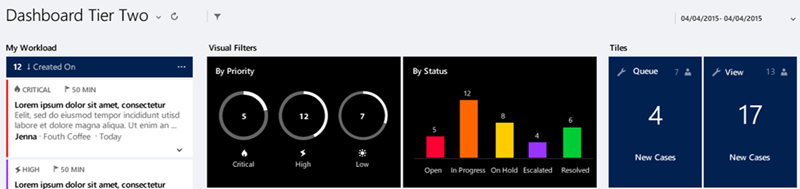
    So you thought there’s not much new in the CRM 2016 UI, huh? There definitely is a lot of new investments to be found here, ranging from brand new “interactive experience dashboards” to updated form layouts with embedded cards, revised components like Timeline (ex Social Pane) and new concepts like the Reference Panel (“Related”). It’s all built on top of the MoCA framework, and it gives you a taste of how the Dynamics CRM application of the future will behave: less like a web page and more like an app.

    Why do I say “the future” if it’s in fact already available in CRM 2016, for both Online and on-prem customers? Well, if you’re an existing Dynamics CRM user, the chances are that you’re not going to deploy this into production use quite yet. For starters, it only supports a limited set of the core CRM entities like account, contact, activity and case. Sales opportunities, leads, marketing lists or campaigns aren’t within the scope of this release. While you can show custom entities in the Interactive Service Hub, you’ll not be able to perform many of the more advanced customization tasks that the traditional Dynamics CRM web client supports, like embedding web resources or Iframes to forms.

    CRM_2016_interactive_service_hub_dashboard_filters

    There’s a lot to like about the new user experience that this “interactive” web client presents us with. The new dashboards especially appear to address many of the requests that CRM users typically have, like the ability to apply global filters to all the charts. The method of presenting related records and streams of activities is definitely more in line with the way modern mobile apps work, even if the experience itself feels a bit too mobile for a full size monitor in terms of information density. Still, in its current state it remains more of an experimental release that’s not meant for wider adoption yet. Much like the infamous Polaris release prior to CRM 2013, this Interactive Service Hub will be best used for learning about and preparing for the direction of future Dynamics CRM web clients.

    Explaining this grand scheme of things to the customers will be tricky, as it was with Polaris. For example, in order to leverage the new Knowledge Articles you have to access them via The Hub, presumably because Microsoft hasn’t wanted to build a rich text editor UI for the old web client anymore but has rather focused their investments on MoCA. Within the right feature scope you can probably do cool stuff with this client already, it’s going to required setting the right expectation level right from the start. Oh well, I guess that’s what us consultants are there for…

    CRM Via The Apps

    CRM_2016_visual_controlsOn the mobile apps there is now the ability include new types of visual controls for the mobile forms that can make CRM data both a lot more pleasing to the eye as well as easier to work with on a touch screen device. While many of these new controls would surely be great additions to have on normal web client forms as well, Microsoft has decided not to enable them for browser users of CRM in this release. Remember what I said about the MoCA framework being the focus area for MS?

    CRM_2016_task_based_experiencesTask Based Experiences (“TBX”) a.k.a. Task Flows is another new feature that is not just “mobile first” but “mobile only”. The idea behind these experiences is to be independent from the underlying entity relationship model and rather guide the user through a set of screens that present a subset of only the relevant fields from each related record that need to be touched in the process. What’s a bit cumbersome in this release is that TBX isn’t actually launched for a specific record but rather from the bottom left corner of the mobile app start screen. It’s almost like the old (and mostly abandoned) Dialogs feature from CRM 2011 but with a more modern approach, including the ability to add nice looking photo icons for the launch menu. (more…)

  • A Few Notes on Convergence 2015 Announcements

    A Few Notes on Convergence 2015 Announcements

    Hey, did you notice what happened in Atlanta last week? Yup, it was again that time of the year when the Dynamics CRM & ERP crowd gathers together at Microsoft Convergence. Instead of packing my bags and hopping on a plane, I once again opted to staying at the comfort of my own home and instead opened up Tweetdeck to keep an eye on all the great content being shared by Dynamics community members on the social networks.

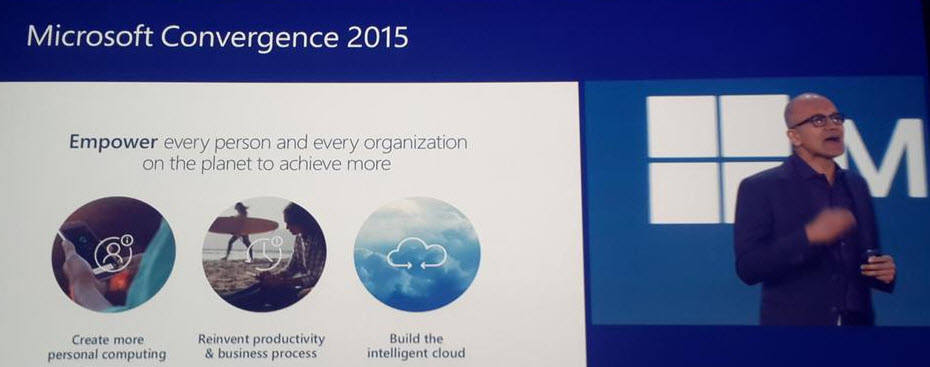
    With Satya Nadella himself opening up the event, it was clear that this year Convergence was going to be about a much broader spectrum of Microsoft solutions than just the Dynamics products. Although Satya is a former CRM blogger, he wasn’t there just to prove he still can build cool mashups with the XRM toolkit but rather to tell the higher level story of what business benefits companies can expect to gain from using the latest and greatest cloud technologies that Microsoft today offers. This is of course the fundamental reason behind why applications like Dynamics CRM are being deployed, and with the ever growing complexity of technologies intertwined together to support digital business, it’s important to increase the customers’ awareness of the types of end results they could be pursuing with the use of this technology.

    CRM_system_is_just_part_of_the_picture_2

    So, while technology is just the means to an end and CRM is just one (central) part of a modern business technology stack, it’s still the area in which I personally strive to deliver the biggest positive impact to our customers. That is why I’ve decided to write down a few notes about what Convergence 2015 announcements you should pay attention to if you also happen to work with Dynamics CRM.

    CRM Online Spring ’15 (v7.1) Is Almost Here

    Known by the codename “Carina”, the next CRM release scheduled for this spring was officially revealed at Convergence 2015. The “What’s New” page for the upcoming version is already live and so is the admin content on TechNet, as well as the developer content on MSDN. The official name for Spring ’15 appears to be “CRM Online 2015 Update 1“, which is a bit of an awkward choice since based on the aforementioned documentation Vega a.k.a. CRM 2015 was called “CRM Online 2015 Update” (without a number, so presumably “Update 0”). Oh well, we all know product marketing names at Microsoft are an eternal mystery, so it’s easier if we stick to the recently simplified version numbers instead. Vega was CRM 7.0 and this next update is CRM 7.1 (but before that we’ll still get UR1 which is 7.0.1…).

    Okay, enough with the numbers. Considering that 7.1 isn’t a new Dynamics CRM major version release but merely a minor version, there sure are plenty of new features and enhancements packed into this next release. I won’t try to list them here as you’re better of reviewing the above links, but the one feature that you simply can’t miss is the new Navigation Bar. You can see it live in action in this video and let me tell you from my experience with using a Carina preview org, it’s love at first click!

    CRM_Spring15_NavBar_1_small

    Arguably the single biggest gripe people had with the refreshed UI introduced in CRM 2013 was the Nav Bar with its ability to only show ~7 menu items on a single screen, then requiring you to scroll right and play really close attention to not moving your mouse cursor too far or the whole menu would collapse. Microsoft has now taken the menu structure introduced in Dynamics Marketing (which has a lot of menu items in its navigation) and brought it over to the world of Dynamics CRM. We now get a “hamburger” menu button that opens the first level (Sales, Service, Marketing, etc.) and clicking on one of them shows us all the included menus aligned vertically, broken down into subgroups. While this does show many more items to the user at once, it’s still a considerably smaller cognitive burden than trying to remember where you need to click to reveal a menu item that’s not on the screen, which happens all the time with the current version.

    The initial reaction to the new Nav Bar from the CRM folks over on Twitter was extremely positive. This feature in combination with the revised MRU menu (most recently used items) that supports pinning records and views into the Nav Bar is certainly going to improve the user experience of Dynamics CRM considerably. Although it’s still advisable to optimize the structure and contents of the Sitemap to remove unnecessary items and promote the most important menus, the larger menu canvas is very much needed in more complex environments with a high number of custom entities that simply need to be shown to the users somewhere.

    CRM_Spring15_NavBar_3_small

    The one thing that’s somewhat inconvenient about this updated navigation is that it will be initially made available only to CRM Online users. Yes, in case you have missed it, Carina / v7.1 is an Online-only release that will not be made available to on-premises customers. This was the initial plan already one year ago with the Leo release, but that then eventually turned into an Online+onprem release as Microsoft Dynamics CRM 2013 Service Pack 1 was made available for download to all CRM 2013 customers. Don’t expect to see such a change of heart this time around. The new features announced are expected to become available to on-premises customers in the next major release “Ara” (8.0) later this year. (more…)

  • What Convergence 2014 Europe Tells Us About 2015

    What happens at Convergence rarely stays there. So was the case with Convergence 2014 Europe held this week in (supposedly) sunny Barcelona. There was a flood of #CONV14 tweets shared by the friendly attendees of this conference, which give us quite an accurate picture of what Microsoft’s got in store for the beginning of the year 2015 when it comes to Dynamics CRM and the related products.

    CRM 2015

    Given that the new major version, Dynamics CRM 2015, is scheduled to become available in December, Convergence was naturally the place where this release was to be shown live in action to customers and partners. The actual contents of the release isn’t such a big secret anymore, given that the Release Preview Guide became available already quite some time ago. Although new features like Global Search and Hierarchy Visualization provide some nice looking screens for the demos, there’s also plenty of enhancements buried inside the platform that will make the system customizer’s life easier, like calculated fields and rollup fields.

    Product_hierarchy_2_small

    For anyone wanting to learn in more detail about the upcoming release, Microsoft has made available an unprecedented amount of content on CRM 2015. Check out all the links on this blog post about CRM 2015 prerelease content to keep yourself occupied with Get Ready pages, ebooks and videos for the next week or so.

    Mobility

    What wasn’t previously covered in the Preview Guide was how MS plans to take the mobile client capabilities forward with this latest release. At Convergence 2014 Europe we saw a couple of interesting features being demoed on this front. The first was a Windows Phone exclusive, as Microsoft announced the coming integration between Dynamics CRM and Cortana. While this voice guided WP8 digital assistant is currently only available in limited markets and languages, the CRM integration is a fine example of the type of extensibility and the potential that these new types of user interfaces have on our personal mobile devices.

    CRM_MOWA

    Another far more immediately useful feature that was shown in a demo (and a Youtube video) was the ability to finally track emails from a mobile device into records in CRM. As we know, up until today the only way to select emails to be tracked has been to run a PC with the Outlook client, since CRM activity synchronization options do not cover the use case of promoting new items from you mailbox into CRM. As seen from the image above, the MOWA app (as in Mobile OWA, OWA as in Outlook Web Access) shown at Convergence now promises to deliver a way to do this via your smartphone screen, alongside showing the details about the regarding record such as an opportunity. While you obviously can’t inject a “track” button into the native iPhone email app and the likes, this sure seems like an option worth exploring (at least for Office 365 users) once more details about it become available.

    Marketing and Social

    Gone are the days when there was only the Dynamics CRM product in the Dynamics CRM portfolio. As we saw in the US Convergence event this spring, the product roadmap these days consists of four different lanes, with Dynamics Marketing, Social Listening and Parature (the customer service component yet to be re-branded) having their own releases lined up alongside CRM itself.

    On the Dynamics Marketing side there has been some catching up to do for the features that didn’t originate from the marketing resource management product (Marketing Pilot) that Microsoft acquired a couple of years ago. While the Mira release this spring was the first version to give us a package with the core marketing automation features for email and web content, the next release (Electra) is starting to look a lot fancier, with advanced features from competing solutions being replicated there (graphical email editors, A/B testing, inbox previews) as well as new areas like the Sales Collaboration Panel (included in CRM Professional license now) and integrated Social Listening data making the MDM product an interesting offering for many existing Dynamics CRM customers.

    Microsoft_Social_Engagement_2_small

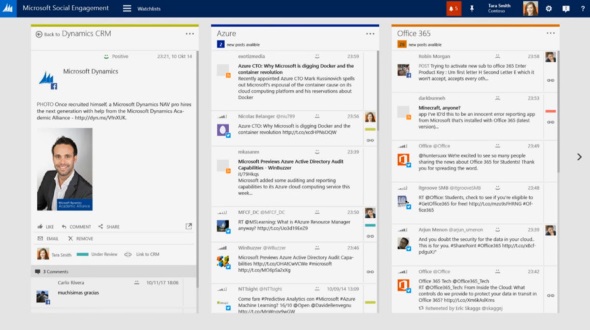
    Speaking of the social side, one highly interesting concept that Microsoft demonstrated during the sessions at Convergence was a social tool targeted not only for listening to the data streams from a central tower but also for bringing out this information to a wider range of CRM users. Labelled as “Microsoft Social Engagement” in the demos, this application offered both a dashboard with KPI charts as well as a stream based view for presumably any CRM user who’s interested in following certain topics on the social networks. Whether this is Microsoft’s version of Hootsuite or something completely different remains to be seen, but simply having the social feeds integrated into the CRM UI and then providing a “track in CRM” button for engaging with the people who are having the discussion on these networks seems to make some of the “social looking glass” visions from 3 years ago finally a reality. Definitely something to keep an eye on for 2015. (more…)

  • What’s on the 2014 Roadmap for Microsoft Dynamics CRM?

    The annual festivities of the Microsoft Dynamics Convergence event in the US have now been completed for the year 2014. This means that the outline for upcoming releases in this calendar year have also been presented to the 12K attendees in Atlanta as well as anyone watching the sessions via Virtual Convergence. The following roadmap slide shown at the event tells us the big picture: it’s going to be a busy year for Dynamics CRM!

    Microsoft Dynamics CRM roadmap 2014

    OK, so if the first “swim lane” in the CRM Roadmap schedule is titled “CRM”, then what’s with all the other lanes then and how do these non-CRM items relate to the Dynamics CRM roadmap? Well, here’s the thing: this ain’t the CRM you used to know. It’s no longer that IIS application you used to install on your own little Windows server along with a SQL database and maybe a client component in Outlook. It’s now a suite of services that cover not just your internal processes and tools for your employees but also a wealth of external touch points where your customers will also encounter your CRM system, be it directly or indirectly. Oh, and naturally most of it lives in the cloud, because that’s also where your customers are.

    Of course customer relationship management has never been about just that single CRM database where you keep your own contact records, but now it has become very obvious that also Microsoft’s offering in the field of CRM has grown way beyond that. Following on the footsteps of Oracle and Salesforce.com, the acquisition and integration of a growing number of tools to complement the traditional core Dynamics CRM platform means the future CRM product will be much more modular, as opposed to the earlier “one app & license for everybody” approach. Let’s go through each of these lanes in the CRM roadmap and look at what was announced for them at Convergence 2014, starting from the most familiar one: “CRM”.

    CRM

    After last fall’s release of the new Dynamics CRM 2013 major version (code name Orion), you might have been lead to believe that there wouldn’t be so much happening with the core platform this year, at least in the on-premises world. The earlier communication from Microsoft indicated that the plan was to introduce a new release for CRM Online twice a year and roll out an on-prem version once a year. The code names for these releases were also shared: Leo in Q2 2014 and Vega in Q4, one year after CRM 2013 RTM.

    This is no longer true. But wait! It’s not an R8 style cancellation but rather a positive piece of news. The Q2 2014 release Leo will be for both CRM Online and on-premises customers, as will Vega. It doesn’t mean all the features will be identical across deployment models but it does promise to deliver new functionality also to customers who are running CRM on their own servers. What exactly will be the delivery mechanism (Update Rollups were supposed to be clear of any new features) or how the official naming convention for different versions will evolve is not yet clear, but currently Microsoft is referring to this as the Dynamics CRM Spring Wave. Partners will have a training blitz session for this wave on April 8th/9th, so expect to see more details made public after this.

    The functional changes in Leo will focus on the service module of CRM. New features showcased in the Convergence sessions included SLA management with a timer control available on the case form, merging cases and linking parent/child cases, entitlement management, email to case automation and improvements in the queue feature usability. Considering how much these new features alter the case entity functionality and configuration options, it would have surely been quite difficult to continue supporting two different feature levels if Leo would have in fact been Online only. For callcenter scenarios the new Unified Service Desk (USD) will offer functionality similar to what has previously been delivered via components like the Customer Care Accelerator (CCA) or User Interface Integration (UII). Expect to see also other feature enhancements or tools released as a part of Leo that will not be customer service specific, as well as new capabilities for CRM Online subscription management.

    The contents of the Vega release had not really been disclosed prior to Convergence 2014. As this release is still further away in the future the details are not yet as clear as for Leo, but a number of very interesting enhancements to the core Dynamics CRM product were shown on the CRM roadmap slides. Calculated fields will finally be available without writing custom code, via a graphical editor with intellisense support. Business Process Flows (BF) will be enhanced with support for branching processes. On the UI side we can expect to see built-in capability for visualizing account hierarchies. These three features all address very common scenarios that Dynamics CRM customers require in their system implementations, so it’s great to see them introduced as configurable features that a system customizer can leverage right out of the box.

    Social

    Remember when Microsoft bought NetBreeze one year ago? Their service has now been integrated into the Redmond product portfolio and carries the name Microsoft Social Listening. Last month it was announced that Microsoft Social Listening will be offered as part of the CRM Online Professional licenses at no additional charge, whereas on-premises customers can get it for an incremental cost. This “incremental cost” was later specified to be $20 per user per month for CRM Professional CAL holders. So, while it’s not free for everyone, the pricing is still in line with Microsoft’s previous announcements of wanting to “democratize social” and integrate it as just another channel into their CRM product. (more…)

  • The Next Dynamics CRM User Experience: Orion

    Post updated 2013-06-26:

    Hi there, thanks for your interest in Orion, the next version of Microsoft Dynamics CRM. You’ve probably arrived here by following a link that promised to show you what the user interface of the upcoming application release was going to be. Unfortunately you won’t find that content here anymore.

    Back in March 2013 several Microsoft representatives presented a preview of the upcoming release at the Convergence 2013 event. It was the first time that Orion was publicly shown to MS partners, customers and anyone interested enough in the product to either attend the event in New Orleans or watch the webcasts through Virtual Convergence. I enjoyed the latter ones and took a few screenshots from those sessions (which can still be accessed through the aforementioned site. Based on them, I wrote my own analysis of how the upcoming user interface changes were going to impact Dynamics CRM users, consultants, developers and so on.

    It turned out to be quite a popular post. As I write this update on June 28th, the page had been viewed over 11,000 times. Links to the post had been shared almost 300 times on various social channels. Several Dynamics CRM experts contributed to the discussion on the Orion UX changes in the comments section, on LinkedIn and elsewhere. In short, it was a hit.

    Linktally_analytics_Orion_UX

    The reason why the post cannot be available for you to read anymore is that three months after its release my employer has signed an agreement document and the contents of my (personal) blog is seen to be in conflict with the terms of this agreement. I understand the reasoning behind this interpretation and have no problem removing some of the content based on the request I’ve received. After all, I think the post has already done its job in distributing the publicly available information from Convergence 2013 in a structured format that has hopefully made it easier for anyone working within the Microsoft Dynamics CRM ecosystem to understand the direction where the product is heading in its upcoming release.

    We’re approaching the moment when Microsoft will be making official information available about the Orion release. At that point there will no longer be a need for any preview screenshots of the UI. If you simply can’t wait for that moment to arrive, then luckily this is the Internet and it does a great job in distributing information to anyone who can be bothered to search for it. If you want to stay on top of the latest news around Microsoft Dynamics CRM, one source of information to keep an eye on is the Surviving CRM Google+ page. If you want to know, how to prepare for Orion, there are some fine articles written on the topic 😉

  • Convergence 2012 in a (virtual) nutshell

    Full disclosure: I didn’t actually physically attend Microsoft Convergence 2012 in Houston, Texas. However, that doesn’t mean you have to feel left in the dark, thanks to the immersive experience that is the social web of our times. With live webcasts, near-live blogging and some 6000 tweets on the #CONV12 hashtag, keeping up with the online buzz has never been easier. Here’s my summary of what the event looked like through the eyes of a virtual attendee and some thoughts on where Microsoft and its Dynamics product line appear to be heading based on the announcements at Convergence.

    Microsoft Convergence 2012 keynote summary on StorifyKeynote

    The opening keynote is where the stage is set for the rest of the event, so watching the live broadcast on Monday was definitely on my agenda. Sure, it’s all about building up hype for your products by telling how great you’ve done so far, how excited you are about your future roadmap and showing off with future concept demos that have little to do with the current reality. So what! You need a little show business alongside your business applications conference.

    Having the luxury of my PC keyboard & mouse at my disposal during the event allowed me to experiment with Storify, a social media storytelling tool. I captured the best tweets, photos and screenshots during the keynote and compiled them into my Convergence 2012 story. If you’re anything like me, the mental barrier for sitting down and watching a recorded conference event for 1.5 hours is quite high, so why not glance through the highlights of the show on the Storify summary? After that, you can decide if you want to read the full transcript or watch the recording on the Virtual Convergence site.

    Some notes picked up from the opening keynote included:

    • The Dynamics CRM momentum now stands at 2,250,000 users in 33,000 customer organizations.
    • “There are no happy Siebel customers in the world, there just aren’t.” – COO Kevin Turner on Microsofts internal journey from Siebel to Dynamics CRM.
    • Nearly half of the deals won by Microsoft over Salesforce.com have been due to the on-premises option and the hybrid model.

    Metro

    It’s Windows reimagined time all across Redmond now as we’re nearing the launch of Windows 8 later this year. This means everything that can be shown as a Metro style app running on a tablet, will be shown precisely that way. The fictional Contoso Electronics scenario of the big keynote demo used a highly customized UI built for the retail store experience only. A much more interesting demo was the project management Metro app that looked so realistic you could imagine it becoming an actual UI to some future Microsoft product to be rolled out at Windows 8 launch.

    We didn’t get any official screenshots of a Dynamics CRM Metro app yet, but luckily Garth Knutson was able to snap & tweet this picture of a UI concept presented in one of the sessions. Just imagine if assigning users onto a Dynamics CRM opportunity record would look like this, how much higher would the user adoption of a CRM system be among sales people? Ah, CRM reimagined…

    Microsoft Dynamics CRM and Metro UI

    But the road to metro is paved with Apples. The actual tablet product Microsoft had to show at Convergence was the Dynamics CRM Mobile client for iPad, which meant that Apple devices were well presented in many of the Convergence sessions. Funnily enough, during the conference an internal email leak revealed that Microsoft was banning the use of company budget to buy any Apple products for its Sales, Marketing, Services, IT, & Operations Group. Oh well, guess we won’t be seeing many iPads on stage anymore in the following events. For those of you who haven’t seen the current client yet (developed by CWR Mobility), see my previous post on Microsoft Dynamics CRM Mobile iPad screenshots.

    Microsoft Dynamics Metro app running on a Windows 8 tabletAn important aspect to note is that the move towards Metro apps and tablet devices does also have an impact on traditional desktop usage of Dynamics CRM. Back in November I speculated that the legacy of Outlook could not be carried over to the world of Windows 8 tablets in its existing form. Since then this assumption has only been enforced by the announcement of Windows on ARM (WOA) tablets with no classic Windows application support and no sign of Outlook in the list of Office apps promised for these “iPad killers”. What this means is that the functionality exclusive to Dynamics CRM Outlook client must be moved to the cloud. At Convergence, the following functionality was more or less revealed to be included in the R9 release later this year:

    • Direct synchronization of activities through Exchange (instead of Outlook)
    • Support for “track in CRM” functionality in Outlook Web Access (OWA client)

    Woo-hoo! It’s been a long time coming, but to me this is a clear sign that Dynamics CRM is definitely on the right track in terms of becoming more compatible with the habits of today’s mobile workforce; how they manage their activities and messages on multiple clients, not just the single Outlook on their work laptop. Making the CRM features available through new channels, such as the Office 15 Agaves, is very important for making Dynamics CRM a relevant tool for knowledge sharing as the applications and devices surrounding it are evolving.

    (more…)

  • More agile direction for Dynamics CRM future product releases

    During Convergence 2011 Atlanta we already heard the first pieces of news about an upcoming change in the release cycle of Microsoft Dynamics CRM product versions. Now we have the updated Statement of Direction May 2011 whitepaper in our hands and it lays out a roadmap for more rapid delivery of new features into both CRM Online as well as on-premises and partner hosted instances.

    What has now been labelled as the agile release model for Microsoft Dynamics CRM will mean that an update/upgrade to the core platform will become available every six months. Contrast that to the previous 2-3 years in between major releases and you can see it’s no minor readjustment but rather a whole new way from the Microsoft Dynamics team to deliver products to the business users.

    Funnily enough, the SoD whitepaper claims that CRM 2011 is the fifth major release of the product. While it goes by the 5.0 version number, I guess some of the folks in Redmond have already forgotten that there never was a CRM 2.0 realease, rather we saw the version number incremented from 1.2 to 3.0. Oh well, time flies when you’re having fun working in the field of CRM, so let’s move on…

    The new release cycle is of course a direct result of the Cloud Power in action. No longer can you spend years in designing and developing features for your new product behind closed doors, even if you are Microsoft. Cloud applications have taught us consumers into living in a world of perpetual beta products that constantly get updated with new functionality, without any effort required from us to physically upgrade the apps. If Google can do it for Gmail, then why would the enterprise users settle for working with a standarized XP/2003 toolset for almost a decade? In the scheme of CRM, if you’re competing against Salesforce.com that has a monthly release cycle (or so I’ve heard), delivering a huge box of new features once every three years (which is what 2011 does offer over 4.0) means you’d have to actually keep three years ahead in terms of development, just to avoid slipping behind your competitor again. Doesn’t quite sound like a winning strategy.

    Microsoft Dynamics CRM Statement of Direction May 2011

    During the CTP and Beta phases of the Dynamics CRM 2011 release process there were many times when I found either myself or someone else on the forums & blogosphere expressing their thoughts along these lines: “these new features are really awesome, but I just wish the small details of X and Y could be included before RTM, so I can really truly make the most of the product”. In the world of the old release cycle, hearing MSFT representatives reply back with the words “thanks, we’ll try to include it in v.Next” didn’t give much comfort. If the next version was three years away, it’s effectively the same as “forget about it”, if you contrast it with how fast the world of applications keeps turning these days. Facebook grew from 10 million to 310 million active users during a timeframe like that.

    Smaller packages of new features twice a year should definitely help Microsoft fill the gaps in product functionality that inevitably appear whenever a big release deadline approaches and planned features have to be dropped to meet the real life requirement of shipping a release. At the moment, Dynamics CRM 2011 is lacking some functionality on three distinct areas that the Statement of Direction says will be addressed in upcoming versions to be released within one year:

    • Cross-browser support. Transforming Dynamics CRM from an Internet Explorer only application to a true cross browser app through a new HTML5 UI, thus finally making the platform an option for Mac users as well.
    • Mobile devices support. The Mobile Express client in 2011 is identical to what we had in 4.0, but with more and more iPads and Android/iOS/WP7 smartphones found in the workplace, the out-of-the-box mobile experience should be much better, with possible 3rd party apps taking it on an even higher level (offline data access etc.).
    • Social CRM. There are two dimensions in which a CRM application needs to be “social enabled” these days: 1) internal collaboration on customer information and activity feeds á la Yammer and Chatter, and 2) capturing and enabling a dialog with the customers in social media channels like Twitter, Facebook, LinkedIn.

    Dynamics Marketplace will also presumably play a role in addressing some of the needs that don’t quite fit into the core product delivered by Microsoft. The accelerators that we saw released for CRM 4.0 were nice proofs of concept, but they weren’t proper add-on products that could have been deployed by the end user organizations without customization and development services provided by MS partners. The solution management framework included in CRM 2011 will make the distribution of apps much easier and I would expect to see development also on the Marketplace functionality as a channel for app delivery (eventually commerce). When the base platform of Dynamics CRM is built on one single product edition (meaning no separate standard/enterprise or sales/service versions), modularity is enabled throug the solution packages. While the verticals will likely remain a partner driven domain, I’m expecting to see some interesting releases coming from Microsoft Dynamics Labs as well.

    (more…)

  • Greetings from Microsoft Convergence 2010 EMEA

    Continuing with the format introduced in 2009, this year’s Microsoft Convergence for the EMEA region was split into three locations: London, Prague and The Hague. Out of all the options, Prague fit our schedules the best, so that became our destination of choice to hear the latest news and buzz around Microsoft Dynamics products.

    With the fairly recent release of Dynamics CRM 2011 public beta, there was certainly a lot for Microsoft to present on the CRM front. Having been working with the product since CTP3 already, I wasn’t expecting too many surprises for myself in the CRM 2011 session contents. It’s still interesting to observe what is being said about the new release and how the customers and partners react to it. There is such a wealth of new, important features included in CRM 2011 (see my walkthrough slides for starters) that you can’t really construct the one right pitch for the product. You could say that there’s something for everyone.

    We saw the first glimpse of CRM 2011 during Kirill’s keynote, when Reuben Krippner showed a bit of Process Dialogs in the Dynamic Business demonstration. From there on, Reuben was a busy man, since he was giving demos in the next four consecutive CRM sessions on the agenda. Great job pulling it off, Reuben! Let’s hope Liverpool picks up their pace in the Premier League, so we can see some more of them in future CRM demos 😉

    Barry Givens held the last CRM session of the day, focusing on data visualization in CRM 2011. Not like we hadn’t seen the charts a few times already during the day, but hey, I always enjoy hearing Barry talk about his favorite topic i.e. analytics in CRM. While the out-of-the-box charts in CRM 2011 certainly do deliver value, you should really look at the broader picture of what the visualization features introduced in the new version truly mean in terms of customization and application design. The charts are actually one alternative method of navigation, due to their tight integration with grids and the drill-down capability. They can be embedded not only on grids but also forms (through sub-grids), bringing visualizations to every part of the CRM UI. Oh, and don’t forget to check out my post about editing the .NET Chart Controls for CRM 2011. Dashboards, on the other hand, are not just an item in the main menu but rather a new form type. By allowing flexible arrangement of embedded components like grids, charts and web resources, the dashboard forms might actually one day become the next generation UI for navigating in Dynamics CRM. You know, something for the future ahead of us when every modern web app must be built in RIA fashion, with Silverlight controls and what have you.

    (more…)

  • Greetings from Microsoft Convergence 2010 in Atlanta – Part 2

    In Part 1 I shared some thoughts and observations on what role cloud computing was playing at Convergence 2010 Atlanta. I also promised to get back on the other hot topic, which should not be a surprise to anyone. No, it’s not XRM. But if we’d follow a similar naming convention, I guess it could be called SocialX, meaning “social anything”.

    If the cloud computing movement is about the shift in technology, then the social web revolution is all about the people and their new forms of behaviour. Sure, it’s powered by some tech innovations from Web 2.0, but it would be a stretch to claim that the source code behind services like Facebook or Foursquare contains the magic ingredients that have caused the eruption of the social media volcano. To prove my point, just take a look at the following slide:

    This “social customer stack” is taken from the Deriving Value from Social Networks session by Nikhil Hasija and Paul Greenberg. It was the best 60 minutes spent during Convergence 2010, hands down (even better than The Return at Tabernackle or The Geeks Band at Hard Rock Café). One particularly great thing about it was that there were absolutely no sceenshots of Microsoft applications, like in all other Convergence presentations. No attempts to push products like the Social Media Accelerator or anything else MS branded. Everything was built around the core message: what has changed since the invention of traditional CRM and why the customer is now in charge.

    (more…)