Tag: consumption

  • Why Power Platform licensing is complex, part 4: the role of CDS

    Why Power Platform licensing is complex, part 4: the role of CDS

    Three months ago I set myself a goal to publish a 4-part series on the many mysteries around Power Platform licensing models. I’ve been known to write blog posts that are a bit on the long side and sometimes it surprises myself when after announcing the new article on LinkedIn I see a “20 minute read” info tag added alongside what I though was just a quick exploration into a topic. So, learning to better pace myself is a skill worth practicing, and dividing my writings into more digestable portions is one such exercise.

    To recap, the original outline of this series was to cover these sources of licensing complexity:

    • Protection of intellectual property as well as development budgets across Microsoft product portfolio (part 1, done✔)
    • The old world of apps as data silos & the concept of multiplexing (part 2, done✔)
    • Light use scenarios for information workers vs. “Real Business Applications” (part 3, done✔)
    • The role of CDS as the platform, not just a data source/target (part 4, you are here 📍)

    The Common Data Service is more than a data service

    For the majority of users and developers out there who work with Microsoft technologies on a daily basis, CDS is not yet a “common” part of the toolkit. It’s not a visually sexy thing like Power Apps pixel-perfect UI’s, nor an superglue that connects different cloud services like Power Automate. There’s nowhere near as much flare in the data part as with Power BI. It’s not (in itself) an intelligent thinking AI machine with fancy algorithms either. For many it simply looks like a boring database that sits somewhere in the MS Cloud.

    These people got it all wrong, of course, but it’s hardly their fault. After all, “CDS” sounds a bit like “SQL” and the term often isn’t used in any other context than when you’re planning the data storage part of your solution architecture. What CDS really should have been called is “Power Platform”, because essentially it is the single place that represents all the platform elements that makers, developers and admins can take advantage of when building on Microsoft’s low-code application platform.
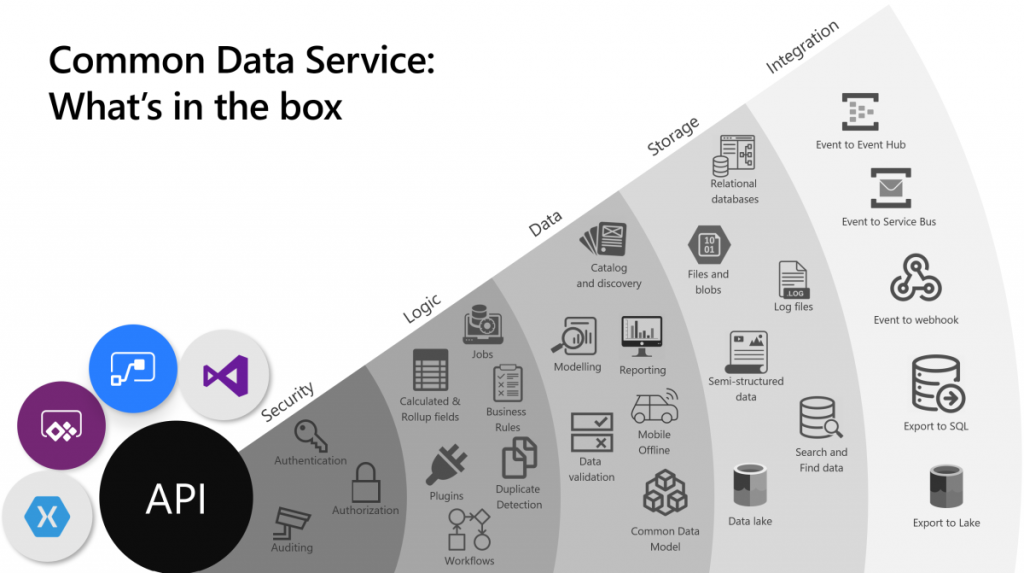
    The above image is the best illustration of the many dimensions of Common Data Service that I have yet come across in Microsoft’s slide decks. “Yeah, that’s pretty much all the important stuff you get with CDS”, I was thinking for a long time. Until someone pointed out to me that this picture is actually missing one obvious thing: solutions! That’s perhaps the single most important thing that CDS from its XRM origins is bringing to the table. Without solutions, what Microsoft would otherwise have is just a collection of independent cloud services that each have a completely separate way to manage their configuration, with no way to package these components into one logical container covering the functionality of an app, nor any valid ALM story for enterprise scenarios. In short, Power Platform would not be a platform without the solution model that’s powered by CDS.

    The fact that we can so easily miss a critical part of the Common Data Sevice while talking about it just goes to show how much of a foundational part CDS is in the business applications offering. It’s not just one icon in the cloud architecture pictures. In fact, we also should keep in mind how many different Azure services CDS runs on, to deliver its feature set to users, makers and developers:
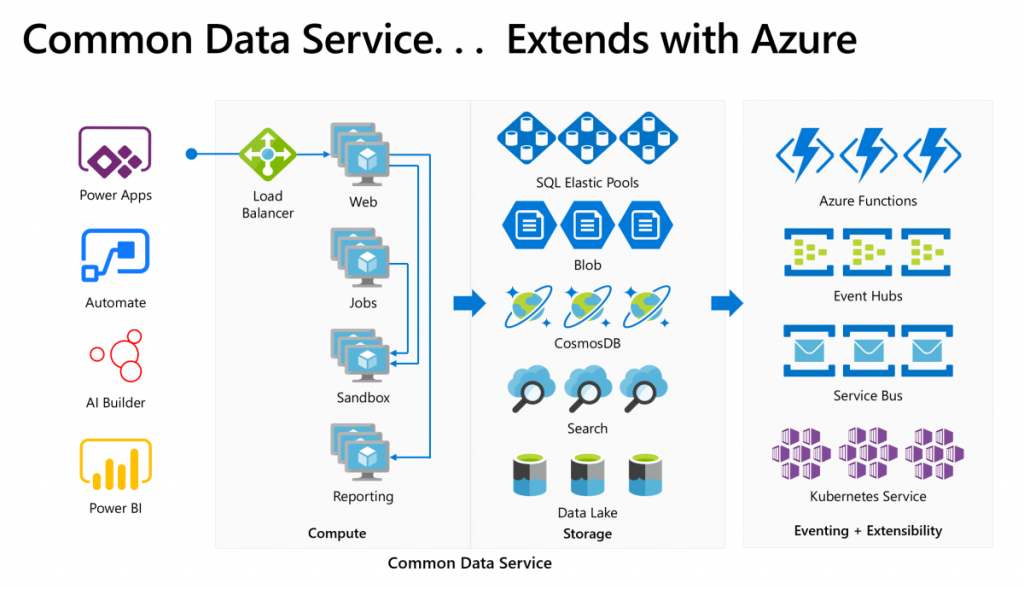
    Yes, there is of course a whole bunch of deep tech stack found behind each and every icon in that picture too – say CosmosDB, for example. It is “big”, in the same way that CDS is “big”. What I think makes the Common Data Service special in this discussion is how it can abstract all that techy stuff from Azure and allow citizen developers (like myself) to control it indirectly, either via our own configuration or through the predefined patterns built by MS.

    Essentially CDS is a value-added layer that brings much of the cool new cloud technology into my business apps while I’m sleeping. What I mean by this is that the architecture evolves to cover new requirements and open up new possibilities, all the while the original business logic and data of the app is preserved. If I create a custom entity, like I did for the first time in 2007, it will keep gaining new superpowers every year as application platform beneath it matures and evolves. All I have to do is keep paying for the service.

    How do you price such a thing then?

    The answer: in all the wrong ways. At least that’s what it often looks like at that moment when the cost factor is brought into the discussion in Power Apps business scenario planning.

    The more central CDS becomes in the app story of MS Cloud, the more dissatisfaction there seems to be on the impact that its premium licensing model has on business decisions. There have been many debates on Twitter during the past few months, with valid arguments and counterarguments presented between the participants that range from customers to Microsoft 365 pros to Dynamics 365 pros to MSFT employees. Threads like this highlight an important aspect:
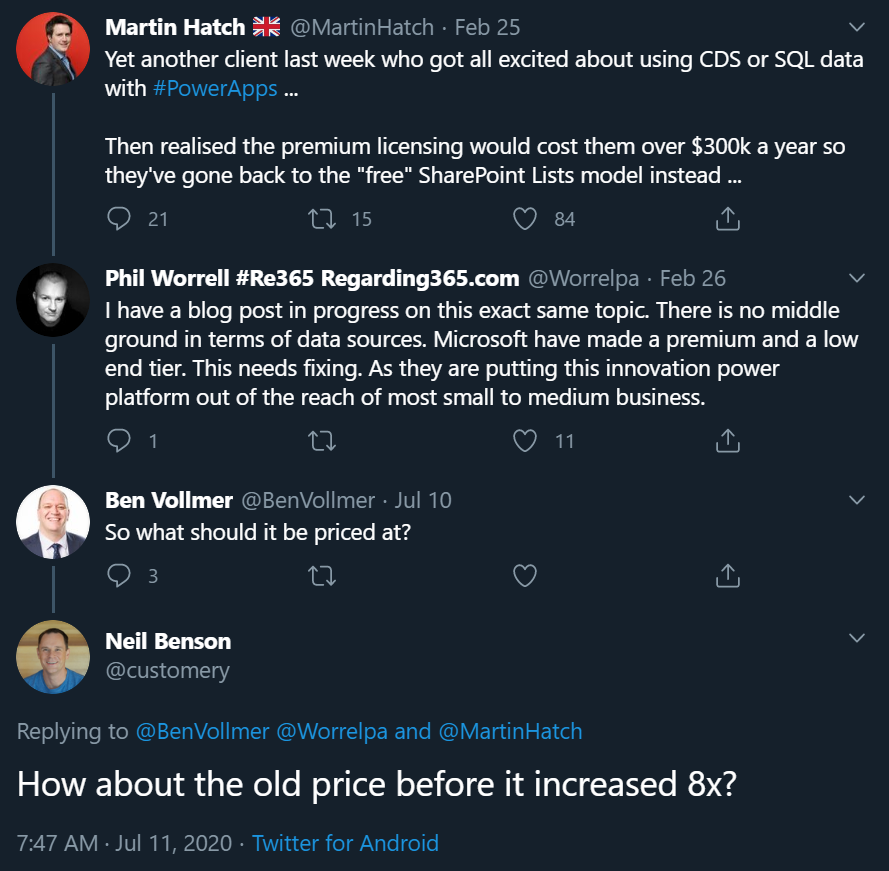
    If you were to invent a brand new service out of the blue, had zero customers and then started to plan the pricing model for it, life would be easy. If, on the other hand, you take an online service that has been offered to customers for over a decade now, then try and mold that into whole new use cases, you’re inevitably going to cause some anger among the existing customer base.

    In the above example, Neil’s point about the CDS storage cost increase in the new pricing model that moved from a flat GB rate to database/log/file storage type separation is entirely true: some part of the bill will go up 8x and that quite frankly sucks. Imagine if that would happen to the price of gasoline and your fuel costs would suddenly be 8 times higher. But hold on: the price of diesel went down considerably at the same time, and filling the tank with natural gas like LNG is now practically FREE!!! “Well whoop-de-doo, I’ll just switch my old gasoline Volkswagen to use LNG the next time I need to stop at the station.” Yeah, real life comes with a bit more friction to change the system that powers your vehicle, or your business processes.

    Going back to my CDS custom entity example, though, if we think about the types of cars that Volkswagen sold back in 2007 vs. in 2020, of course there are slight differences in what the product is. The transition to electric cars is a very apt metaphor when thinking about the difference between XRM and CDS. Even though the Volkswagen engineers were able to create an electic version of the popular VW Golf model and sell the e-Golf alongside its combustion engine powered cousins since 2014 already, that particular path wasn’t going to get them far enough. In order to remain a competitive vehicle manufacturer in the global game, Volkswagen has had to design a pure electric compact car in the form of ID.3, and struggle with the many issues that come with brand new technology (also on the software side).

    Similarly, it wasn’t ever really enough for Microsoft to just take XRM to the cloud and host it there (which they did a decade ago already). A lot of R&D budget has surely been spent in building the new foundation of Power Platform. At the same time, some existing features that the loyal fans of the classic VW Golf would have enjoyed could not be brought over to the ID.3, because there just isn’t a logical place for the combustion history to co-exist with the electric future all within the same frame. Witness the same pain with CDS, Power Apps and Power Automate never quite reaching full parity with what was available in the world that came before them.

    Aside from just going electric, there’s one even bigger existential question the car makers are facing: do people even want to purchase cars in 2020 or would they prefer to just pay for the transportation services that they need at any given time? A bit like the dilemma of the light use scenarios, whereby it would make more business sense to lower the barrier of entry by not requiring the purchase of a full user license for the complete platform but rather selling tickets to enter the app when the need arises. This growth in revenue wouldn’t necessarily come from the existing customer base that pays more – it could be a whole new revenue stream made possible by the way the technology as well as the world out there has evolved.

    Think about a simple, timely example: customer self-service terminals. In the aftermath of COVID-19, our day-to-day interactions with humans directly are being greatly reduced due to regulations on keeping a safe distance when roaming out there in the physical world. Instead of talking to clerks and cashiers, we are now acquiring the same information and completing the same transactions by using touch screens that allow the customer to do the data entry and retrieval themselves. Now, Power Apps Canvas apps would of course be the perfect fit for quickly creating touch friendly tablet UIs for various self-service scenarios. There’s only one blocker: Canvas apps don’t have a licensing model for kiosk scenarios where the person interacting with the app isn’t equipped with a user license for Power Apps. Doh!

    It’s hard to imagine Microsoft not wanting to expand the footprint of Power Platform to more and more scenarios that aren’t tied to named users with dedicated licenses. Yes, Portals can already do that, Power Virtual Agents can of course serve anonymous customers, Power BI can even be embedded inside third party applications. It’s that direct interaction with the CDS entities through a user identity mapped into security roles that isn’t quite as flexible yet in the current world… because like I’ve been telling you all along, Power Platform licensing is complex for the customers, the partners and surely Microsoft themselves as well.

    Life finds a way, licensing may follow

    The good news is that CDS as a technology is doing better than ever, thanks to the critical role it is playing in so many different Microsoft products these days. It’s further expanding inside the Dynamics 365 portfolio via Dual-write. Data platform is embracing it via the native sync to Azure Data Lake. It’s the ALM backbone for all Power products (aside from Power BI – and of course PowerPoint!). Project got rebuilt on top of CDS to replace the earlier SharePoint based architecture. It’s perfectly feasible to imagine more and more MS apps and products gravitating towards this growing platform and starting to orbit around the central body that is CDS.

    That still leaves open the question of the customer specifc business apps that are getting built every day as Power Apps Canvas apps. In order to ensure the citizen developers don’t just default to using SharePoint Lists (soon to be called Microsoft Lists) as their data storage solution, MS needs to find ways to lower the barriers to go with CDS instead. There’s the technical barrier from the long legacy of CRM requirements, then we have this licensing complexity. Even though the recent launch of Per App passes as a concept has in some high value scenarios made the business case calcuations easier, the vast majority of true citizen developer apps won’t ever even reach that stage where official calculations for a specific app’s ROI would be analyzed in detail. For this long tail of app development, there should just be ample CDS capacity available to be used for the purposes that the business experts themselves have identified as worthy to spend their time on (which often may cost a lot more than the actual software licenses).

    Capacity based licensing of course wouldn’t make the tools free either, it just changes the way the final bill is calculated. The example of CDS storage pricing change is a reflection of exactly what happens when trying to find non-user based billing metrics that would reflect the rate at which the platform is used. Looking at the Power Platform price points, Microsoft may well feel that it’s perfectly OK to sell the CDS database capacity at $40/GB/month when their traditional CRM rival Salesforce has set their list price per GB to be a whopping $250 (which I don’t think they publicly advertise anywhere, so your real mileage may vary). Both figures have nothing to do with how much it actually costs to store data in the cloud, they are purely intended for building a pricing curve where the growth in platform usage (and hopefully business value) results in growth of revenue to the service provider.

    The more we have capacity based pricing of Power Platform features, the bigger the issue of capacity limits and their enforcement will become in solution architecture design. API calls are much more difficult to estimate than user counts, so there is bound to be some increasing complexity ahead for scenarios where CDS and other Power Platform tools are used in a “pay per request” model. MS will likely continue to bundle quotas of API and storage capacity into their own software products that use CDS and where the revenue is attained via other means, in an effort to simplify the experience for that one product. The challenge that remains is the more holistic usage of an application platform, where not only do you buy the Apps but use features powered by CDS in your own unique ways.

    Other parts in this article series can be found here:

    Read more about Microsoft Business Applications licensing

    Check out my earlier blog posts in the licensing category.

  • Why Power Platform licensing is complex, part 3: light use scenarios

    Why Power Platform licensing is complex, part 3: light use scenarios

    In this series we’ve talked about the complexity that arises from how Microsoft defines (and re-defines) their product structure, as well as the concept of multiplexing where indirect usage of software (or data) needs to be licensed just like direct usage is. In this third chapter it’s time to look at the varying depth of software usage and how the licensing models out there don’t always take this into consideration the way people would expect them to.

    “I only need to do X, why do I have to pay full price?”

    For any business application deployed within an organization there’s bound to be a group of heavy users who spend a significant share of their working hours using the broad range of features offered by it. They might be administrators of a process that is managed with this app, or users whose tasks are either handed out via the app or facilitated by the information that the app can provide them. A service technician might have his or her day planned out in detail via Dynamics 365 Field Service. A salesperson could be using customer information and activities to keep track of their pipeline and prioritize actions via Dynamics 365 Sales.

    Then there are those employees whose roles aren’t primarily focused on the aforementioned processes but who need to participate in them in some stage, or consume the outputs from these processes as one ingredient of their work. It might be merely signing off on an approval or completing a task that has been generated from the end-to-end business process. Again we could use here the same example as in Part 2 where merely submitting a new lead via a web form that has fully automated connectivity with Dynamics 365 will mean that these employees must be equipped with a type of license that would essentially allow them to also work with the lead qualification process of an full-time inside sales role. Hmm, why are these two very different personas treated the same, when one is a very light touch scenario and the other a heavy use of the system?

    Whether you perform the task once a year or a hundred times a day doesn’t make a difference, due to the way how these business applications licensing models are constructed. It’s not a consumption model where you’d pay for the number of events and computing capacity like in Azure, rather it’s all based on purchasing the rights for a specific user to access feature X in the application. Underneath the app UI there is of course the same Azure technology being consumed to keep the bits running, but products like Dynamics 365 are quite a thick value-add layer of SaaS on top of it that removes the need for you to pay for the infrastructure. Similarly it removes the need for a custom software development project to manage your sales process, as an example, because you can simply subscribe to the Dynamics 365 Sales product and gain access to all of the business logic, UI, security models, auditing, APIs and numerous other features you’d eventually need for your digital business to operate in a sustainable way. You get a lot, so it’s only fair that it should cost something, too.

    Still, it’s very common to run into a scenario where the idea of licensing every actor involved in the business process with the same flat monthly fee just doesn’t feel justifiable. In the Dynamics 365 world it might involve working with a single entity that’s not covered by the Team Member license. On the Power Platform side it might be a Flow that would need to do one step that inolves a Premium connector. All of a sudden the cost of allowing users to touch these tools might multiply the monthly fee, just because of that one thing. Couldn’t we, you know, just make that one thing be excluded from the Premium category and solve this dilemma?

    Virtual borders vs. platform unions

    It’s not like Microsoft wouldn’t be aware of the issues with these functionality borders and how they end up blocking many otherwise valid scenarios for leveraging their software products. Obviously there could be more money to be grabbed from the table if only there was a suitable licensing card to be played in these occasions. The problem is that every customer’s problem tends to be slightly different. Moving one feature checkbox from this license type to that license type isn’t therefore the answer. It would be like trying to adjust the borders of a country to follow a slightly different pattern so that you could optimize where you live, work, shop, go fishing, use medical services, and so on. A border will by definition limit your freedom in some ways, in exchange for offering you rights to (hopefully) exercise your freedom within the area covered by it. You gain some, you lose some.

    In an interview by MVP Steve Mordue, Steven “Guggs” Guggenheimer described these light use / light touch scenarios and the licensing demands around them as “the most complex thing you’ll ever see”. Be it Dynamics 365 or Office 365, there doesn’t seem to be a satisfactory way to draw a line between heavy use and light use for the software products because when it comes to licensing everyone wants both A) simplicity and B) flexibility, which are C) a paradox.

    There is a collective challenge, which is how do you build a licensing framework where you can’t tell between the two, light touch or light use, or you can tell but there’s no consistency. If I ask the question, “What does light touch mean to one ISV or light use?” I’ll get a very different answer than what I get from another one, so you can’t design a licensing type that works for everyone.

    Looking at the evolution of Dynamics 365 products that used to be called CRM, then Customer Engagement and now “Model-driven apps in Dynamics 365”, they’ve been moving towards an “á la carte motion” where instead of subscribing to the whole software suite (Plan) you instead buy individual Apps. While initially this might sound like something that addresses the aforementioned customer pain points, I believe it’s mainly aimed at allocating the revenue more accurately between Microsoft product teams (and thus creating clear incentives for new product development) rather than making Business Applications less complex for customers to license. After all, you’ll often still need to buy a minimum of one Enterprise app at a list price of $95 per user per month, which isn’t exactly a figure that’s a great fit for the light use territory.

    The platform SKU, meaning Power Apps Per User Plan, is closer to solving some of the challenges for customers that are ready to consider broadly licensing their work force for the business application platform rather than individual apps. Sure, a $40 list price is still more than Microsoft 365 E3, for example, so not an insignificant cost by any means. The more app scenarios you can cover in your organization with that flat platform fee, the cheaper it becomes. The first time you need to cross the border to the Premium territory it’s still a costly visa to acquire, but the more you travel the cheaper the relative investment becomes. You could compare this to a political and economic union like the EU, where benefits of having a single market that allows free movement of people, goods and services can outweigh the cost of forming and running this union. The application platform opens up opportunities by removing some (but not all) borders for your organization’s employees to participate in the digital processes runnign on top of it, regardless of if it’s just an occasional holiday trip to the neighbouring business unit or a permanent role of deep co-operation.

    Alternative pricing methods

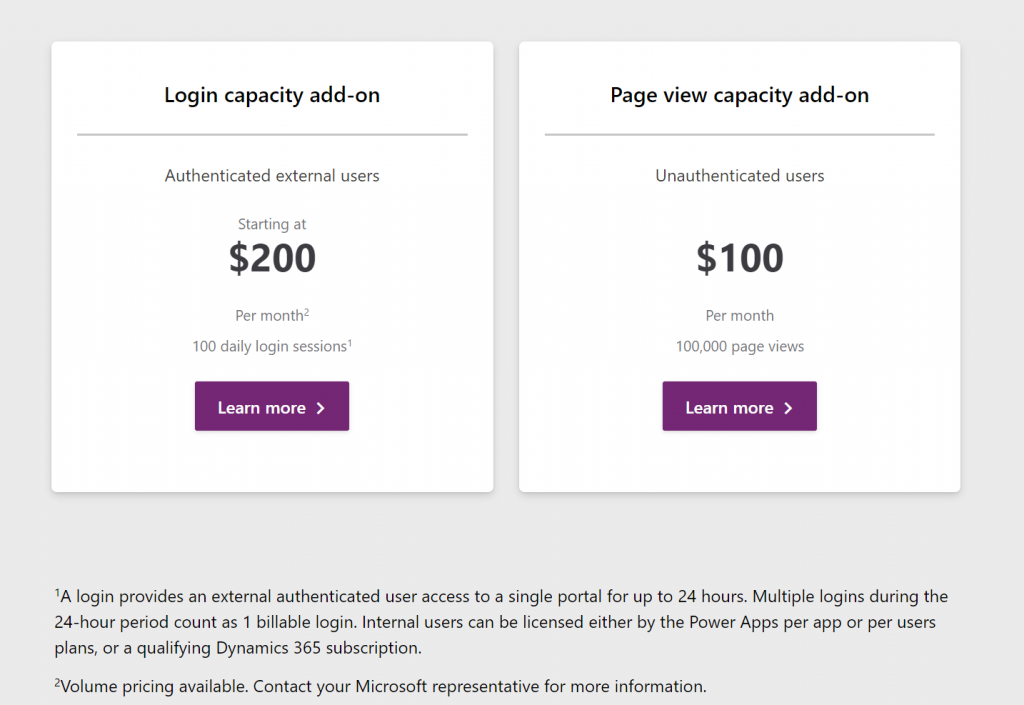
    The Power Platform today requires you to purchase a license for each internal user, but there already is a mechanism available that would in theory allow paying for the actual usage. It’s the new pricing model of Power Apps Portals, where instead of buying the Portal application itself you purchase capacity to be consumed by the usage of the portal. This covers unauthenticated usage like page views, which isn’t all that relevant for real business application use cases. However, the concept of paying for each login of an authenticated user would be very applicable to many light use scenarios with infrequent but still valuable application usage.

    The beauty of a consumption based pricing model like this would be that you wouldn’t need to purchase a full licenses for each and every user that might or might not use the system during any given week. However, when there would be a valid business need for them to access the system and use some of it’s features, they could be assigned a “day pass” that grants them the license for a 24h period. If on the next day they again need to do the same thing, it’s a new pass to be consumed. Doesn’t this sound like exactly the sort of a mechanism that could…?

    Unfortunately as of today there isn’t yet a way for customers to purchase these type of day passes for their internal employees. The Portals licensing model is limited to only external users, whereas internal users must be assigned either a Power Apps license or an applicable Dynamics 365 App license (note: Team Member license does not apply here). There is some irony here because the per-login pricing model is actually making Portals a tough sell for some of the intended external audiences. Buying pre-paid packages of login capacity that would cover you entire potential user base of customers that might or might not log in to your public website can quickly become so costly that it makes more commercial sense to build a custom portal with custom integration into CDS instead of leveraging this product capability built by Microsoft (at least with the list price).

    Regardless of these current challenges with aligning the license terms, I do believe the roads in Power Platform are eventually leading more and more towards the model of licensing by consumption. Not as the primary mechanism, but as something that will complement the user based licenses. This is because ultimately the goal should be value-based pricing. How do you measure the value generated by the business applications that are running on your shared cloud platform and used by millions of people out there for their own specific business processes? Well, the usage of the software products is a nice concrete way to gauge the potential sources of value – as well as idetifying places where the value is certainly not being captured (due to lack of usage/adoption).

    In the on-prem era where some of the enterprise software licenses practices we still see today were originally drafted, you were selling a big system that the customer would acquire the server & user licenses for and then deploy the whole thing behind their own firewalls. The cloud has changed this model whereby the SaaS vendors are now able to see in much more detail the metrics for active usage (DAU, WAU, MAU) from the customer environments running on systems that they operate. In addition to ensuring that the customers keep renewing their subscriptions, access to this usage data also opens up possibilities for offering alternative pricing models that would make the many light use scenarios more attractive for large pools of potential users. The example of charging for app access by every 24h may not be the model that will be offered to internal users, but at least it represents a much less complex mechanism for customers to digest than the earlier models of drawing licensing lines between entities, features or access types.

    Other parts in this article series can be found here:

    Read more about Microsoft Business Applications licensing

    View all my blog posts in the licensing category.
  • Licensing by consumption: pricing model of Power Platform online services

    Licensing by consumption: pricing model of Power Platform online services

    On the topic of Dynamics 365 and PowerApps licensing changes coming in October 2019, I earlier wrote about the biggest change in how Microsoft is separating the first party applications and the underlying platform in the new Per App pricing model. There’s another aspect in the coming licensing updates that has also caused a lot of concern among partners and customers: the API call limits. While the existence of limits on how much load one can place on the online service are not an entirely new construct, it’s the first time that the amount of API calls available is directly tied to the type of licenses bought.

    In their August 29 blog post, Microsoft stated the following:

    “A single, integrated approach for daily capacity limits will be implemented to help maintain a consistent quality of service for customers with PowerApps and Flow plans. These capacity limits should not impact standard or reasonable usage of PowerApps or Flow. Organizations that require additional capacity for heavy usage scenarios will be able to purchase add-on capacity and assign it to specific users or processes.”

    Updates to Microsoft 365, Dynamics 365, PowerApps and Flow Licensing

    The finer details of the new model are outlined in the PowerApps and Microsoft Flow licensing FAQs for October 2019 as well as the Requests limits and allocations pages over on docs.microsoft.com. You should keep an eye on these documentation pages, since further information will be made available, based on the incoming questions from customers. There have already been a lot of blog posts around this topic and I’m not expecting the debate to die out anytime soon. Rather than speculating about what the exact policies will be, I will instead try to set this new consumption based licensing into context with what’s happening in the Microsoft Cloud.

    Users aren’t the only thing that matters

    USL, user subscription license, has been the dominant model for pricing applications from Microsoft in the online services era. Of course they’ve been a key component ever since the personal computing revolution started with PCs running DOS, then Windows and many productivity applications like those found in the Office suite. The networked computing era extended the pricing models to server software that wasn’t always purely a per-user play, as the complexity and robustness of your back-end services determined how expensive that side was. In the initial wave of SaaS business applications, we saw a return to the simplicity of just paying a fixed fee like $50 per user and getting all of that server stuff covered for you. Oh bliss! Isn’t this exactly the way the cloud should be sold?

    Those first SaaS services also were in themselves quite simple. A replica of the server software you could have either in your own closet or the data center run by companies like Amazon and MS. You just offloaded the complexity involved in managing hardware redundancy, backups, storage etc. and instead payed for all that in the USL. This is all fine and dandy as long as the value from the applications can be closely linked to the number of licensed users accessing it. Using CRM as a simple tool to improve sales person productivity might map into this type of cost-value structure. But how about when you take a step further on the digital transformation path and start to actually replace those tasks carried out by human employees with something that is almost fully automated? Hmm, perhaps the PC business model isn’t optimal for a future that looks like this.

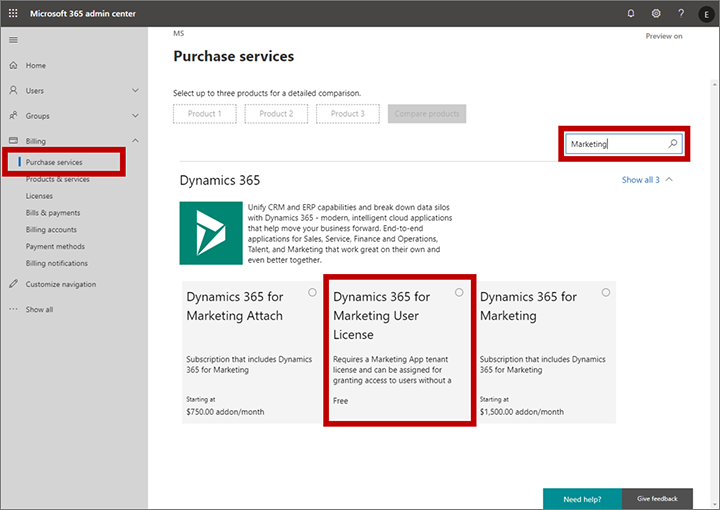
    Let’s look at some of the new services in the Dynamics 365 cloud. The commercial launch of Dynamics 365 for Marketing in Spring 2018 was a bit of a shock for anyone who always though these applications are licensed per user. Instead, Microsoft chose the model that HubSpot any many other vendors in the marketing automation space apply, by setting the pricing per contact. Yes, initially they were way off with this thinking by applying the pricing logic to the entire contents of the CRM database, but based on market feedback the model was adjusted to now count only for marketing contacts actually used by the specific application (i.e. where business value should be generated). Also, you actually don’t need any Dynamics 365 user license for those marketing people who build the customer journeys and analyze the results, since free user licenses are available to unlock the door into the system. Licensing is done on the environment level, after all.

    Purchase a free user license for Marketing

    Dynamics 365 Customer Insights is a CDP (Customer Data Platform, for those not keeping up with the latest acronyms) that allows customers to bring in customer related data from various different sources and unify them into a “customer 360” profile that links all those activity entries into a single view of the customer. You can then leverage big data processing features of a CDP to generate target segments like customers most likely to churn, select them to be a target group in Dynamics 365 for Marketing customer journeys and preserve your revenue streams by holding on to these customers identified by the intelligent machine in the cloud. How is this service priced? Per number of profiles: starting at 100k profiles for $1.5k, so 1.5 cents USD per profile. Any user in the tenant can be simply authorized to access the application, since the dedicated UI doesn’t have any dependency to the USL construct found on the Model-driven application side.

    Forms Pro is a professional version of the personal/team productivity app found in the Office 365 suite, storing its data into CDS entities for process automation and data analysis. Do you need a USL for the Pro features? Nope. The pricing is based on the number of responses to surveys, at $100 per 2k, making it $0.05 per response. If you want to listen to your customers and improve business outcomes as a result of that, it’s not about how many people you have looking at the data but rather how smart and how automated your feedback management processes are.

    AI Builder will go GA in October 2019. Guess how that’s going to be priced? That’s right: not per user. You buy a capacity license at $500/month for 1M “service credits”. When it comes to machine learning models as a service, with no pre-packaged Dynamics 365 app on top of them, there isn’t even any concept like contact or survey response that would tie the pricing to the physical world. You literally extract value directly from the data you put in there, with the help of apps and automation that builds on top of and integrates with your unique business processes.

    The consumption pricing model is already here. Future products in the Business Applications portfolio are more likely to gravitate towards that, rather than finding a user to attach a price tag on.

    Sandcastles in the sky and how to draw the lines

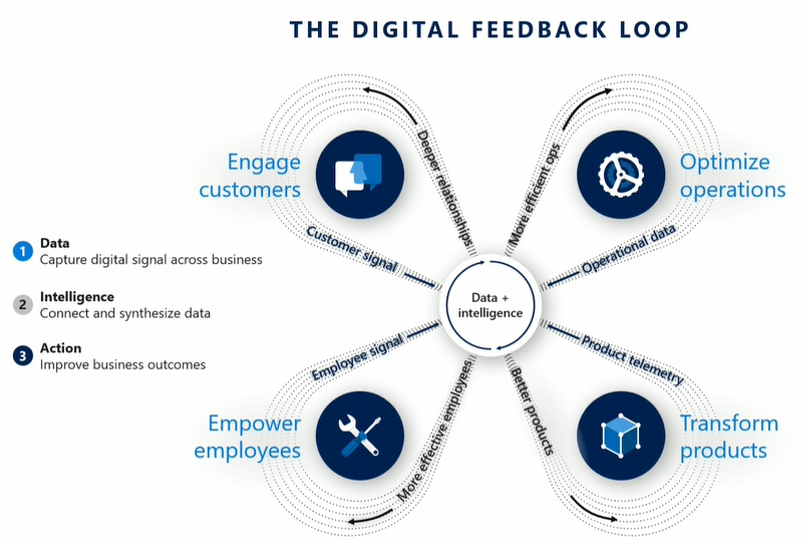
    In the cloud era, Microsoft can see everything. No, they don’t have employees looking at any customer’s private data or anything like that. What I mean is they have telemetry data on everything that happens on the service, because they are hosting all the moving parts involved. This gives them the opportunity to be very data driven in analyzing how products are adopted, what people actually do with them. It is essentially their own implementation of the digital feedback loop that you see James Phillips preaching to Microsoft’s customers and partners in every keynote he does. There’s the “transform products” part that is all about aligning product features to meet customer needs, but you can be sure MSFT also want to “optimize operations” when it comes to the logistics of delivering the cloud services and how to price them appropriately.

    Was gibt es Neues vom Microsoft Business Application Summit?

    Dynamics 365 is claimed to be the biggest service running on Azure today. Now, even though at Microsoft they both fall under the Cloud & AI that Scott Guthrie runs, there’s not a single bucket where all the costs would be thrown. The more Business Applications products are built that consume data storage and compute capacity, the higher the bill from Azure will be. The term COGS (cost of goods sold) is being used frequently when talking about the resources needed to keep cloud services up and running on these platforms like Azure. Power Platform is a platform on top of another, and while it often uses higher levels of abstraction that its raw Azure counterpart, API calls from the citizen developer PowerApps do turn into API calls against Azure services. Whatever product is generating this consumption must also front the bill.

    The vast majority of Dynamics 365 business today is still done based on user licenses, regardless of what our AI & big data driven future may look like. These are sold as SaaS apps you can just sign up and start using, rather than a complex solution that needs a technical architect to build the blueprint for. As such, the message Microsoft wants to get out there (but isn’t always so good in phrasing) is that the app user license should cover all normal usage for real human beings interacting with Dynamics 365 CE. Yes, anytime a user opens a contact form on a Model-driven app there are around 10 API calls made, which count against the quota for that particular user account. All CRUD operations theoretically count, but for an end user you shouldn’t need to count them. This is not the intention of MS.

    What is the idea behind setting the API call limits then? Well, the situation is this: the platform has evolved from the early days of being a simple CRM database for sales user productivity improvement into something that can connect OoB to a vast number of external (non-CDS) data sources and run complex automation on this data without anyone sitting in front of their PC and opening those contact record forms. When sold as Power Platform, there will be a massive amount of this non-CRM style consumption of computing resources running on the platform (unless MS completely fails with capturing this new business potential). Building all of this abstraction on top of the underlying Azure services and then giving it a way with essentially a per-identity flat monthly fee just wouldn’t be a sensible business model.

    (more…)