Tag: collaboration

  • Share links with access to records in Model-driven Power Apps

    Share links with access to records in Model-driven Power Apps

    Microsoft has been working towards a unified sharing experience across their cloud products. The dialogs that many are using today in Microsoft 365 services like SharePoint and OneDrive for sharing access to files is also finding its way to Power Platform.
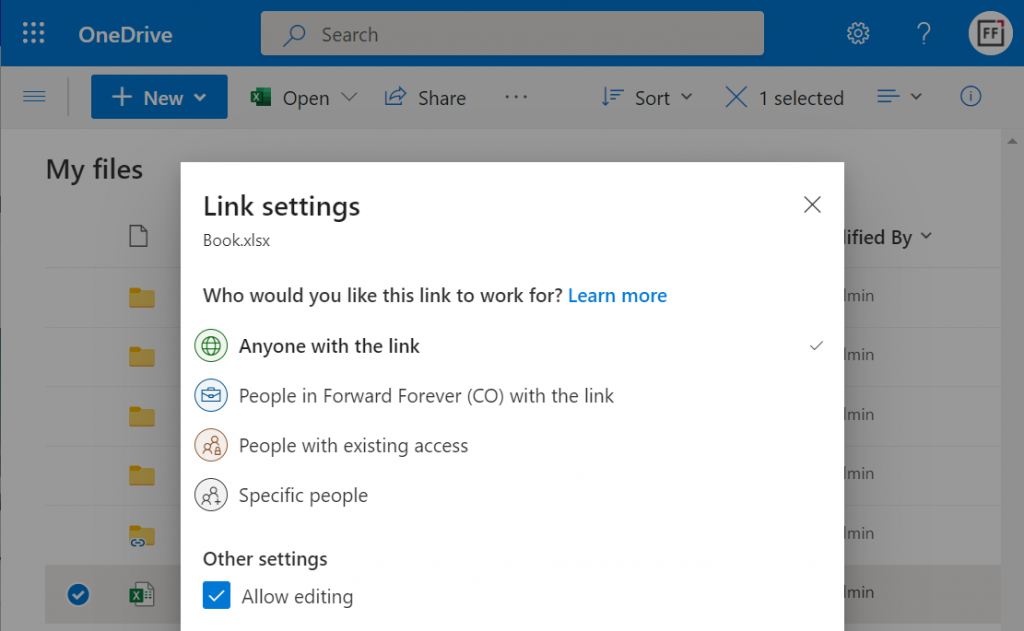
    The visible UI in a sharing dialog is only one part of the experience. Knowing what the traditional sharing experience for Dataverse records has been in Dynamics 365 and what the underlying security model consists of, the new direction can present a few surprises for app makers and admins.

    For example: did you know that a user without any visible security role may be able to read the data of certain Dataverse records? Wow! That goes against everything we’ve learned about security modelling in the good ol’ XRM era. Sounds like something worth investigating a bit deeper then.

    Enabling the sharing links

    Since the new sharing functionality can have a big impact on the security model of your business apps, this capability needs to be consciously enabled by the administrator. I haven’t yet come across the official Docs materials for the feature. Presumably this page is where the details will eventually be published. For now, this blog post is based on my experiments of what you need to have in place (by minimum).

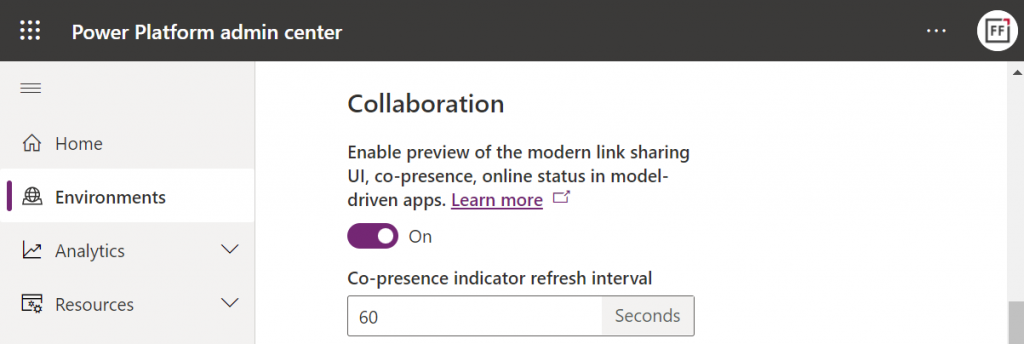
    First, you need to enable the collaboration feature in the environment settings via Power Platform Admin Center (PPAC):
    Next, you should go to the Privacy + Security page of the same environment and switch “enable sharing” to on:
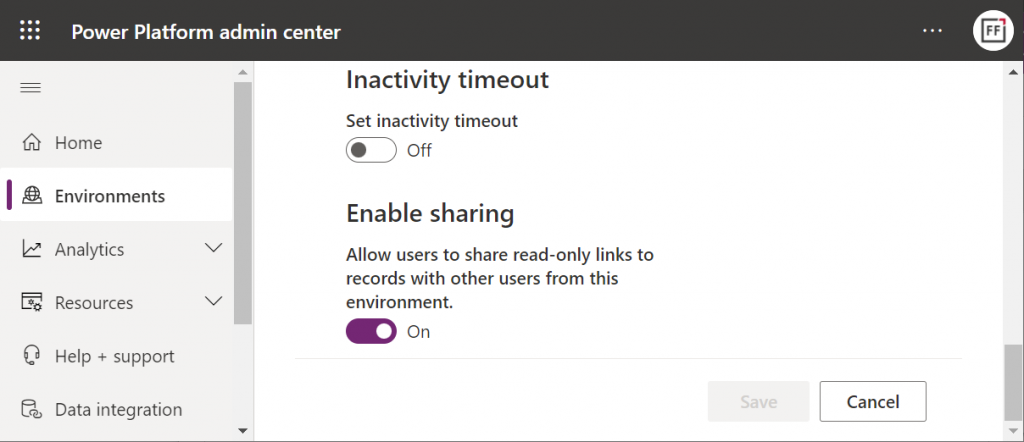
    As the message says, this should “allow users to share read-only links to records with other users from this environment.” I managed to get this working in a couple of different environments in our tenants, yet another demo tenant in the same European geo refused to co-operate. So, don’t be surprised if you see different results in your environments at this point.

    The link sharing experience

    Now that the features are turned on via PPAC, you should be able to go to a record like an account in a model-driven Power App and discover the new sharing menu in the top right corner of the form. Selecting “copy link” will give you a standard link that is the exact same URL as you’d get from the browser’s address bar. That’s because it’s meant for “people with existing access”.

    Once you click on the chevron and explore the link settings, there should be more options available (assuming the environment settings applied earlier have taken effect). Let’s select the “people in your organization with the link” option this time:
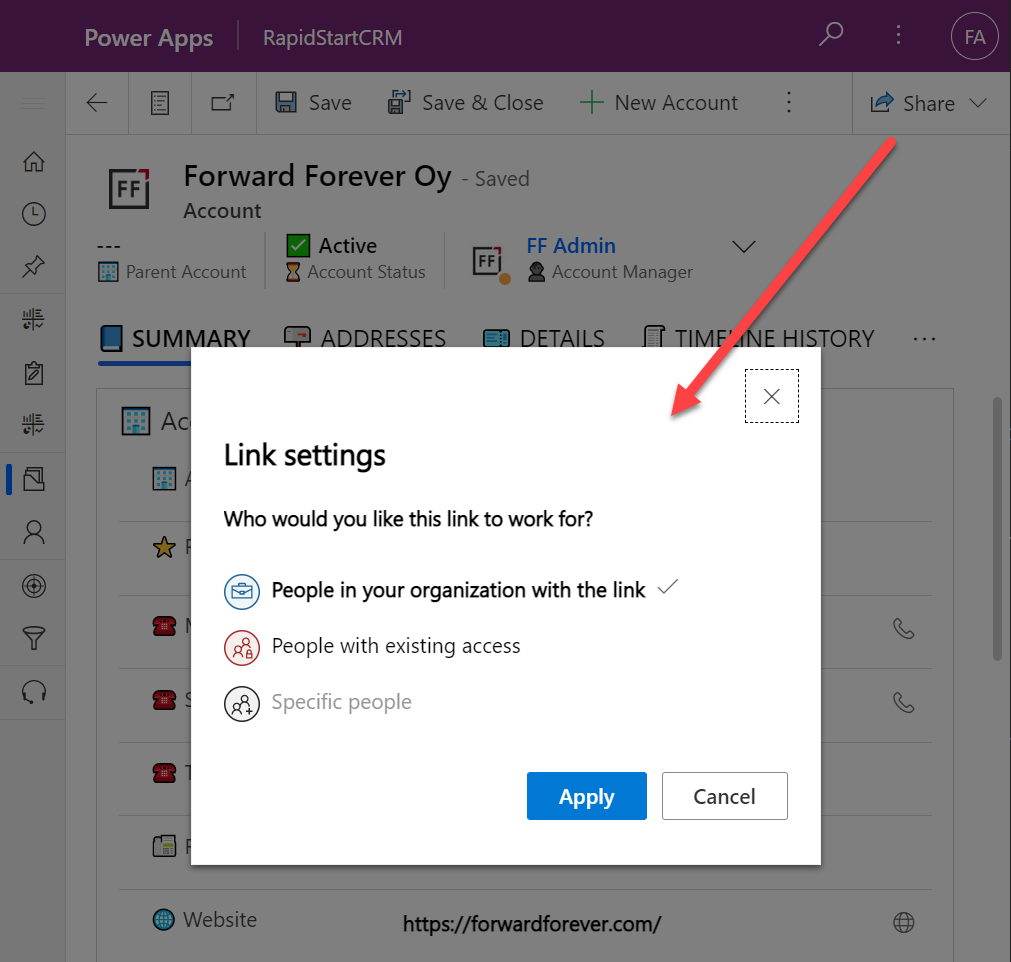
    Now we get a URL that is appended with parameters “shareLink” and “sig”. These are the magic keys to authorize someone who does NOT have existing access to the record in Dataverse.

    To validate how the feature actually works, I used our sandbox tenant’s user account FF App User as the guinea pig. First, as an administrator I went and removed any existing security roles for this user from the environment. Then I ran the diagnostics test from the user list in PPAC. A warning was displayed, saying “this user doesn’t have any security roles assigned directly to them”. Looks perfect for our testing purposes.
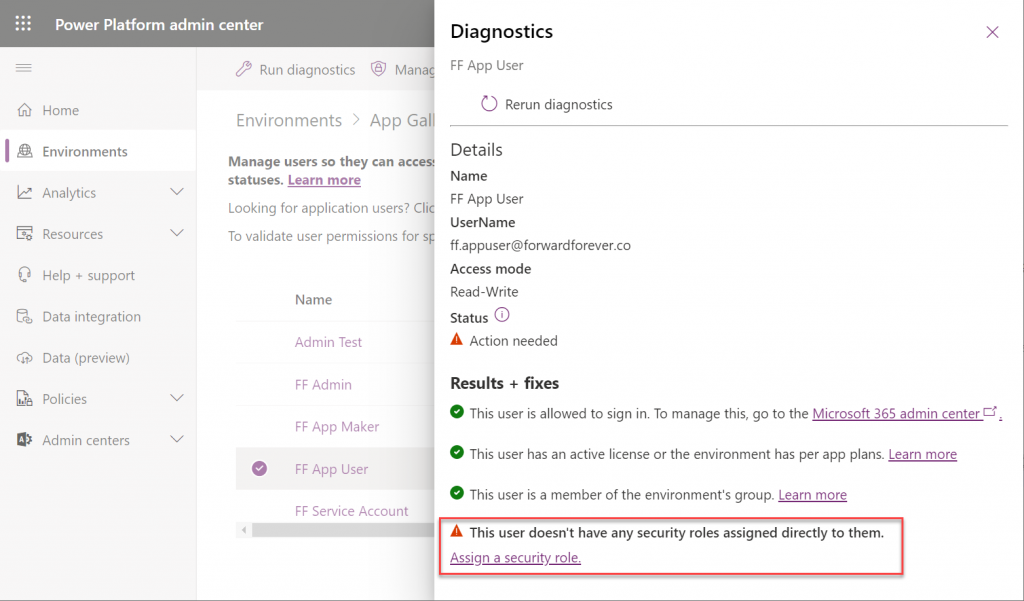
    (I actually also removed the license, yet that didn’t get flagged in the diagnostics test. Oh well, we all know how mysterious the license assignment and validation in Power Platform can be, so let’s ignore it this time.)

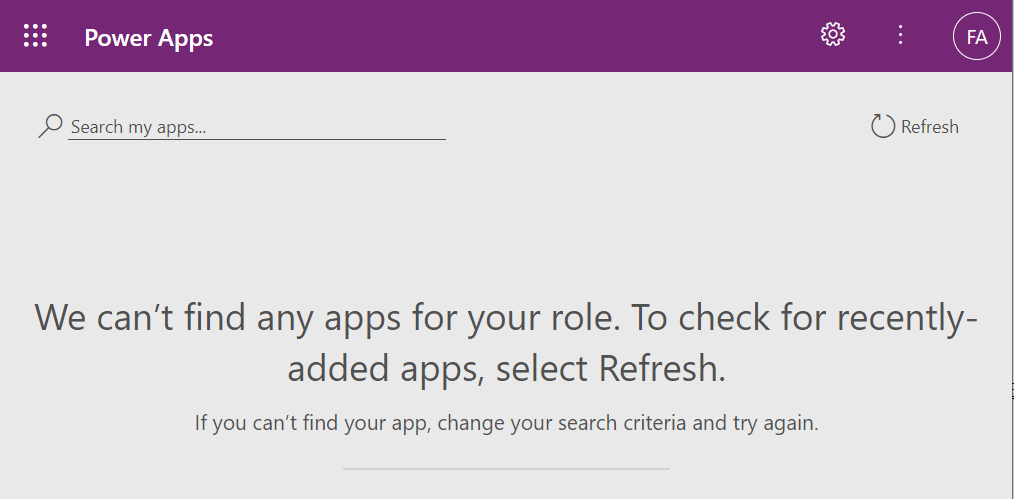
    Opening the naked URL of the Power Platform environment with this user account resulted in a screen saying “we can’t find any apps for your role”. Under normal circumstances, this would be the end of the road for a user.
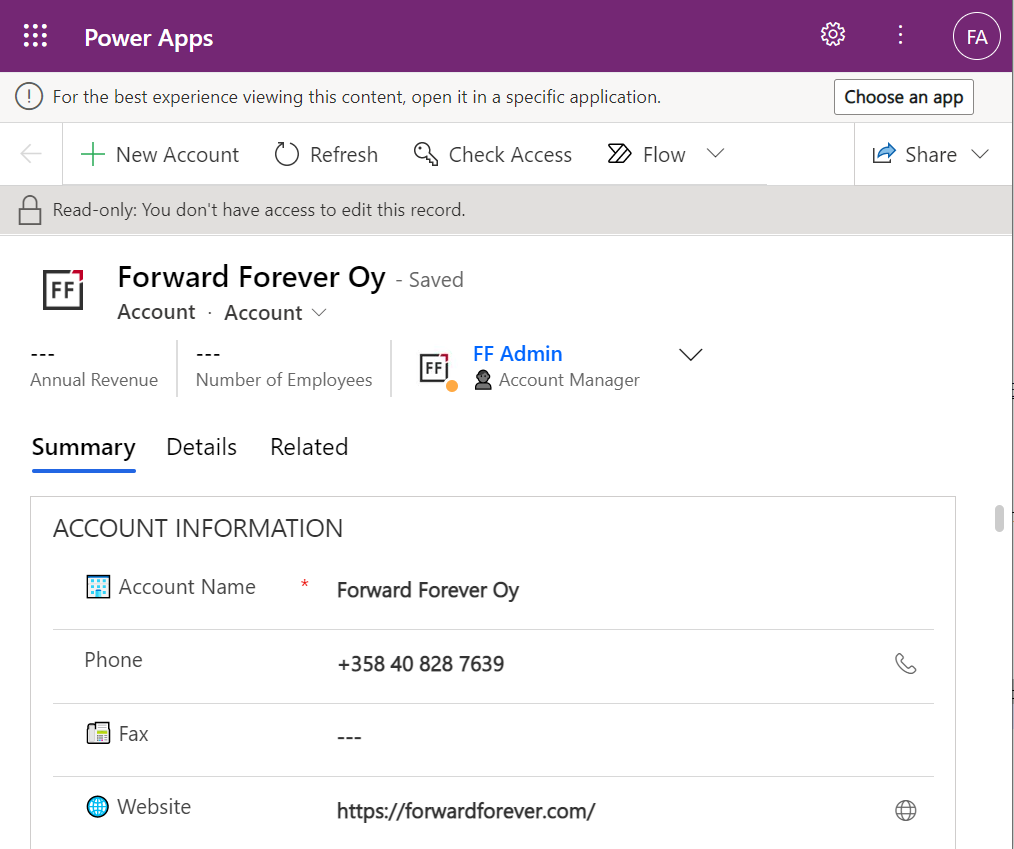
    This user has a special trick up his sleeve, though: the sharing link with the secret access code parameters. Using it allows us to open the account form outside any Model-driven app module. Yes, it’s read-only as the feature’s description text suggested, but from a viewing perspective this record form seems fully functional.
    How far do the sharing rights go?

    If we’d go back to our admin user’s profile and re-run the user diagnostics in PPAC, we’d see that there still aren’t any security roles assigned for the FF App User. Let’s visit the sharing dialog of the single record instead and go to “manage access”.

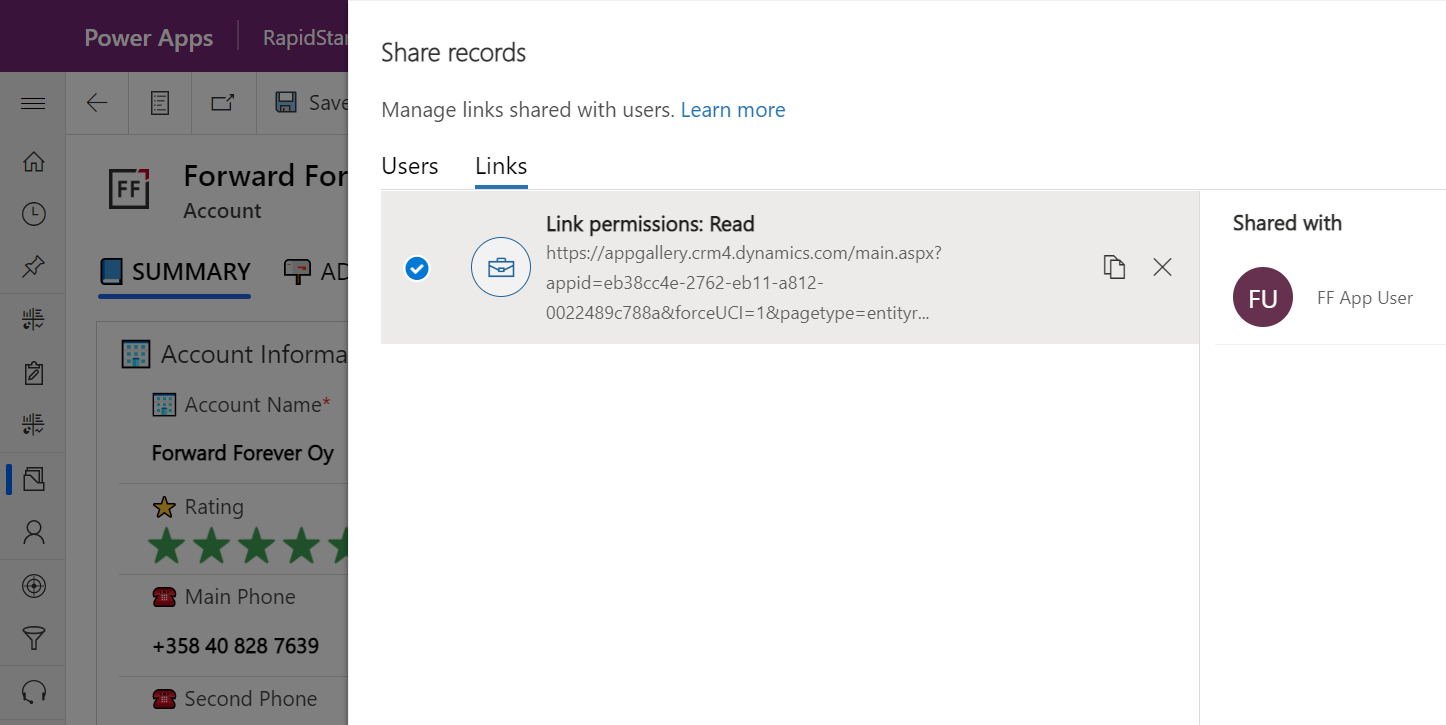
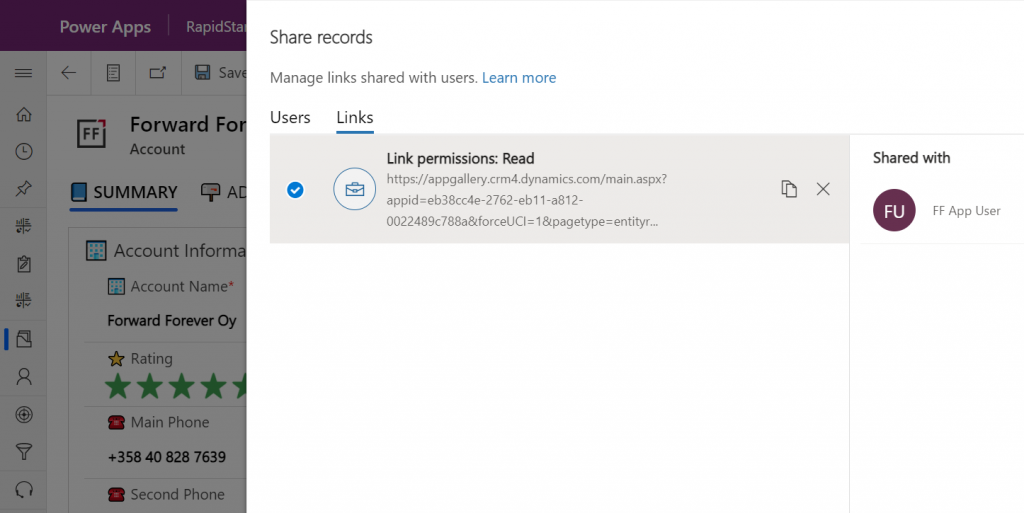
    This screen shows us that we have one sharing link generated for the account in question, with read permissions. Also, since FF App User has accessed the record via the link, the user account is listed under “shared with”.
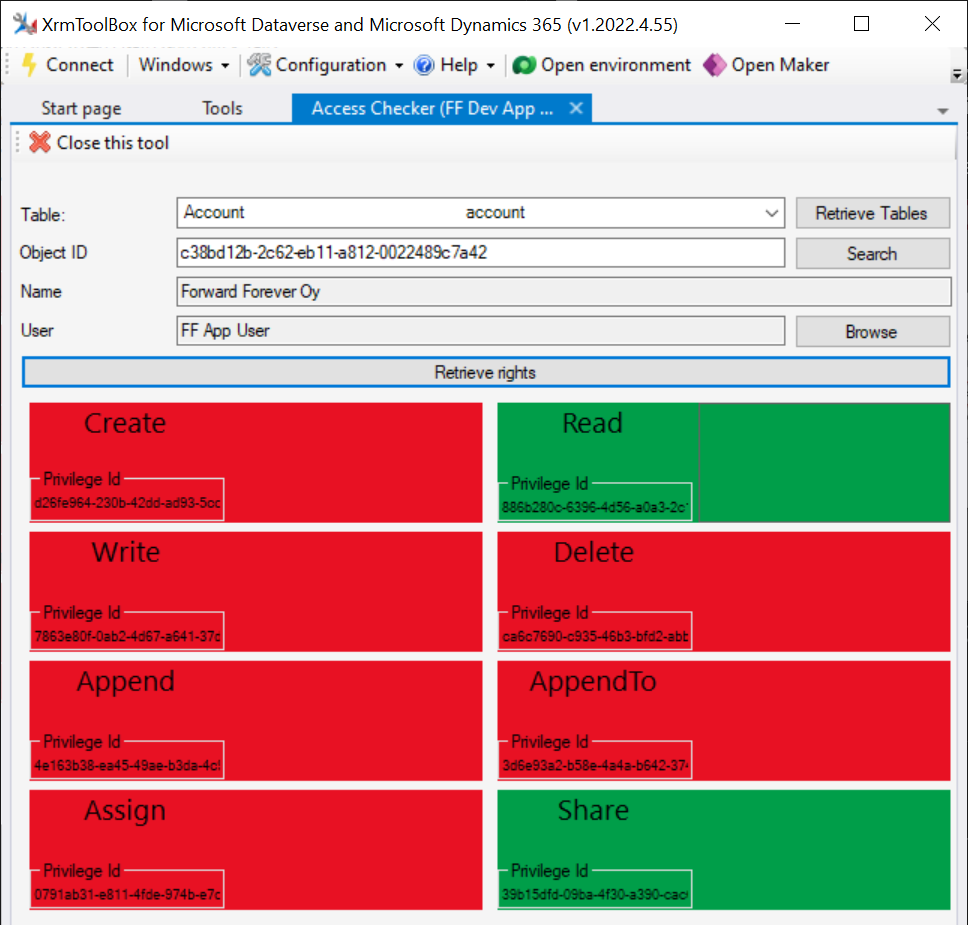
    Time to go deeper still, so let’s open XrmToolBox. Using the Access Checker plugin, we can run a test for the specific account record and the specific user account. We do indeed see that when called via the API, the user has both read and share privileges for this record:
    Could we find out even more about how the privileges are applied? Sure! Another plugin in XrmToolBox, “Your User Security – Magnified”, gives us a very interesting output for the FF App User account:
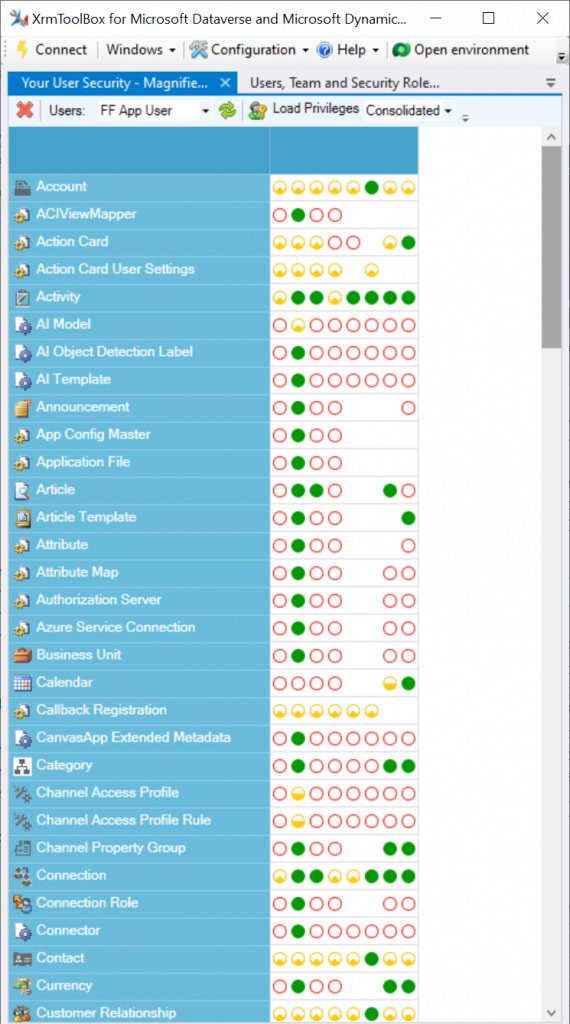
    As many of you know, there are plenty of system metadata tables (entities) that the user must be able to read for the application to function properly. Things like “attribute” or “user” are therefore understandably opened up for the FF App User account upon sharing the record.

    There are plenty of real business tables listed in that output, too. Contact and activity, for example. While the privileges are granted only in the user’s scope (meaning only records that the user is an owner of), this made me go back and think: what else did we see on the account form when we opened that one record?

    Activities related to the account show up on the timeline. In addition, we’re able to navigate to their forms. We do also see the primary field values of anything that’s in a lookup, such as the regarding opportunity name.
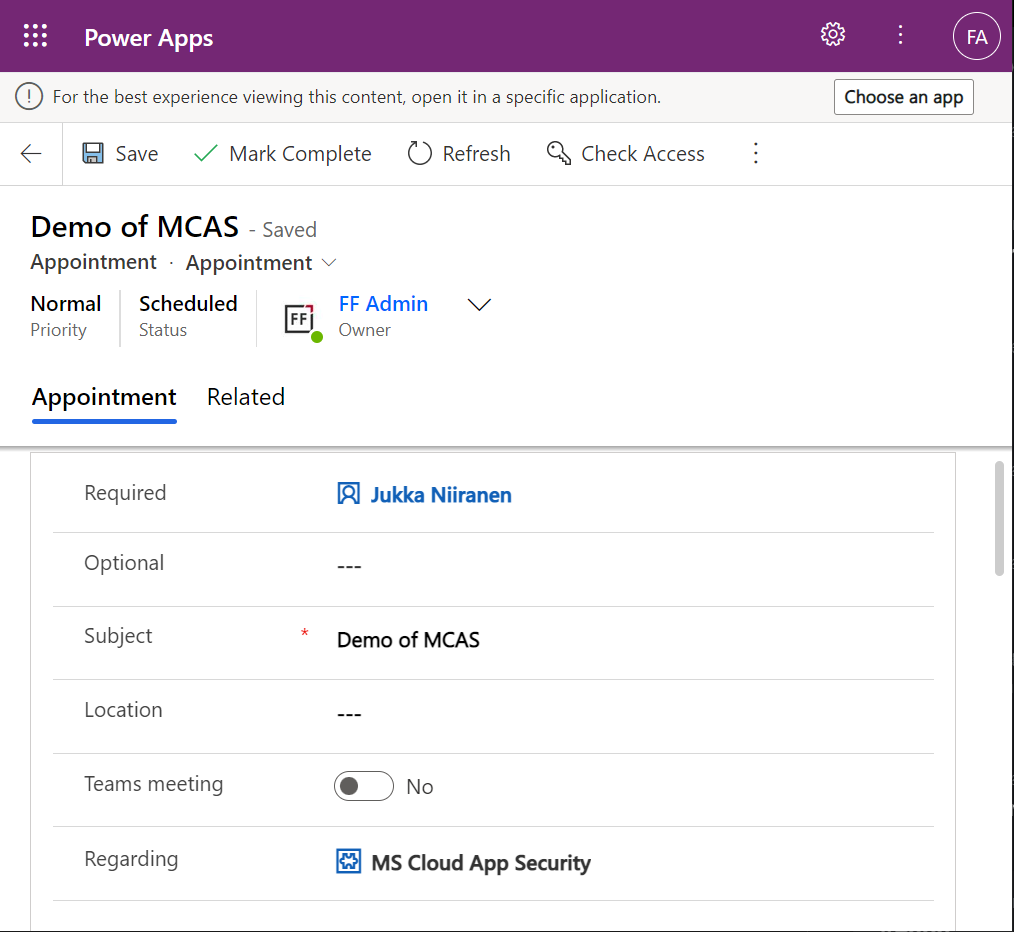
    Clicking on lookups, such as the contacts that are activity parties, will show an error message on missing read access rights. So, the security model is still enforced as expected, meaning we couldn’t just navigate via links to other records. It’s not just the lack of a surrounding app and its navigation that is missing from this user, there’s access checks also on the server side of course.
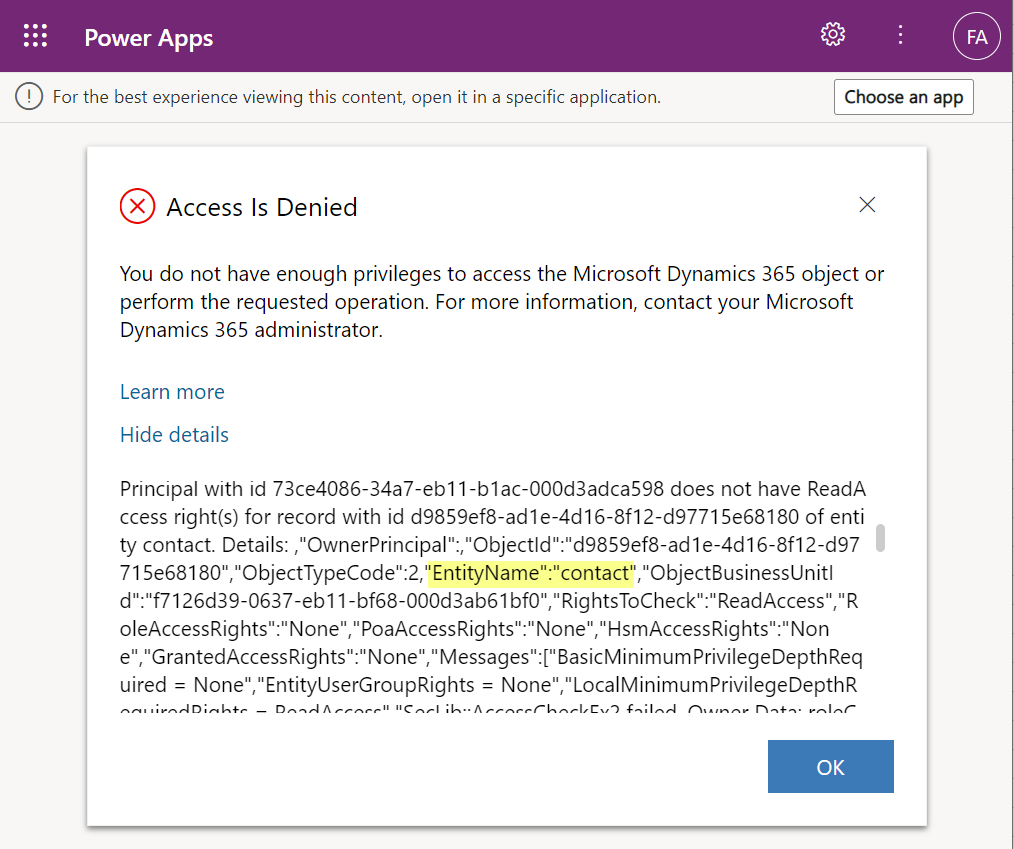
    It’s good to keep in mind that the modern collaboration features are currently enabled only for certain tables: account, contact, opportunity, case. There may be more configuration options ahead for how the sharing links work once the feature reaches general availability.

    Sharing within Microsoft Teams

    The primary scenario that these internal sharing links have surely been designed for is collaboration within Teams. Already back in July 2021 it was announced by Satya Nadella that “Teams customers will receive access to Dynamics 365 data within Teams at no extra cost.” We’ve been waiting for that possibility to arrive ever since.

    Given how the concept of sharing access to data has been radically different between a document world like SharePoint and a business record world like Dynamics 365, there has understandably been a lot of work needed to be done on the platform side. Now that the share links infrastructure appears to be in place, are we ready for the collaborative apps story to come to life?

    Although the sharing capabilities are a Power Apps feature, there doesn’t yet appear to be the needed pieces in place on the Teams side for any low-code apps to take advantage of record sharing. However, if we test the sharing links in a Dynamics 365 enabled environment and with the Dynamics 365 Teams app deployed for the user, things start to light up:
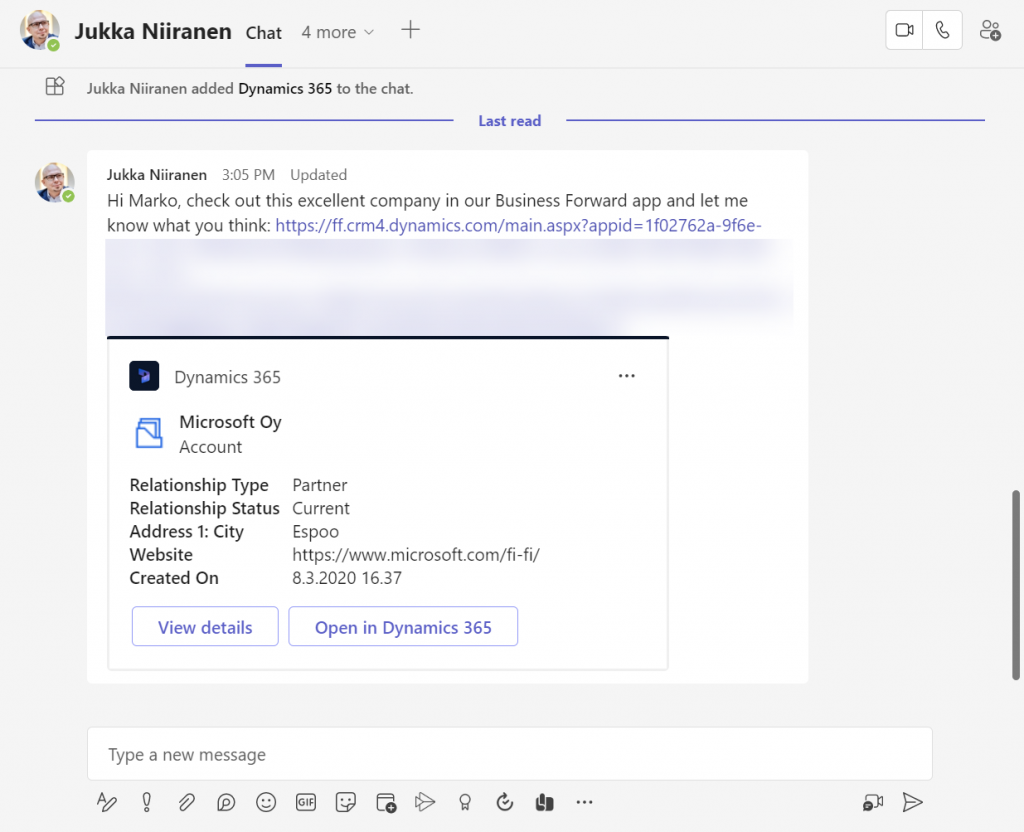
    Pasting the link into a Teams chat will now unfurl the contents and show an information card preview of the record. We also get the option to view the full record in the context of Teams, via the “view details” button. These are small yet important steps in allowing people to get work done within the platform that is Microsoft Teams, without needing to look for the details in another browser window.

    We’re still missing some of the elements showed by Microsoft as part of their collaborative apps story, like Context IQ for at-mentioning a Dataverse record or Loop components to embed live data into messages in Teams or Outlook. While we wait for a delivery timeline on those elements, at least this easy record sharing feature in Power Apps model-driven apps has a target GA date for September 2022.
  • Is Dynamics 365 data now “free” in Microsoft Teams?

    Is Dynamics 365 data now “free” in Microsoft Teams?

    In the opening keynote for Microsoft’s partner conference Inspire 2021, Satya Nadella stated the following:

    Today, I’m excited to share that Microsoft Teams customers will receive access to Dynamics 365 data within Teams at no extra cost.

    Wow! That’s a major licensing related announcement – with not too much details to go with it yet. The feature is also covered in the summary blog post “From collaborative apps in Microsoft Teams to Cloud PC—here’s what’s new in Microsoft 365 at Inspire.”

    Together, Dynamics 365 and Teams offer powerful new ways for everyone across an organization to seamlessly exchange and capture ideas right in the flow of work. Today we announced a new collaborative app that brings together the best of Dynamics 365 and Teams. We’re also eliminating the licensing tax that has historically held organizations back from this kind of integration, making these experiences available within Teams to any user, at no additional cost. No other technology vendor offers this kind of integration and accessibility across the organization without the need to pay for multiple underlying software licenses.

    Clearly this is quite a big factor for Microsoft when competing against the likes of Salesforce. The features are therefore unlikely to be merely on a “check the box” level that the competition could undermine with their counter arguments. Obviously Teams is the platform that Microsoft is betting pretty much everything on, so a deeper integration with Dynamics 365 is hardly a surprise.

    The brand new 2021 Release Wave 2 release plans for Dynamics 365 that came out on the same day have multiple references to new Teams integrated features:

    …And I won’t even go to things like Mixed Reality. You get the idea by now: if a Microsoft product doesn’t have any Teams integration today then it might as well be nearing the end of its natural lifecycle.

    Collaborative apps in practice

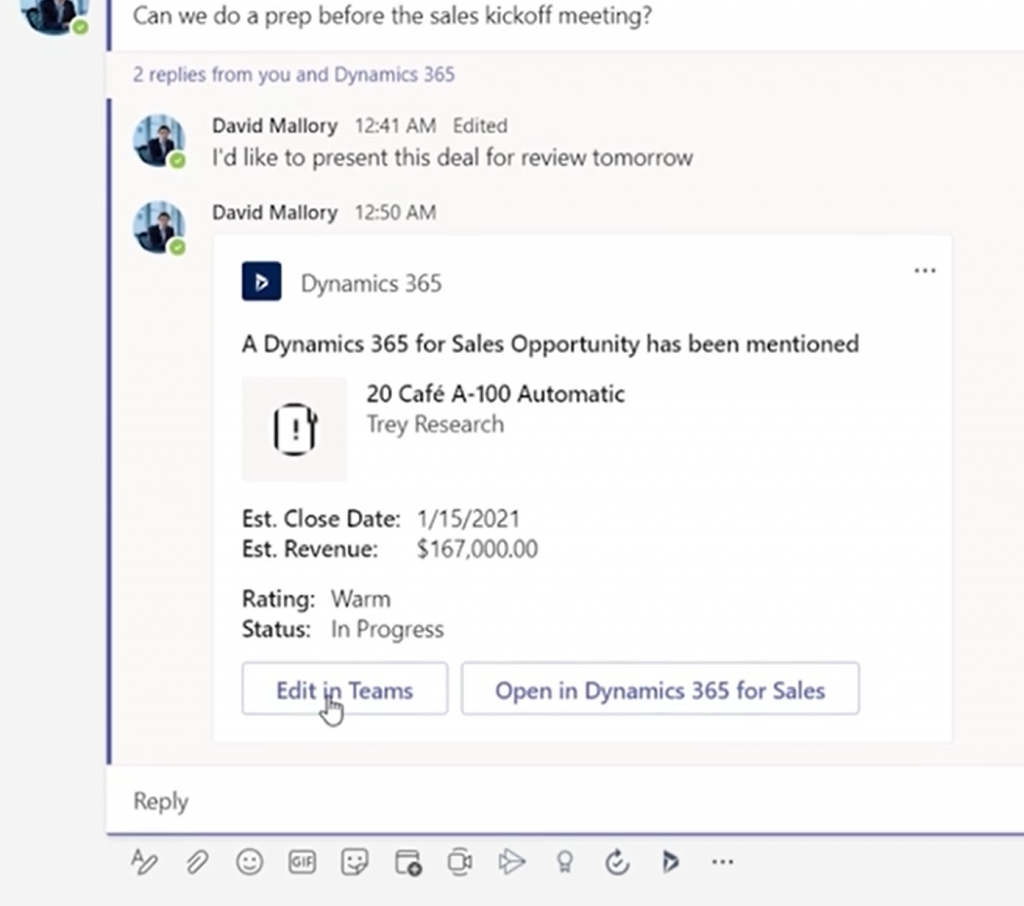
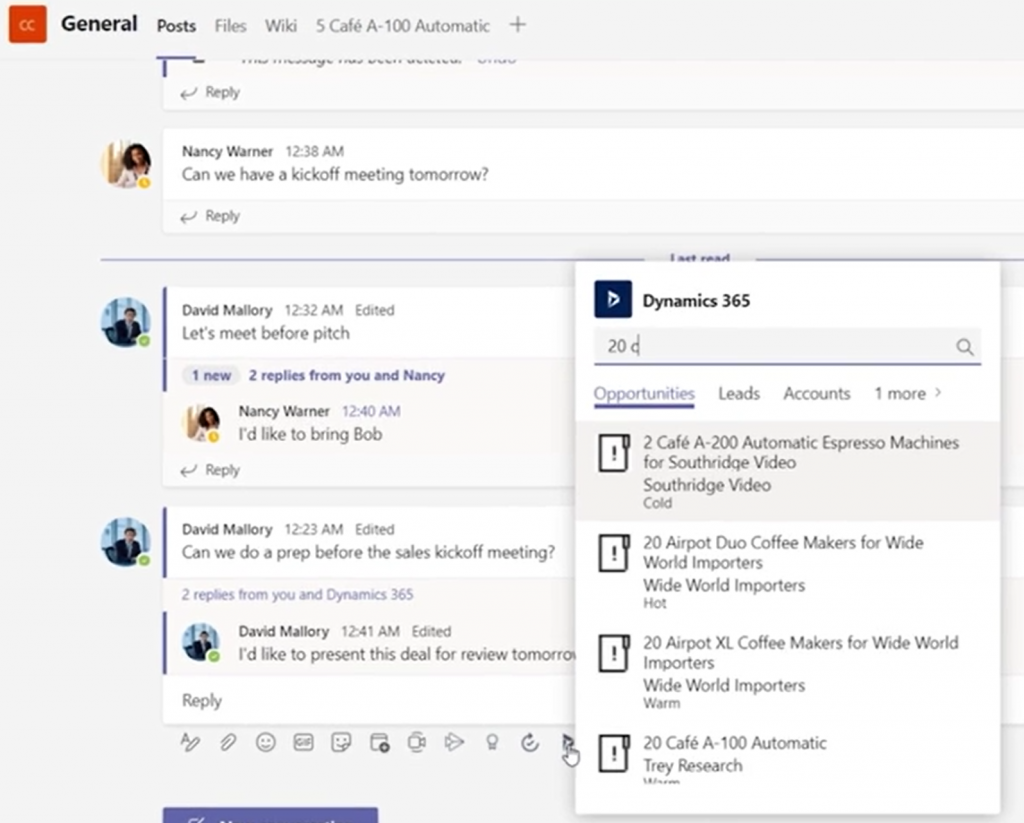
    Today we’re limited to the product marketing materials published by MS, but let’s try and make the most of it in our feature analysis and licensing speculation. Starting from the Dynamics 365 + Microsoft Teams landing page, we can watch a promotional video that includes some UI footage of the collaboration scenario. To start off, sharing Dynamics 365 records into a Teams channel is obviously a key to unlocking the collaborative scenarios, so a new experience for attaching records like opportunities or accounts will be provided:

    From the resulting Adaptive Card we see that the user is offered not just an option to “open in Dynamics 365 for Sales” but also to “edit in Teams”:

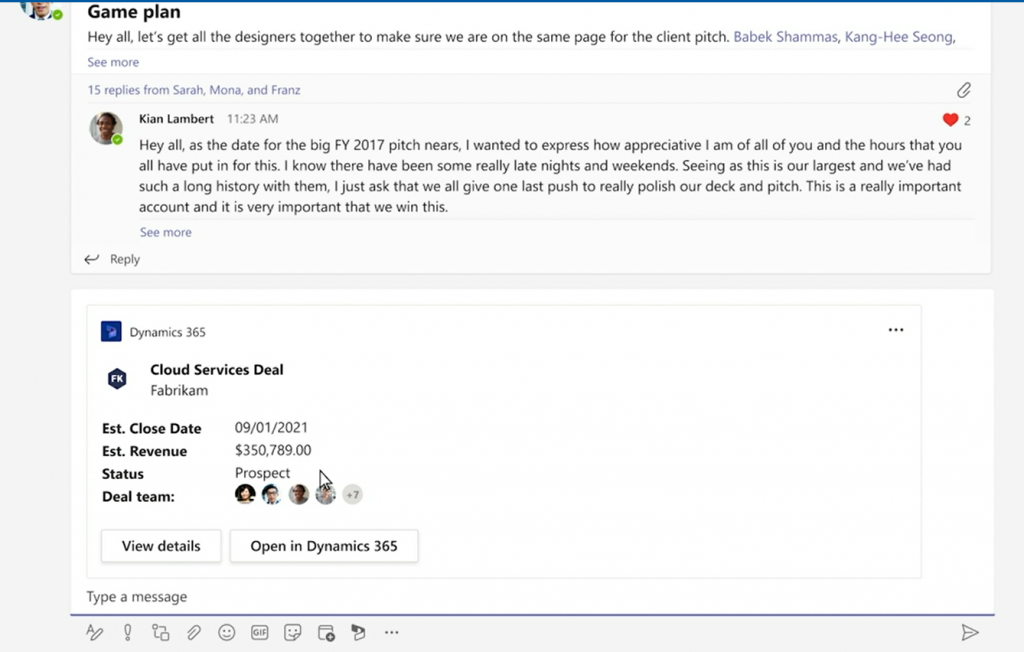
    We don’t get to go very deep in this video, so let’s switch over to the Inspire session called “The Cloud Built for a New World of Work” where Alysa Taylor introduces the Teams + Dynamics 365 story to the MS partner audience. The story has a similar “attach a Dynamics 365 record to a channel message” scenario. Here the button says “View details” rather than “Edit in Teams” but since these videos probably need to created well in advance, we can assume these two feature to be the same.

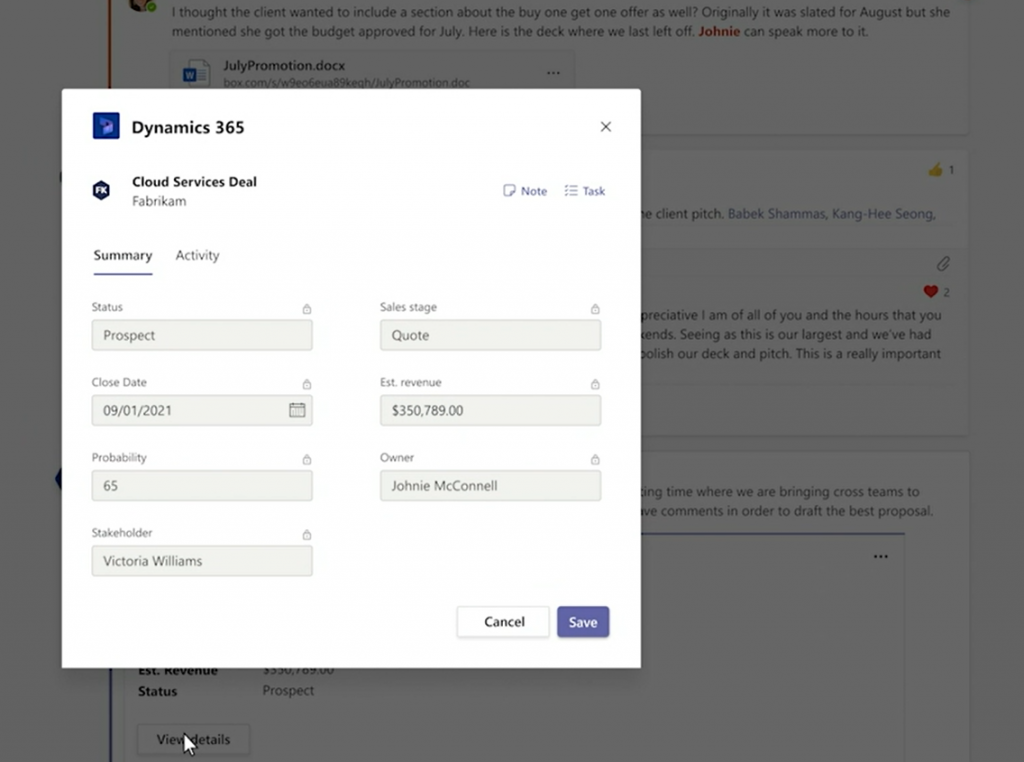
    Here we then get to see the actual details/editing experience. An opportunity record opens in a modal dialog within the Teams client’s channel context (no tabs) and presents a simplified form with key fields in the Summary tab. All the fields appear locked here, but the dialog has a Save button, so presumably the security roles from Dynamics 365 will be reflected here on the UI level already.

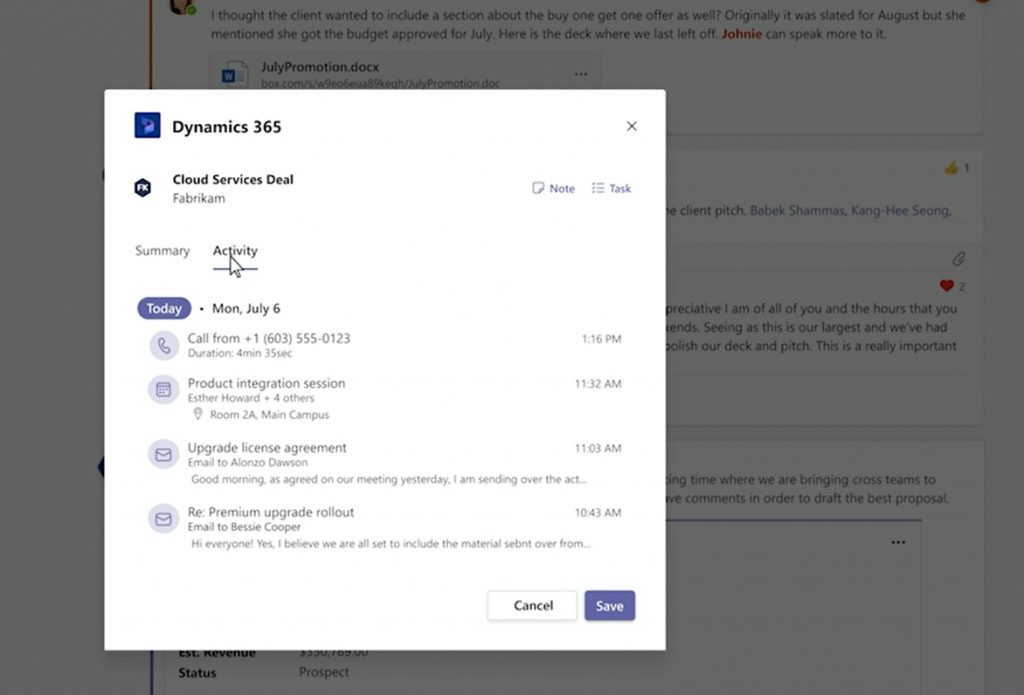
    Next we see the Activity tab, which is again a simplified version of the full Timeline view found on a Model-driven Power Apps form (meaning Dynamics 365 for Sales et al.).

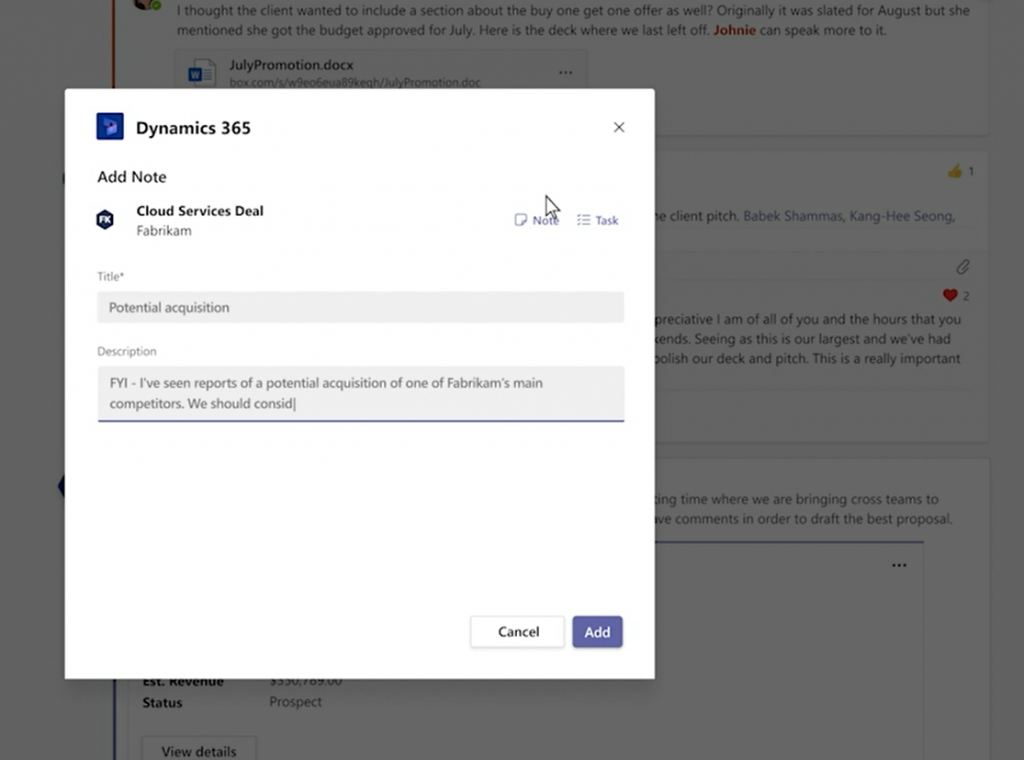
    The user in question has the ability to add a new note for the record, which will get stored within Dataverse rather than just the Teams thread. Tasks also appear to be an option presented in this modal window.

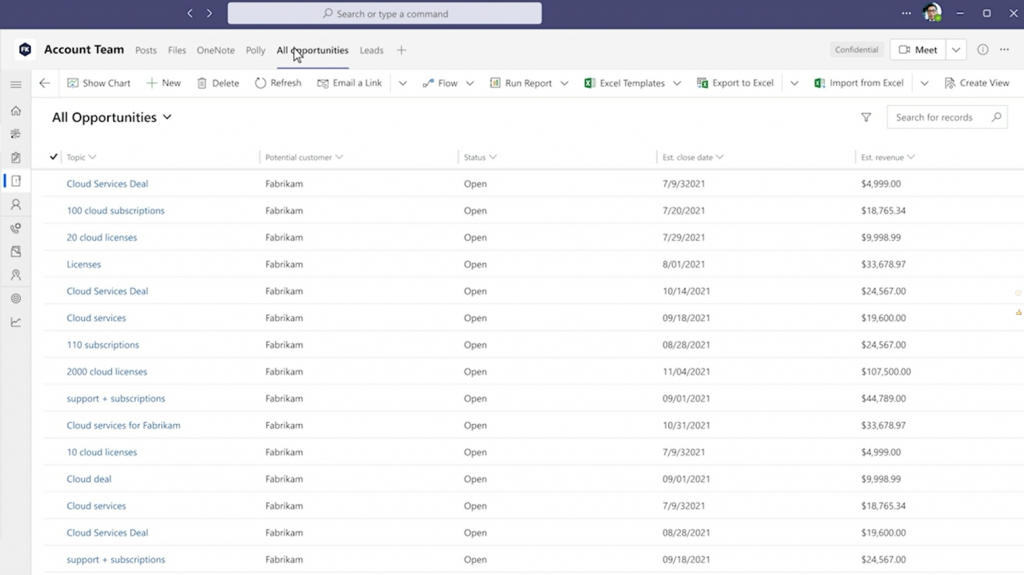
    What happens next in Alysa’s demo scenario is not entirely clear from a licensing perspective. The marketing executive performing the actions in this demo has also the access to any Dynamics 365 views pinned as Teams tabs. Also the full forms are accessible, including Command Bar buttons allowing record creation and editing.

    Whether these rights have been inherited merely from the Teams collaboration scenario depicted in the demo is not disclosed here. The user might as well be a fully licensed Dynamics 365 user and MS just wants to show off the seamless experience of working with CRM data within the Teams client.

    In addition to the licensing story, there’s also the access management angle that isn’t revealed in detail yet. Obviously not any person within your tenant will just automatically have access to records inside a Dataverse environment. Therefore the process of sharing the record with non-users of Dynamics 365 when attaching a record into a Teams message and mentioning users within a message is likely to have a lot of interesting new functionality for any Dynamics 365 admin or solution architect to consider.

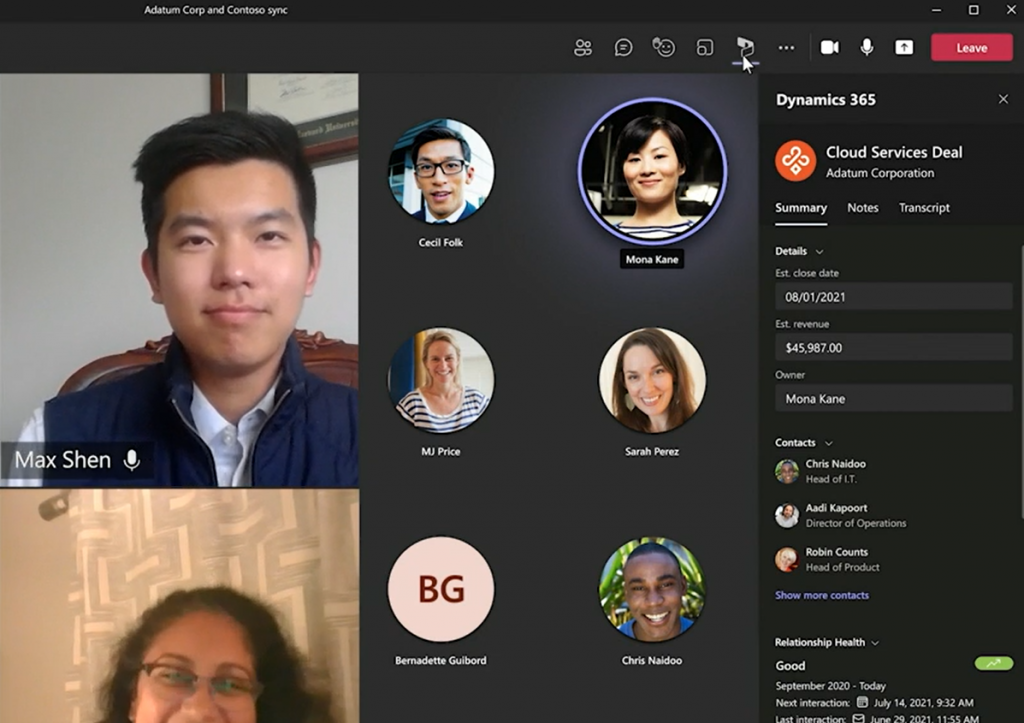
    Contextual presentation of business application data inside Teams is not limited only to channel messages or chat. Meetings can also be associated with Dynamics 365 records in the future, thus opening up further possibilities to make use of this new “free” access to Dynamics data for any Teams user.

    Licensing implications in practice

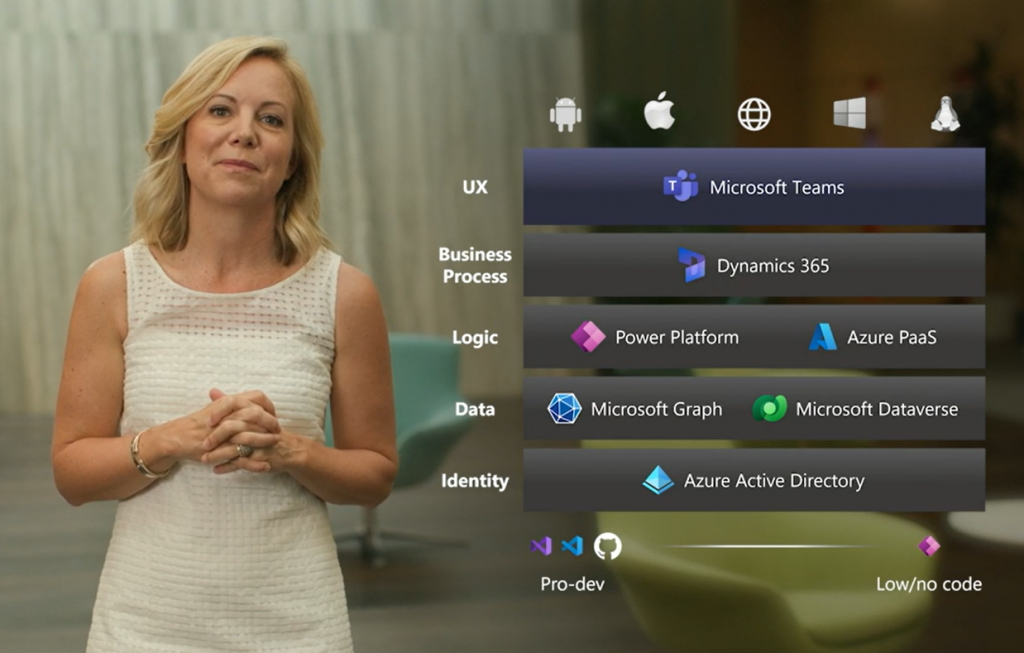
    Let’s think about the broader context of this licensing announcement. The big picture of what Microsoft wants to draw with their Collaborative Apps story is a stack like this:

    When I’ve drawn a similar diagram for customers I’ve labelled the top layer as “OS” rather than UX. Understandably MS may not want to rock the boat that much yet, keeping in mind that they also have concrete operating system announcements like Windows 365 and Windows 11 to pitch to the partner audience. Still, the logical layering is the same and that’s what matters. Teams is how MS can regain its relevance inside the users’ devices that are today running Android, iOS or even Linux. Therefore making things not just easy to use but “free” to use within Teams makes perfect sense.

    Dataverse for Teams has considerably lowered the barrier for organization wide usage of the low-code apps built on Power Platform tools, with its bundled rights to basic Dataverse features for no additional fee if used within Teams. To me, this Inspire announcement of unlocking access to Dynamics 365 data “without the licensing tax” (Microsoft’s words, not mine) is a logical continuation on this same path. You won’t get full features for free, but the upsell potential with the massive audience of Teams users globally is what makes this bargain lucrative for MS product teams.

    From a Dynamics 365 perspective, there are similarities here to the earlier Team Member licensing model that MS launched back when their CRM+ERP vision of a 365 cloud saw the light of day exactly 5 years ago. It was a $10 license that helped to close deals but ended up being a big headache for MS in practive. The launch of Power Apps as the official platform SKU eventually made the TM license pretty much redundant.

    Whereas Power Apps is the story for custom low-code apps, it isn’t exactly meant to be used for Dynamics 365 scenarios (if you ask MS). Yet the licensing terms currently do make it an interesting option for unlocking light use of Dynamics 365 data. Especially given the coming 50% price drop for Power Apps licenses, the fact that you can use these in a Dynamics 365 environment would certainly make them ever more interesting for customers to evaluate as an option.

    Depending on how far the read rights on Dynamics 365 data for Microsoft Teams users will actually go, this latest change might be able to deflect some of these Power Apps “misuse” threats. It’s a fact that not such a big share of a typical organization’s employees will need to work daily with updating CRM data, yet from a reporting and data referencing perspective it’s pretty darn valuable if you have access to the records within the customer data master system.

    If there’s one thing I hear from pretty much every customer (and many partners), it’s that they think Microsoft Business Applications licensing is complex. I’m hoping that whatever this new Dynamics 365 + Teams licensing announcement turns out to be in practice, it wouldn’t create more seemingly arbitrary lines for what data can be used in which context for what license. I’ll need to revisit this topic once we have the full story on today’s Inspire 2021 announcement, to see which way the licensing model is turning this time.

    Update 2021-07-22

    From the comments section in the original Dynamics 365 product team blog post for this announcement, we can gather the following details around Dynamics 365 privileges that will be embedded within Microsoft Teams:

    • Scope: “We are initially launching Teams experiences for Dynamics 365 Sales and Dynamics 365 Customer Service but working on the possibilities of additional experiences across the Dynamics 365 portfolio.” So, further CE scenarios like Field Service and the ERP side for HR, FinOps, BC will be covered later.
    • Schedule: “These experiences will start to become available as part of our Dynamics 365 Wave 2 release which begins in October.” As expected, 2021 Wave 2 release plan is where you should go and check the current target dates for public preview / early access / general availability dates for these Teams related features.
    • Technical implementation: “We are entitling all paid Microsoft Teams users with ‘Team Members’ level access to Dynamics 365 allowing Teams users to read Dynamics 365 data and action upon designated scenarios. These new connected experiences between Dynamics 365 and Teams will make it easier for Teams users to access Dynamics 365 records but only from within Microsoft Teams.” Quite similar then to the earlier technical enforcement of Team Member licensing on app module level. Except that direct browser access outside of Teams clients will be restricted, so presumably the current Dynamics 365 Team Member license SKU will still remain in place at $8 per user per month.

  • Make CRM Activity Feeds easier to follow by creating custom groups

    The functionality of the new Activity Feeds feature introduced in CRM Online R7 / CRM 2011 Update Rollup 5 is built around the concept of following specific records. This allows a very granular level of control for the users to select the specific items from which they wish to see posts on their personal wall. However, this does also force us to carefully plan for the scenario of a new user who logs into the Activity Feeds view for the very first time. What they will have in front of their eyes is an empty wall with just a few links to the online help material.

    An empty wall greets the new CRM users

    In order to make Activity Feeds a shared, trusted source of information on customer related events, the organization using Dynamics CRM needs to provide its users a path that they can follow to become a member of this community. Although it is possible to build custom business logic through the SDK that automates the following of records, wouldn’t it be better if teams of users could themselves choose topics that they wish to follow, and also broadcast their posts to other users following the same topic? You know, like #hashtags on Twitter. Well, there’s no built-in support for hashtags in the current release of the Activity Feeds solution, but here’s a description of one possible workaround which I’ve come up with.

    In my previous post on the topic, I covered the general process of how to enable Activity Feeds for entities in Dynamics CRM. The natural choice for supporting a team collaboration scenario would be to use the default entity Team to display relevant posts for its’ users on the entity form. Unfortunately you can’t enable Activity Feeds for teams, since that’s not a supported entity. In fact, you cannot enable Activity Feeds for any organization-owned entities, even custom ones.

    Luckily there’s nothing stopping your from creating a user-owned custom entity and enabling it for Activity Feeds, so let’s go ahead and create a new entity called “Group”. No need for new fields, just publish the entity, then create a Post Configuration record with the same entity name (new_group or something like that). After this you’ll need to go and adjust the form so that the Record Wall is directly visible when you open the form, by moving it below the first General tab.

    New entity Group created for enabling mentions on Activity Feed posts

    Now you’re all set for starting to use the group entity in Activity Feed posts. No matter on which record’s wall (or your personal wall) you’re writing a post to, you can perform a mention by entering the @ character followed by the group’s name. In this case I’ve created a group called CRM, so I’ll add a mention of @CRM on an account record wall. You’ll see how that turns into a hyperlink to the group record.

    Post with a group mention on an account record wall

    How the user’s personal wall works is that it will display all Activity Feed posts that contain any reference to a record that the user has followed. It doesn’t have to be the record where the post has been written on. This is what enables us to make following updates concerning a certain topic easier for the end user, as long as the posts contain a mention/link to the group record. For manual posts the users will need to indicate that they wish to direct the post to the group’s followers by performing the @[groupname] mention as seen below.

    Performing a mention on a Personal Wall post

    So, does this mean that the mentions can only be utilized with manual user initiated posts? Absolutely not! There is a new attribute available in the workflow editor, called Post Url (Dynamics value). You can read this post on the MS Dynamics CRM Team Blog for details on how the feature can be leveraged in building workflow rules that create Activity Feed posts with mentions referencing other records. This allows us to reference multiple related records in a single post and make it appear on the personal wall of anyone who’s following one of the records.

    Let’s say we want to create an auto post whenever a case record is created and it has the value “CRM” in the subject field, to notify anyone who’s following the CRM group. Ok, so we can find a relationship to the related subject record but since that’s not supported for Activity Feeds (just like teams aren’t), we wouldn’t be able to use it for creating a mention. Also, since the group entity we created doesn’t have a relationship to the case entity, it’s not available in the workflow dynamic values menu.

    Should we go and create a relationship through entity customization? Well, that would be a bit cumbersome, since you’d then have to include a reference into the actual group record in every case record you wish to create a post a mention on. You’d pretty much have an additional subject lookup on the case form as a result, which is not a good solution in terms of usability (at least if you already use the default subject entity in your processes). (more…)