Tag: Azure Data Lake

  • First impressions on Power Platform 2020 Release Wave 2

    First impressions on Power Platform 2020 Release Wave 2

    At the start of this year, we made the decision to go all-in on Microsoft Power Platform and founded a company that focuses on helping organizations on their journey to take ownership of this low-code business application platform. You could therefore say that it’s pretty darn important for us that there is compelling roadmap for the products that represent the technical foundation of our services.

    Luckily Microsoft doesn’t show any signs of slowing down the investments into Power Apps, Power Automate, Power BI, Power Virtual Agents and all the underlying elements of the platform. Our MVP team at Forward Forever already did a “Top 3 x 3” highlights article on what each of us found to be the most exciting feature announcements in the 2020 Release Wave 2 release plans that Microsoft published yesterday. I wanted to expand a bit on that top list and reflect on how I see Power Platform evolving based on this new roadmap information.

    But first: what happened to Wave 1?

    Ah, true. We’re actually only halfway through the April-September period that 2020 Release Wave 1 represents. This means that many of the features I highlighted in my earlier first impressions posts have not yet shipped. Just because there’s a virtual launch event every six months doesn’t mean that it would be the exact time when a big box full of new software is made available. There are no version numbers in the cloud, it’s a continuous release train that runs on its endless route.

    It’s important to keep in mind that these are release plans, not release notes. The thing with plans is that they tend to change, and such is also the fate of some items in 2020 Wave 1 that I picked as the higlights in my post back in January. If we look at the change history page in the release plan, for Power Apps alone we see that 15 items had their release schedule changed and 7 were removed from Wave 1. And remember we’re only a bit over 50% through the April-September period, so more changes are bound to still occur.

    Changes do happen for the better, too. 8 new features have been added for Power Apps already after the initial release plan. In total there are one hunderd new features added to 2020 Release Wave 1 after January 27th. Wow! I can’t recall how many items in total there were originally, but this really highlights two things:

    1. The Release Plan is not a static document, rather it’s an evolving backlog of planned features.
    2. Microsoft has been very actively maintaining the online version of the Release Plan over on docs.microsoft.com.

    This is what the product roadmaps for clour services are like today. You can’t simply have a look every 6 months and then forget about them, rather you should always refer to the latest information online. Also, you can be 100% sure that there will be a lot more coming for Power Platform between October 2020 and March 2021 than this first Release Plan version reveals. Just look at Wave 1: we would not have seen from the plan that MS would acquire an RPA vendor like Softomotive, or that they would announce T-SQL support for CDS during MS Build. Get ready to be taken by surprise during Wave 2 as well!

    Wave 2 features to keep an eye on

    Portals Web API with CRUD support was big news in Wave 1, but the GA date for the feature isn’t until February 2021. It’s all part of the story where Portals is being made more compatible with the two other app types in the family. Wave 2 now promises a preview of PCF control support for Portals in December 2020, which should certainly be a nicely wrapped Xmas present for pro devs if that schedule will hold.

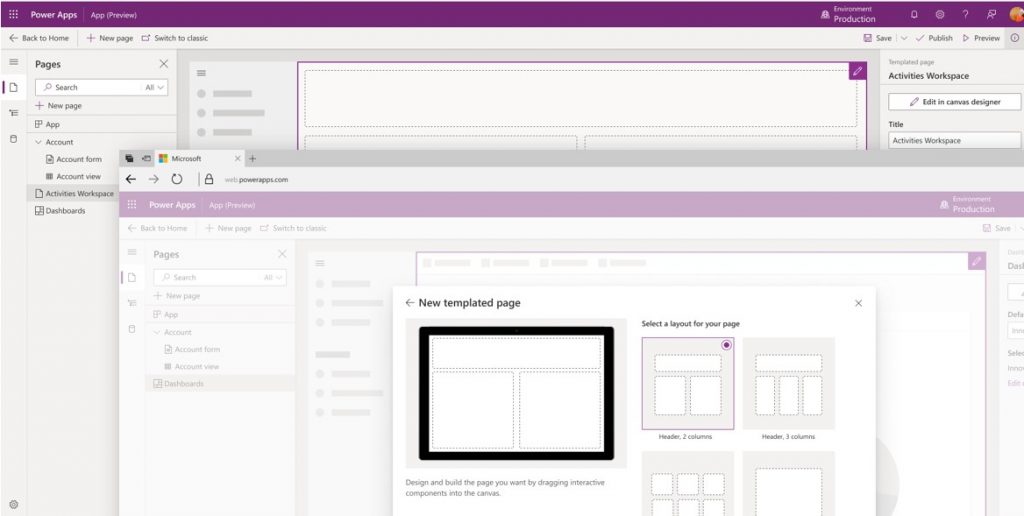
    If Portals is getting closer to the mainstream Power Apps types, then the unification of Canvas and Model-driven apps into “Run One UI” is also moving along. By the time the custom pages feature hits public preview in December 2020 it will have been 18 months since we saw the roadmap, but I’m not actually that surprised it’s taking a while for making these 2 very different client technologies work in harmony. It’ll surely be worth the wait from an UX perspective, as the Canvas app embed story has been somewhat limited in its impact so far.
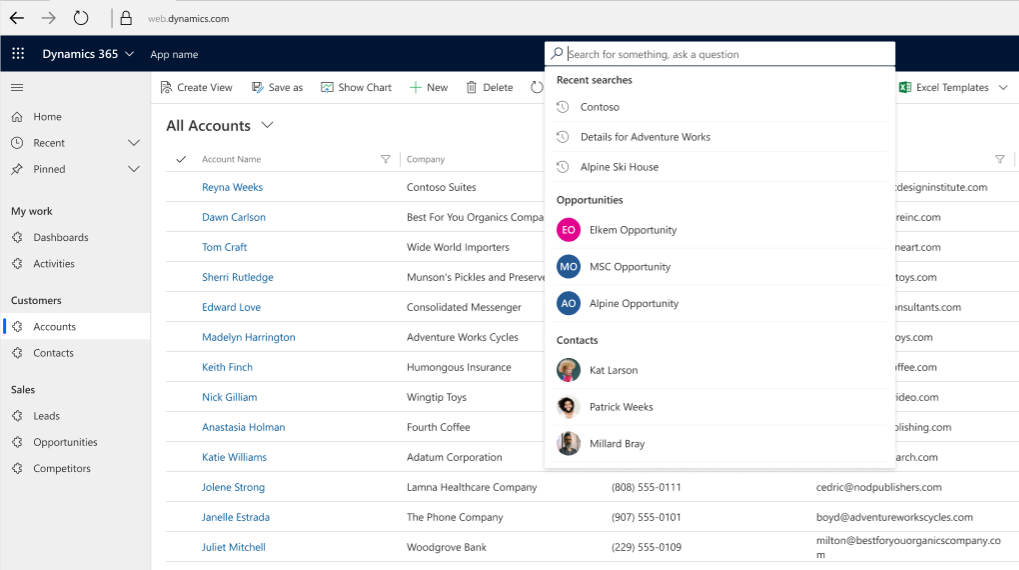
    To gain something new means you often must let go of something old, in this case the legacy web client. Transition to Unified Interface has been delayed a bit due to COVID-19, but it is definitely happening. While it will bring a more stict licensing enforcement on app module level, the benefits from features like improved global search experience and improved app header, sitemap and app switching should make it easier for anyone familiar with Microsoft tools to be productive when using CRM “Model-driven apps in Dynamics 365”.
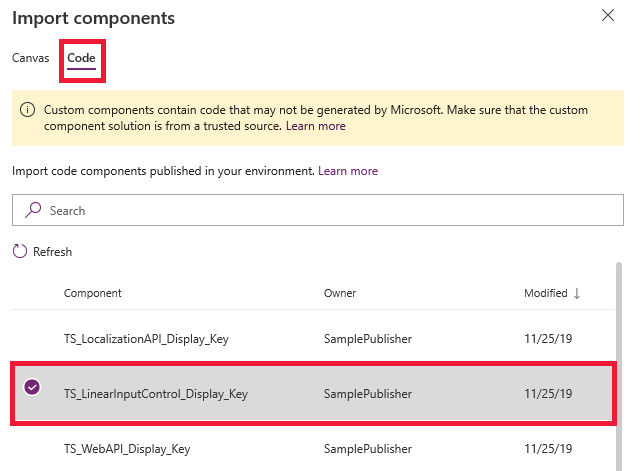
    Once Canvas apps can be natively placed on pages that appear inside the app navigation, they’ll be ever more likely to become an integral part of more complex enterprise applications. This means that also Canvas development practices need to become more mature, which is exactly what the reusable components for business logic are aiming for. PCF components for Canvas apps are also critical to allow the pro dev audience to contribute into low-code app development projects. Code components have already been in preview for a while and GA is expected in March 2021, so obviously injecting custom code into what was originally designed as a “PowerPoint + Excel” experience for citizen developers is a big investment that takes time to polish.
    Power Automate has grown into an all-encompassing process automation service that covers both API and non-API (meaning RPA) scenarios. I have to say that for me personally it’s one of the scariest parts of this “low-code” platform due to how much secret formula knowledge one must posses to achieve something where XRM workflows offered a full GUI experience. I’m glad to see that MS is investing not only in the UI flows territory from their Softomotive acquisition but also in making Power Automate work more seamlessly with Power Apps. Simplifying things even further, the coming “diet designer” and templates desined for Microsoft Teams users is an example of how broadly the PaaS foundation of Azure Logic Apps is being productized via its Power Automate UI experiences across the whole MS stack.

    From the Data Platform side, we will finally be seeing the ability to use Power BI on system dashboards for Model-driven apps. It’s one of those things that the vast majority of customers probably would have assumed to be possible for ages already. Getting proper support for parameters like environment variables has been a prerequisite to make these components play well together in the Power Platform ALM story. Now, this still doesn’t mean PBI would replace the built-in visualizations from CRM 2011 era, rather we see that MS is actually only working on catching up with the year 2011 when it comes to Unified Interface charts customization (i.e. supporting ASP.Net chart XML based features with the new Highcharts).

    Come to think of it, there isn’t a single mention of the TDS endpoint / T-SQL support in either 2020 Wave 1 or 2020 Wave 2 release plans. It’s a good reminder to everyone that despite of the huge volume of information in the release plans, they don’t reveal the complete story of what’s happening with Business Applications beyond the immediately visible end user and app maker features. You’ll still need to do a bit of 1+1 yourself to figure out how things like DirectQuery support enabled by the TDS endpoint might have a dependency on unlocking more modern visualizations on top of CDS data in Power Apps.

    While creating charts on a sales pipeline etc. could be seen as just doing old stuff with new tech, what’s really net new in terms of data analysis capabilties is all the goodies coming into CDS integration with Azure Data Lake. Time series data: get the full historical values of business record in a format that you can actually report on (i.e. not audit logs). Soft delete support: instead of keeping all historical data in that fairly expensive CDS database storage, delete the transactional record but still keep the data in the analytical system. Support for entities with attachments: if you’d like to get some value out of the annotation data clogging up your CRM system, push it into the Data Lake where AI can crunch it and generate new insights from it. All in all, this built-in continuous replication of data from the Power Apps / Dynamics 365 app database into Azure Data Lake seems to be truly delivering on the vision of The Real Common Data Service that goes far beyond the boundaries XRM used to have.

    If getting data out of CDS is evolving, so are the mechanisms for getting data in. Power Platform dataflows have a lot of potential for sure, yet just like with Power Automate, it’s been difficult for these new generic cloud services to complete with the built-in XRM tools when it comes to feature completeness for CRM customers to achieve their common business goals (use a GUI to automate a process, run a Wizard to import relational data). Power Automate already has the path to “upgrade” the business logic into Azure Logic Apps and now also Power Platform dataflows can grow up to Azure Data Factory, once the March 2021 preview arrives. In the big picture, this ability to start from citizen developer tools and then transition to pro dev methods and systems is a very powerful value proposition from Microsoft to all their customer organizations who are looking to empower their subject matter experts to take steps forward in the day-to-day digital transformation. App creation & automation is where this Maker revolution has started, and I bet we’ll see more and more data driven features in the next phase of Power Platform evolution.

    Finally, as the number of apps grows and they become an irreplaceable part of critical business processes, there’s a growing demand for tools to ensure the digital machine is well oiled. As we know, data is the new oil and in this context that means organizations need broader access to telemetry data on how their business apps are working. The 2020 Wave 2 feature that promises to deliver CDS errors, performance data, and diagnostics data in customer’s own Azure Application Insights should do exactly this, by complemeting the built-in metrics available in PPAC with a way for customers to build their own alert systems for both proactive and reactive maintenance. Yet another “grow up to Azure” path that illustrates how closely the low-code application platform-as-a-service will be intertwined with Microsoft’s PaaS offering.

  • United at last: Dynamics 365 Dual-write goes GA

    United at last: Dynamics 365 Dual-write goes GA

    On March 27 2020, Microsoft announced that the Dual-write feature is generally available. After being in preview for over a year, the functionality itself isn’t necessarily a surprise to anyone who’s actively following what’s taking place in the Dynamics 365 product portfolio. The GA does however mark a milestone where it makes sense to reflect on what the broader impact of Dual-write is to business applications built on top of Microsoft Power Platform.

    The very short answer to “what is Dual-write” would be that it’s a built-in feature for making business data available across Dynamics CRM & ERP products without any additional integration tools. It may come as a surprise to people outside the MS ecosystem that even though the Dynamics 365 brand was announced already in the summer of 2016, the practical work of bringing the different apps from this product suite together has not yet changed that much from the early days of custom integration projects. Putting things into context, the effort to unify the 1 CRM & N ERP products in Microsoft’s portfolio originally targeted its first deliverables in 2004 (as “Project Green”). This proved to be impossible (or rather not feasible from a business perspective) in the on-premises era, but now when the Dynamics products are services hosted in the global MS cloud, the unification has actually been doable.

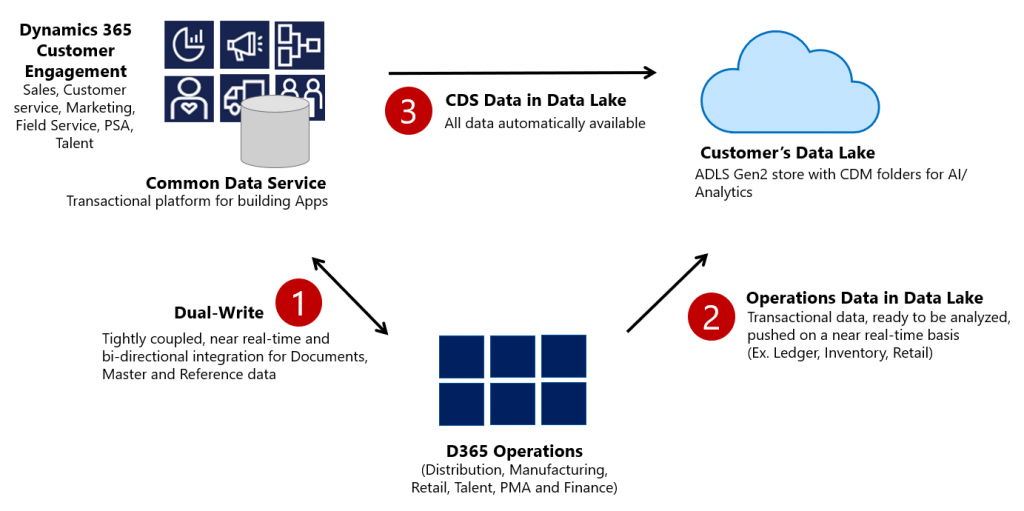
    Dual-write isn’t your everyday CRM-ERP integration, though. It is a near real-time synchronization of data between the Finance and Operations database and the Common Data Service that powers the low-code application and automation development story of Power Platform. Looking at the even broader data story that Microsoft is building around it’s business apps, BI and AI capabilities, we can also see that Dual-write is just one of the mechanisms that will move business data around:

    Taken from the Ignite 2019 session “Common Data Service with Dynamics 365 Finance and Operations”, this slide highlights the role of Azure Data Lake Gen2 in the analytical features that will be offered both as preconfigured features from Microsoft as well as customer specific implementations, to derive new insights from the business data. When it comes to the more operational side of doing business in the digital world, having the SCM and Finance app data available in CDS is what opens up plenty of new interesting scenarios. What if anyone could easily build Power Apps that work directly with the enterprise master data from ERP like customers, products and pricing information? If CDS indeed could lower this data integration barrier and bring task based experiences with pixel-perfect Canvas apps into the hands of frontline workers, that could surely be a transformative service worthy of its name. Not just a single database like XRM was but a connecting layer across many Microsoft cloud technologies.

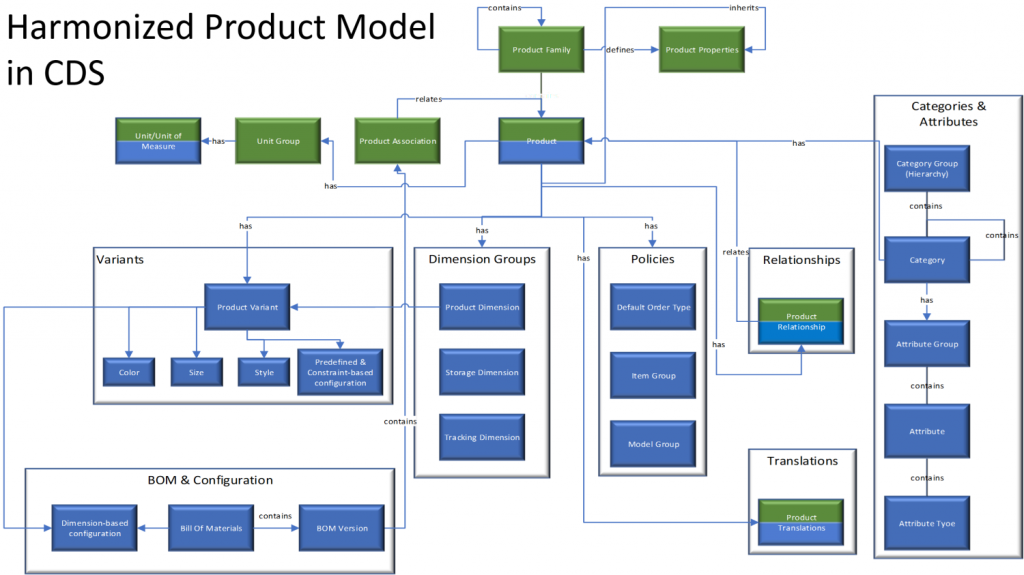
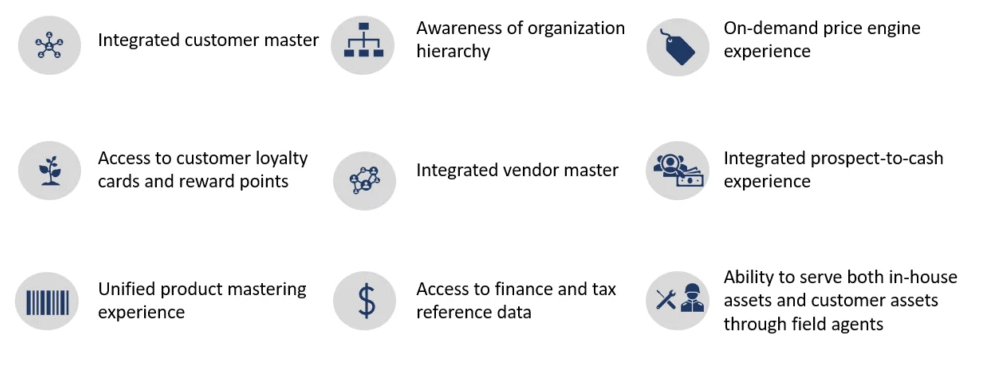
    In order to bring the ERP data into CDS, Microsoft needed to design harmonized data models that align with what used to be the independent products of Dynamics CRM and Dynamics AX originally and define how the schema of each system maps to the other. As an example, the CRM product data model has understandably been considerably more limited than that of an actual ERP application. Now with Dual-write, these two must come together in a unified product experience:

    No two businesses operate exactly alike when it comes to data and processes, so the logic of Dual-write has been built to allow no-code configuration to adjust the details of specific implementations. However, this new depth of application integration within the Dynamics 365 portfolio now means that you should have very good reasons if you decide to deviate from the standard model. Let’s look at Microsoft’s guidance for the above mentioned product data model as an example:

    The dual-write entity maps for products have been designed to flow data one-way only, in near-real time from Finance and Operations apps to Common Data Service. However, the product infrastructure has been made open to make it bi-directional if required. Although you can customize it, it’s at your own risk, as Microsoft does not recommend this approach.

    Anyone who’s worked with Dynamics CRM / Dynamics 365 Customer Engagement implementations in the past has surely come across the need to extend or modify the overly simplistic product and pricing data model that hasn’t been flexible enough to accomodate many real life sales scenarios. Jumping from such a customized environment in production use into Dual-write may not be all that easy, nor will the new data model defined by Microsoft just magically solve everyone’s problems. Dynamics 365 consultants working on data integration between systems aren’t likely going to be out of jobs just yet.

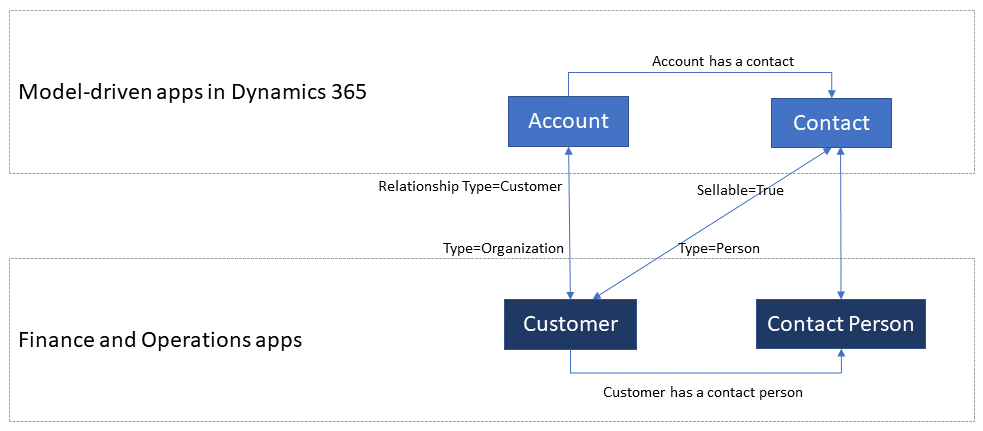
    Whether you’ll be jumping into deploying Dual-write or not, everyone needs to educate themselves on the implications of this new piece in the Dynamics 365 puzzle. From the DW documentation, have a look at the chapter “What does dual-write mean for users and architects of CRM products?” to understand why. There will be several new concepts introduced over on the CDS side like “company” and “party” that will affect all apps built on top of it – such as Dynamics 365 Sales, Marketing or Customer Service. Foundational elements like how customers of the organization or the internal units within that organization are defined have different data models in CDS vs. FinOps, so it’s important that everyone working on either side will use the new common documentation for Dual-write as the starting point to try and understand eachother’s perspectives on the world.

    There are also other dimensions affecting future solution architecture listed out in the documentation. According to MS, initially Dual-write will be shipped as separate solutions (notice that DW is solution-aware right from GA, highlighting the role of CDS as the cross-product ALM foundation in Power Platform). “In future releases, those solutions will become part of Common Data Service”, which I presume translates to every Dynamics 365 customer getting the core components, regardless of whether they already have Finance and Operations apps deployed in their tenant or not. Data types in CDS are also about to get extended to accomodate the enterprise ERP needs arising from this out-of-the-box FinOps integration.

    Of course not everyone is using the ERP solution based on AX, Finance & Operations, Unified Operations, Finance/SCM or whatever name Microsoft comes up next for it. A large share of the customer base will be a better fit for Dynamics 365 Business Central, which isn’t at least publicly yet targeted with Dual-write. Is there going to be an impact to SMB implementations where CDS is part of the solution architecture in some way and is this going to be positive or negative? According to the documentation, “in future releases, concepts in model-driven apps in Dynamics 365 (for example, customer, contact, quotation, and order) will be scaled to mid-market and upper-mid-market customers.” If Microsoft is really aiming to have a Common Data Model that should serve not just all Dynamics 365 products but also software providers from outside the immediate MS ecosystem, there are bound to be trade-offs between the complexity of the required schema for enterprise ERP and the ease of use for how citizen developers can tap into the Common Data Service for building simple business apps.

    Finally, there’s the ever interesting licensing aspect, of course. From the Ignite 2019 presentation, we can find the following statement on Dual-write licensing implications:

    When Microsoft customers (ISV, Partners, End Users, etc.) possess a valid Dynamics 365 for Finance and Operations license, they are entitled to replicate data between the Common Data Service and Dynamics 365 for Finance and Operations.  This entitlement does not include capacity consumed by the replicated data; if necessary, this is purchased separately.  This entitlement does not include use rights for the Dynamics 365 for Customer Engagement applications, including Sales, Service, Marketing, etc; if necessary, this is purchased separately.

    I’m expecting that the upcoming versions of the Dynamics 365 Licensing Guide would include documentation about the licensing scenarios for Dual-write, as at the time of writing there isn’t any public guidance available yet to address the concerns of multiplexing that inherently arise from the real-time synchronization of ERP data into CDS.

    As we know, having Power Apps licenses allows you to read all of CDS data. If you read through the GA announcement of Dual-write and its documentation, you’ll notice that MS is following its own guidance and not mentioning Customer Engagement even once, since CE now refers to on-premises software only. The new term, “Model-driven apps in Dynamics 365”, is a representation of Microsoft app teams themselves ship as the Sales app, Customer Service app and so on. When it comes to the customer specific business apps tailored to their needs, meaning Power Apps, these can be Model-driven or Canvas, ranging from simple “one click” mobile experiences to advanced information worker UI’s for desktop environments. They are all backed by the Common Data Service and running on the Microsoft Power Platform. How will these custom apps be treated in the licensing documentation that traditionally assumes customers would just be using the Dynamics 365 Apps as-is rather than adapting them to their unique needs and real life processes? This remains to be seen.

    Now that we are gradually getting over the age old divide between CRM and ERP, I hope the next area of unification would be a common licensing story that doesn’t draw artificial lines between Dynamics 365 and Power Apps. Splitting these into different licensing guides and different pricing publication formats isn’t all that helpful for the customers nor the partner ecosystem. A Common Data Service based on a Common Data Model should preferably be backed by a Common Licensing Model, don’t you think?

  • Year 2019 in Microsoft Business Applications

    Year 2019 in Microsoft Business Applications

    For the past couple of years I’ve done a “top 3 themes” post at the end of the year, to reflect back on what were the key topics that shaped the coming direction of Dynamics 365. Just because this is no longer a “CRM blog” doesn’t mean I should give up on that tradition, so let’s do some exploration on what has happened in the past 365 days.

    One year ago I described 2018 as the year of the platform and listed the top themes to be 1) Power Platform, 2) One version, and 3) AI journey. What will 2019 be remembered from? Just like before, it was fairly easy to select three bullets that I think have been most impactful on the Business Applications ecosystem:

    • Low-code movement
    • Licensing confusion
    • Data story evolved

    Let’s discuss what happened under each of these themes in 2019 and do some forward thinking on why they’ll continue to be relevant in 2020.

    Low-code movement

    This first topic is a much broader phenomenon than just Microsoft’s Power Platform offering. During 2019 we’ve seen the general tech media and industry analysts give plenty of attention to the rise of low-code/no-code development and how organizations are exploring its possibilities to augment (or even replace) traditional software development methods when it comes to internal app development. Microsoft receiver recognition from both Forrester in March 2019 and Gartner in August 2019 for its position as a leader in the low-code application platform market.

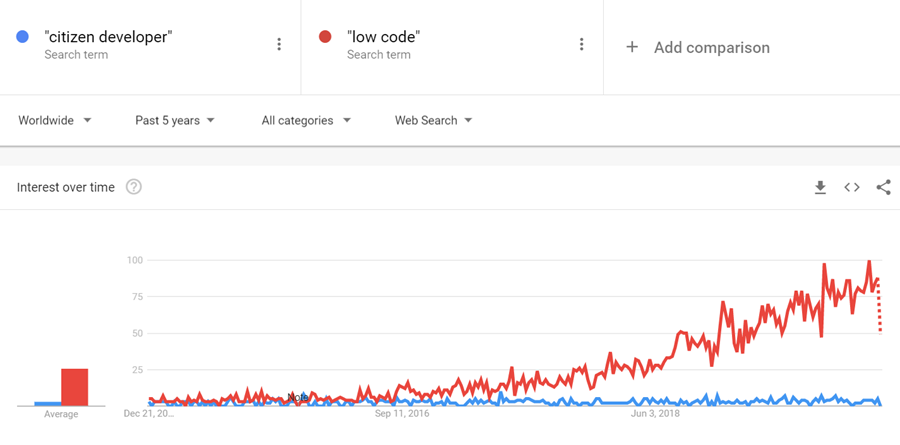
    The term “citizen developer” had of course been used already much earlier in Microsoft’s description of the target group for Power Apps (earlier “PowerApps”) and Power Automate (formerly known as “Microsoft Flow”). However, it’s safe to say that the general interest on low-code is rising much faster, if you look at what people are googling:

    What has propelled Microsoft to the top right corner in the analysts’ charts is not just the functionality aimed at everyday information workers / power users in these tools. Making their low-code offering enterprise ready has been a clear goal for Microsoft, as can be seen from how the pro developer audience is being presented Power Platform + Azure as the platform for every developer. On the IT administration side the efforts to put together a Center of Excellence (CoE) toolkit for Power Apps are showing Microsoft’s commitment to providing a governance story to address both the common admin needs of organizations as well as adapting to the varied support needs of the new breed of app makers.

    There is a wealth of functionality that’s still just in the MS product team’s pipeline to land sometime in 2020 which will make the Power Apps development process much more like “real” app building. Built-in tools like Power Apps App Monitor will be the go-to place for debugging formulas, analyzing performance and in general taking a peek under the hood of what the low-code declarative app development studios actually produce. The coming Power Apps Test Framework will allow the authoring and execution of proper test cases, to ensure the app quality doesn’t erode as new features and platform functionality are introduced. There will be Power Apps telemetry data available in a similar way as Azure Application Insights provides to custom apps today.

    All these platform investments together with the growing interest from customers (and presumably partners, too) should mean that low-code app development will become increasingly mainstream in 2020. This will boost the awareness of different vendors in the category and may well steer us a bit further away from the ever so familiar head-to-head comparison of Salesforce vs. Microsoft that’s founded in their CRM product offering. Dedicated low-code players like OutSystems or Appian may start to appear more frequently on the radar, as well as companies like ServiceNow that are running towards the citizen developer territory from a slightly different background. Oh, and you should definitely expect there to be even more heated debates ahead on the possibilities, limitations and roles of no-code, low-code and pro code!

    Licensing confusion

    This second theme is in part related to the growing pains of how the Power Platform tools are turning into self-sustained products rather than just an extension method for Office 365 and Dynamics 365. Yes, they are still very much the toolkit for how you customize applications in the aforementioned suites. However, building extensive custom apps with the full low-code platform capabilities is no longer something that “comes with Office” when looking at the latest licensing terms. Citizen developers can still easily get started with the “seeded” plans in Office 365 for their personal productivity explorations, but for the organization wide deployment of low-code solutions, customers should prepare to purchase dedicated Power Apps and/or Power Automate licenses.

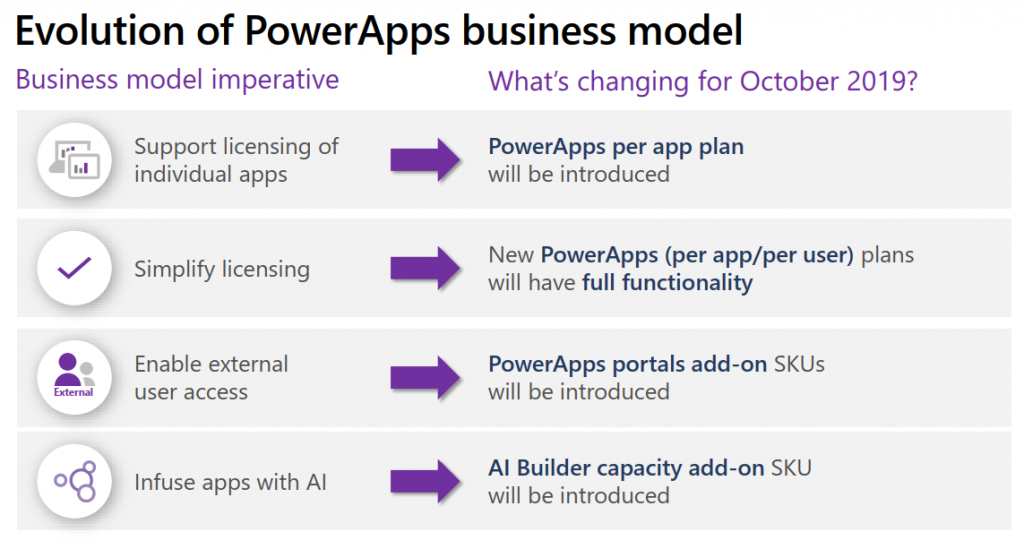
    In 2019, removing the earlier included rights from Office 365 seeded plans to use custom connectors, HTTP custom actions, on-prem gateway, Azure SQL was understandably something that irritated those early adopters who had dived deep into building Power Apps and utilizing flows on a wider scale in their organization. While I bet many had suspected there would eventually be limitations designed to drive customers towards the paid plans, it might have been a surprise that minimum price point for the required Power Apps user license was kept at $40/month. From the Office 365 point of view, this can sure look like quite a “cliff” for taking app development further.

    Another big surprise was the way how Microsoft introduced a new $10 per app pricing model as an option for basically any custom apps built on top of Power Platform. With rights to full feature set of CDS, Model-driven apps and pretty much everything that you’d need for running an app that looks like the native Dynamics 365 apps, it seemed almost too good to be true – if you’re coming from the Dynamics side of traditional CRM style business applications where the enterprise apps cost $95. A great example of the two different realities clashing, when Power Platform can simultaneously be seen as crazy expensive or dirt cheap, depending on the frame of reference.

    The policy of licensing the low-code Power tools from Microsoft via primarily a per-user model with upfront payment requirement is sometimes challenging when talking about the business cases for an application platform that would be gradually adopted for more and more app scenarios. There’s no pay-as-you-go option like with raw Azure resources, because Power Platform is a value-added abstraction layer that should remove any direct dependencies to those resources. However, in 2019 we saw MS take things towards capacity based licensing, with the introduction of explicit Power Platform API request limits per user license type, plus the option to purchase additional capacity if needed. Although MS has stated that normal users should be well within the included API quota, there have been many concerns raised from developers on how custom apps and integrations will be impacted. The fact that these new consumption based limits were announced before any metrics were made visible to customers for evaluating their existing scenarios didn’t exactly help in alleviating concerns.

    I’ve never spent as much time investigating the details of Microsoft licensing as I did in 2019, and honestly I hope that 2020 would be at least a bit lighter on the licensing changes side. Seeing the rate at which the product portfolio of Microsoft Business Applications is growing, though, I’m not sure if it’s realistic to hope for the size of the licensing guides to shrink anytime soon. We’re also still waiting for some of the October 2019 licensing announcement details to be finalized, like the promised API usage metrics in Power Platform Admin Center, or the updated list of restricted entities requiring Dynamics 365 license. Oh, and I bet in 2020 we’ll see the launch of technical enforcement for the types of apps that each license holder is able to use (1st party, custom, Team Member etc.).

    From the customer and partner perspective, the licensing of Power Platform is often perceived as its most complex part, based on feedback from various community members. Although many of the recent changes have been undoubtedly necessary to align the very different Power Apps and Dynamics 365 licensing models into a coherent and future proof platform licensing model, unfortunately the continuous adjustments on what these services actually cost to run has clearly eroded the customers’ trust on being able to predict the operating costs of their solutions built on top of Microsoft’s cloud. After shaking things up on the licensing front in 2019, let’s hope that 2020 would see less drama. Who knows, Microsoft might actually study their own data on how the latest licensing and pricing decisions have impacted service consumption and calibrate the model on those areas that could be better balanced to drive greater adoption of the platform and the apps.

    Data story evolved

    Basing business decision on larger and larger pools of data, gathered from an exponentially growing number of sources, processed closer and closer to real time is the Digital Feedback Loop story that Microsoft has been preaching in basically every Business Applications themed event for the past couple of years. The underlying message is that you must have applications so well integrated with one another that you can establish such a loop in real life – which of course the products in Dynamics 365 and Power Platform portfolios promise to deliver.

    Back in 2018 we saw the birth of many “AI for X” products that have since then been rebranded as “[something] Insights”. I called this out as the start of the business AI journey in last year’s summary blog post, since we hadn’t yet seen much of these new intelligent features find their way into actual customer environments. Based on my observations today, it’s still fairly rare to find these premium Dynamics 365 licenses for Sales Insights or Customer Service Insights deployed in real life scenarios (let alone Market Insights that’s still a bit of a mystery product in its preview state). So, it appears that at least these core CRM processes didn’t just magically get transformed by adding some AI frosting on top. A big practical blocker seems to be lurking in the availability of clean enough data in large enough quantities that these packaged AI features could show concrete results to business decision makers in customer organizations.

    What 2019 did deliver is a set of new products that are aiming to leverage business data in a way not previously covered by Microsoft’s business apps offering. In the second half of 2019, the headline Dynamics 365 product demonstrated in all MS events was Customer Insights. Built as a Customer Data Platform (CDP), its purpose is to enable marketing users to combine customer and transaction data from numerous different sources, to form a 360 degree profile of that customer and use it in better segmenting offers and providing personalized service. Pouring data into Azure Data Lake & CosmosDB is designed to be effortless from any source, be it Microsoft’s or other vendors’ solutions, with intelligent matching algorithms generating “keys where keys don’t exist”. While it can be used with Dynamics 365 apps, there’s no requirement for the customer to have a specific CRM system in place. It’s also not a black box like some of the earlier Insights products, since the built-in templates like churn prediction can be replaced with custom Azure ML models to take advantage of machine learning models built and trained by your own data scientists.

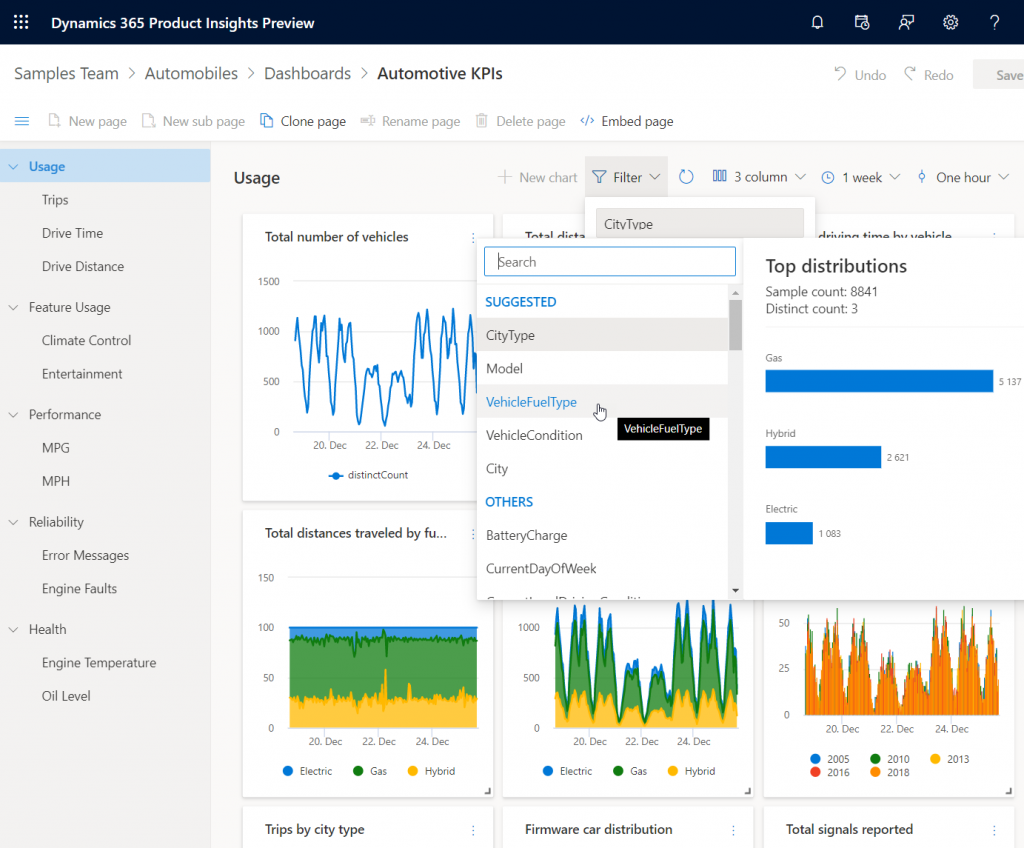
    Another similar data intensive new product launched as preview in 2019 was Dynamics 365 Product Insights. The origins of this application lay in Microsoft’s own telemetry data management systems, where services like Xbox, Skype, Bing and Office have been sending up to 25 million events per second to be processed by the same technology that’s now offered as a Dynamics 365 SaaS product to customers. Yes, you could use Azure Event Hub to push all that product telemetry data into the PI service, but there’s a Signals SDK for Java, Objective-C or Python, too, if and when the whole product architecture of the customer organization isn’t based on MS technology. Insights derived from processing the signal data could be consumed via Power BI or embedded inside Dynamics 365.

    These kind of new services that are aimed at exposing business users to data that previously used to exist outside the reach of the Digital Feedback Loop sound a lot more transformative than the earlier “AI for X” products. Sure, there’s also value in bringing predictive opportunity scoring into the traditional sales funnel management in CRM. However, those kind of features will likely become the new norm for the type of smart business apps that users will expect to be interacting with everywhere. The customer specific implementation of solutions based on Customer Insights or Product Insights, on the other hand, have the potential to be a source of true differentiation if organizations can learn unique ways to use their data for proactively serving their customers. It also aligns with the ambitions that Satya Nadella has on how organizations can break traditional data processing barriers with the help of Azure:

    We are building Azure as the only cloud with limitless data and analytics capabilities across our customers’ entire data estate, bringing hyperscale capabilities to our relational database services.

    Satya Nadella, September 2019 post on LinkedIn

    New services like Azure Synapse will naturally be the toolkit for creating highly specific, cutting edge analytics solutions on the MS data platform, but I can imagine the SaaS style Dynamics 365 products to follow pretty close by when it comes to covering repeatable business scenarios for big data – with the same underlying Azure tech, of course. In 2019 we already saw CDS data export to Azure Data Lake becoming available both via Dataflows as well as through a standard feature (preview). The traditional relational world of business application data is intermingling with the less structured analytical data systems at a rapid pace, with Microsoft building these services that blur the lines of what specific type of data is being used in which business scenario. Is 2020 going to be the year when Dynamics 365 professionals must step out of their comfort zone of having everything in one database and start connecting to all these strange new services, to deliver those much sought after actionable insights to their business user audience? We’ll know that in approximately 365 days!

  • The Real Common Data Service Emerges

    The Real Common Data Service Emerges

    When Microsoft announced one year ago that XRM would become CDS v2.0 (officially Common Data Service for Apps), there wasn’t yet any big system redesign implemented to make this a physical reality. Today we are much further down that road where CDS truly becomes a Service that has less and less to do with the familiar XRM databases that we’ve previously been working with. In this blog post I’ll explore the three data related dimensions that give us an indication of where CDS is heading as a part of the Microsoft Power Platform.

    CDS is now Dataverse!

    While reading this article, you can translate the term “Common Data Service” to now refer to its new name, Microsoft Dataverse. See this post for comparison between CDS vs. Dataverse.

    Dynamics 365 Storage Model Changes

    As a part of the April 2019 release train, MS is changing the way how data storage is managed for both Dynamics 365 and PowerApps customers. It hasn’t been an official feature bullet on the release notes document, but that doesn’t mean its significance would be any less than what the shiny apps demonstrated in the April 2nd Virtual Launch event have.

    A new version of licensing guides for Dynamics 365 and also for PowerApps and Flow (for the first time ever!) was released in April. This outlines the commercial impact of the new model to customers, which is probably what most of us will have first paid attention to. Yeah, whenever the pricing mechanism of a widely used MS cloud service changes, it will be a big deal. What makes it even trickier is that MS considers storage as a “subscription add-on” for which they don’t publicly disclose any per GB list prices. I’m not entirely sure this model is beneficial for their ambitions of turning Power Platform into an actual foundation for building third party and customer specific apps, but I guess the shadow of the old CRM and ERP world still looms above this world when it comes to licensing and pricing practices.

    Let’s forget licensing for a moment and focus on the technical changes for Dynamics 365 online environments. All of the existing data that used to be stored in the Azure SQL relational database will in the future be divided into three specific storage types: database, file, log. This should have no immediate impact to customers, as the migration will be taken care of by MS. Their promise is that nothing should change in the way how users and developers work with data, since the APIs that govern access to this data will remain unaffected.

    File data will be in Azure blob storage, as this is the most efficient way to handle miscellaneous documents, images and other “stuff” that may end up inside a typical Dynamics 365 system via features like email tracking that carries over the attachments. Why would you ever store this in a relational SQL database to begin with? Well, the simple reason is that the original on-prem architecture of XRM had no other secure place to put these items, so it was all lumped up there. Now when CDS is a native cloud service, there are much more options available.

    Log data will be in Cosmos DB. This will probably offer a more suitable architecture for managing things like plugin trace logs, audit data and other items of similar nature. What should be noted is that Microsoft’s plans don’t just stop at this IT admin activities level. In a recent podcast by MVP Mark Smith, we heard the General Manager of Power Platform, Charles Lamanna, describe this storage type to be designed as the future place for other types of observational data, too. Charles referred to things like IoT device sensor data, which should give you an idea of how this again is data that is A) relevant to many CRM use cases and B) in no way optimal to be stored inside that relational XRM database.

    One significant and very welcome change that is introduced as a part of this new model is that there will no longer be any license cost tied to the number of instances you have in the cloud. Previously you had to buy add-on licenses for acquiring production and non-production (sandbox) instances for developing, testing, training and in general managing your complex Dynamics 365 online environment. Once the new subscription terms kick in, you’ll have the ability to create as many instances as you like, provided that you have sufficient database capacity available. A major driver behind this change is surely the PowerApps side, in which the licensing terms already granted any user with PowerApps P2 license to create 2 CDS environments for their applications. (For more details, see my presentation on Demystifying Dynamics 365 & Power Platform licensing.)

    In the short term, this storage model change should not result in much functional changes for the Dynamics 365 customers. Depending on when your current subscription renewal date is, the new terms will be applied either at that point in time or the renewal after that (if you choose to hold on to the old model for one more subscription period). Any new customer will likely be leveraging the new pricing model starting from April 2019.

    It’s important to understand that the actual data storage technology change and the commercial terms that are applied are not tied to one another. Migration of your Dynamics 365 data to the new database/file/log model will probably take place much sooner than what you’ll see in your subscription fees. Refer to the admin documentation on Common Data Service storage capacity for details on how you’ll be able to analyze and manage your storage consumption in this new model.

    Diving Into The Data Lake

    When looked at purely from the storage license model changes for Dynamics 365 customers, the story would end here, with the three storage types. However, the bigger picture of how data is used as a part of the Customer Engagement systems that cover various digital touchpoints is much broader. Or should I say “bigger” as in Big Data? As much as I dislike the casual use of tech marketing hype terms like Big Data and Artificial Intelligence, there’s no escaping the fact that the familiar world of CRM systems founded on SQL databases is being disrupted by what machine learning models and big data systems can offer today.

    (more…)