Tag: AppSource

  • Application/Platform Separation in New PowerApps Licensing Model

    Application/Platform Separation in New PowerApps Licensing Model

    Ever since Spring 2018 when the XRM and PowerApps platforms merged on a commercial level, I’ve found myself spending an ever increasing number of hours per week involved in licensing discussions and scenario planning. My initial exploration of the platform licensing back then came to the conclusion that many of the crucial details for actually determining what you can & can’t do with PowerApps licenses vs. Dynamics 365 CE licenses were simply not available at the time. Obviously this was not an ideal starting point for Microsoft to start pushing their Power Platform into new business areas that should see it capture the next 10 million developers from outside the traditional CRM field. But still, it is the legacy that came with the underlying platform that was designed to be sold as Sales, Service, Marketing etc. solutions delivered via traditional enterprise projects via partners that mostly had started back in the Microsoft Business Solution (MBS) days. What can you do about that, huh?

    This year at the Inspire 2019 partner conference, Satya Nadella framed the role of Business Applications and Power Platform in particular with the following numbers:

    (Click here to watch this segment of his Inspire 2019 Corenote.)

    If there are indeed 500 million new apps that will be created in the coming five years, then those sure ain’t gonna emerge from the MBS style business model and development methodology. Today the world is full of both cloud service providers that offer low-code/no-code tools for building your own apps very rapidly, as well as savvy power users who are interested in seeing if they could take their Excel workbook desktop wizardry to the next level with these cool new tools that promise to deliver modern apps for this smartphone era. Since MS has obviously identified this new business potential that Power Platform can unlock for them, are they going to let the prior licensing model of Dynamics 365 stand in their way? Probably not.

    It just so happens that Inspire 2019 was also the place where the upcoming licensing changes for both Dynamics 365 and Power Platform were introduced to the partner audience. Since Inspire is a public conference that anyone can attend, it also meant that any customers paying attention to the Microsoft ecosystem are already aware of the changes announced to take effect on October 1st, 2019. The slide decks for both sessions are available for download on the Inspire website for a more detailed look. On the PowerApps blog there is also a summary of these changes, which is nice. What’s really nice is that the comments section is open, which often isn’t the case for corporate announcements related to licensing (is it even a “blog” if there is no reader interaction opportunity given?). The product team has been responding to a lot of the feedback around the topic, which makes me optimistic about the possible fine tuning of the licensing model to align with what the outside world thinks about it.

    Pay per App

    As with licensing always, there’s far too many details in the Inspire 2019 news to cover in one blog post. Maybe I’ll eventually do a revised version of my “Demystifying Dynamics 365 & Power Platform Licensing” session from January, but right now I want to focus on one aspect: the price of an App. This is something the new PowerApps licensing model highlights in particular:

    In short, what Microsoft will do in October is to retire the earlier PowerApps P1 and P2 plans and introduce new “Per App” and “Per User” plans. Nothing (major) is going to change with how the rights bundled into Office 365 and Dynamics 365 licenses work. The “Per User” plan will be the same price ($40) and mostly the same capabilities as the earlier P2, whereas the earlier “lite edition” of PowerApps P1 at $7 will be discontinued completely.

    “What?!? How can they just take away the $7 plan and push everyone to buy a license that’s almost six times the price of that?” Yes, this is the hardest part about the changes, no doubt. I was a bit surprised to see this as the direction where Power Platform is heading, given how the citizen developers who’ve been playing around with the seeded Office 365 PowerApps license should rather be pushed into learning more about CDS, solutions and all those “real” application development tools that P1 previously offered. Nevertheless, after letting the new model sink in for a few days, I believe that this pricing mechanism makes a lot more sense than the earlier version.

    A fundamental problem with the current P1/P2 divide was that it attempted to draw the line on app complexity. There were limitations like the inability to attach real-time custom business logic (workflows, plugins) on entities that were used by PowerApps P1 license holders. This was particularly problematic when operating within CDS environments that also serve as the Dynamics 365 CE app database (yes, they’re all CDS now): any developer or 3rd party app registering a plugin step on an entity like account would instantly have put all P1 users attempting to access it out of compliance with the license terms. Also the rights on “complex entities” and “restricted entities” differed between P1 & P2. Sounds complex? Yup. I had to write a blog post for demystifying these PowerApps “starter” plan capabilities just to get my head around on where the lines were drawn.

    Something that would have eventually become a big problem with the old P1 definition was that it only allowed the users to run Canvas apps. Sure, those pixel-perfect mobile-first applications are what most people think PowerApps is made of, but that is a view of the world that needs to be deprecated. Model-driven apps are just as important area of what Power Platform represents (on CDS in particular), but that capability was reserved for P2 license holders only. Given that Microsoft is aiming to remove all of these artificial limitations between app types and eventually get all PowerApps customers to Run One UI, keeping P1 users locked from this future app convergence simply wasn’t a viable option anymore.

    (more…)

  • 4 directions for Power Platform business growth

    4 directions for Power Platform business growth

    It’s now roughly one year since Microsoft launched the concept of Power Platform. It’s been extremely interesting in the past 12 months to watch how this new platform strategy starts to play out in the world outside Redmond, as the pieces of this grand puzzle begin to become visible here and there. Having worked in the MS ecosystem on customer & partner side for 14 years now and coming from the Dynamics CRM side originally, this is the biggest single shift I have witnessed in their product strategy to date.

    Putting all the puzzle pieces together is surely not easy for anyone who isn’t devoting a sizable share of their time on consuming information from the various events, announcements, blog posts and documentation released by Microsoft. The thing that really makes it tricky is that this Power Platform thing isn’t confined inside a single bucket. It’s not Dynamics 365, it’s not Office 365, it’s not Azure. It’s all of them and yet none of them. Every MS partner and every customer decision maker will increasingly run into the product messaging, but they’ll hear it presented in a different way – and most likely interpret it uniquely based on what their background is.

    The only reason Microsoft would be investing so heavily in building and promoting the Power Platform is that they see a massive new business opportunity in it. As Steven Guggenheimer wrote in his recent blog post:

    “The Business Applications Total Addressable Market (TAM) is predicted to be at $125B by 2022, and 57 percent of this will be driven by ISVs. Dynamics 365 and the Power Platform are an important area of investment for the company, and represent a significant growth opportunity for partners in this market.”

    Accelerating opportunities for ISVs with new programs and technology – Steven Guggenheimer

    Big numbers, but that’s what they always are in these grandiose statements about global market potential. What I need to understand when talking with customers, partners and internal stakeholders at our company about the strategic direction of Power Platform is from where specifically might this growth come from? To help these discussions I ended up drawing the following diagram about the four different dimensions where I see this Microsoft application platform strategy creating new business:

    The way I see it, the growth will happen both A) inside Microsoft’s product offering and B) the outside world of customers and partners, within 1) the traditional business process management scenarios as well as 2) those processes that you wouldn’t have tried solving with any CRM style application/platform in the past. Let’s dive into each of these areas and I’ll explain what the impact of Power Platform might be in generating new business to run on top of this new Microsoft aPaaS (Application Platform as a Service) foundation.

    1. Dynamics products

    Let’s start from the most familiar ground. The place where the most concrete changes resulting from the Power Platform strategy have been felt during the past year must be Dynamics 365, and the Customer Engagement apps specifically. The platform formerly known as XRM is in the process of being replaced by what is sometimes referred to as “PowerApps platform”, although that may not be any official term that would stick. Regardless of the marketing lingo, the customizers and developers of Dynamics 365 CE solutions are right now facing a lot of pressure to adopt brand new concepts and tools that will replace those ~10 year old building blocks that XRM solutions were made out of. Compared to the earlier transition from on-premises to Online products, that may well have been a much easier shift to adjust to than this new Power Platform whirlwind that’s moving everything around on its path, from licensing to UI to SDK.

    From the perspective of the internal Microsoft world, the Dynamics product teams have previously been somewhat captive of the CRM legacy that came along with the XRM platform. As a commercial software product, it wasn’t originally built to be a pure platform, rather the design choices and customer requirements drove it more towards being an extendable CRM application first and platform second. In the process of migrating Dynamics 365 CE Online to run on Azure services, the platform and the applications were separated from one another. To balance things off, there’s also been a huge unification process initiated with the client side technologies, where the target is to remove the barriers between Model-driven and Canvas apps, to Run One UI. The platform tools like PowerApps Component Framework (PCF) now give also the internal product teams a far more agile path forward in deciding what kind of features and experiences the specific apps like Sales or Customer Service should contain. What this means is that the stagnation period where everyone had to just wait for the new platform capabilities to become available may be coming to an end and in the next release waves we can expect a significant growth in new app functionality being shipped to Dynamics 365 customers. In other words, a growth in application depth.

    Alongside this internal platform development, another huge benefit that Dynamics 365 as a business has gotten from the new direction at Microsoft is the closer connection with the Azure teams. A few years ago there was still the MBS silo to keep up the walls between CRM & ERP business and the mainstream MS product business, which explained a lot why we didn’t see so much of the Azure innovation trickling down to the business applications built by the same corporation. Now the tables have truly turned as we’ve witnessed all of the new applications like Dynamics 365 for Marketing betting heavily on the very latest Azure services. AI is getting infused into every product at Microsoft, but it also gives birth to brand new products like Sales Insights or Virtual Agent for Customer Service. To link all this with the Power Platform story, it’s important to understand that this platform side is what eventually allows customers and partners to customize these new apps and services to meet their real life business requirements. The growth potential in this Dynamics products segment is being amplified by the fact that PowerApps, Flow, Power BI and CDS give it the extension points needed for going beyond packaged SaaS apps. The growth in Dynamics 365 app portfolio width is therefore driven by the Power Platform connectivity with Azure.

    2. Other Microsoft products

    While the merger of Dynamics 365 CE and PowerApps platforms is a great boost for the Dynamics products, that’s not the only area within Microsoft that is touched by the Power Platform strategy. Office 365 has of course been the biggest product display window for PowerApps and Flow, due to how services like SharePoint and OneDrive have been deeply integrated with these tools. There is a Microsoft 365 Business Applications partner program that interestingly enough doesn’t seem to align with the “actual” Microsoft Business Applications group’s activities at this moment, as it sits within a different organizational box, the Modern Workplace solution area. When you think about the origins of how the previous generation apps for information workers were often built on top of the ubiquitous SharePoint Server, this arrangement does make sense, but I wouldn’t expect these separate boxes to remain forever in place. After all, what’s been happening to PowerApps recently in terms of commercial success is “like SharePoint all over again” (according to Charles Lamanna), so all roads here lead to the Power Platform being the growth engine for Office 365 and Microsoft 365 to reach further into the customers’ information management needs.

    (more…)
  • From AppSource to Solutions to Dynamics 365 Apps

    From AppSource to Solutions to Dynamics 365 Apps

    In my previous blog post I presented the various different meanings that an App can have in Dynamics 365 Customer Engagement. Now that we’re aware of this jungle, let’s grab a machete and start making our way deeper into the heart of it, to understand how a system customizer can survive in there.

    Before there was Microsoft AppSource for Dynamics 365, the methods available for distributing apps in a generic sense were pretty basic: you downloaded a zip file (or several) from a location provided by some party, then navigated to the solutions menu in your XRM environment and started importing them. When there were updates to those apps, you needed to repeat the procedure. If there were some other configuration steps needed in getting the application properly set up, you had to read the friendly manual and complete those. In a more tech savvy environment the Package Deployer might have been used here, but that was hardly a task for the accidental CRM administrator.

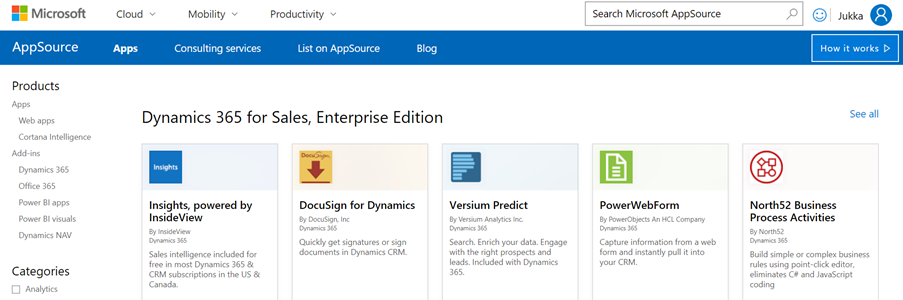
    What AppSource aims to change in the Dynamics 365 app distribution process is similar to what the smartphone app stores did a decade ago, i.e. simplify the steps for the customer and also provide a better channel for app developers to deliver their updates. When you go to AppSource and choose to either install a free App or start a trial on a paid one, the next screen will provide an instance selector to determine where in your Office 365 tenant you want to put this App in. Also presented are the checkboxes for agreeing on both Microsoft’s as well as the ISV’s legal terms.

    From here you’ll be taken into Dynamics 365 Administration Center. This part of the process nor the UI of the admin center isn’t very intuitive, so let’s pause here for a moment. While you’ll land on the Solutions view of an Instance after clicking on “Agree”, on the logical level we should be paying attention to the Applications tab instead. The chosen ISV (or MS) App will have been added as a row in the applications list, which applies to the whole tenant. In this example we see that North52 Business Process Activities is now available in our tenant. It doesn’t have any configuration options in this UI, but the Microsoft apps like Portal Add-on or Voice of the Customer both have an additional “Configure” button that is accessed via this Manage Applications screen.

    If we click back to the Instances tab in the admin center, select one of our instances and click the Solutions icon on the right side, we’re now presented with the list of solutions available to this instance via the AppSource delivery channel. It is not the same as going to your XRM instance and clicking Settings – Solutions, as there can be more solutions within that instance. For example, the organization specific solutions that you’ve created as a container for your own customizations. Not even the managed/unmanaged status of those solution has anything to do with what’s shown in the admin center, because whatever zip files you imported directly into your XRM instance as a solution is only visible from within the XRM UI.

    The solutions list in the admin center is also different in the way that it shows also the solutions you haven’t installed in the instance. These are applications that someone, either MS or your D365 admin, has made available in your tenant and possibly installed them into some other instance (a test sandbox, for example). To get them installed you don’t have to go to AppSource, rather you can start the process from here.

    What makes this view so relevant for the Dynamics 365 instance administrator is that here’s where you’ll see what solutions have upgrades available. In the above example, Microsoft has released a new version of the Relationship Insights solution. Since they don’t want to accidentally break your dev/test/production orgs by changing the solutions on their own, they are rather giving you the controls to click on the “Update” icon for the particular instance when you’re ready for it. This same process is applied also for third party ISV solutions to deliver updated versions of their apps.

    Now when we have deployed the app from AppSource and the Solutions view in the Dynamics 365 Administration Center for our chosen instance shows the status as “installed”, let’s use the Office 365 app launched to navigate to our Dynamics 365 start page, meaning home.dynamics.com. And… there’s nothing new here. Even if we click the “Sync” button to refresh the My Apps view, our AppSource app doesn’t appear. What gives?

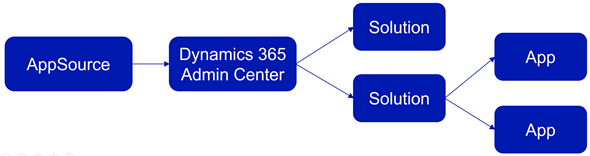
    At this point we need to take a step back from the UI and think about how these different components relate with one another. On the highest level we have AppSource, which is more of a marketing UI for products. From there we get Applications into our Dynamics 365 Administration Center. These manifest themselves as single solution rows for an instance when viewed via the admin center, but they can actually contain N separate solution files (look at Dynamics 365 Portals, for example). Finally, these solutions may or may not contain Apps – from 0 to N. This diagram illustrates these four conceptual levels and their relationships:

    In our example we’ve installed North52, which is an administrator/customizer tool designed for “building simple or complex business rules using point-click editor, eliminating C# and JavaScript coding”. In short, it’s an app for configuring apps, but it’s not a business app in itself. That doesn’t mean it wouldn’t need a UI, of course, but the Command Bar shortcuts and the dedicated home page web resource with navigation options quite frankly is much better suited for this type of a power user tool than the new Unified Interface apps that are supposed to work even on 4″ mobile phone screens.

    This brings us back to the App Module concept that was briefly mentioned in my earlier blog post. Before V9 and the Unified Interface there wasn’t so much benefit in building separate Apps for different functional areas of the XRM platform, as we had the one master UI for the instance available anyway. When the features are migrated over to the new Unified Interface, basically everything must be an App. In v9.0 we’ve yet to see how the more complex admin features will be implemented as Unified Interface versions, so currently it’s a somewhat jarring experience of 2011 meets 2018 for the system customizers.

    Even when all the actual business application functionality has moved over to Unified Interface, there will still be many scenarios in which presenting an AppSource app as a Dynamics 365 App Module App doesn’t necessarily make any sense. UI extensions like Checklists will not have much use outside the actual business entity in which they are used. Any app that connects to an external web service to enrich the contents of Dynamics 365 records mainly needs a configuration admin UI somewhere. Sure, there’s nothing stopping developers from using the App Designer to define an App for their solutions, since all you technically need is a single HTML web resource to publish an App with a single menu item. However, separating the tool from the XRM instance in which it lives isn’t going to make the UX of configuring features any easier, so I’m not really hoping for the app clutter to increase this way.

    Both the AppSource marketplace and the App Module in Dynamics 365 Customer Engagement provide significant improvement on how the business application features can be presented to business users and decision makers. What they don’t do is completely remove the need for Dynamics 365 system administrators to understand how the various layers and parts of the application platform are wired. XRM will likely remain an environment that’s just inherently more complex than an iPhone screen with its pretty app icons lined up just the way the single device user likes to see them.