Tag: aPaaS

  • Why Power Platform licensing is complex, part 4: the role of CDS

    Why Power Platform licensing is complex, part 4: the role of CDS

    Three months ago I set myself a goal to publish a 4-part series on the many mysteries around Power Platform licensing models. I’ve been known to write blog posts that are a bit on the long side and sometimes it surprises myself when after announcing the new article on LinkedIn I see a “20 minute read” info tag added alongside what I though was just a quick exploration into a topic. So, learning to better pace myself is a skill worth practicing, and dividing my writings into more digestable portions is one such exercise.

    To recap, the original outline of this series was to cover these sources of licensing complexity:

    • Protection of intellectual property as well as development budgets across Microsoft product portfolio (part 1, done✔)
    • The old world of apps as data silos & the concept of multiplexing (part 2, done✔)
    • Light use scenarios for information workers vs. “Real Business Applications” (part 3, done✔)
    • The role of CDS as the platform, not just a data source/target (part 4, you are here 📍)

    The Common Data Service is more than a data service

    For the majority of users and developers out there who work with Microsoft technologies on a daily basis, CDS is not yet a “common” part of the toolkit. It’s not a visually sexy thing like Power Apps pixel-perfect UI’s, nor an superglue that connects different cloud services like Power Automate. There’s nowhere near as much flare in the data part as with Power BI. It’s not (in itself) an intelligent thinking AI machine with fancy algorithms either. For many it simply looks like a boring database that sits somewhere in the MS Cloud.

    These people got it all wrong, of course, but it’s hardly their fault. After all, “CDS” sounds a bit like “SQL” and the term often isn’t used in any other context than when you’re planning the data storage part of your solution architecture. What CDS really should have been called is “Power Platform”, because essentially it is the single place that represents all the platform elements that makers, developers and admins can take advantage of when building on Microsoft’s low-code application platform.
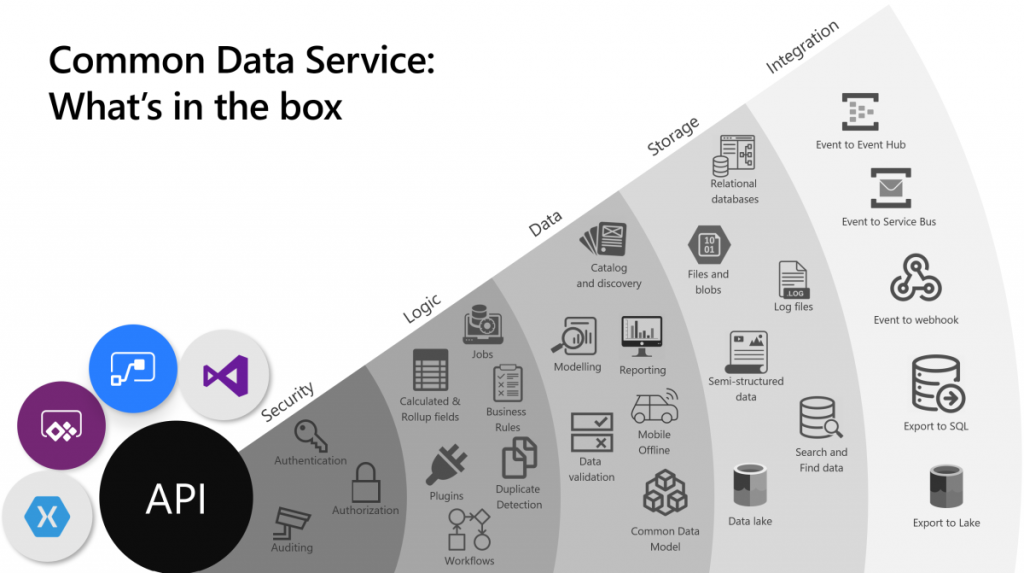
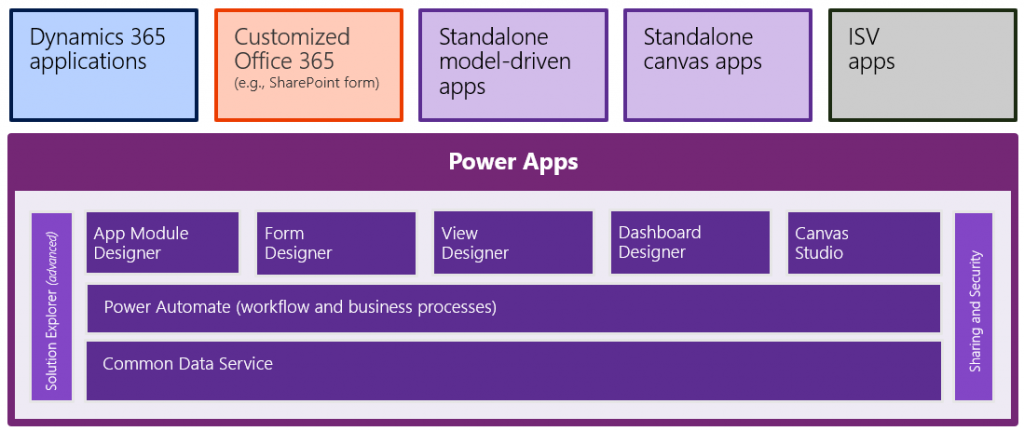
    The above image is the best illustration of the many dimensions of Common Data Service that I have yet come across in Microsoft’s slide decks. “Yeah, that’s pretty much all the important stuff you get with CDS”, I was thinking for a long time. Until someone pointed out to me that this picture is actually missing one obvious thing: solutions! That’s perhaps the single most important thing that CDS from its XRM origins is bringing to the table. Without solutions, what Microsoft would otherwise have is just a collection of independent cloud services that each have a completely separate way to manage their configuration, with no way to package these components into one logical container covering the functionality of an app, nor any valid ALM story for enterprise scenarios. In short, Power Platform would not be a platform without the solution model that’s powered by CDS.

    The fact that we can so easily miss a critical part of the Common Data Sevice while talking about it just goes to show how much of a foundational part CDS is in the business applications offering. It’s not just one icon in the cloud architecture pictures. In fact, we also should keep in mind how many different Azure services CDS runs on, to deliver its feature set to users, makers and developers:
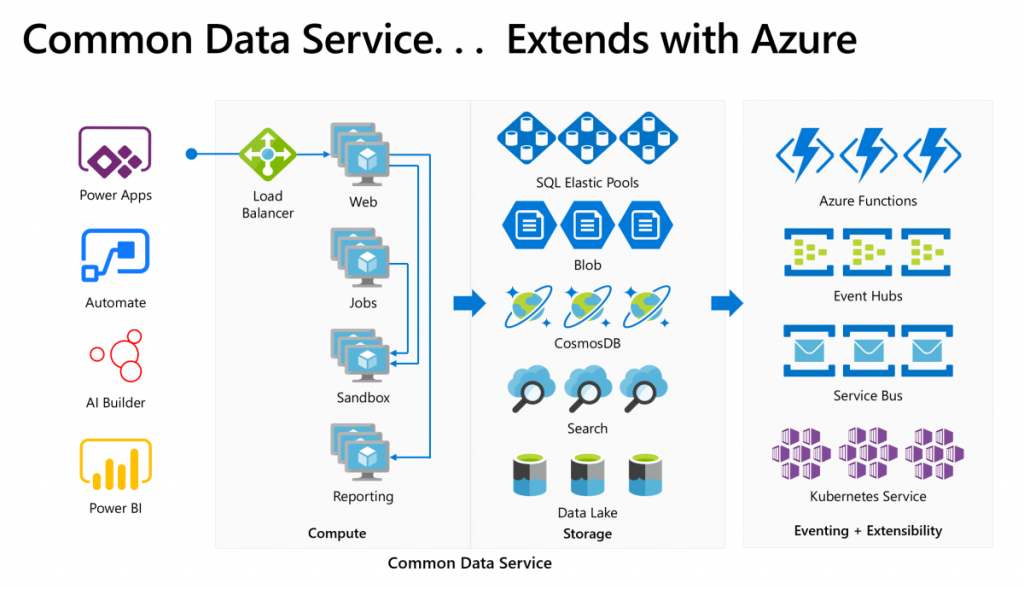
    Yes, there is of course a whole bunch of deep tech stack found behind each and every icon in that picture too – say CosmosDB, for example. It is “big”, in the same way that CDS is “big”. What I think makes the Common Data Service special in this discussion is how it can abstract all that techy stuff from Azure and allow citizen developers (like myself) to control it indirectly, either via our own configuration or through the predefined patterns built by MS.

    Essentially CDS is a value-added layer that brings much of the cool new cloud technology into my business apps while I’m sleeping. What I mean by this is that the architecture evolves to cover new requirements and open up new possibilities, all the while the original business logic and data of the app is preserved. If I create a custom entity, like I did for the first time in 2007, it will keep gaining new superpowers every year as application platform beneath it matures and evolves. All I have to do is keep paying for the service.

    How do you price such a thing then?

    The answer: in all the wrong ways. At least that’s what it often looks like at that moment when the cost factor is brought into the discussion in Power Apps business scenario planning.

    The more central CDS becomes in the app story of MS Cloud, the more dissatisfaction there seems to be on the impact that its premium licensing model has on business decisions. There have been many debates on Twitter during the past few months, with valid arguments and counterarguments presented between the participants that range from customers to Microsoft 365 pros to Dynamics 365 pros to MSFT employees. Threads like this highlight an important aspect:
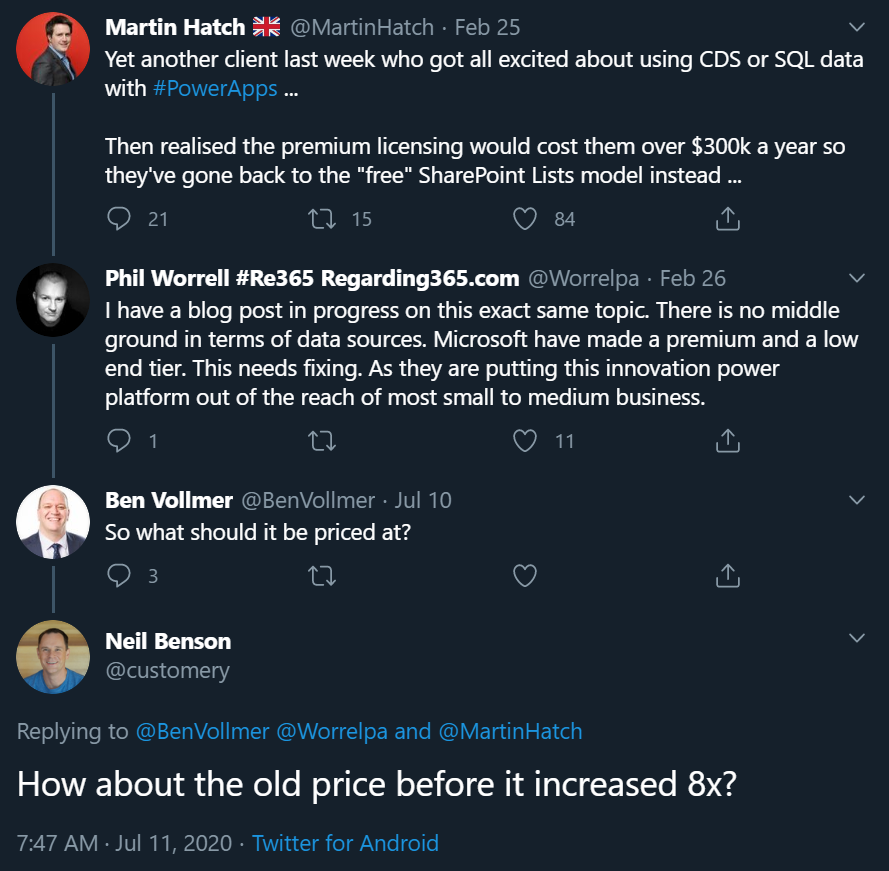
    If you were to invent a brand new service out of the blue, had zero customers and then started to plan the pricing model for it, life would be easy. If, on the other hand, you take an online service that has been offered to customers for over a decade now, then try and mold that into whole new use cases, you’re inevitably going to cause some anger among the existing customer base.

    In the above example, Neil’s point about the CDS storage cost increase in the new pricing model that moved from a flat GB rate to database/log/file storage type separation is entirely true: some part of the bill will go up 8x and that quite frankly sucks. Imagine if that would happen to the price of gasoline and your fuel costs would suddenly be 8 times higher. But hold on: the price of diesel went down considerably at the same time, and filling the tank with natural gas like LNG is now practically FREE!!! “Well whoop-de-doo, I’ll just switch my old gasoline Volkswagen to use LNG the next time I need to stop at the station.” Yeah, real life comes with a bit more friction to change the system that powers your vehicle, or your business processes.

    Going back to my CDS custom entity example, though, if we think about the types of cars that Volkswagen sold back in 2007 vs. in 2020, of course there are slight differences in what the product is. The transition to electric cars is a very apt metaphor when thinking about the difference between XRM and CDS. Even though the Volkswagen engineers were able to create an electic version of the popular VW Golf model and sell the e-Golf alongside its combustion engine powered cousins since 2014 already, that particular path wasn’t going to get them far enough. In order to remain a competitive vehicle manufacturer in the global game, Volkswagen has had to design a pure electric compact car in the form of ID.3, and struggle with the many issues that come with brand new technology (also on the software side).

    Similarly, it wasn’t ever really enough for Microsoft to just take XRM to the cloud and host it there (which they did a decade ago already). A lot of R&D budget has surely been spent in building the new foundation of Power Platform. At the same time, some existing features that the loyal fans of the classic VW Golf would have enjoyed could not be brought over to the ID.3, because there just isn’t a logical place for the combustion history to co-exist with the electric future all within the same frame. Witness the same pain with CDS, Power Apps and Power Automate never quite reaching full parity with what was available in the world that came before them.

    Aside from just going electric, there’s one even bigger existential question the car makers are facing: do people even want to purchase cars in 2020 or would they prefer to just pay for the transportation services that they need at any given time? A bit like the dilemma of the light use scenarios, whereby it would make more business sense to lower the barrier of entry by not requiring the purchase of a full user license for the complete platform but rather selling tickets to enter the app when the need arises. This growth in revenue wouldn’t necessarily come from the existing customer base that pays more – it could be a whole new revenue stream made possible by the way the technology as well as the world out there has evolved.

    Think about a simple, timely example: customer self-service terminals. In the aftermath of COVID-19, our day-to-day interactions with humans directly are being greatly reduced due to regulations on keeping a safe distance when roaming out there in the physical world. Instead of talking to clerks and cashiers, we are now acquiring the same information and completing the same transactions by using touch screens that allow the customer to do the data entry and retrieval themselves. Now, Power Apps Canvas apps would of course be the perfect fit for quickly creating touch friendly tablet UIs for various self-service scenarios. There’s only one blocker: Canvas apps don’t have a licensing model for kiosk scenarios where the person interacting with the app isn’t equipped with a user license for Power Apps. Doh!

    It’s hard to imagine Microsoft not wanting to expand the footprint of Power Platform to more and more scenarios that aren’t tied to named users with dedicated licenses. Yes, Portals can already do that, Power Virtual Agents can of course serve anonymous customers, Power BI can even be embedded inside third party applications. It’s that direct interaction with the CDS entities through a user identity mapped into security roles that isn’t quite as flexible yet in the current world… because like I’ve been telling you all along, Power Platform licensing is complex for the customers, the partners and surely Microsoft themselves as well.

    Life finds a way, licensing may follow

    The good news is that CDS as a technology is doing better than ever, thanks to the critical role it is playing in so many different Microsoft products these days. It’s further expanding inside the Dynamics 365 portfolio via Dual-write. Data platform is embracing it via the native sync to Azure Data Lake. It’s the ALM backbone for all Power products (aside from Power BI – and of course PowerPoint!). Project got rebuilt on top of CDS to replace the earlier SharePoint based architecture. It’s perfectly feasible to imagine more and more MS apps and products gravitating towards this growing platform and starting to orbit around the central body that is CDS.

    That still leaves open the question of the customer specifc business apps that are getting built every day as Power Apps Canvas apps. In order to ensure the citizen developers don’t just default to using SharePoint Lists (soon to be called Microsoft Lists) as their data storage solution, MS needs to find ways to lower the barriers to go with CDS instead. There’s the technical barrier from the long legacy of CRM requirements, then we have this licensing complexity. Even though the recent launch of Per App passes as a concept has in some high value scenarios made the business case calcuations easier, the vast majority of true citizen developer apps won’t ever even reach that stage where official calculations for a specific app’s ROI would be analyzed in detail. For this long tail of app development, there should just be ample CDS capacity available to be used for the purposes that the business experts themselves have identified as worthy to spend their time on (which often may cost a lot more than the actual software licenses).

    Capacity based licensing of course wouldn’t make the tools free either, it just changes the way the final bill is calculated. The example of CDS storage pricing change is a reflection of exactly what happens when trying to find non-user based billing metrics that would reflect the rate at which the platform is used. Looking at the Power Platform price points, Microsoft may well feel that it’s perfectly OK to sell the CDS database capacity at $40/GB/month when their traditional CRM rival Salesforce has set their list price per GB to be a whopping $250 (which I don’t think they publicly advertise anywhere, so your real mileage may vary). Both figures have nothing to do with how much it actually costs to store data in the cloud, they are purely intended for building a pricing curve where the growth in platform usage (and hopefully business value) results in growth of revenue to the service provider.

    The more we have capacity based pricing of Power Platform features, the bigger the issue of capacity limits and their enforcement will become in solution architecture design. API calls are much more difficult to estimate than user counts, so there is bound to be some increasing complexity ahead for scenarios where CDS and other Power Platform tools are used in a “pay per request” model. MS will likely continue to bundle quotas of API and storage capacity into their own software products that use CDS and where the revenue is attained via other means, in an effort to simplify the experience for that one product. The challenge that remains is the more holistic usage of an application platform, where not only do you buy the Apps but use features powered by CDS in your own unique ways.

    Other parts in this article series can be found here:

    Read more about Microsoft Business Applications licensing

    Check out my earlier blog posts in the licensing category.

  • Why Power Platform licensing is complex, part 2: multiplexing

    Why Power Platform licensing is complex, part 2: multiplexing

    In my previous post in this series on Power Platform’s sources of licensing complexity I explored the internal product structure at Microsoft and why changes in this commercial packaging of different technnologies may lead to confusing messages. Now it’s time to move further into the actual usage of these products and discuss how the depth of integration that you – the customer – build between the systems can affect the licensing requirements.

    Multiplexing is a term that isn’t necessarily familiar to anyone who hasn’t worked with either selling or buying enterprise software. This is the core definition that Microsoft is using in all of its documentation:

    “Multiplexing refers to the use of hardware or software that a customer uses to pool connections, reroute information, or reduce the number of devices or users that directly access or use the [X] service. Multiplexing does NOT reduce the number of subscription licenses of any type required to access the [X] service. Any user or device that accesses the [X] service – whether directly or indirectly – must be properly licensed.”

    There’s has never been that much information made publicly available by Microsoft on how the multiplexing topic – probably because it’s a hairy beast that no one would want to let out of the closet. But the beast is there nonetheless, an if you’re not careful in how you design the technical solution architecture and the software products included in it, that beast may jump at you when you’re not ready and mess up all your plans.

    The price of data entry

    Let’s look at a simple example first, one that is a very common requirement from customers. Imagine there are employees out there in the field that work with customers and may hear about their future plans or identify current needs for which the organization could offer services or products to. They’re not in a sales role themselves but would love to pass on the info to the actual salespersons who manage these customer accounts. The lead entity in Dynamics 365 would be the obvious place to record such information, but this would require the employee in question to have the necessary license for creating new records into it. So, even if these field employees would be equipped with a Team Member licenses or even the Field Serivce Enterprise app, this is not an operation that they’re allowed to perform, according to the Dynamics 365 licensing guide.

    “But wait, we don’t need to actually have the users themselves interact with the lead record in the Dynamics 365 application in order to achieve this!” you might think, if you’d be viewing it purely as a functional requirement. Yes, technically we could create a custom entity like “Incoming Sales Information” and store its records into CDS, then run a workflow or Power Automate to copy that data into the lead entity’s corresponding fields automatically. Commercially speaking this would not reduce the need for licensing the users who are initiating the process. You’ve just designed a software solution that does the multiplexing, but the end result is still exactly the same, thus the actual problem remains. First of all, you are automating the data entry into CDS, and second, you are indirectly using an entity that is not covered by all Dynamics 365 license types (funnily enough, it IS covered by Power Apps, but that’s another story).

    The important thing to remember about multiplexing is that it essentially only concerns the internal users of an organization (this includes employees, contractors, vendors, agents). You can have a “Contact Us” web form on a public site with the same fields as you have on your Dynamics 365 lead entity, then have that form call a webhook and use Power Automate to write the submitted form’s data as a new lead record. Everyone else in the world can use that, but if any of your internal users would go onto this public web form and use it for data entry into Dynamics 365, they would have to have a user license that grants them sufficient privileges. (How would you in practice stop employees from using a web form that requires no user identification? Good question.)

    Multiplexing within Dynamics 365

    As Microsoft is making their Dynamics 365 apps more & more tightly integrated, we’re encountering scenarios where the traditional boundaries between the CRM product and the ERP product get very much blurred. The GA launch of the Dual-write feature means that Microsoft now provides an out-of-the-box way for entities common to both sides to have near real-time two-way synchronization. For example, you might modify the field of an account record in CRM (or “model-driven apps in Dynamics 365”) and this will right away be reflected on the customer record in ERP (“Dynamics 365 for Finance & Operations apps”). From an end user perspective, there is only a single system to work with. Awesome!

    How does this align with Dynamics 365 product licensing then? As of today, I haven’t seen Microsoft make any announcements on the multiplexing definition being relaxed as a result of their Dual-write feature. So, if a user creates or edits any record in one of the entities on the CRM side that gets almost instantaneously replicated over on the ERP side, they are using two systems at once and should be licensed for them both. All of a sudden, that $95 Sales Enterprise app license isn’t enough and you’d need something bigger. With Dynamics 365 Finance or SCM App starting at $180 as the base licenses, then adding a bit more of attach licenses to cover the Sales App, you’d be looking at a doubling in costs for the users who are stil working in the one and the same user interface but leveraging functionality that now connects seamlessly with another Dynamics 365 system behind the scenes.

    Setting the licensing dilemma aside for a moment, there are scenarios with very clear benefits from having the CRM and ERP side work together hand in hand, where the cost from the current way of working may well be higher. For example, being able to transiently call the product data and pricing engine of the ERP system to produce the details needed for quoting a customer on the CRM side can potentially remove a lot of context switching from the end users as well as reduce the amount of custom code you need to build and maintain. In the far end of the spectrum, brand new product offerings like Project Operations can emerge from this unified platform that can now replace the prior mix of apps like PSA, Finance and MS Project. They don’t actually need to suffer from the multiplexing “tax”, since all Microsoft needs to do is design a targeted commercial model for offering this functionality.

    Power Multiplexing

    The concept of charging for access to data that has originated from of flowing to another system has been invented at a time when software was deployed to dedicated servers and data had clear boundaries of the system in which it resided. Back when the old Dynamics CRM era rules on multiplexing were defined, I bet most of the Microsoft people working with the product surely couldn’t have imagined that the data used in managing the business processes for sales, marketing or service might one day also be stored elsewhere than the application’s own SQL database. We are living in very different times today.

    With Power Platform the whole purpose of these new cloud native tools is to combine data sources and manipulate their contents by sometimes bypassing the original application altogether – at least on an UI level, when talking to an API via Connectors. It’s effectively a whole platform designed to multiplex all the things!

    In today’s world many of us no longer perceive the value of a software application to be delivered only via the user direclty interacting with the user inteface. Especially in the context of business processes, we’re more concerned with the outcomes from the digital orchestration of data, business logic, and users – both the internal ones and the actual end customer. Despite of this, on commercial level we still need to pay attention to the number of individual systems involved in a process that’s triggered by the user. In a recent interview, Charles Lamanna from Microsoft stated that you should be able to instinctively know when you’re crossing the line to multiplexing.

    “At its core, if you’re using or doing something to circumvent a user license and you’ll know you’re doing it because it will feel unnatural because the system’s not built to behave that way, that’s multiplexing and not allowed. Everything else, the intent is to have it be allowed.”

    The question of whether data is replicated between systems in real-time or in scheduled batches used to be a reasonable criteria for evaluating whether something was multiplexing or not. Today when any citizen developer can build a Flow that pushes data across systems almost immediately, or construct a custom app that pulls & pushes data via Connectors and presents it in potentially a much better UI than the originating enterprise systems, the lines have blurred down to a level where they become almost useless in trying to navigate the licensing maze. The systems are built one way but the business users are now armed with low-code tools that they’re going to use to try and get the systems to work their way. Governance of remaining compliant in this new world is certainly going to become more and more challenging for organizations as a result.

    The business of software

    We can’t escape the fact that while the code based PaaS of Azure is mainly charged by API and resource consumption, the low-code application platform (aPaaS) of Microsof Power Platform is founded on the per-user licensing model. The pricing dynamics of a platform are such that the more workloads you can move away from individual applications (be it legacy on-prem systems or SaaS point solutions) onto a common app platform with a Per User licensing model, the more cost savings you can achieve. However, if you were to try and automate the processes up to a level where the number of licensed employees needed in total is reducing as a result, then that’s actually not a favourable result to the platform provider financially. Hence the strong stance on requiring every user involved in the business process someway to have a license.

    It’s not only Microsoft that has this complexity built into its product licensing. SAP is known for chasing the Indirect Access of data that has touched their system. Oracle talks about Named User Plus. It is one of the core principles through which enterprise software vendors have traditionally defined the rules under which their IPR can be made to be a part of the digital processes of an organization. What this means is that any modern platform which strives to connect these type of systems as data sources or targets in the new application UIs or automations built as low-code solutions is subject to the same licensing impact. Creating new avenues to use the data and business logic of these third party systems may well incur new costs as a result of extended usage.

    It’s tempting to argue that systems like CRM and ERP should not be able to place down a commercial lock on access to core information like the organization’s customers or the pricing of the products they sell. We should still keep in mind that often there would be no such single source of valid records that reflect the business reality in a digital form, had there not been the design and implementation of an enterprise system that can govern all the various processes around it. The API to any system may look deceptively simple, precisely because it abstracts the complexity behind it. Managing that data and process complexity is one of the key reasons why these systems exist, and why companies are usually willing to pay their licensing fees in exchange for the value they get. Unfortunately this tends to push down the complexity to those scenarios where power users and citizen developers might want to build new, creative solutions to that tap into the data managed in these systems.

    Other parts in this article series can be found here:

    Read more about Microsoft Business Applications licensing

    There are plenty of articles in my blog for you to browse in this category: Licensing.

  • Why Power Platform licensing is complex, part 1: products

    Why Power Platform licensing is complex, part 1: products

    It’s hard to avoid this question whenever people discuss the business scenarios for Microsoft Power Platform. The tools and experiences for creating apps are getting more & more streamlined, yet it feels like the complexity of rules on what licenses are needed for each specific scenario just keeps growing. With great powers for designing creative new solutions comes also great responsibility for understanding the commercial factors of implementing them. This means that the solution architecture needs to take the licensing aspects into consideration, even if many technical people aren’t very comfortable with the topic.

    The main factors I consider to be sources of complexity in the licensing discussion around Power Platform, Dynamics 365 and Office 365 are these:

    • Protection of intellectual property as well as development budgets across Microsoft product portfolio
    • The old world of apps as data silos & the concept of multiplexing
    • Light use scenarios for information workers vs. “Real Business Applications”
    • The role of CDS (now: Dataverse) as the platform, not just a data source/target

    I’ll cover each of these dimensions in a separate blog post, to avoid building up too many stress factors into a single post and scaring away people. None of these obstacles are insurmountable, instead I believe raising awareness of them will make it easier for everyone to answer the question of “why” and move on to the “how” part of planning the actual solutions and business cases for leveraging the full potential that lies within the Power Platform.

    Let’s begin from the complexity source nr. 1: Microsoft’s product portfolio structure.

    Protecting the products & investments

    XRM, the predecessor of CDS and partially also Power Apps, was never sold as a platform. The business model was built around selling a suite of CRM applications, which you could then customize and extend to cover business processes not originally within the scope of the product shipped by Microsoft. This meant that a lot of money was left on the table because customers that weren’t looking for a new CRM system didn’t really have much reason to consider XRM as a platform their other business apps needs. From the perspective of Dynamics CRM as a product, there wasn’t much threat of competing apps within the MS ecosystem, but unfortunately it also meant that investments into the core platform weren’t likely to grow very fast if the Dynamics offering was to remain outside the mainstream product portfolio of Microsoft.

    Now that Power Apps is offered specifically as a platform where your citizen developers, pro developers and ISVs alike can all come and build their apps, the upside to everyone is that the common infrastructure for data and application management is evolving crazy fast. The new problem that arises from this is the battle of the internal buckets where money should be flowing in. Unless all customers unanimously purchase both the platform (Power Apps premium licenses) and the first party applications (Dynamics 365 Enterprise Apps), someone could easily consider their bucket to have a leak caused by these new buckets. Cannibalization of revenue is a rational fear to have when there is overlap between product offerings within the organization.

    The way how Power Platform has been positioned as the extensibility layer for both Office 365 and Dynamics 365 is undoubtedly one of its key strenghts from the business perspective on Microsoft level. PP is everywhere because so many customers already have it, underneath their existing information worker tools and CRM systems, whereas low-code competitors like OutSystems or Appian will need to find a way to get their foot in the door somehow. However, this mechanism of having “seeded” Power Apps and Power Automate features inside other products just delays the commercial discussion to a later point in time. “Why do we need to buy these new premium plans if we already have the Office/Dynamics features?”

    Before Power Apps merged with XRM, what we know call “Canvas apps” were introduced to the markets as a technology that could easily work with the ubiquitous Office 365 services as data sources. The same with Microsoft Flow. I believe this really was more of a marketing positioning strategy rather than a deep architectural commitment from MS, since many experiences weren’t really that seamless once you got down to working with SharePoint, for example. Still, this approach made it possible for the community of citizen developers to start gathering around Power Apps, when power users all over the world discovered how they could go beyond Office 365 standard capabilities with these no-code tools – while still remaining within the existing corporate licensing of Office tools offered by IT.

    Had Power Apps and Power Automate (Flow) remained there as just tools in the Office waffle that come with the subscription, we would have likely seen only a tiny fraction of the features that now are rolling out into Power Platform. After all, if you’re not paying any additional licensing fees for the products, then are they really products in themselves at all? “Freebies” like Sway or Bookings that we’ve seen appear in the cloud service nowadays known as Microsoft 365 are examples of what you could expect from technology that isn’t large enough to warrant a SKU of its own in the MS product portfolio. Not a very lucrative position for any ambitious app team in the long run.

    There’s this dilemma that if you raise the barrier of entry too high for a product, the adoption curve is going to take a hit and you’ll miss out on the viral effect of “free” software. At the same time, if you can’t directly tie the usage rate into a visible stream of new money, it’s difficult to collect funding for product development investments beyond the initial hype and excitement of launching something new & cool. In the enterprise software business you can’t even monetize the users by exploiting their data and eyeballs for selling ads, because privacy and confidentiality tend to be bigger factors here than in the consumer market (where unfortunately everything is moving to “pay with your data” business model). Just look at the example of Google, who did build up their own App Maker product into the G Suite, then saw too low usage numbers for it and ended up killing the service and customer apps built on top of it. Now they’ve acquired the low-code application development platform provider AppSheet and are trying to gain a foothold in this growing market.

    While this explains why Microsoft couldn’t just keep the doors open for ever more advanced Power Apps development on top of exisiting Office 365 subscriptions, there’s also the other direction to consider. At some point these apps become so advanced that they’ll start to challenge the Dynamics 365 applications formerly called “CRM” or “Customer Engagement”. These commercial apps from MS are nowadays just called “model-driven apps in Dynamics 365”, which further underlines the role of Power Apps Model-driven Apps as the infrastructure that makes these apps tick. They are preconfigured instances of applications on top of CDS, but they are not the same as the platform itself. Therefore, starting from October 2019, buying a Dynamics 365 Enterprise App no longer gives you an Access All Areas pass to using apps in just any vanilla CDS environment that hosts a custom app for process X. You’ll need to be wearing the lanyard that specifically says “Power Apps” if there’s not Dynamics 365 applications installed in the environment you want to enter.

    In short, buying the Dynamics 365 product doesn’t give you the Power Apps product, just a “seeded plan” to work within the boundaries defined by the application context. The same holds true the other way around: buying a Power Apps Per User license doesn’t grant you the rights to use everything that’s running on the platform within the tenant. Similar to how ISVs (independent software vendors) would charge you a fee to use their application features via their own licensing mechanism, Microsoft is setting up mechansims that will control who can access which App Module.

    Regardless of how that might sound like initially, I believe it could actually be a good thing in the long run. The reason being that the way how Microsoft has previously attempted to limit access to the schema and data of CDS by drawing lines on restricted entities available only to Dynamics 365 license holders (aside from data read operations) isn’t really going to be a sustainable model. In his third chat with MVP Steve Mordue, the Corporate Vice President of what MS internally refers to “Citizen Application Platform”, Charles Lamanna, has stated that an alternative licensing model is being prepared right now:

    “So there is something in the works that we’re working towards and I would say at a high level, restricted entities as a concept are largely antithetical to our common data service, common data model and vision. And they were just like the least bad option to go make sure that we appropriately can license Dynamics apps. So we are working feverously on many proposals to get out of that restricted entity business, but still have a model which more appropriately captures and protects the value of the Dynamics apps without introducing restricted entities.”

    I’ll dive deeper into the whole Common Data Model (CDM) discussion in the next part of this blog series. In general, what I believe to have been a big barrier for the licensing options available to MS work with is the amount of effort needed in making the application/platform separation initiative a technical reality. It has surely been also holding back many teams in terms of how a specific Dynamics 365 App like Sales can deliver features that differentiate it from the sea of business applications that are to be built on Power Platform, by citizens, by customer development teams, by ISVs. A level playing field is needed for the future solution ecosystem to bloom, yet in the short term it requires work behind the scenes that doesn’t surface as application features directly.

    The fact that such investments and also compromises have been made during the past couple of years is a clear signal of how Microsoft believes the demand for its different services will evolve & how they will be competitive because of their dedicated low-code application platform product offering. Customers will continue collaborate via Office 365 productivity tools, likewise they’ll keep on adopting readymade business applications from the Dynamics 365 family of Apps for scenarios like omnichannel customer service. There in between lies the opportunity for 450 million new low-code apps to be built within the next 5 years, as Charles Lamanna states in the recent CNBC article “Next frontier in Microsoft, Google, Amazon cloud battle is over a world without code”.

    It is not a market that the Office products could easily rise to cover, nor is this bottom-up innovation a natural fit for the Dynamics way of delivering top-down enterprise systems. A dedicated product offering is needed here, which is why the Power Platform exists. Since Microsoft has chosen not to follow the “buy” path of Salesforce, Google and other competitors, but has rather adopted a “build” strategy to create their low-code application development platform from in-house technology, many of the elements in this platform have already been used somewhere else, and as a result also commercially licensed for scenarios that predate this new low-code era. This is the reason we’ve seen so frequent changes in the licensing model across Power Apps and Dynamics 365. It is a source of licensing complexity that is difficult to avoid when the different apps don’t live in their dedicated silos but rather share so much of the common platform capabilities.

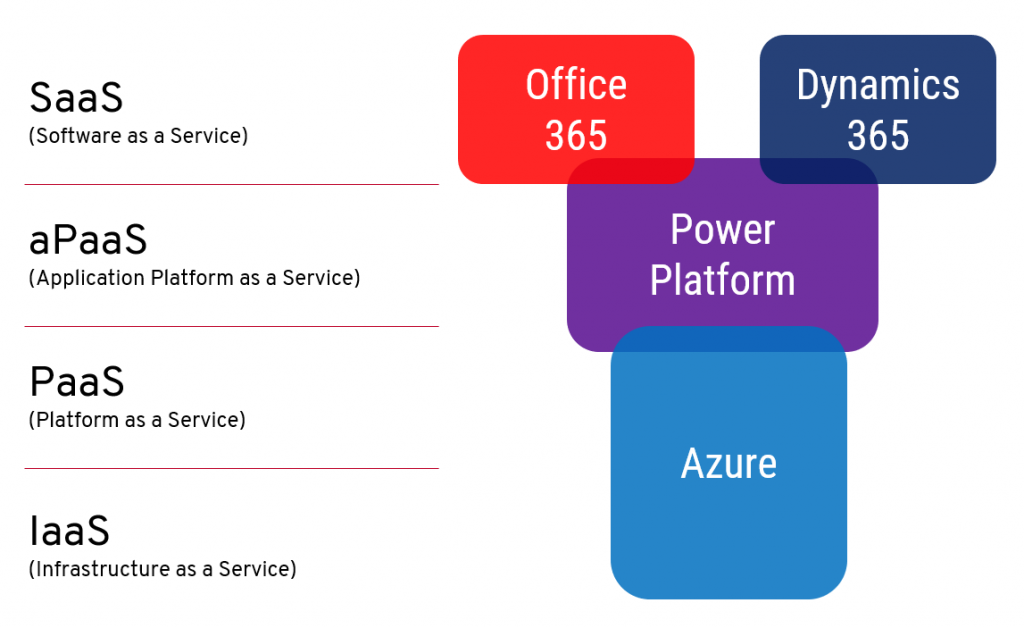
    Microsoft talks a lot about having three clouds: Office 365, Dynamics 365 and Azure. Where Power Platform fits in is right smack in the middle, and with plenty of overlap in relation to the existing clouds. It’s a new “aPaaS” layer added between the SaaS apps of Office & Dynamics and PaaS/IaaS offered by Azure. As a result, the relative position of existing products needed to shift a bit, which created a before/after dimension into both how Microsoft envisions each cloud to be used and as well as how they commercially offer the services to be licensed.

    Other parts in this article series can be found here:

    Read more about Microsoft Business Applications licensing

    There are plenty of articles in my blog for you to browse in this category: Licensing.