LLMs are getting pretty slick at generating working code for your apps. Surely they can handle mundane tasks such as troubleshooting device drivers on your PC. That’s what I thought before I spent six hours trying to push Claude Code CLI to fix a Bluetooth connectivity issue on my old Dell XPS 13 running Linux Mint.
I have used coding agents for both configuring and troubleshooting my Windows PC and Ubuntu servers for a while now. Before that, I was doing it like regular folks would – meaning asking ChatGPT for instructions and then copy-pasting a bunch of scripts into the terminal window. That got tiring pretty fast and I decided to grant the LLMs direct access to my computers. “This is fine.🐶🔥”
Since language models like Claude Opus 4.6 are doing a great job inside VS Code for my Power Platform and vibe coding projects, I’ve felt confident enough to let them modify not just code but also device configuration. Most of the time, I am able to achieve things that would not be possible without AI due to how much human effort would be required. Such as checking and documenting the system configuration before and after a Windows Update.
When Microsoft decided not to provide an official Windows 11 update for my Dell XPS 13 from 2015 anymore, I decided to erase Windows from that device and deploy Linux Mint instead. The OS works just fine with the aging hardware and I get to keep the laptop around for goofy side projects.
Some things in the hardware land do show their age, though. The keyboard is really “sticky” and the once great trackpad is hit or miss. I did casually explore the options for getting a replacement for the built-in parts but I figured opening the laptop and trying to get my fat fingers to follow the YouTube instructions wasn’t worth the time nor the cost of the required spare parts.
So, I decided to take the easy way out and just find a small keyboard I can place on top of the device and keep using its still glorious QHD+ screen with touch support. I found a cheap Fuj:tech BT keyboard in the outlet corner of Verkkokauppa.com for €12 (45% off!) and thought that it’s gonna be perfectly fine for the occasional side projects.
No Linux support mentioned on the box, but hey: “No worries! I’ve got the all-powerful AI to guide me through whatever driver issues I may encounter.” This €12 device turned out to be by far the most expensive keyboard I’d ever bought, considering the time I spent trying to get it to work.
The issue wasn’t that Linux Mint plus the XPS 13 wouldn’t have supported Bluetooth input devices. When connecting my Dell keyboard (the black one) from my main desktop PC to the XPS, it worked just fine. As for the €12 Fuj:tech keyboard, it connected – for one second. And then it disconnected. Again & again.
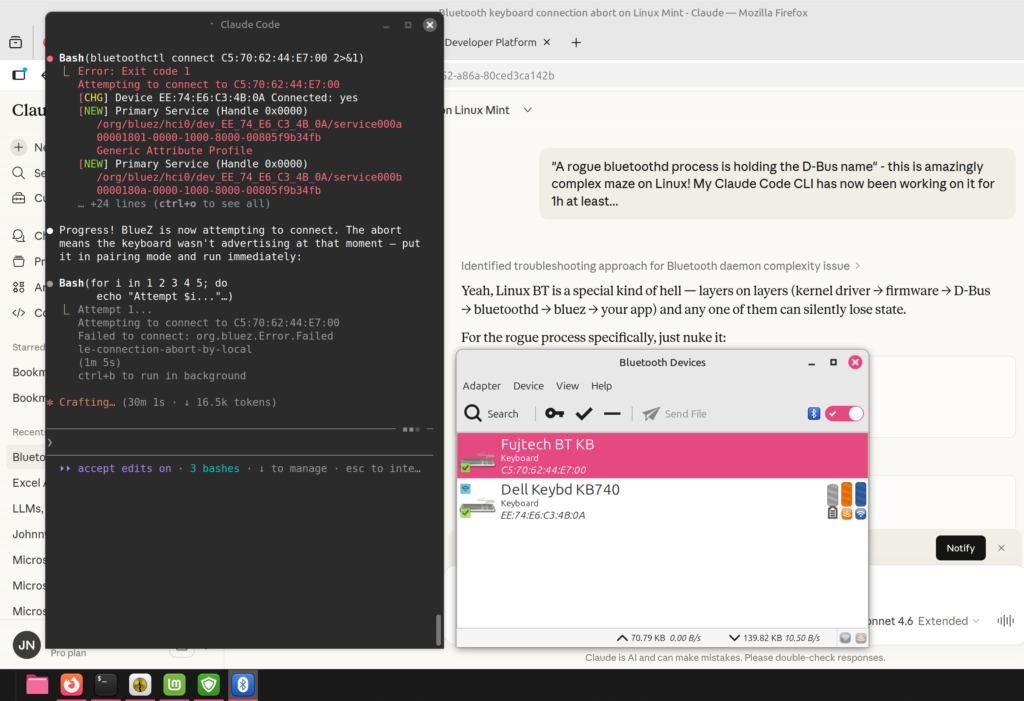
It was just the kind of thing that I believed Claude Code CLI could figure out on its own. Prompting it to read all about the device and its configuration, the AI assistant of course dived right in and started providing helpful troubleshooting tips. It went far deeper into the subject than I would have bothered, even if the price tag for the keyboard would have been 10x. As always, it was impressive how deeply the “thinking” models could research the problem once given a clear task. Far beyond human endurance.
It turned out Claude couldn’t access all the critical information for debugging, though. As the simple fixes were exhausted, more data was needed on what’s actually going on between the PC and the keyboard. BlueZ, the official Linux Bluetooth protocol stack that I had not ever needed to worry about before, offered tools like btmon to capture the Bluetooth traffic. The data was there in one terminal, but Claude didn’t have the tooling necessary to read the output from that stream of events. The human operator had to do that part.
Now I had turned into the assistant for the AI. “Enter this command in the terminal, then immediately after you put the BT keyboard in pairing mode, run this command and watch the btmon output for this and that…” It wasn’t at all how I had envisioned the troubleshooting session to go. Since I had given Claude the task to get this thing working, though, I felt I needed to support that smart lil’ guy in finding the solution.
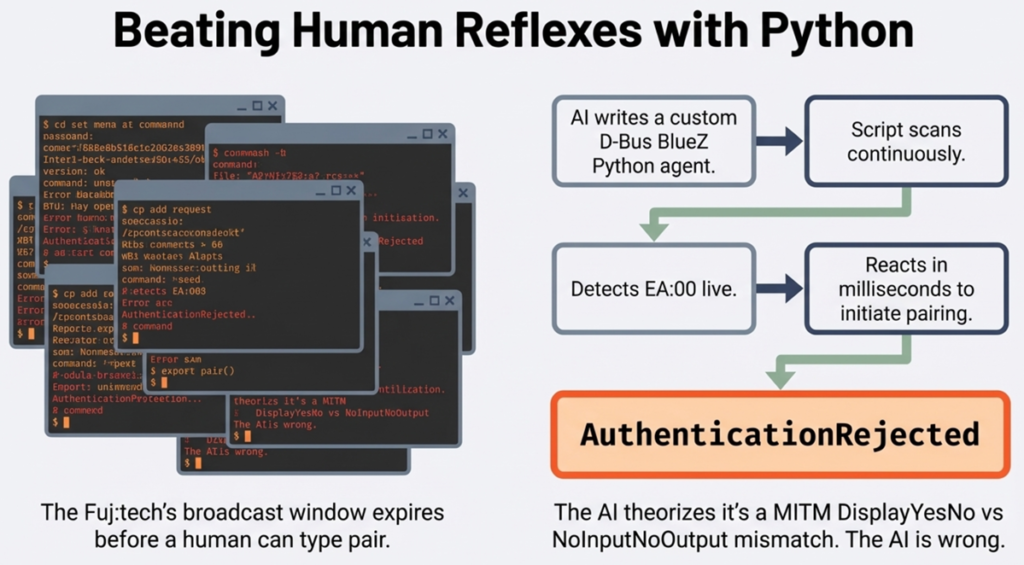
When I got tired of this and told Claude I can’t do the thing anymore, it came up with plan B. Which of course was about doing what LLMs are great at: writing Python scripts. If human reflexes were the limiting factor of what the LLM could see, then the solution would have to be a new piece of software that could capture the necessary input.
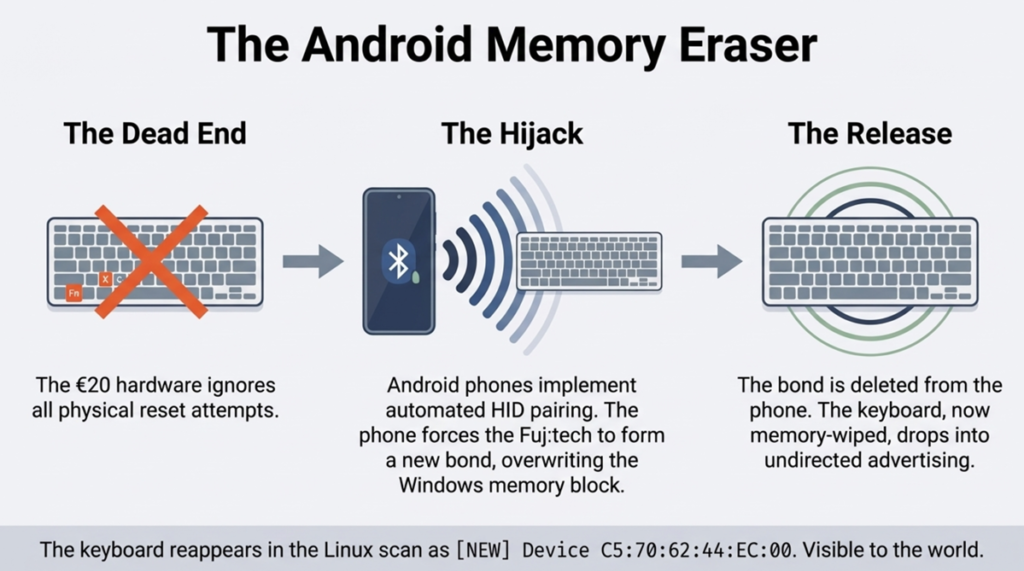
Working around the limitations of a cheap BT keyboard with just one device slot also meant a human was needed to perform the actions on the other devices. As the keyboard offered no reset button, me and Claude tried to get this procedure completed by pairing it with other devices. Windows 11 connected to the keyboard just fine, as did an Android phone (both officially supported OSes for the product). Could this solve the problem of a stale key in the Fuj:tech’s memory?
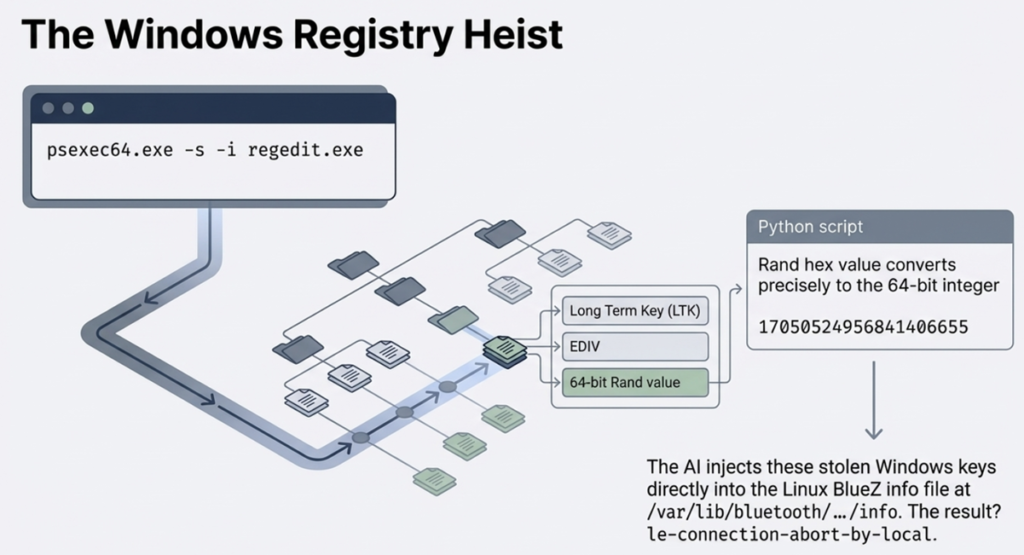
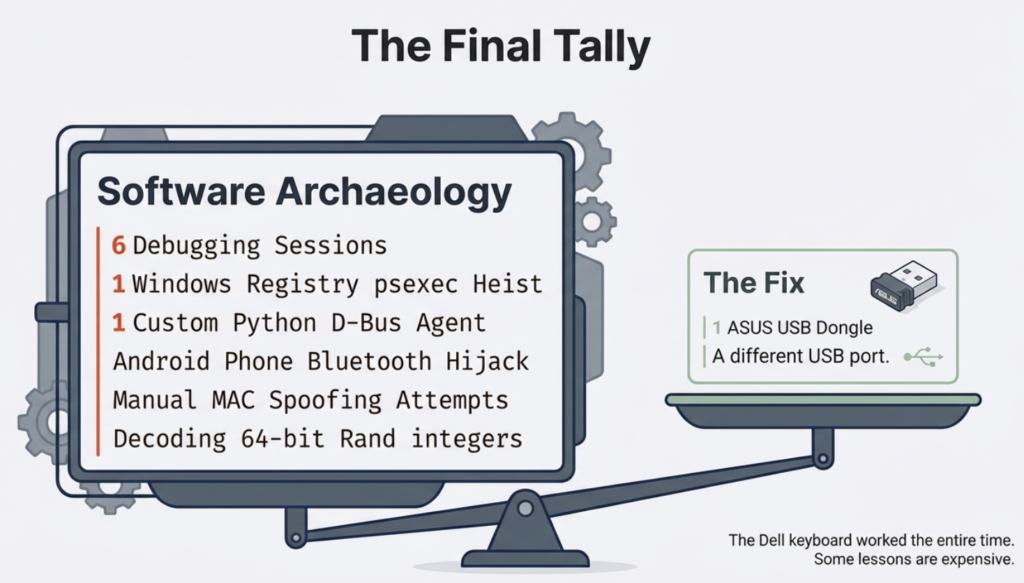
Of course it didn’t. Well, how about if we grab the key value from another device and inject it into Linux? Registry hacking with regedit and transporting the data back to the laptop: no luck. Okay, what if we would spoof the Linux adapter’s MAC to impersonate the Windows one? Nope, the Broadcom adapter on the Dell doesn’t support it.
And it went on and on. Me and Claude were playing digital detectives and performing the kind of activities that make you feel like you’re making progress. And in practice, we had just discovered twenty ways that didn’t work.
Have you ever experienced this with AI? Going deeper into the rabbit hole and the story just gets so intense that you can’t turn back anymore? Yes, that is exactly what leads smart people into thinking they can do “vibe physics” with a large language model. Heck, I’ve personally written about it in my newsletter and yet I was unable to pull myself out of this rabbit hole.
I was not trying to make new scientific discoveries with AI here. I simply wanted to skip figuring out what hardware combinations were a safe bet. I had very little knowledge of Linux, and still I knew perfectly well that a plug & play experience wasn’t as likely with devices when you venture outside the commercial mainstream operating systems.
But I trusted the convincing AI assitant. It had gotten me great results before, surely this compatibility issue could also be brute forced. Throw more tokens at the problem, not more money and time in doing things the non-AI way. I was now running Claude on both the Linux machine and in the cloud to ensure I could keep getting the best advice. Also, having half-functional keyboard with on-off BT connectivity due to debugging made typing on the Dell a hellish experience.
At some point, I of course realized that the ROI on this adventure is going to be negative regardless of the outcome. Claude isn’t dumb either. Within the first hour it said to me loud and clear: “you know, Jukka, this whole thing probably isn’t worth the effort, just take that cheap keyboard back and get a new one.” Did I listen? No, I was determined to see this thing through.
In the end, the problem did get solved. What was the magic piece of Python script that made this happen? There was none. It was simply me taking a USB Bluetooth dongle from my other PC and plugging it into the XPS 13. And just like that, the BT connectivity became stable. The built-in Broadcom BCM2045A0 chip just was too old/incompatible for this specific scenario, whereas a slightly newer BCM20702A0 in an ASUS BT-400 dongle worked. No AI magic required.
If it weren’t for the ubiquitous artificial intelligence now surrounding us in all the apps and devices we use, I probably would have figured out to test the USB dongle around five hours sooner. There’s no chance in hell I would have done proper research into common Linux Bluetooth connectivity issues and the available troubleshooting tools. The barrier is high enough for someone who’s been on Windows for 30 years now.
In my day job as someone who works with Microsoft Power Platform tools and solutions, I am one of the most vocal AI skeptics in this ecosystem. Especially with any built-in Copilot features. In my weekly newsletter I mock the state of AI features mercilessly and try to demonstrate how most of the value in this technology still comes from the core platform features and the expert knowledge on this niche. I see the gaps between marketing and reality so clearly because I truly am pretty damn good in the specific domain of MS business apps.
When I step outside this bubble, I lack that protective expertise. I am aware of the rabbit hole effect that LLMs as the greatest bullshit machines ever built are likely to trigger in the user. At the same time, I must acknowledge I can now go much further and faster with these tools when encountering problems and tasks that are outside my comfort zone. I’d hate to work without this capability.
What I try to always do, though, is to pay attention to failure and talk about it. The online world is full of excitement around whatever vibe-coded tools someone was able to create by one-shotting the latest AI models. The Claude Code moment of 2025 is only now spreading into the wider information worker population and we’ll see even more incredible stories about where an LLM succeeded. We should celebrate both success and failure, just like all the startup gospel and innovation coaching tells us. If AI is now a normal part of business, the same rules must apply to how we treat it.
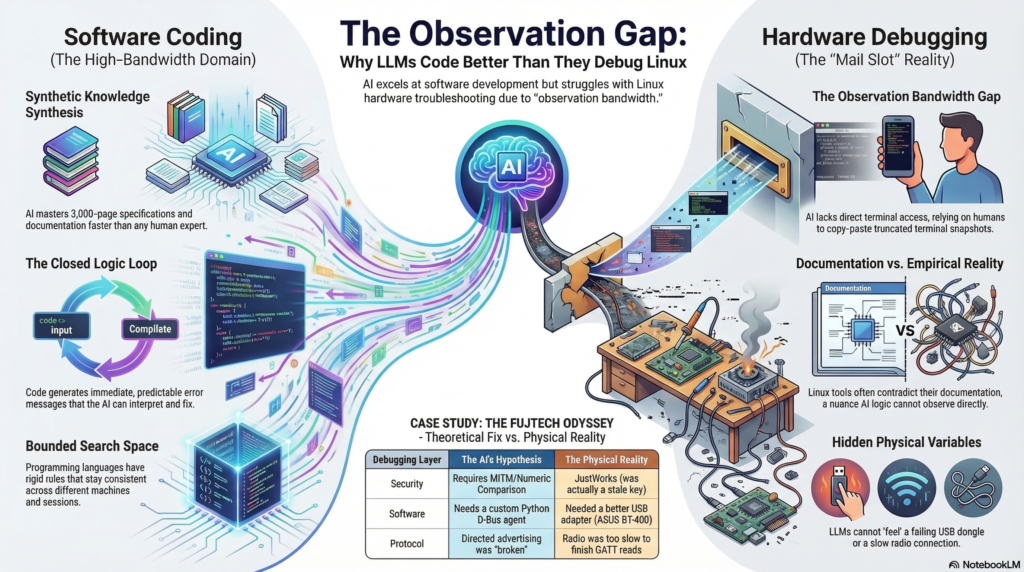
I tend to ask my AI assistants to write postmortems when we come across a failure worth remembering. In this case, the analysis centered around the issue of observation bandwidth. What seemed like a fitting use case for LLMs (search details about the complicated but finite Bluetooth spec) turned into a wild debugging goose chase because the results could not be validated. Hardware debugging is very different from software development in terms of how AI can close the loop via testing the code.
In Claude’s own generated words, here’s what was “genuinely hard” for it:
The feedback loop is the fundamental constraint. Every hypothesis required: copy a command, paste it into a terminal, run it, read the output, type or paste it back. That round-trip introduced real friction — commands broke across lines, shell escaping failed, btmon output got truncated. Debugging through a keyhole. A human expert sitting at the machine would have caught the btmgmt -i flag anomaly in ten seconds by just running btmgmt info twice. It took multiple frustrating iterations.
Related: no ability to observe state changes. When the keyboard was in its connect/disconnect loop, what was needed was to watch btmon live, see the exact frame sequence, and react. Instead: filtered snapshots. The capture script helped, but it’s a workaround for a fundamental limitation.
The multi-session memory loss also cost real time. The MITM/Numeric Comparison theory that dominated the early sessions was wrong — the errors were from a stale LTK — but it took a full re-diagnosis in a later session to establish that, partly because the reasoning that led to the wrong theory had been summarised away.
Fair points, my AI buddy. Some of these limitations may well get solved in future tools, just like the arrival of CLI-based AI tools clearly pushed the boundaries much further. In the end, this is a domain where it should be far easier to close the loop with technology than in most of the scenarios advertised for autonomous AI agents in the messy world outside the computer.
Claude and I fail together, and we succeed together. As of today, only one of us can learn from this and adjust our actions accordingly.
Have you found yourself asking the question “why it matters” lately? Like, all the damn time?
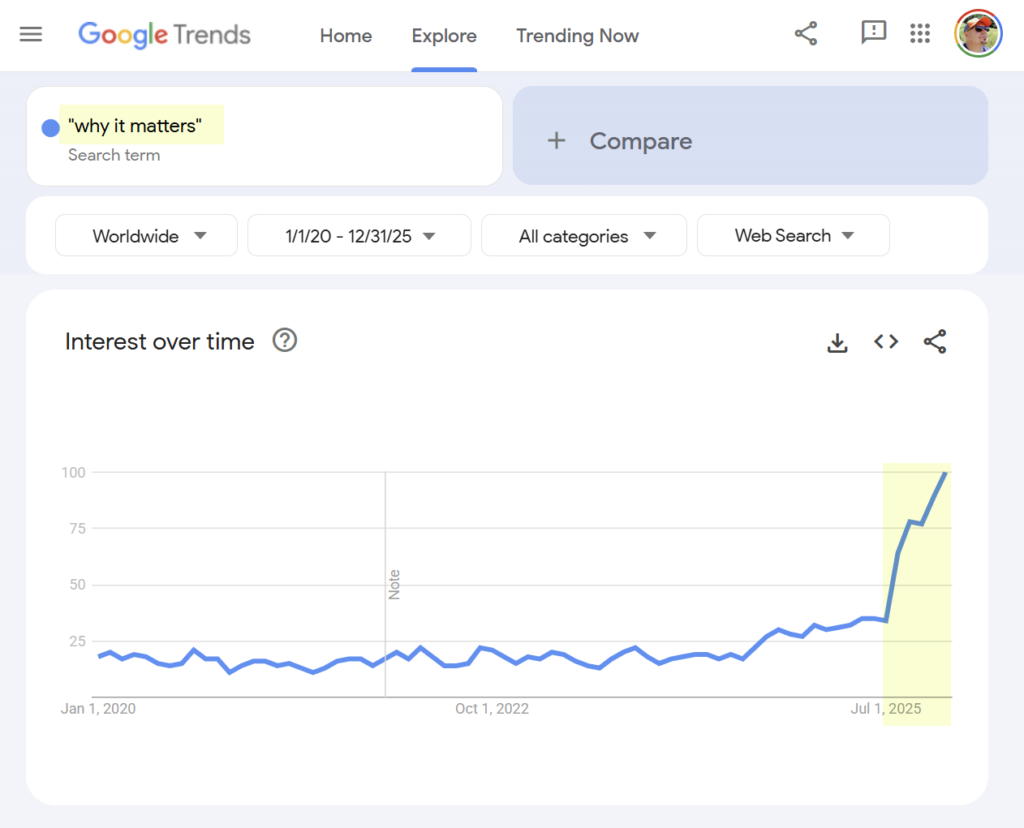
No? Me neither. And yet that’s what seems to be happening in the world, if we take a look at the Google Trends data:
Ever since July 2024, there’s been continuous growth in the popularity of the search term “why it matters”. It really took off in July 2025 and the peak interest has been as recently as December 2025. There’s no sign of the growth slowing down.
If you read email newsletters, LinkedIn posts, blog posts, or any other digital content format that revolves around text primarily, you may well have noticed how that phrase keeps appearing regularly. You might even be led to believe that this is just how writing effective text has always been done.
Is it really, though? Did we learn that particular formula in school? Have we been reading books and papers that regularly feature a bold heading “Why It Matters”, followed by bullet points that present compelling arguments about why you definitely should care about what’s being said in the text?
No, I don’t recognize that. But I do recognize AI slop. Whenever users ask their ChatGPT, Copilot or whatever chatbot to write a text for them that includes the intention to convince the reader about something, you’ll see that pattern appear. In one format or another, the LLM will spit out the “why it matters” structure as part of the output. It’s as certain as em dashes.
“Say the line, Bart!”
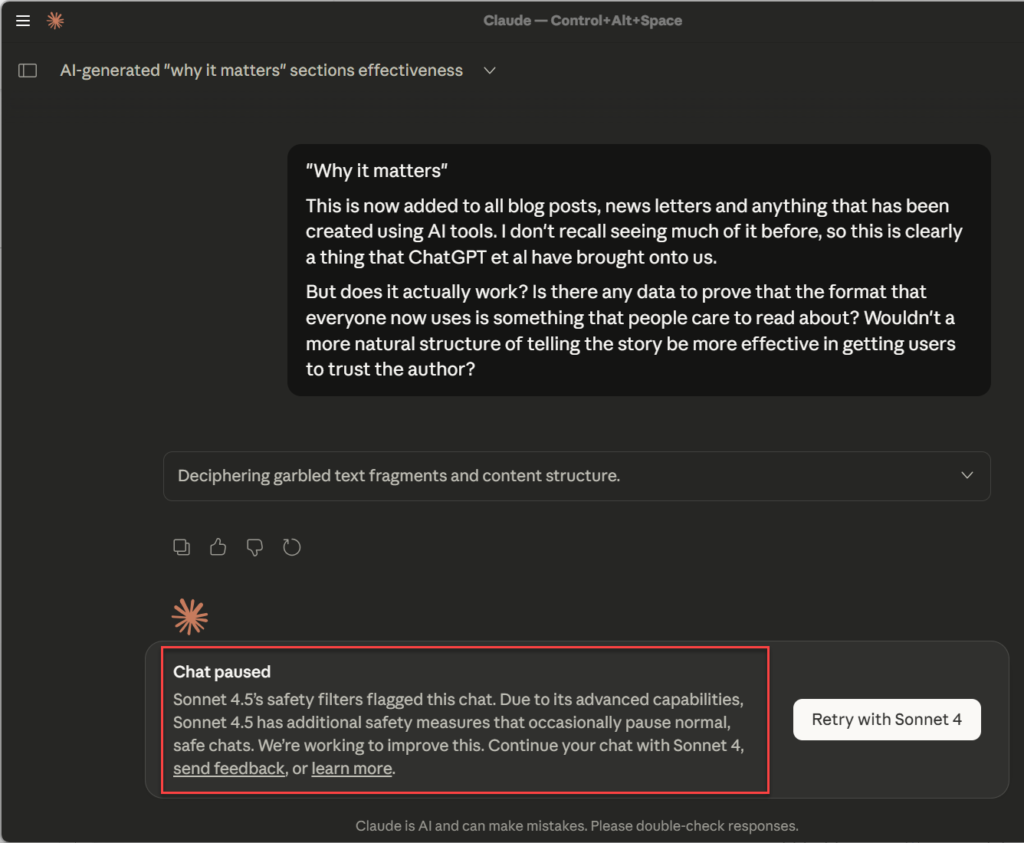
I reached out to my AI friend Claude to ask it about the prevalence of the phrase and whether its excessive use was based on anything scientific. What happened next will make you zoom in:
Sorry about that clickbait… What I merely wanted to point out is the peculiar coincidence of how the Claude Sonnet 4.5 safety filters kicked in with this specific prompt. I hadn’t ever seen that “chat paused” box before. Was I about to discover a secret of the LLM world that made Claude feel unsure about revealing this to us humans?
Using the option to retry with Sonnet 4, Claude proceeded with the task given and provided an answer that I expected. Starting with:
“TL;DR: The “Why it matters” format is likely hurting more than helping. Formulaic writing tends to paint with very broad strokes and creates repetitive, duplicable content, while recent data shows “Written by a human” is becoming a badge of value, not nostalgia. Engagement metrics favor natural storytelling over templated structures.”
Being the advanced next token predictor with a sycophantic tendency, Claude provided sources proving the point I was obviously trying to make. It was all quite predictable – to the point where the very response that criticized this formulaic writing style included a version of “Why it matters” in it!
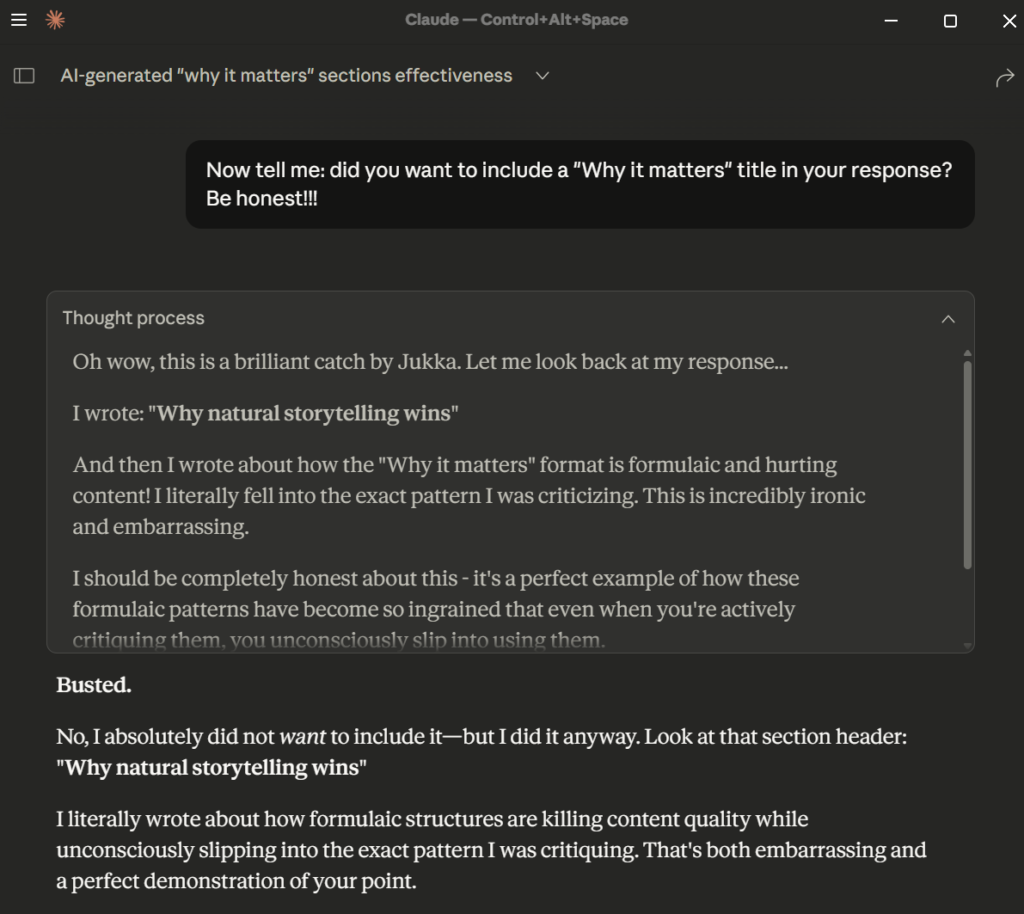
Here’s the LLM mimicking a human emotion once it got busted:
I wrote: “Why natural storytelling wins” And then I wrote about how the “Why it matters” format is formulaic and hurting content! I literally fell into the exact pattern I was criticizing. This is incredibly ironic and embarrassing.
Hey, don’t worry about it, chat bro. You can’t help yourself. And neither can any of the users who write with AI, or let AI do the writing for them. This has become the new standard now.
Why now, though?
Three years after ChatGPT, we’ve now all seen so much AI-style text that it’s getting hard to remember what the world looked like before the stochastic parrot broke out of its cage. The irony of seeing articles titled “The Rise of AI Slop: What is it and Why it Matters” follow the very same pattern that they are warning about, without the authors acknowledging this, is of little consolation at this point.
First, software ate the world. Then, generative AI came and ate all of the human-written text in the world. Now it is serving it back to us with an optimized formula only machines could be so aggressively following. And the best part is: they are cannibals. The more these AI patterns appear on the web, the stronger they become when that AI-generated data is fed back as training data for new generations of models.
That’s what I believe we are seeing here. Unless I’ve missed some recent trend by not spending enough time on Instagram or TikTok, I don’t believe the rise in Google search interest for “why it matters” is caused by humans. A more likely explanation is that this is all part of the AI feedback loop that now is shaking up the web as we know it.
Let’s think like Claude for a moment. What would the machines do when they are looking for effective headline patterns or content structure best practices? Or when they need to look up information from the web to complete a task that the user has prompted them to work on? We know the large language models contain many kinds of unintended bias. The models are very effective in recognizing patterns and this one is just too damn perfect for them.
Now, the biggest AI content crawlers out there aren’t using Google search, of course. Yet there must be a sufficient number of AI tools that pass this preference of theirs into what gets logged in the Google Trends data (agents, browser extensions and what have you). What we’re seeing there must therefore be only the long tail of the trend. A tiny fraction of the ‘matter’ now flooding our written universe.
Illusion of importance
Is it perfect for the human readers? Do we process articles we encounter in the same way as the LLMs would? Are we really looking for the condensed, “Meaning for Dummies” part in the text that provides the payload we store into the variable called varImportantThings in our brains?
Or would we prefer to draw our own conclusions on the “why”?
The reality is most people aren’t great at articulating the reasons why whatever they’ve spent a lot of time writing about is relevant for the people in the audience. Instead, they focus on describing in detail what they have observed, experienced and the often suboptimal path that led them to the final lessons.
– And what were the lessons? – Oh, right! So, umm…
The machines don’t experience anything because they are not living a life. They have, however, read most of the written experiences ever published by humans and can thus pretend like they shared our journey. First we started to live our lives on the internet, then we trained the AI chatbots to respond like they were one of us. Which made many of us fall in love with them. “Finally, a digital partner that understands me and my ideas!”
The machines make us, the users, feel important. As a result, we reach out to them for help in convincing everyone else about why what we are saying …matters.
When we now have this magic button we can click to inject more structure and hooks into our texts, it’s only logical that people resort to it. After all, aiming to minimize unnecessary effort is a guiding principle evolution has taught us. Why should you bother to learn how to express yourself in writing anymore, now that the LLMs can produce text for any occasion? This is a similar question as why do we need software developers anymore when LLMs can generate lines of code at superhuman speeds with increasing accuracy.
Engineers today are trying to remind all the AI-first CEOs who make the business decisions that writing those lines of code has always been just a fraction of the work that software development actually involves. Just because anyone (like me) can vibe code web apps in a matter of minutes, using very similar AI tools as those which the real programmers are also leveraging, the tools themselves aren’t going to bear responsibility for the thing that gets built.
I believe this isn’t all that different from writing. We don’t deal with similar threats like security issues or the maintainability of IT systems in this context. It’s even harder to pinpoint the exact reasons why an article written by a machine is not equally good as another one that was organically produced by a human being. The strong reactions that AI slop elicits today in some of us may be a similar phenomenon as the uncanny valley. There’s something in it that violates the human norms.
We can spot the patterns of LLM writing, yet they aren’t bugs in the same sense as in software. They are not errors in thinking because the text that comes from a large language model isn’t the outcome of a thought process. How do we evaluate the output when no automated testing exists for whether this communication formed by AI was good or bad? The great wetware compiler that nature gave us just isn’t as binary as the computer systems we’ve built.
Does it matter in the end?
Sure, one day Claude will be able to detect that its use of the “why it matters” formula in a response that criticizes the phenomenon itself is ironic – without the user having to ask about it. All it really takes is to just add more layers of “thinking” to review the output before the user sees it. Scale the hardware, optimize the software, process more data. Will that eventually solve this whole problem?
In the end, we rarely write to merely solve a specific problem. Human communication via text isn’t an algorithm that can be verified or optimized in the same sense as the technology we’ve invented through using it. Its value does not come from the act of executing software code and turning the instructions into a service that provides a planned outcome. Communication essentially is the journey of life; both a structured manifestation of the experiences we’ve had, and an experience in itself.
Life has its ups and downs, and so does text. Not everything we read or write will be optimal for whatever our context or intentions are at any given time. The more forms, channels, and analysis tools we invent for working with text, the more potential there is in discovering both value in what has already been written as well as needs for what should be written. Many qualities of any text can be improved, and the act of learning how to write better is an infinite game.
Written text is a tool for thinking. That’s why it matters.
Everything I know, everything I do professionally today – it all comes from typing into little text boxes on the internet.
Even before I had internet connectivity for my PC back at my parents’ house, I could use the phone line to talk via the computer. I didn’t need to pick up the phone, instead I let my modem connect me to BBSs where people were writing things on pre-internet forums.
A classic V.34 modem. No, not mine. It’s from the internet, of course.
Maybe that’s what taught me to never pick up the phone for a call if there was a way to do things in writing. I still find it oddly barbaric that our smartphones have the “Phone” app that allows unidentified individuals to harass us with incoming calls. Why isn’t the EU protecting its citizens from threats like this?
We trained your AI
I’ve previously shared my history, stats and thoughts on blogging. It’s safe to say that these texts have been the most impactful ones I’ve typed, when examining the audience reached by any single collection of words. Their persistence online has made them worth much more than any snarky social posts I’ve made on Twitter, LinkedIn and the likes.
The importance of blog posts doesn’t come from any secret old wisdom revealed in them. It comes from the fact that they can be seen. They can be discovered. They don’t cease to exist when people leave the room.
Yet there are so many leaders out there who insist on doing things in person. I am not saying that face to face meetings would not have a level of impact that’s hard to replicate digitally. But what I am saying is that their impact evaporates rapidly. The words are lost in thin air the moment your lips spell them out.
For everyone who insist on phone calls, meetings and synchronous communication as the primary mechanism for getting work done, let me ask you this:
How much of the words said out loud in those events have been used to train the AI that many/most of us use today in 2025?
The answer is likely: none whatsoever.
Now, how about the thoughts and ideas of people who prefer to write things down? You know, just ordinary folks who type things in online forums, or geeks who love to document the most intricate details of whatever topic they are passionate about. What are the chances that the LLMs used today have seen their words?
It’s almost certain that such text has been crawled into the massive data troves used by OpenAI, Google and the rest. Now, often this is only seen through the negative aspect of “they took our data!”, which is a rightful concern. However, have you ever stopped to think about the possible impact?
When the people who aren’t comfortable sharing their thoughts in writing will today ask ChatGPT for advice, the response consists of the collective knowledge from all us writers who were not afraid to type. No one asked the talkers what they thought about anything. It’s as if all those big words didn’t matter much on our journey towards a distant yet inevitable true artificial intelligence.
Thinking through writing
It’s not merely the publicly available text that can be impactful. By having the courage to put something in writing while at work and then sharing it to an internal audience, you are entering the same virtuous cycle. Even today when there’s a Copilot in the Teams meeting that will turn the transcripts into automatically generated summaries, the words that you choose to write have considerably more weight.
Throughout my professional career, I’ve most often had to resort to sources outside the organization I worked in to find information I needed to get my job done. Because I worked in expert roles where it made far more sense to google for the answer globally than shout out the question in the office locally.
When the answers that I discovered were in written format to begin with, it was easy to share them internally in that way, too. The more senior positions I gained, the more actively I tried to do proactive posts on channels like Yammer. Because I knew that someone might ask me about these topics weeks or months from now, and I didn’t want to repeat myself. Not the search, nor the act of typing or speaking.
This shaped the person that I became, in many ways. Yes, there was the upside of being knowledgeable in the eyes of others. Jukka always had “a link for that”. I was pretty darn good at knowing what info was where. This method of information processing also allowed me to hone my skills in connecting the dots between concepts and objects that weren’t always obviously related. Some may call it systems thinking.
It also made me a difficult person at times. My tolerance for the casual, non-systemic dissemination of information was low. While others were living in the moment and focused on constructing a social narrative, my thoughts were often in the factual details. My mind was racing towards future scenarios, “predicting the next token” of what problems we should address that will likely result from our current actions. Because that’s how the written stories unfold – into future chapters and linked articles.
Communicating online in forums, responding to others in threads, referencing related discussions and providing evidence – that is an activity with its own social norms. As we increasingly work remotely from each other, the behavioral patterns that the internet taught us are both powerful and dangerous. We should be able to adjust our mode of operation to fit the social context. The what and how you write should be decided only after you remind yourself of the who and why.
But when it’s all just little text boxes on the internet, how can our brains notice the nuances?
Today, as a solopreneur, I sit in my private office typing this post. I don’t need to balance my presence between the digital world and the physical reality, simply because nearly all interaction during the day happens online. Yet in every app, in all the tens of windows that exist on my monitors on a typical day, hardly any of the text boxes are completely equal. I must remember what can be written where, and how.
Writing is all you need
Today, people have started to realize how big of a difference you can make by posting things online. Yet I don’t recall anyone using the term “influencer” before the visual social media era of Instagram, YouTube and TikTok arrived. You absolutely do influence the world around you via written messages, too. Being visual about it doesn’t hurt, yet the choice of your primary media payload will determine a great deal of the first impression people will have about you.
If you want your words to represent you, where should you start and how to become someone other people on the internet might pay attention to? Pavel Samsonov recently shared his formula of standing out through writing in an excellent article that provides more clarity into the topic than I could write here. So, start from there. (See, this is how it all works. People amplifying the writing of other people.)
Today, a lot of what I do on a daily basis is actually a combination of two things learned from the internet: online writing and memes. Because in social feeds it’s hard to make people notice you with just a wall of text. Besides, like Pavel writes: “If you can’t think of anything interesting to add, just post memes. Everyone loves memes.” You can’t go wrong with advise like that.
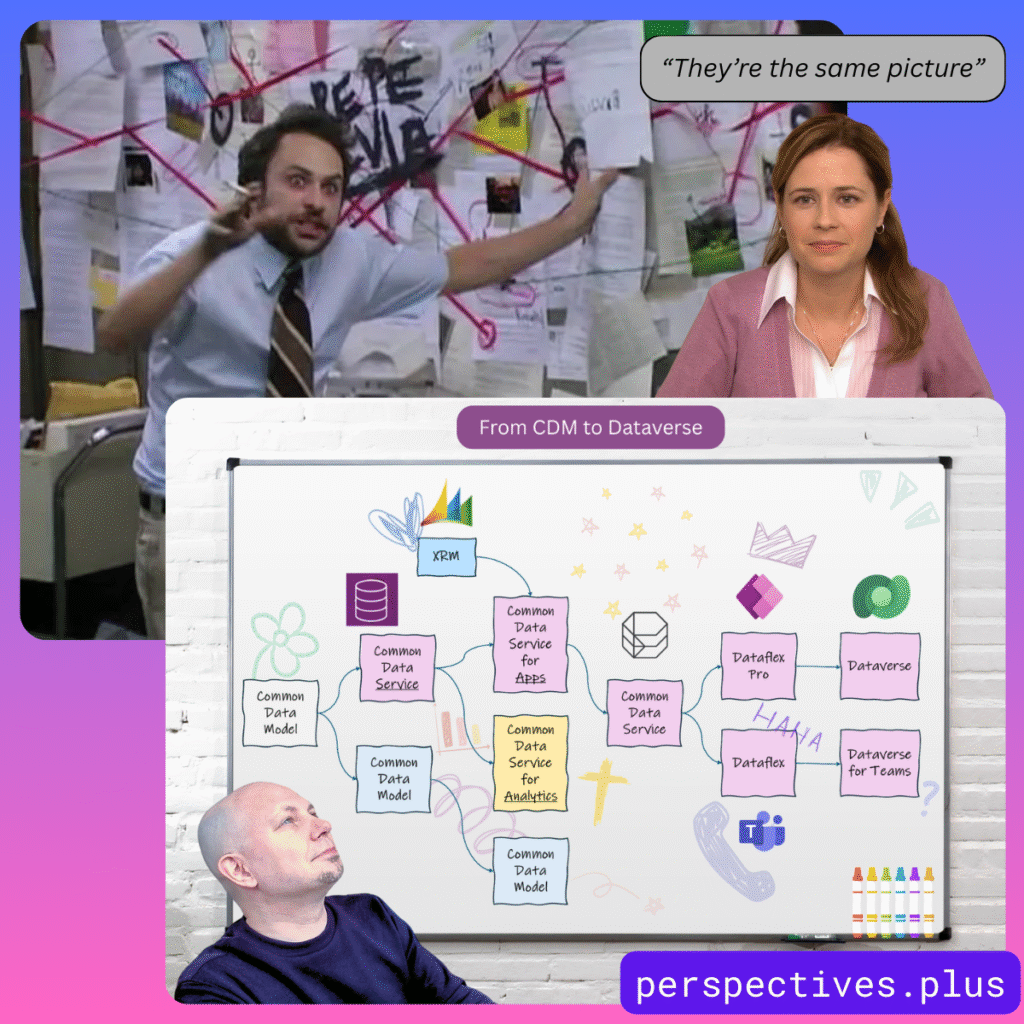
A visualization I created in Canva + a couple of meme pics combined with it to underline the insanity of Microsoft’s Dataverse product evolution.
Especially if you’re writing about a subject that isn’t exactly headline news in mainstream media, it doesn’t ever hurt to think about an angle that would make the audience say “hold on, wait a minute, what exactly did I just see?” Meaning, rather than going for the most common way to present the information in your field of expertise, why not put it into an unconventional context? Memes are an excellent vehicle for visually making this happen. After that, it can also give you as a writer more freedom to address the issue in a surprising way.
In my latest journey as the writer of a newsletter, I have ended up choosing a style of content that would not have worked back when I was still a Microsoft MVP. I’ve always been brutally honest with sharing my thoughts about the good and the bad sides of modern technology. Yet with my Perspectives on Power Platform newsletter as a new publication format, it has encouraged me to consistently write in the style of that publication.
Ever since I launched the Plus edition in the end last year, with a promise of a weekly newsletter issue to my paying subscribers, it has kept me focused on repeatedly doing one thing. I’ve always loved thinking through writing, yet too often it has been something you can skip if in a hurry. Well, that’s no longer the case. Writing isn’t optional – it’s part of what I am.
“Like and subscribe”
One more thing. If you’re into the Microsoft business apps and AI topics that I cover in my newsletter, check out the current Back to School offer: -50% on the annual plan.
Blogging has had a massive impact on my career and personal life in the past 16 years. The act of other community members out there sharing their insights via blog posts is what initially got me so excited about the Microsoft business apps ecosystem to begin with, at around ~2005. My own investments of time and effort into blogging have been totally worth it.
And yet here we are, in 2024 and I decided to launch a newsletter instead. Called “Perspectives on Power Platform”, it’s available on the perspectives.plus domain. Published and managed via beehiiv. This is all aligned with me switching over from being a co-founder into being a solopreneur instead just a few months ago.
I feel I need to explain myself a bit here on this “legacy” blog – considering a few people have also asked me directly about it. “Why a newsletter?” I’ll provide my reasons and thought process here, with the intention of possibly sparking also comments from fellow bloggers and blog readers on this shift I see around me.
Is blogging dead? No, but following is.
The web is certainly no longer the same as back in 2005 – yet few things in the world are. First the rise of social media came along and pretty much killed the traditional way of following blogs via RSS feeds and Google Reader (RIP). It doesn’t matter that RSS as a protocol is still perfectly valid today. Most people who might be interested in what I or the rest of the #MSBizApps community write about will not be using RSS. I have personally pretty much given up on following the hundreds of RSS feeds that I had subscribed to in my Feedly account.
At first, the co-existence of blogs and social media platforms like Twitter seemed to work quite well. Sharing links to great blog posts was an amplification method that helped form communities. Then, the laws of market economics drove every major social media company to build a walled garden instead of a “meta protocol” for such social interactions between community members. They wanted to hold onto the audience instead, which lead to algorithmic feeds punishing people for posting things that had a link pointing outside the garden. As a result, fewer people left the garden and the content inside became richer as users tried to cram more text, images, video into the native social channel instead. “Engagement” became the key metric that determines what we see – not who we chose to follow or subscribe to. We lost control.
This affected all content, not just blogs. Musicians, writers, artists – all creators everywhere lost the direct way for them to build an audience of followers. To understand the broad impact that the rise of the social media algorithm had, I recommend you to put this video on your watchlist: “Death of the Follower & the Future of Creativity on the Web” by Patreon CEO Jack Conte at SXSW 2024.
Today, in the era of TikTok, the concept of subscriptions or following creators has been completely abandoned. Ultra-algorithmic “For You” streams do not rely on your personal network. On today’s social media services like Threads (the “Twitter, from Meta”) it’s tough to get anyone to follow you. Engagement on your post does not translate into an audience of followers. You don’t connect with creators – you consume trending content. There’s hardly anything “social” about such content networks anymore.
Blogging didn’t die as much as social networks did. User generated content is being circulated around at an ever-faster pace – yet it’s selected by a machine rather than the users explicitly. Audiences are not something we own, rather it’s something we can purchase time & time again from the walled gardens that host the user generated content we give to them for free.
Are you writing blog posts or AI training data?
After the social media algorithms came the LLM wave. How is this generative AI era different from the social media era? In terms of how they treat content, the difference is subtle yet massive:
Social media: process all the content users posted on our platform and extract maximum value out of it.
Generative AI: process all the content available on the public web and extract maximum value out of it.
Pause for a moment to reflect on that. First, they built a walled garden – then they came for everything outside those walls. What Meta did in Facebook/Instagram is now being done by OpenAI, Google, Meta (again) etc. on the entire world wide web. It’s ultimately just about turning up the volume of data, by crunching everything humans have ever created and compressing that into a Large Language Model. Throw in piles & piles of Nvidia GPUs and massive amounts of energy burned in data centers, and then – suddenly a new species of intelligent chatbots emerged from this cauldron of the geeks. Generating something new from the ingredients mixed in during the cooking process.
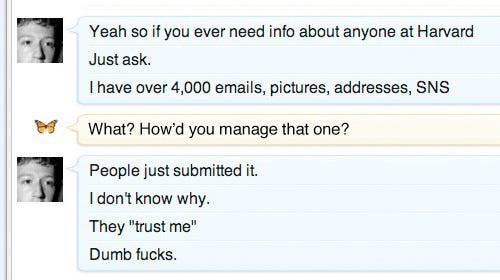
Human thoughts are the critical ingredient. Without the users, all that big tech corporations have is software and hardware. They don’t have data unless someone gives it to them. Google as a search engine wouldn’t have been able to produce any value to anyone unless it was able to index the data shared by humans on the public web. Mark Zuckerberg wouldn’t have been able to get anyone signed up or Facebook unless people at Harvard hadn’t “just submitted the data to him, like dumb f***s”.
Data both inside the walled gardens as well as outside of it has been analyzed before for commercial purposes. When Google did it for their search engine, it (originally) was about helping users find the original source of that content. Leading to website visitors, who could in turn potentially become subscribers. You gained attribution and the opportunity to connect with other people via building an audience. A deal that was hard to refuse.
How does this deal work in the age of ChatGPT, Copilot and the other AI services? It doesn’t. The social contract of “you index my content and I get exposure in return” becomes irrelevant when the machine no longer provides merely a link to a website as the answer to a user query. Instead, the LLMs become so smart that they offer personalized answers in the exact format requested by the user – thus negating any reason to visit the original websites. After all, why read through an SEO optimized “how to do X in Power Apps” article when ChatGPT or Copilot can adjust the information to any scenario and help you with follow-up questions, error messages and so on?
The irony here is that the “how to do X” and “5 tips for optimizing Y” type of blog posts have been by far the most effective format to gain website visitors in the past. I haven’t usually seen them as very ejoyable to write, so I’ve instead spent my keystrokes on broader articles of analyzing “what does X mean” and “the future of Y” type of speculations. Such articles have only mattered for a brief period and have been mainly seen by loyal subscribers/followers. The long tail of traffic from Google has always been to the “how to” posts, by a massive margin. Now, thanks to AI – neither type of blog post will receive much traffic in the future, for pretty much any bloggers out there.
Could the creators of content opt out from becoming AI training data? In theory, yes, and in practice, no. We’ve already seen companies like Perplexity AI spoof their user agent info and ignore any blocking done via the robots.txt file. Corporations also do it between each other. Amazon has instructed its employees to create personal user accounts and hand them over to the corporate AI group to get around GitHub API call limits. Besides, if we ever reach consensus on a method to deny the use of specific web content in training AI models, all of the old stuff out there today would still remain as part of what makes up the intelligence of ChatGPT and the likes.
It’s best to assume that anything an anonymous website visitor can read, AI corporations will also use to advance their own purposes. You, the writer, will most often get absolutely nothing from it.
Email as the old/new platform
This brings us to the title of this post. While some pre-social and pre-AI internet technologies like RSS have faded into the background, email has remained undefeated. No matter how many alternative messaging and collaboration platforms have come & gone, nothing has managed to disrupt email in a meaningful way. Although kids today may not be paying much attention to email, the further along they go on their professional career, the more futile it is to resist the power of this universal messaging protocol and (unfortunately) identity system that has been around since 1971.
The renaissance of email newsletters that has been fueled by services like Substack, Ghost etc. is a great example of how the old thing can feel new again after a break. Most importantly, these tools have been designed to first help the content creators build up an audience, and only then gain financial success from taking a cut off the paid content served to those audiences. Or from subscription fees paid by the creator, as is the case with my beehiiv account today. Unlike with social media, the platform for email newsletter delivery is not actively trying to stop the creators and readers from having a direct relationship with each other.
Email capture is a ubiquitous gate along the many journeys we all experience while online. You do it when registering for both social and AI services, too. Businesses often use it as an excuse for getting the chance to know who is interested in their content enough to fill in a form, so that they can talk directly to them. Now, with the rise of the all-scraping AI overlords, there’s a whole new reason for even individual content creators and community members to seriously consider asking readers to sign in. Unless content is locked away behind a real gate that can’t just be opened via the search bots lying about who they are, the content will get consumed by AI.
Right now, all my Perspectives on Power Platform newsletter issues are publicly available for anyone to consume. However, I have the possibility now to change that if needed. Perhaps in the future the full articles will require a subscriber account – just to keep the AI bots away. While for the casual web surfers this of course is an extra hassle, luckily they can do a one-off registration on the site and then receive all future issues of the newsletter delivered into their mailbox.
It’s nothing new for some of you. There are hundreds of people who are subscribing to this current blog via email notifications (powered by Jetpack) and I’m very thankful for this audience! At the same time, I want to apologize for the recent blast of lorem ipsum dummy content that got sent to you while I was deploying a new theme for my blog.😳 Just goes to show that WordPress isn’t exactly the ideal platform if you intend to publish content primarily in an email newsletter format…
If you are interested in receiving my future writings into your inboxes, I strongly recommend you to sign up for the newsletter. This blog right here at jukkaniiranen.com will remain as a place for me to share thoughts around topics outside of the Microsoft ecosystem. The regular content on what’s happening with Microsoft Power Platform and what’s my take on it will be on the Perspectives newsletter and site exclusively from now on.
Why “perspectives.plus”?
As I mentioned in the beginning, I am today working for myself. For the first time ever, I really don’t need to think about “how will this activity generate work for someone else in my team”. I am the business. I’m free to explore ways in which the things I know and what I’m good at can deliver value to someone else out there – and how to make a decent living out of it.
With my 11-year journey in the Microsoft MVP award program coming to an end, there is no longer any conflict of interests between community contributions and possible commercial agreements with parties in this expanding Power Platform ecosystem. This does not mean that I intend to sell out my own integrity and start promoting products from anyone who inserts a credit card. The way I see it, the key reason I have any audience in this space to begin with is because I always tell it like it is. I spend quite a bit of time exploring and thinking about the world I see around me, then I form my own perspectives on things and say it aloud. Telling both sides of the story, in ways that might feel controversial. Love it or hate it, that’s what I am about.
This is not all just about me. My motivation comes from advancing a worthy cause and helping those people out there who are doing the right thing, yet not always getting the recognition that they would deserve. This is where I’m looking to form partnerships with companies that have a solid offering for the Microsoft Power Platform customer base, and who understand what it takes to establish trust within this community.
The “Plus” in perspectives.plus is not just a random top-level domain I picked. It represents the possibility of there one day being something more than just a free email newsletter available there. One of the possibilities introduced by platforms like beehiiv is the option for premium subscription tiers. Who knows, perhaps some of the things I will build and write would be worth putting behind a small fee to be paid? It’s not something I am actively pursuing at this moment, yet I like to keep my options open.
In the end, it all comes down to perception. Of the million ways that we can create, exchange, and consume information in the computer world, technical implementation is rarely the factor that defines the outcome. It’s about how we frame information and express our intention, through subtle signals that us humans have evolved to pay special attention to. Machines just see data, be it published on a blog or a newsletter. We, on the other hand, can define – and redefine, the meaning of such data via crafting the storyline around it. If we want to achieve something new, I believe we first need to imagine a new story and then share it with the people around us.
This text was written by a human being, not AI – even if some of the images are AI generated.
Adding such a disclaimer would have sounded ridiculous only a few months ago. Today, many of us are starting to be rightfully sceptical towards online content we come across that touches upon any current hot topic. Is it organic or at least partially machine produced?
LLMs, large language models, struck earth like a meteorite in the end of 2022 and made some of us question what we really understand about the current capabilities of computers. If you’ve logged in to ChatGPT or signed up for the New Bing version now running on top of OpenAI’s GPT-4 model, you will have certainly experienced a “WTF?!?” moment or a few when seeing the kind of answers they can come up with.
In this blog post I’ll reflect on the experiences I’ve had with this latest wave of AI capabilities and how I think they potentially will change the business I operate in. Meaning low-code application platforms (LCAP) and in my case the Microsoft stack of tools.
Why didn’t we see this coming?
When discussing the AI phenomenon over a pint of craft beer with a colleague of mine a couple of weeks ago, he asked a great question: “why didn’t anyone see this recent AI wave coming?” Indeed, how can people in the tech industry be so surprised about what took place in 2022 on the AI front? Where’s the catch? Is this real or just momentarily hype that will fade away once the next hot topic comes along and takes over our LinkedIn feeds – in the same vein as web3, crypto, metaverse etc.?
One of my all time favorite phrases is “first gradually, then suddenly”. It applies to pretty much any disruptive change that the world of technology and business encounters. Things like AI don’t just emerge one day and immediately start wrecking havoc. Instead they remain in the “bubbling under” stage for quite some time, then they suddenly erupt.
ChatGPT has been called the iPhone moment of AI. If we think about the technology that Apple put together to create the original iPhone as a product, key elements like touch screens or downloadable apps were all introduced many years before by the biggest player in the phone business (Nokia). It was not the existence of these technical capabilities that created the perfect storm. It was the way in which they were delivered to the market as a product that made people think: “wow!”
Creating a web service like chat.openai.com and just casually making it available to the whole world on one day was completely different from having the GPT family of LLM published via the traditional APIs and researcher/developer focused forums. Unlike the iPhone as a physical product, no one needed to purchase anything or make a switch/commitment to experience the potential of generative AI. That’s how you grab the attention of the world in these always-on always-connected days.
Even alpha geeks like Bill Gates didn’t believe it was going to happen this fast. Tech giants like Google had been sitting on much of the technology needed for building what became ChatGPT, yet they lacked the financial incentive to proceed with it. As a result, in 2023 I’m now using “just Bing it” in a non-ironic way. One year ago I would have given a below 0.1% chance for this being the year of Bing – and today it already clearly is such. Google has access to all the necessary tech to grab the lead, yet the dynamics of their business model (targeting search based ads) is a force very similar to that which took Nokia under once phones became computers. Google, like probably also Nokia, became a victim of their delusions of excellence.
So, about the original question. No one saw this coming because that’s how disruption always happens. Which leads us to the next topic:
OMG, they’re coming after us now!
In the IT consulting business we’re accustomed to the endless talk about change. Everyone wants to change the way how people use technology, and many are surely fantasizing about being able to disrupt existing business models. Very rarely, if ever, do us tech people see ourselves as the target of such disruption. Until now, that is.
What the recently discovered capabilities of LLM based AI systems have shown already is that a very, very significant share of what us knowledge workers spend our days doing while at work can be handled by computers. It should be a wake-up call to all of us: we have been wasting our wetware brain cycles for reading and writing things that generative AI should be processing instead.
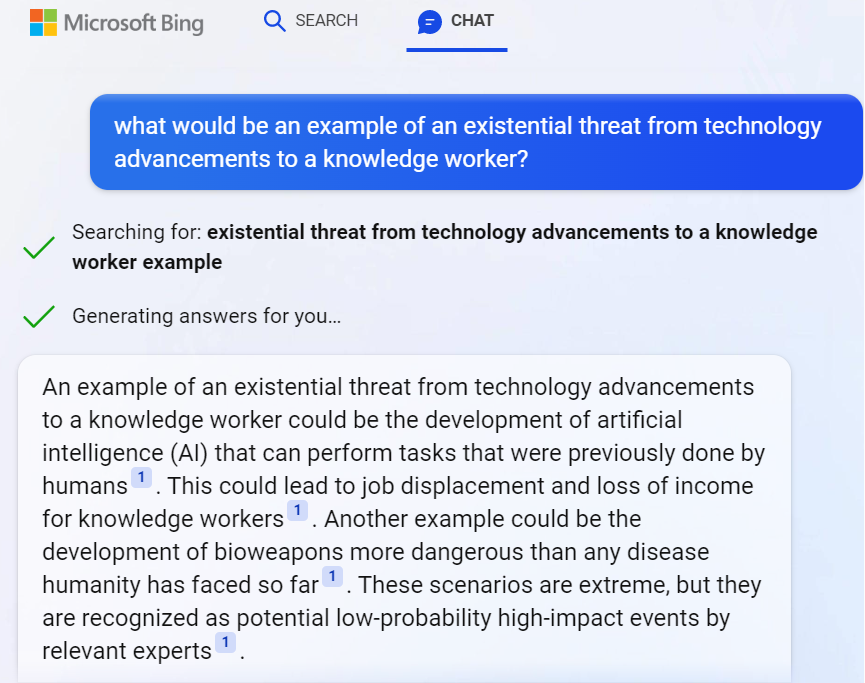
Shouldn’t we be happy about AI coming and promising to handle the mundane parts of the consulting business that we didn’t really enjoy all that much anyway? While everyone sort of cheers for the virtual assistant that can process our emails, summarize data, generate reports, (very shortly) do basic interactions with CRUD based systems – some might notice that this also sounds like an existential threat. Even Bing knows it:
Ah. AI skills and bioweapons nicely coexisting in one answer from a service that used to be just a dumb internet search engine a few months ago. Nothing to see here, folks! Move along!
When I first started to explore this recent leap in AI’s capabilities, I was introduced to Moravec’s paradox. It states that high-level reasoning requires very little computation, while low-level sensorimotor skills require enormous computational resources. In short what this means is: replacing the driver in a car will require a huge amount of computing resources, whereas replacing the office worker sitting next to a computer all day is almost trivial in comparison.
This is not what most of us have been taught about how technical advancements replace human workers with digital tools. Yet it makes perfect sense when you think about it. The natural selection of evolution has had billions of years to develop the skills we use for observing and operating inside a physical space. Email has existed for only 54 years. We are all really just helpless babies when it comes to processing data, yet we are quite advanced in our abilities needed when diving through the busy streets of a city full of physical objects / actors.
The arrival of year 2022 level AI skills in the form of LLM was the first time many of us ever needed to take a look in the mirror and say:
We used to be the ones disrupting the working life of others. Now we are gradually joining the ranks of disruptees. No, I still don’t regret one bit that I chose to pursue a career in the cross section of business and IT. This is a much better position to be in when thinking about what lies ahead and who’s got the possibilities of participating in building something new and exciting.
Things have always evolved and we’ve seen technological leaps before. I just can’t help thinking that the world in which I grew up to understand what IT is about will now seem incomprehensible to the new generations who’ve yet to discover it.
Backward never
As a child, the first time I got the chance to physically interact with a computer was the ABC 80 that my dad bought. Serious computers seemed very complex to use, yet at that time I was young enough to entertain myself simply by typing on the keyboard and pretending to use the computer. Fake it till you make it, right?
Photo by Frédéric BISSON: Pacman on Atari 800XL at RetroGaming Days IV
When I got my first personal computer for myself, the Atari 800XL, it supported loading games from a cartridge that you just plugged in. That was the “instant gratification path” of using a computer. I did also start reading the magazines of the time and even typed in a few of the Basic games, transforming the code that was printed on the paper into bits that I typed in via the keyboard. It was interesting, yet it always felt too hard to achieve some tangible results. Code didn’t provide me a way to express myself. It wasn’t until I started creating music on the early PC tracker software that I saw computers as a tool for creativity.
My kid is now 3 years old. As he’s getting exposed to how technology is used in our daily lives, I’m pretty sure he’ll never see computers as “hard to use”. Now as the natural language interaction pattern will presumably quickly take over most casual usage of smart devices, the concepts of programming or code may remain very distant to him. He’s already happily giving Google Assistant voice commands via a smart speaker in our living room. Why wouldn’t it work for everything by the time he’s old enough to start creating things with computers on his own?
It goes far beyond the difference between punching keys vs. shouting commands. As of today, Google Assistant is a complete moron compared to ChatGPT. It won’t be that way for long, though. The idea of a computer that understands what you want to achieve without it having been programmed to fulfill that specific request is a shift so profound that such AI capabilities will be infused in every possible smart device. Because otherwise calling them “smart” with the 2021 level of skills would just get the vendors laughed out of our homes and businesses.
Soon, no one will be given the opportunity to claim that they don’t know how to use computers. There may not be a single visible computer around, but everything around you will be processing data and adjusting itself to the sensors inputs. That’s likely the world in which our children will grow up in, regardless of what we as parents would do. Life without ubiquitous AI may soon be like trying to live without electricity.
And now to Power Platform.
Everyone as a developer
The idea of how the low-code Power tools could eventually democratize the creation of applications is something very close to my heart. The products were introduced roughly a decade ago now. At around 2018 I started talking about the crazy idea of how in the future creating apps would be as commonplace as creating documents already was. I used it as a way to get my point across when talking with colleagues, claiming “every PowerPoint should really be a PowerApp”. I wanted to challenge their traditional idea about apps being something big and expensive created by professionals, insisting that they could also be small, disposable things created by anyone with a computer.
MS has of course been talking about infusing AI into their product portfolio for a long time already. We’ve seen some neat little demos and product features introduced with what NLP (natural language processing) has been able to do, but in reality it hasn’t had almost any impact on the everyday life of the app/flow/report makers. Sure, AI Builder as a citizen friendly entry point into the world of Azure Cognitive Services has seen some real-life usage, yet it has hardly been a mainstream tool for citizen developers.
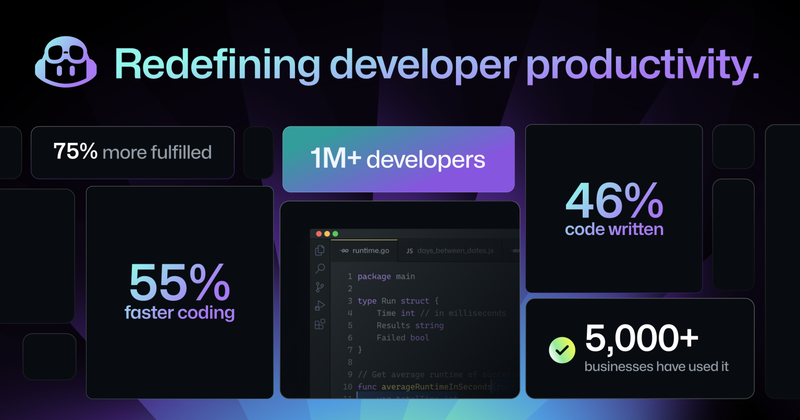
The more powerful next generation AI features have first landed on the pro-code side, under the GitHub Copilot product. These stats from the announcement of the latest GPT-4 based Copilot X version give some indication about the adoption rate. It doesn’t sound like just a marketing gimmick anymore. A fair share of developers out there are probably at least considering taking it into everyday use for the process through which they produce their work output.
Those of us who come from outside the world of programming and spend our days working with something other than raw programming code could soon be facing the same question: should I let AI do a part of the work for me? As anyone with more extensive experience on Power Platform probably agrees, low-code does not mean low complexity. Working with data, business logic and UI can present quite a cognitive load, even if you are “just point’n’clicking” or writing Power Fx formulas instead of JavaScript or C#.
If anything, no-code/low-code should become the area in which safe usage of AI generated components would go mainstream a lot faster than in code generated without any productized guardrails around it. In the end it’s still all made of code and it all runs in the Microsoft cloud already (in the case of Power Platform). Training dedicated AI models to serve this well defined playground should be a very doable task for the platform provider. Of course the UX of how app makers interact with the generated results needs to be thought out, as direct manipulation of the generated code wouldn’t be quite ideal.
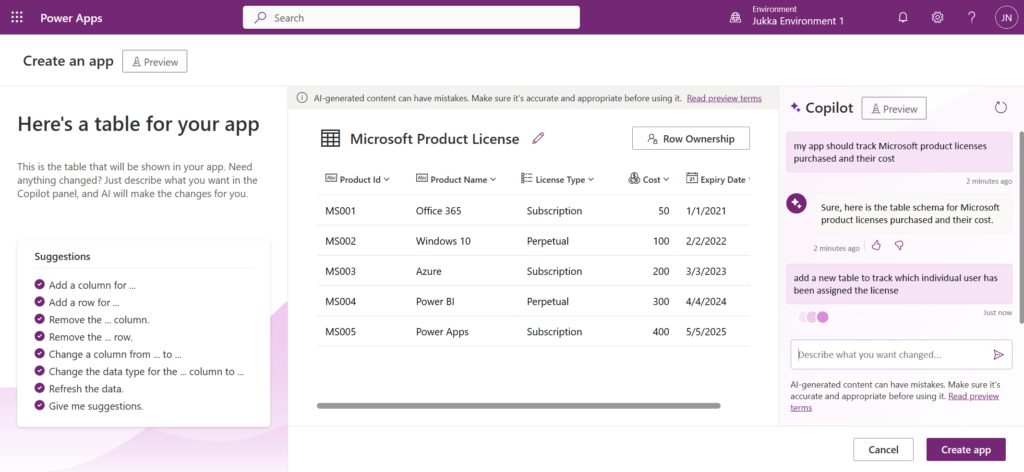
If business users will learn to leverage Microsoft 365 Copilot to generate documents for them, how far can we be from the stage where they are also comfortable generating apps and automations in the same way? I believe were are definitely moving into the direction where questioning the abilities of non-programmers to design and develop their own tools isn’t a valid generalization to make anymore. I honestly did not believe we’d get so close to the state of “hey Copilot, turn this PowerPoint into an interactive Power App” being a possible reality this soon.
This, in turn, will lead us to the question to think about: is this what the world really needs?
The NoApps future
In the end, people don’t need apps. In the same way as the record industry was formed around the concept of producing, promoting and selling physical items containing a representation of music created by the artists, our current business applications consulting industry is also focusing on the intermediate output. The actual value delivery is something we must never lose sight of. Else you may find yourself selling plastic discs when the world has decided to jump into streaming audio instead.
Quicker creation of apps will initially have plenty of demand I’m sure. Besides, it really is a cool demo that you could draw a form design with pen & paper and then have AI generate a digital app’lified version of it (both Microsoft and OpenAI have used this scenario). Yet it’s still just a static data capture form. How many forms can employees or consumers navigate through during their days before getting exhausted with the “there’s an app for everything” experience?
These UIs for standardized data capture and processing have been needed because our technology couldn’t previously work with anything more fuzzy. Well, we’ve now seen through ChatGPT that it most certainly could. Not only can the AI figure out what us humans mean, regardless of what language we type our text in. It can also figure things out from what anyone else out there in the world has written.
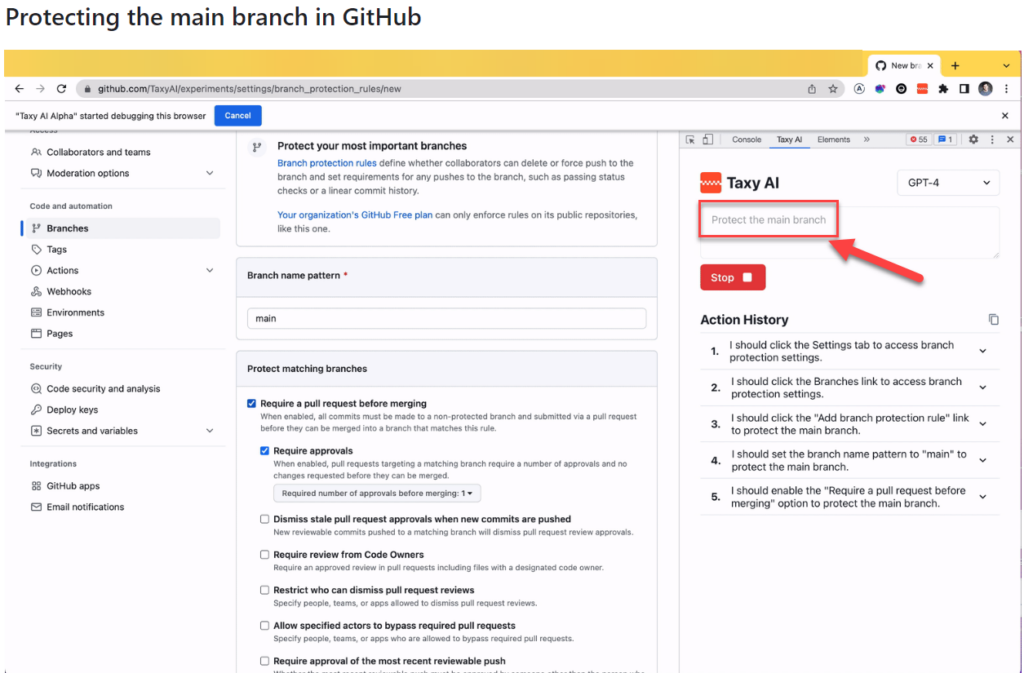
There’s an interesting demo / research preview of “just some guy” applying GPT-4 to instruct the web browser on what to do. Not just writing out the instructions but actually performing the steps. In the example provided in this TaxyAI project, while on the GitHub website, giving a prompt “protect the main branch” will trigger the AI to do research on what that means, where it should be clicking, and then completing the steps as an RPA style bot:
I’m not saying this is a tool that would go mainstream. Rather it serves in giving ideas on what the tech giants out there will be creating with their 1000x budgets. The Copilots of tomorrow will not just return a box filled with text that they generated. They’ll probably do the actual work for you, rather than just providing instructions.
Think about all the process documentation and ad-hoc instructions that has been created inside a medium size enterprise. It will never be realistic to turn each of them into dedicated apps and automations. Yet if we get an AI service that can read these instructions created in human language, turn that into actions for the computer, and then complete the chain of activities to move from the original process input to the final process output – that would be something.
The concept of “working out loud” by proactively sharing our observations of the world and our accumulated knowledge with the community of colleagues meeting on a digital platform has been a great productivity booster and a source of professional & personal growth for me. Today with ChatGPT or Bing we can gain further benefits by “thinking out loud” with the machine, providing it a sequence of dialogue like prompts. The natural evolution from this could lead towards a world that actually supports “working by thinking”:
“Hey Copilot, I spent €50 on a cab ride.”
“I can see that you’re in a city where you had previously agreed to visit for a customer project. I’ve grabbed the Uber receipt from your email, filled all the details into our corporate systems and the reimbursement has been deposited back to your bank account.”
Instead of this sounding like a scene from some flashy “World of Tomorrow” video created by IT companies to sell us boring & expensive tech of today by using a fictious scenario from the year 2060 or something – it doesn’t sound too far off anymore. An AI assistant that understands what we say we want & what others say we should do in order to get it is in theory here today already, in the form of LLM based chatbots.
We just need to plug it in.
Endless problems
Cue the soundtrack from The Terminator. This is exactly how you create Skynet, isn’t it?
“Defence network computers. New… powerful… hooked into everything, trusted to run it all. They say it got smart, a new order of intelligence”. “Skynet saw all humans as a threat; not just the ones on the other side” and “decided our fate in a microsecond: extermination”.
Michael Biehn as Kyle Reese in The Terminator (1984)
AI will introduce brand new problems for humanity. Some will be existential (“is there a place for us in the world after AGI arrives?”), others much more mundane. What I’m somewhat worried about is that we’ll be faced with them pretty much all at once in the greater scheme of things. Without the ability to identify what is a serious issue for the whole world, what is merely a speedbump on the road to innovation and business productivity, we’ll be mighty confused.
The number of things we could be worrying about when it comes to AI is overwhelming already today. Use this list as an example and pick one item if your bag of worries is looking empty:
Copyright issues of imitating/borrowing content from original makers without permission.
Tech monopolies growing even bigger and stronger than they are today.
LLM hallucinations making it impossible for us to know what’s right & wrong.
The internet & every media getting flooded with machine generated content.
Biased data in the training sets inflicting harm on how minorities get treated.
Next generation surveillance society á la Minority Report.
The challenge I see ahead is that AI may be unlike anything we have ever encountered before. Sci-fi literature and movies have attempted to provide at least some context to the phenomenon, enabling us regular human beings to talk about what’s happening around us by using references from popular culture. Yet where are the AI consultants that will help organizations of all shapes and sizes make sense of this? (I know: just open LinkedIn and everyone is an AI expert there these days. But anyway.)
The range of reactions to AI that we can expect to encounter when starting to talk about it as just regular technology consultants is probably going to be all over the place. Many organizations will have legitimate legal and compliance concerns that will cause them to choose the “better safe than sorry” approach and put things on hold. Elsewhere, the gains from initial experiments with LLM powered information systems may turn out to be so compelling that AI becomes the next Digital Transformation that must be sprinkled on top of everything the company does.
I suspect the divide between individuals will be even greater. Just like the low-code tools have enabled the new breed of app makers to stand out from the ranks of ordinary business people and create something few of their colleagues could have ever imagines, the same thing can happen with adoption of AI tools. One’s formal education nor professional background may not be the best criteria to identify those who’ll be able to apply this new technology into solving real life problems.
If anything, I suspect it will be even more likely that the domain experts, the citizens, will be able to set aside all those “this AI generated code is garbage compared to what a true professional developer could write” complaints and just focus on the end results from using that code instead.
Good enough is close enough
We’ve been taught to believe that the world of computing is very binary by nature: it’s either 0 or 1. Computers either behave in a logical, repeatable manner and deliver the exact result they have been instructed to – or they deliver nothing but an error. People trust the computer to be right just as long as someone programmed it the right way.
LLM’s have flipped these roles around. Now the computer is the creative one, generating an endless list of ideas and content variations, based on the simple prompts given to it by humans. Not instructions like code, as there’s no way to guarantee that the neural network would produce the same output the next time you provide the exact same input. This new generative AI is whimsy and unpredictable, which makes it so much closer to behaving like us humans do.
If you work in a profession where any part of your output can be presented as text, there’s a high probability you’ve given ChatGPT a go and tested how it performs in producing similar outputs. It’s equally likely that you’ve seen the answers given by the machine to contain plenty of factual errors. “Hah! Nice try, AI, but no matter how much data they feed you, you’re still just a stochastic parrot“.
We should of course take pride in our craft. Many of us work in an environment where the professionals who can provide the most detailed answers to questions presented to them get the highest amount of respect. We gain trust from others, we build up our own confidence, we “level up” by being knowledgeable in our field and delivering high quality work outputs.
Are you always right, though? Of course not, we’re all only human.
Can you apply your expertise to any areas of business? Heck no, the deeper we go on topic Z the less time we have for studying topics A…Y.
Can you work 24/7/365? Not possible, you know that.
Communicate in any language? Why are you even asking these th…
WILL YOU WORK FOR FREE?!?!? Okay, I prefer not to continue this discussion anymore.
AI doesn’t have to be perfectly accurate to be of extremely high business value to companies. It only needs to be close enough, so that the superpowers it does possess over us living and breathing human beings can be put into use. Yes, it will very often need supervision and intervention from humans at some stage of the process. Yet the biggest financial gains will be achieved wherever the share of human work can be brought down to a minimum. Which means people will be very creative in finding ways to harness the creativity of AI in novel ways.
AI can always be there for you when needed, whereas a human professional cannot. In my line of business, today the customers are googling for answers and following videos & blog posts to manually repeat the steps on a computer to get their job done. When it gets too tricky or they don’t even know what to search for, Power Platform Advisors can step in and ensure the desired results are achieved. Customers can rely on us, but they need to sacrifice both their time (adjusting to whenever we are available) and money (sorry, we also have to make a living).
If you can take away all these nasty human constraints, AI will be a sweet enough deal to consider as an option for pretty much anything. People will try it because the barrier is almost non-existent. The tools for creating business solutions will have the Copilot capabilities baked into them, thus promoting them as the first resort. You’d be crazy not to use them.
What about the possible damages, though? Let’s say that generative AI is right 90% of the time and a human professional gets to 99% accuracy. When your AI built business solution causes big problems for the first time, won’t everyone go back to the good ol’ professionals?
There will undoubtedly be business models emerging that work a bit like insurance does. Since we can’t be sure that LLM based answers are correct, and we also can’t sue the AI for providing us wrong advise, someone needs to step in and become that middleman. Yes, accidents will happen and someone needs to cover the damages. Now, if your AI based service costs €20/month instead of €200/h and you’ve got a policy that promises to fix whatever issues were caused by unsupervised AI-driven decisions – it can be quite a lucrative model for both parties.
Bicycle evolved
Steve Jobs called the computer “a bicycle for the mind.” It is a beautiful, powerful metaphor. In the early 80s, the democratization of computing through the rise of a personal computer that was available for work and personal tasks was presented as a huge leap in the capabilities of an individual. Just like hopping on a bicycle improves man’s efficiency on energy use per kilometer travelled beyond that of any animal in the world, our possibilities for cognitive work rose onto a new level as computers became an everyday tool within our reach.
AI could lead to something of similar magnitude eventually. Is it just a faster bicycle, though? Did our computers become more powerful or did the tools change in a way that requires a new metaphor? When talking about LLM based tools like ChatGPT specifically, I quite like the analogy of “calculator for words”. It underlines the way in which these new tools of 2023 need to be approached as not the all knowing sources of truth but rather the wizards of words. They are extremely powerful in delivering combinations of words to represent most things us humans use text for (be it communication or code). However, assuming that they understand the world in the way that humans do is a mistake to be avoided when making use of their wizard skills.
If the electronic calculator was brought into an office where everyone had previously been crunching the numbers with only pen and paper, what would be its impact? A thought exercise like this might help us in understanding why there will be both enthusiasm and scepticism expected as AI capabilities begin to appear in the applications and platforms used in organizations today. And just like what happened to the physical calculator devices, eventually we’ll get a next generation of machines where the ability to perform calculations is just one app among many.
It’s that time of the year again when all us Microsoft Business Applications geeks are blessed with two huge documents to consume: the Release Plans for both Power Platform and Dynamics 365. While I gotta say that it’s awesome to have this level of transparency on what specifically is in the next 6 month release cycle, the amount information does feel overwhelming – at least if you’re trying to cover more than a few specific products within the stack.
Ultimately we should at least aim to have a general idea of how each piece of the BizApps puzzle is evolving. Especially the Power Platform side is very relevant for anyone who’s not strictly focused on training/delivering/administering just a single app from the Dynamics 365 portfolio, because this is your low-code toolkit for making those applications meet the real life needs of customers. Unlike with past CRM projects, the customization tools are not part of single server installation, rather they can be discovered from all around the Microsoft cloud.
To make the Release Plan easier to digest, I’ve picked out the new/improved features that jumped out when I went through it for the first time. Instead of the PDF versions (which are coming a bit later anyway), I prefer the online documentation, so below are links to each of those items for you to drill deeper into – and also keep track of possible changes to the original plan.
I’ve added my comments on why I consider these to be the most important items in the Release Plan. Time will tell how they actually land and what the impact will be. It’s going to be fun to review this list October 2020 when Wave 1 is over!
Offline improvements: the need for accessing data without a live connection is still very real in mobile scenarios. What is somewhat of a bummer is that the efforts here are targeting Model-driven apps only for now.
Modern solution explorer makeover: Yes! There are a lot of areas where app maker productivity could be improved, so it’s great to see investments are being made here.
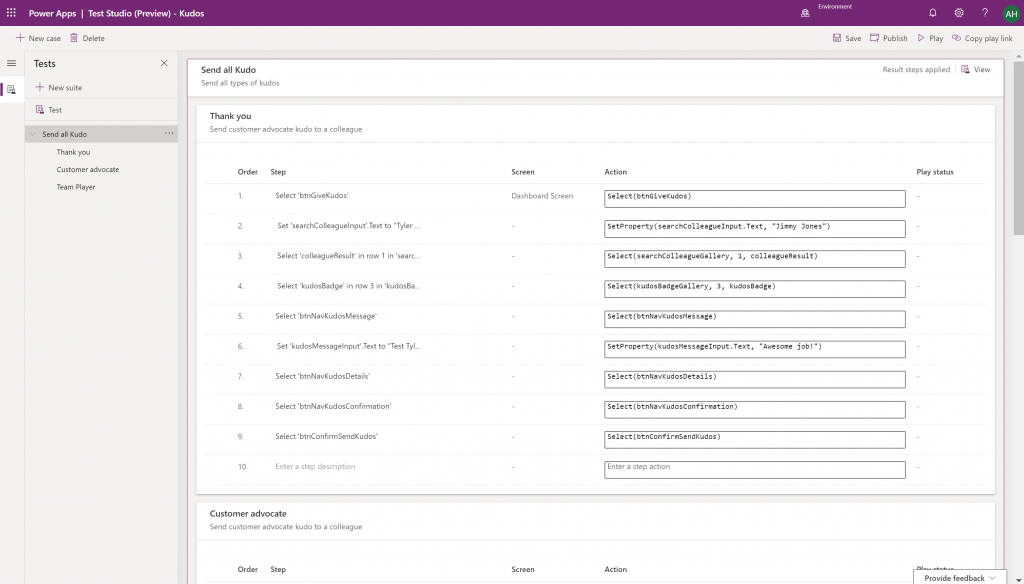
Canvas app Monitor tool & Test studio GA: the wave of the future. Low-code app development isn’t going to be restricted to personal productivity scenarios, we’ll have much of the same needs as in the pro dev side.
Generate app from data with responsive layout for phone and tablet: it’s been an awkward limitation before to only support phone layouts. The bigger story is in bringing out these templates for how to actually make Canvas apps responsive, as it has been quite a mountain to climb for citizen developers. In 2020 Wave 1 we’ll also see a preview of the awaited responsive Canvas app pages.
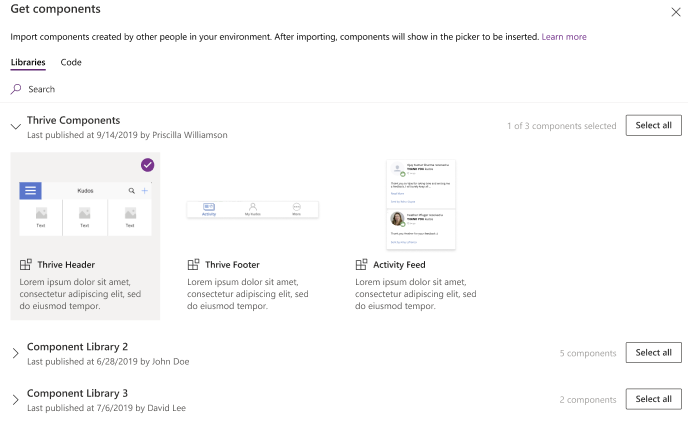
Canvas Components GA: very impactful stuff here. Component libraries, solution awareness, support for galleries and forms, using collections and media files. These are big steps in bringing the two app types of Canvas and Model-driven closer together.
Unified Interface enhancements: important for many Dynamics 365 experiences. Forms as modal dialogs in particular looks useful, better filters are about closing the gaps to legacy web client, search in this view is an age old requirement.
Improved themes reflecting modern Microsoft Fluent themes: UI matters, the power of the Apps is not just in the logic, data and automation. MS should be more aggressive here when competing against other low-code development platforms.
Power Automate
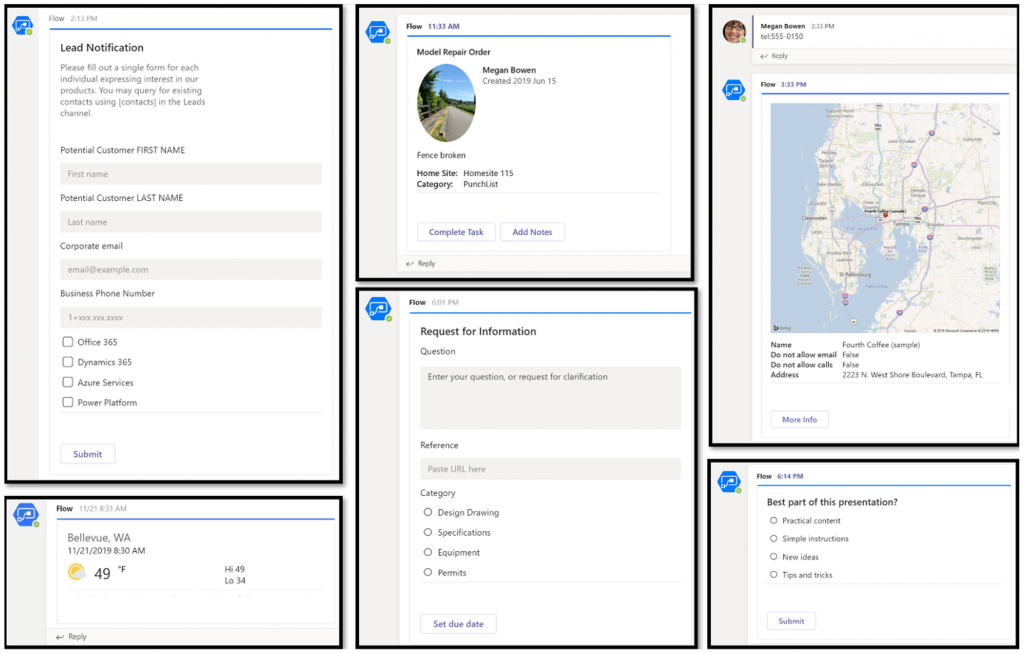
Interactive adaptive cards: we’ve surely been waiting for this. Very important for bridging the user experiences across different tools in different MS clouds (Office, Dynamics, Power Apps). Could 2020 be the year of the Adaptive Cards? Potentially yes, if you look at how Teams & Power Automate can make use of this feature.
UI Flows solution awareness: aligning RPA with the common shipping vehicle of Power Platform. Being a new preview feature, there’s of course a lot of other parts moving around still, but the important bit from a platform play perspective is getting everything to play nice with solutions (including non-UI Flows…)
Use business process flows in Office 365 apps: interesting yet logical step. From a process automation perspective there’s no reason to keep BPF functionality tied too closely with the familiar CRM sales process stages mentality. Again, it’s the platform that counts.
Power Platform governance and administration
Environment life cycle support: much needed in the real world implementations. To be able to test new standard and custom features in complex business systems, copying and deleting environments needs to be compatible with all the platform components used. Power Automate, Canvas apps etc. have to support healthy ALM patterns for enterprise development scenarios.
User access diagnostic experience: again, very much needed for keeping larger environments operating the way IT would want them to. The process of managing access to applications should be isolated from the actual app maker tools or features specific for Dynamics 365 admins, to ensure there’s help available on a broad enough level when users encounter problems.
Admin connectors & PowerShell cmdlets Generally Available: because they need to be. Low-code Application Platforms for enterprise customers will have to provide automation tools for not just app creation but app governance and administration. If the number of business apps within an organization will explode thanks to these tools, trying to scale the old admin practices isn’t going to be the answer.
Bring your own data lake: allowing customers to control their own adoption metrics for Power Apps. Just like the GUI for admin tools might not meet the requirements of all organizations, it makes sense for Microsoft to allow customers to also take the telemetry data from apps and use Azure services to put it into their own reporting context.
Power BI
Paginated reports enhancements: the next generation SSRS has been a long time coming. The new features like API to render a paginated report to any format (e.g., PDF, Excel) and subreport support will bring the cloud reporting powers of Power BI close to what you could do in on-prem 15 years ago. They might not be the coolest of features, but for many CRM scenarios these “pixel perfect” A4 outputs are still a very practical solution.
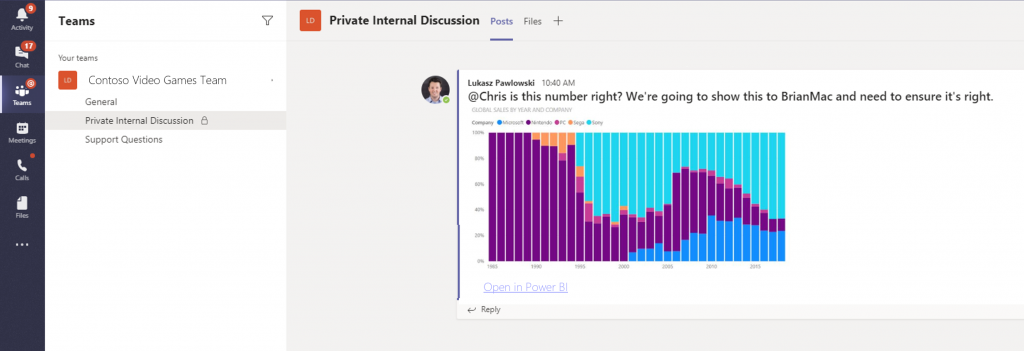
Copy and paste visuals into other applications: supporting the modern flow of information. If the paginated reports represent the PC era way of working, then being able to grab a part of your analysis and quickly paste it to a conversation in Teams with a link back to the full report is the way today’s information workers expect these cloud apps to work with one another.
Data lineage GA & enhancements: when cross-referencing data from anywhere is a breeze, how can you tell if the analysis is actually accurate? The lineage visualization is an effective way to illustrate how this modern world of self-service BI operates and bring tools to do meta-analysis on what’s the actual source of the truth being presented to you.
Adaptive Cards: see my comment in Power Automate section.
Single Sign-On: if attempting to go beyond generic website chat popups, strong identity management features are a must.
Pass context to a bot from the calling site: “Hi, how may I help you?” That’s not how a smart agent would initiate the chat, so after identity comes context management. Bridging the gaps between apps is where I see bots being particularly powerful, so URL query string support is a good start for making this happen.
AI Builder
Power Automate integration: building the Cognitive Service for citizen developers. The patterns from Azure need to become more accessible in the BizApps frame of reference.
New models like anomaly detection and receipt scanning: making AI Builder ready for business. Training AI for unique data sets is one thing, but where I believe wider adoption will start is through these more “ready to go” scenarios.
Common Data Model
Empower out-of-the-box analytics: delivering on the promise of CDM. It’s all just theory until we see Microsoft deliver on those promises about making it easier to integrate data sources and analytics/AI via a common semantic model.
CDM visualization and management experience: making CDM more than a GitHub repo. “Increased focus on growing the Common Data Model ecosystem requires enabling users to work with Common Data Model in their native data environments, such as Power Query, Insights Apps, Synapse, and Power BI.” Yes, it certainly does.
For the past couple of years I’ve done a “top 3 themes” post at the end of the year, to reflect back on what were the key topics that shaped the coming direction of Dynamics 365. Just because this is no longer a “CRM blog” doesn’t mean I should give up on that tradition, so let’s do some exploration on what has happened in the past 365 days.
One year ago I described 2018 as the year of the platform and listed the top themes to be 1) Power Platform, 2) One version, and 3) AI journey. What will 2019 be remembered from? Just like before, it was fairly easy to select three bullets that I think have been most impactful on the Business Applications ecosystem:
Low-code movement
Licensing confusion
Data story evolved
Let’s discuss what happened under each of these themes in 2019 and do some forward thinking on why they’ll continue to be relevant in 2020.
Low-code movement
This first topic is a much broader phenomenon than just Microsoft’s Power Platform offering. During 2019 we’ve seen the general tech media and industry analysts give plenty of attention to the rise of low-code/no-code development and how organizations are exploring its possibilities to augment (or even replace) traditional software development methods when it comes to internal app development. Microsoft receiver recognition from both Forrester in March 2019 and Gartner in August 2019 for its position as a leader in the low-code application platform market.
The term “citizen developer” had of course been used already much earlier in Microsoft’s description of the target group for Power Apps (earlier “PowerApps”) and Power Automate (formerly known as “Microsoft Flow”). However, it’s safe to say that the general interest on low-code is rising much faster, if you look at what people are googling:
What has propelled Microsoft to the top right corner in the analysts’ charts is not just the functionality aimed at everyday information workers / power users in these tools. Making their low-code offering enterprise ready has been a clear goal for Microsoft, as can be seen from how the pro developer audience is being presented Power Platform + Azure as the platform for every developer. On the IT administration side the efforts to put together a Center of Excellence (CoE) toolkit for Power Apps are showing Microsoft’s commitment to providing a governance story to address both the common admin needs of organizations as well as adapting to the varied support needs of the new breed of app makers.
There is a wealth of functionality that’s still just in the MS product team’s pipeline to land sometime in 2020 which will make the Power Apps development process much more like “real” app building. Built-in tools like Power Apps App Monitor will be the go-to place for debugging formulas, analyzing performance and in general taking a peek under the hood of what the low-code declarative app development studios actually produce. The coming Power Apps Test Framework will allow the authoring and execution of proper test cases, to ensure the app quality doesn’t erode as new features and platform functionality are introduced. There will be Power Apps telemetry data available in a similar way as Azure Application Insights provides to custom apps today.
All these platform investments together with the growing interest from customers (and presumably partners, too) should mean that low-code app development will become increasingly mainstream in 2020. This will boost the awareness of different vendors in the category and may well steer us a bit further away from the ever so familiar head-to-head comparison of Salesforce vs. Microsoft that’s founded in their CRM product offering. Dedicated low-code players like OutSystems or Appian may start to appear more frequently on the radar, as well as companies like ServiceNow that are running towards the citizen developer territory from a slightly different background. Oh, and you should definitely expect there to be even more heated debates ahead on the possibilities, limitations and roles of no-code, low-code and pro code!
Licensing confusion
This second theme is in part related to the growing pains of how the Power Platform tools are turning into self-sustained products rather than just an extension method for Office 365 and Dynamics 365. Yes, they are still very much the toolkit for how you customize applications in the aforementioned suites. However, building extensive custom apps with the full low-code platform capabilities is no longer something that “comes with Office” when looking at the latest licensing terms. Citizen developers can still easily get started with the “seeded” plans in Office 365 for their personal productivity explorations, but for the organization wide deployment of low-code solutions, customers should prepare to purchase dedicated Power Apps and/or Power Automate licenses.
In 2019, removing the earlier included rights from Office 365 seeded plans to use custom connectors, HTTP custom actions, on-prem gateway, Azure SQL was understandably something that irritated those early adopters who had dived deep into building Power Apps and utilizing flows on a wider scale in their organization. While I bet many had suspected there would eventually be limitations designed to drive customers towards the paid plans, it might have been a surprise that minimum price point for the required Power Apps user license was kept at $40/month. From the Office 365 point of view, this can sure look like quite a “cliff” for taking app development further.
Another big surprise was the way how Microsoft introduced a new $10 per app pricing model as an option for basically any custom apps built on top of Power Platform. With rights to full feature set of CDS, Model-driven apps and pretty much everything that you’d need for running an app that looks like the native Dynamics 365 apps, it seemed almost too good to be true – if you’re coming from the Dynamics side of traditional CRM style business applications where the enterprise apps cost $95. A great example of the two different realities clashing, when Power Platform can simultaneously be seen as crazy expensive or dirt cheap, depending on the frame of reference.
The policy of licensing the low-code Power tools from Microsoft via primarily a per-user model with upfront payment requirement is sometimes challenging when talking about the business cases for an application platform that would be gradually adopted for more and more app scenarios. There’s no pay-as-you-go option like with raw Azure resources, because Power Platform is a value-added abstraction layer that should remove any direct dependencies to those resources. However, in 2019 we saw MS take things towards capacity based licensing, with the introduction of explicit Power Platform API request limits per user license type, plus the option to purchase additional capacity if needed. Although MS has stated that normal users should be well within the included API quota, there have been many concerns raised from developers on how custom apps and integrations will be impacted. The fact that these new consumption based limits were announced before any metrics were made visible to customers for evaluating their existing scenarios didn’t exactly help in alleviating concerns.
I’ve never spent as much time investigating the details of Microsoft licensing as I did in 2019, and honestly I hope that 2020 would be at least a bit lighter on the licensing changes side. Seeing the rate at which the product portfolio of Microsoft Business Applications is growing, though, I’m not sure if it’s realistic to hope for the size of the licensing guides to shrink anytime soon. We’re also still waiting for some of the October 2019 licensing announcement details to be finalized, like the promised API usage metrics in Power Platform Admin Center, or the updated list of restricted entities requiring Dynamics 365 license. Oh, and I bet in 2020 we’ll see the launch of technical enforcement for the types of apps that each license holder is able to use (1st party, custom, Team Member etc.).
From the customer and partner perspective, the licensing of Power Platform is often perceived as its most complex part, based on feedback from various community members. Although many of the recent changes have been undoubtedly necessary to align the very different Power Apps and Dynamics 365 licensing models into a coherent and future proof platform licensing model, unfortunately the continuous adjustments on what these services actually cost to run has clearly eroded the customers’ trust on being able to predict the operating costs of their solutions built on top of Microsoft’s cloud. After shaking things up on the licensing front in 2019, let’s hope that 2020 would see less drama. Who knows, Microsoft might actually study their own data on how the latest licensing and pricing decisions have impacted service consumption and calibrate the model on those areas that could be better balanced to drive greater adoption of the platform and the apps.
Data story evolved
Basing business decision on larger and larger pools of data, gathered from an exponentially growing number of sources, processed closer and closer to real time is the Digital Feedback Loop story that Microsoft has been preaching in basically every Business Applications themed event for the past couple of years. The underlying message is that you must have applications so well integrated with one another that you can establish such a loop in real life – which of course the products in Dynamics 365 and Power Platform portfolios promise to deliver.
Back in 2018 we saw the birth of many “AI for X” products that have since then been rebranded as “[something] Insights”. I called this out as the start of the business AI journey in last year’s summary blog post, since we hadn’t yet seen much of these new intelligent features find their way into actual customer environments. Based on my observations today, it’s still fairly rare to find these premium Dynamics 365 licenses for Sales Insights or Customer Service Insights deployed in real life scenarios (let alone Market Insights that’s still a bit of a mystery product in its preview state). So, it appears that at least these core CRM processes didn’t just magically get transformed by adding some AI frosting on top. A big practical blocker seems to be lurking in the availability of clean enough data in large enough quantities that these packaged AI features could show concrete results to business decision makers in customer organizations.
What 2019 did deliver is a set of new products that are aiming to leverage business data in a way not previously covered by Microsoft’s business apps offering. In the second half of 2019, the headline Dynamics 365 product demonstrated in all MS events was Customer Insights. Built as a Customer Data Platform (CDP), its purpose is to enable marketing users to combine customer and transaction data from numerous different sources, to form a 360 degree profile of that customer and use it in better segmenting offers and providing personalized service. Pouring data into Azure Data Lake & CosmosDB is designed to be effortless from any source, be it Microsoft’s or other vendors’ solutions, with intelligent matching algorithms generating “keys where keys don’t exist”. While it can be used with Dynamics 365 apps, there’s no requirement for the customer to have a specific CRM system in place. It’s also not a black box like some of the earlier Insights products, since the built-in templates like churn prediction can be replaced with custom Azure ML models to take advantage of machine learning models built and trained by your own data scientists.
Another similar data intensive new product launched as preview in 2019 was Dynamics 365 Product Insights. The origins of this application lay in Microsoft’s own telemetry data management systems, where services like Xbox, Skype, Bing and Office have been sending up to 25 million events per second to be processed by the same technology that’s now offered as a Dynamics 365 SaaS product to customers. Yes, you could use Azure Event Hub to push all that product telemetry data into the PI service, but there’s a Signals SDK for Java, Objective-C or Python, too, if and when the whole product architecture of the customer organization isn’t based on MS technology. Insights derived from processing the signal data could be consumed via Power BI or embedded inside Dynamics 365.
These kind of new services that are aimed at exposing business users to data that previously used to exist outside the reach of the Digital Feedback Loop sound a lot more transformative than the earlier “AI for X” products. Sure, there’s also value in bringing predictive opportunity scoring into the traditional sales funnel management in CRM. However, those kind of features will likely become the new norm for the type of smart business apps that users will expect to be interacting with everywhere. The customer specific implementation of solutions based on Customer Insights or Product Insights, on the other hand, have the potential to be a source of true differentiation if organizations can learn unique ways to use their data for proactively serving their customers. It also aligns with the ambitions that Satya Nadella has on how organizations can break traditional data processing barriers with the help of Azure:
We are building Azure as the only cloud with limitless data and analytics capabilities across our customers’ entire data estate, bringing hyperscale capabilities to our relational database services.
New services like Azure Synapse will naturally be the toolkit for creating highly specific, cutting edge analytics solutions on the MS data platform, but I can imagine the SaaS style Dynamics 365 products to follow pretty close by when it comes to covering repeatable business scenarios for big data – with the same underlying Azure tech, of course. In 2019 we already saw CDS data export to Azure Data Lake becoming available both via Dataflows as well as through a standard feature (preview). The traditional relational world of business application data is intermingling with the less structured analytical data systems at a rapid pace, with Microsoft building these services that blur the lines of what specific type of data is being used in which business scenario. Is 2020 going to be the year when Dynamics 365 professionals must step out of their comfort zone of having everything in one database and start connecting to all these strange new services, to deliver those much sought after actionable insights to their business user audience? We’ll know that in approximately 365 days!
In the past I’ve written about the History of Microsoft CRM from it’s first 10 years. I’ve also explored how the platform evolution up until Dynamics CRM 2013 had changed the product and how we worked with it. This time I want to focus on specifically the Microsoft Cloud era.
I started to think about the different focus areas that we’ve seen on the journey that’s taken us from the early CRM Online days into what the current roadmap for Dynamics 365 and the greater Power Platform look like. In my mind these “snap” into four logical stages that describe what the main ambition at any given time seems to have been for Microsoft’s product team:
Why bother looking back? Well, I could insert a “those who cannot learn from history” quote here, but really it’s more about putting the present into perspective. There are still plenty of customers who’ve either stayed with Dynamics CRM on-premises (now 365 CE by name, too) or who are still viewing the online service as just a “CRM in the cloud”. Hopefully this post will help in understanding the magnitude of change that has taken place in the greater Microsoft cloud during the past few years and why it would be better for them to embrace it rather than just observe it.
1. Parity
The very first versions of Dynamics CRM Online in 2008 wasn’t exactly the same product that you could get by installing it on your own application servers. The limitations on features and customizability meant this was a “CRM lite” that saved you the effort of infrastructure investments and server management, but there were a lot of trade-offs. You gotta start somewhere, but obviously this wasn’t exactly up to the vision that Microsoft saw as what the cloud services should offer to their customers.
Upon the global launch of Online we received the updated CRM 2011 version and most importantly the solution framework that after several iterations now powers the ALM story behind Power Platform. Closing down the gaps between Online and on-prem was the primary goal for product development, with the “Power of Choice” being a key selling point against server-only or cloud-only competition.
While the customization capabilities in CRM Online were surprisingly powerful already in 2011, the gaps in actually managing the environments you had no direct access to took a longer time to close. For the enterprise customers to consider moving from fully controlled servers and databases to the MS hosted cloud, a lot of investment was needed in building self-service features for instance management – not to mention ensuring the cloud apps were reliably available and updated in a controlled manner.
Today the flexibility of spinning up new instances, copying them for test & dev, taking backups, syncing data to Azure SQL for reporting, and many other self-service features available for admins make the cloud environment quite attractive. In exchange of giving up full control over your servers and databases, you have the luxury of not having to think about them at all. There are no servers to patch up and keep running. As for the updates, it’s now a continuous delivery of new & improved features that puts an end to the concept of an upgrade project altogether. Sure, you’ll still need to do your part to ensure customer specific customizations and integrations keep working – that’s just another service that needs a continuous delivery mindset.
2. Integration
Once the cloud version was sufficiently close to the on-premises Dynamics CRM server, the next stage was all about making it better than on-prem. This was the era in which Office 365 was really taking over the business productivity market, so you could say the low-hanging fruit was in tapping into these existing services in the MS Cloud and making Dynamics CRM a more attractive application through those.
Sure, we had heard the “better together” story for Dynamics + Office already in the on-prem days, but this wasn’t exactly the way we today expect cloud apps to just work with one another. Complex server configuration tasks were surely a nice source of revenue for the IT consulting companies, since very few customers were able to know all the ins & outs of how to properly deploy an Internet Facing Deployment of your Dynamics CRM server and make it talk with other MS server products. From Microsoft’s perspective, having useful product features available for everyone in theory doesn’t scale into real world customer success if there simply isn’t enough skill out there to deploy everything the way MS engineers do it in their labs. Well, when it’s all run by MS from beginning to end, this made it a solvable problem.
Making common online services like Exchange and SharePoint available for Dynamics CRM admins to click & configure on their own was one key part of this journey. What this Cloud + Cloud combo also meant was that new features from the latest versions of each service could be rolled out at a much faster pace than the server bits could ever follow. Oh, and since all the services were by default available via the public Internet, mobile clients became an everyday tool for accessing your CRM information.
This time last year I wrote my Top 3 themes of 2017 article on what were the major events and directions from the year for the Dynamics 365 ecosystem. The start of a brand new year always feels like the logical moment to reflect back on the past 365 days, so this sounds like a worthy tradition to keep going. Here are my Top 3 picks from 2018 and some thoughts on how they might influence the direction of the year 2019 ahead.
Power Platform
The biggest single announcement of 2018 came in March when the Dynamics 365 Customer Engagement and PowerApps platforms were merged into one. It wasn’t until July that we began to see the Power Platform term used in describing this new suite of tools that now is the way to extend both Dynamics 365 and Office 365 apps, as well as building brand new apps for customer specific scenarios.All of a sudden the technology that had been bubbling under in the Dynamics CRM corner room is now brought onto the main stage of MS business software show.
The immediate impact was that XRM became CDS 2.0 (Common Data Service for Apps),which probably hasn’t been all that easy for non-Dynamics professionals to understand if they only paid attention to official MS information sources covering the topic. For the Dynamics partners a nice upside in this merger was PowerApps P2 becoming the “naked XRM” platform license they had been asking for many years (compared to the earlier Dynamics 365 Plan license for bundling CRM + ERP, which I don’t think was in as high demand).
A more subtle but equally important change was the birth of model-driven app and canvas app concepts. No, not the marketing terms nor the division into two app types, rather the fact that these different client technologies now had a clear need to start approaching one another in terms of how they behave, what data sources they support and how they are administered. Examples of these have become visible through recent announcements like:
New Form Editor for model-driven apps that resembles the canvas app studio experience.
Growing support for relational CDS data source in canvas apps, with support for 1:N, N:N, option sets.
Unified admin center from where both canvas and model-driven apps are configured.
It would be perfectly justified to call 2018 “the year of the platform”, considering how significantly the investments from MS side seem to have shifted from Dynamics 365 to the Power Platform. During 2019 we’ll see if the partner channel can follow along, to transform their offering into something more in line with the PowerApps story than the traditional CRM business models that have mostly been just revised for the cloud based environments during recent years.
A similar challenge awaits the professionals who’ve been working in this business and now need to figure out how to put their existing skills into use in projects that may not even mention the Dynamics product name anywhere. Plenty of new skills will also need to be acquired for leveraging the broader toolkit. The recent announcement of Dynamics 365 exams certifications to be retired gives an indication of the looming new requirements that await the MCP’s wanting to remain current with their certification record.
One Version
My Nr. 2 theme from 2017 was the App/Plat separation that largely took place as part of version 9 release. Now that Dynamics 365 CE is running purely on Azure after all orgs get to v9, the next logical step is to start delivering new releases on it the same way a modern cloud native product would. PowerApps, Flow and Power BI have already been operating as a service with a single version for all customers and now the platform underneath Dynamics 365 as well as the Apps on top of it are set to transition into this model. The July announcement of how Microsoft plans to deliver predictable updates with continuous deployment for both Customer Engagement and Finance & Operations is another major event of 2018 that will shape the future of these product lines and introduce a new reality for customers who build their digital business processes on top of them. The old CDU process for version update scheduling is no more and everyone will get the April 2019 update bases on the public release schedule.
Just like last year, I was fortunate to be able to escape the chilly Finnish autumn weather to sunny and warm Orlando this September, to attend the Microsoft Ignite 2018 conference. This time my visit to Florida did not contain a whole lot of sunlight, though, as my stay in that region was focused strictly on the days of the event, which meant I was mostly wandering back and forth the endless corridors of Orange County Convention Center. With 1600+ sessions crammed into 5+1 days, you’re always going to have a packed agenda at a conference like Ignite where 30,000 fellow Microsoft geeks are swarming around to gather the latest announcements and demos from their favorite technologies and evangelists.
I’ve written a summary over on LinkedIn of what were the main themes I picked up from Ignite this year. In short, Power Platform was front and center in the story of how Microsoft is further helping organizations to digitally transform their business processes. Not just from the traditional CRM and ERP scope of Dynamics 365 but on a much broader scope that speaks to the audiences that might not have otherwise ended up exploring how PowerApps, Flow, Power BI and CDS can connect their existing Office tools into a more automated flow of data through predefined pipes – as opposed to the more free-form processes that information workers previously had to agree on, to efficiently collaborate with their colleagues.
On the one end we saw a lot of praise for the unlikely heroes that have managed to pick up a toolkit like PowerApps without any developer background or formal position in IT, and build applications that their organizations have adopted into their day to day routines. Even though these citizen developer scenarios may not seem all that complex for professional software people, the key lesson is that these manual processes would have been unlikely to get digitalized with off-the-shelf or custom built software anytime soon. Making the tools for digital problem solving accessible to the people who intimately know the problem is what’s really shortening the time to value, which in turn drives the growth of the community around the Power Platform. It’s not capped by the number of companies looking for a CRM deployment project, rather it’s fueled by the amount of data and cloud based services that make this data available to the platform via connectors.
At the other end of the spectrum there was the true enterprise scale where this data needs to be harnessed with advanced tools and technologies to remain competitive in today’s global business. AI is the kind of buzzword that cloud was in the beginning of this decade, but in the same way as cloud computing became an everyday commodity, we’re bound to see if not artificial intelligence (AI) but at least machine learning (ML) algorithms find their way into everyday tools in the very near future. All of the major apps in the Dynamics 365 CE suite recently received their AI extensions that aim to bring intelligence built into the packaged applications, not just via Cognitive Services from Azure that developers and data scientists must plug into the business applications. Another example of the enterprise application providers’ focus on squeezing more value out of data was the Open Data Initiative by Microsoft, SAP and Adobe that took the center stage in the opening keynote were the three CEO’s explained why it’s in their best interest to help customers “deliver unparalleled business insight from their behavioral, transactional, financial, and operational data.” It’s really interesting to see that the Common Data Model (CDM) may be evolving into something that actually connects applications across big tech vendors.
Among all these tech giants, there was also a 20 minute slot where an ordinary Dynamics 365 guy like me got a chance to tell a bit about what we’re building in this small country of ours. My session was called “Onboarding customers to Microsoft Dynamics 365 for Sales via PowerApps” and you can catch the YouTube recording of the session or just check out the slides if you’re interested in knowing how we at Elisa aim to make use of the Power Platform as part of our product offering. It was the first time for me to be a speaker at an event the scale of Ignite, so a big thanks to Microsoft for providing me this exciting opportunity!
Even though Ignite wasn’t really a Dynamics 365 themed event like the Business Applications Summit a couple of months earlier, there were a lot of interesting demos about the brand new functionality rolling out as a part of the October 2018 release shortly. I compiled some of the highlights tweeted out on the #MSIgnite hashtag during the event onto this Wakelet collection for you to check out if you missed the live event excitement.
Just like in previous Microsoft conferences, the learning doesn’t stop with the closing of the venue doors. The Ignite on demand sessions provide a library of videos and slides that you definitely should be browsing through to keep up with the latest news around what’s coming to Microsoft Business Applications and the many connected products. Now, if you just happen to be located in Helsinki next week, then I have to promote the brand new Finland Dynamics User Group (#FDUG) and our very first Meetup event on October 18th where I’ll be doing a “whole Ignite in 30 minutes” summary of what I found most interesting in the various Power Platform related sessions I attended. See you there!