Tag: activity feed

  • Using the updated Activity Feeds to monitor Queues

    As a part of the CRM Online Polaris update and the on-premise Update Rollup 12, new functionality has been added to the Activity Feeds solution. In fact, it’s no longer a separate solution but rather converted into a part of the Default Solution during the upgrade to Polaris / UR12 (see this YouTube video for details). Yeah, I know you were thinking that Activity Feeds are on their way out as the Yammer integration arrives, but the reality is that the auto posts functionality will still remain a CRM platform component, although the data itself may be presented through the common Yammer UI.

    We’ll see how it goes in practice once the Yammer integration arrives in February (hopefully for on-prem, too, although no official info on that yet), but we’re already free to explore the enhancements of the updated Activity Feeds. In addition to the great new feature of being able to filter the records from where posts are shown in your feed instead of having to go and follow each and every interesting record, there’s also another important addition: the support for organization owned entities. Previously you couldn’t add the Record Wall onto entities like competitor but now such limitations have been lifted.

    Another interesting entity that could well benefit from the Activity Feeds style of presenting the latest updates is the queue entity. Although queues themselves are a useful feature for process automation and routing tasks between users, their usability in the out-of-the-box configuration of Dynamics CRM is fairly poor. Unless you’re a full time service rep working on queues, it’s not a very intuitive way for monitoring work to be done and who’s working on what, let alone getting notified of something added into a queue that you should do something about.

    UR12_ActivityFeeds_Queue1

    Enter Activity Feeds. With the ability of having the actions in queue item updates being reflected in a timeline that allows people to also comment on the progress of these items, all of a sudden the whole queue concept can become a lot more accessible to casual CRM users. Following the relevant queues you want to receive updates from is as easy as following your teams’ accounts, and with the new filters in Polaris/UR12 update there’s even more possibilities for creating views of only specific types of queue items.

    There are no standard post configuration rules available for the queue or queue item entity, so you’ll have to build the auto post rules by using workflow processes. Although the users will prefer to follow queues and not queue items, what you as a system administrator or customizer will want to do is create workflow rules for queue items and reference the related queue as a regarding object. This will allow users to see Activity Feed posts when new items are added into queues they are following, when their “worked by” information changes etc.

    UR12_ActivityFeeds_Queue2

    With the new social dashboards introduced in Polaris, it’s ever more likely that users will encounter the What’s New section when logging into CRM. Why not make the most of this and configure a few new rules for creating auto posts that surface relevant and interesting information to the users on what’s happening with the various processes that Dynamics CRM is used for managing?

    UR12_ActivityFeeds_Queue3

  • Breaking down the Polaris and Statement of Direction documents

    After the announcement in July 2012 regarding the delayed delivery schedule of the CRM Anywhere functionality, Microsoft has been promising that their updated product roadmap would be announced “soon”. Well, it took until November eventually, but we now have two new documents available from them: the Statement of Direction and Microsoft Dynamics CRM December 2012 Service Update Release Preview Guide. In this post I’ll share a few thoughts and questions that these documents have raised in my mind.

    Polaris (Microsoft Dynamics CRM December 2012 Service Update)

    Much of the contents of Polaris was revealed in eXtreme CRM 2012 Las Vegas and tweeted out into the online communities. One major piece of news from there is only casually mentioned in the beginning of the Release Preview Guide document, so let’s emphasize it here once more:

    This document is organized to highlight specific investments included in the December 2012 Service Update for Microsoft Dynamics CRM Online. This release begins in mid-December 2012 and will continue through January 2013.

    Yes, on-premise and hosted customers will still need to wait another 6 months while the new functionality is previewed in the cloud. The Orion release, currently scheduled for around mid-2013, will include these new treats into the CRM server bits you can download and deploy on your own or outsourced hardware. In the meantime, there will be a gap during which some UI customizations and development can be done only in CRM Online, so remember to take this into consideration when planning you solution deployment strategies.

    The new Flow UI, also known as the “Process-Driven UI” or “Refresh UI”, has been shown from the user’s point of view already earlier, but in the Release Preview Guide we get a first glimpse into the configuration options of how you can actually adjust it to match your real business processes. The Process Control Customization Tool appears to consist of a basic set of stages and steps, with no direct connection to the familiar workflow or dialog processes. Of course if you trigger a workflow process from a field value change you could include much more business logic into the stages and steps. The document mentions that there will be “several pre-defined steps such as locate existing contact and account”, so we’ll need to wait and see if the process steps will actually provide a new extension point that allows developers to create custom steps.

    Ever since the Yammer deal in June, we’ve all been wondering (well, perhaps it’s just me who’s obsessed with these things) how this social business tool would be integrated into Dynamics CRM and specifically what it will do to the Activity Feeds functionality introduced in Q4 2011 Service Update. Looking at the Polaris UI preview, we still don’t have too many details about this, but at least there’s a screenshot for us to stare at. Back in July when the Flow UI was first shown, the Activity Feeds were presented on the opportunity form alongside activities and notes/attachments, but now it’s been replaced by a Yammer feed. However, the distinction between auto posts and user posts in the menu suggests that there’s a bit of the CRM Activity Feeds functionality in play here, since Yammer doesn’t have such concepts in their own product.

    Showing updates regarding CRM records in the Yammer UI was already possible before Microsoft bought Yammer, thanks to the integration they had developed. In the release preview guide we can now read that “Microsoft will enable the ability to post messages from Microsoft Dynamics CRM to Yammer and vice versa”, which suggest a deeper level of integration, most likely leveraging Yammer’s Enterprise Graph. I guess it’s safe to say by now that the CRM R8 beta functionality developed for CRM Activity Feeds to filter the feed content has been permanently cancelled and all the efforts are aimed at integrating Yammer into Dynamics CRM. However, Microsoft will probably not completely rip out the existing feeds from on premises Dynamics CRM deployments nor implement a non-cloud Yammer, so the transition may take a while. Another thing worth noting is that the current free version of Yammer does not support any integration to applications like CRM, so the Enterprise Plan for Yammer may be required in order to leverage the new functionality in Dynamics CRM unless Microsoft changes the pricing policy.

    Bing Maps integration will be available for the Flow UI, where “addresses for contacts and accounts will be displayed in an embedded contextual map provided by the Microsoft decision engine Bing”. There were some good comments to my previous Future Stars blog post about the licensing of Bing Maps, so you might want to check them out if visualizing your customer addresses on an integrated map is of interest to you. Just like with Yammer, currently the Bing Maps API requires a separate license when used in internal applications and there’s no mention of any changes to this model in the release preview guide, so it’s best to assume that these new Polaris features will not be free to users with a Dynamics CRM Online license alone.

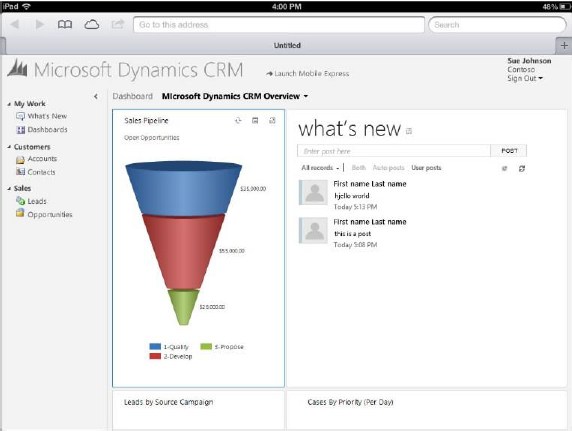
    Cross-browser support arrives with Polaris, but it’s a bit of a “yes and no” regarding support on iPad Safari browser. Yes, users will be able to access something else than Mobile Express on their iPad, but it’s not the same browser client as you’d have on a PC or Mac. A special version of the web client has been created for the iPad only, utilizing the new Flow UI forms. However, as the Flow UI is only available in a limited number of entities so far, only the “sales experience” is enabled in the iPad CRM client version. Judging by the menu below you can only access accounts, contacts, leads and opportunities. Any other entities (presumably even quotes, orders or products) will require you to click the “Launch Mobile Express” link, which will take you back to the CRM experience designed for pre-iPhone era smartphones. The Polaris version of iPad client seems therefore like an intermediate solution while we await for the full tablet UX to arrive.

    So, where’s the Dynamics CRM Mobile part of the CRM Anywhere release? Hmm, not mentioned in this document, so let’s check out the long term roadmap next.

    Statement of Direction, November 2012

    This document discusses the Dynamics CRM product vision for the next 36 months and is therefore much less specific on the upcoming functionality than the Polaris release documentation. It starts with a list of upcoming applications to be added into Dynamics CRM in future releases. Putting the terminology into context, an example of a new application for CRM 2011 was goal management, so these would likely include a bunch of new default entities, business logic, UI enhancements and potential new integration points.

    On the SFA front we’ve got Quote, Order, and Pricing Management, which is a very important area for Dynamics CRM to step up it’s game. Anyone who’s ever demoed the existing UI for creating quotes knows that the popup jungle is something you want to avoid showing to potential customers, so a more flat user experience for working with product lines . In the Service section the term Knowledge Management brings a breath of canned air from the past decade, especially when we later on hear that “SharePoint will power next-generation content and knowledge experiences to strengthen supporting business processes”. All joking aside, it’s pretty obvious that the KB functionality in Dynamics CRM is in need of a makeover, so bringing SharePoint into the picture is the obvious route for Microsoft to improve its CRM offering for service users.

    The direction of marketing functionality development in Dynamics CRM will be shaped by Microsoft’s latest acquisition, Marketing Pilot. Although no one seems to have heard about the company before the MS press release, that doesn’t mean it wouldn’t be a good choice for the foundation which the v2.0 of Dynamics CRM marketing module would be built on. Whereas Skype and Yammer were big existing brands with their own technology stack, MarketingPilot is a small company that has developed their product on top of Microsoft’s platform and should therefore be much more easily assimilated into the Dynamics CRM product. Not a big splash like Salesforce.com’s acquisitions of Buddy Media or Radian6, not even close, but Microsoft have said marketing automation is one of their key investment areas for CRM, so let’s wait and see how that story develops.

    While not exactly a bullet point in the Statement of Direction document, it’s pretty clear that Surface will be the central vehicle for launching the re-imagined Dynamics CRM experience and Microsoft have come up with a nice promotional video to build up the hype while we wait for the Windows 8 app to arrive. Folding the “Metro CRM app”, Yammer, Skype and Surface all into one sure does result in a compelling image of what the next generation of customer relationship management applications could be like.

    What about devices other than the Surface? More precisely: what about mobile as in smartphone apps? Unfortunately there’s not much to say about them, except that there’s another delay for supporting iPhone and Android devices. Even the upcoming Windows Phone 8 customers won’t initially be able to use their mobile device for more than reading CRM records and posting Activity Feeds posts with the existing Microsoft Dynamics CRM Mobile client.

    The February 2012 announcement of Microsoft partnering with CWR Mobility pretty much put everyone in a waiting mode, as the official mobile client for Dynamics CRM would have obviously been the safest bet for any customer or partner. Well, by now we can clearly see that the deal is off and the CWR client is no more “official” than Resco, TenDigits or any other ISV offering. Instead of buying a solution, Microsoft eventually decided that they need to be the ones who build it. In the long run I believe this is definitely the right strategy for them, as mobile is simply far too important to be an outsourced component of CRM.

    We’ve heard from the Dynamics team that they’re betting big on HTML5 to deliver experiences across different devices. Even though Facebook famously backed off from their HTML5 strategy in favor of native apps, I’m somewhat optimistic that the path chosen by Microsoft can work better in the business apps landscape. MS will naturally build native CRM clients for Windows 8 and Windows Phone 8, but the effort required in delivering an enterprise scale mobile solution for a fragmented Android platform probably doesn’t make sense to them. Those are the gaps that ISV’s are there to fill, delivering more advanced offline clients for non-MS mobile platforms.

    At the same time as the device specific offering is being rearranged, we’ve heard from a source claiming to have official confirmation from Microsoft that the Dynamics CRM CAL price will soon be increasing by 15 percent, in preparation of the upcoming support for more devices per user. Since there will not be any additional 30 USD monthly fee per mobile user, the user CAL can be leveraged on more devices and therefore it delivers more value to customers, which in turn means Microsoft sees it can justify a price increase. Although no one ever rejoices when the cost of a service goes up, I’m actually in favor of a pricing strategy where the mobile and tablet clients will be as easy as possible for any Dynamics CRM users to access, rather than the customer organizations having to go through the internal negotiations of who really needs a premium license for mobile CRM usage. There’s always the device CAL for those who need to just enable CRM access on a single PC per user, after all.

    Conclusions

    Polaris is certainly an important update for Dynamics CRM and in many ways it feels like the starting point for “the next chapter” of the product. With all the UI and client changes lined up for Orion in mid-2013, in my mind it raises the question that will this already be a fully new product á la Microsoft Dynamics CRM 2013? Any which way, I think Microsoft is right now delivering a compelling vision with their whole product portfolio and announcements this year, and this reflects positively on the Dynamics applications as well.

  • Activity Feeds and user rights: who can see what?

    Activity Feeds are a channel that’s much like Twitter: creating posts that are visible for other users who are following you. On the surface they share many of the same concepts (mentions, following, replies/comments), but there are some notable differences that may come as a surprise to a user who’s accustomed to the open communication taking place on the external social networks. This is especially apparent in a CRM organization that has a hierarchical structure of business units and is limiting the visibility of core records such as accounts across the BU’s.

    Let’s assume that we have a CRM deployment with multiple BU’s that form a hierarchy of a single parent (the top level BU) and multiple child business units. In our example the child level is represented by two country specific BU’s: Finland and France. There’s a user called Jukka in Finland and another user by the name of Teppo in France (OK, not exactly a typical French name, but we’re actually dealing with a Finnish expat here in this case). They are both using CRM to manage accounts and opportunities in their own business units but do not have visibility to any other BU’s data. Nevertheless, we’d like to leverage the Dynamics CRM Activity Feeds as a channel for sharing insights and connecting across BU borders, to make the most of the human capital and knowledge available within our global organization.

    If Teppo from France is looking for new users to follow, he will need to fire up Advanced Find and perform a search of the user records available in the CRM organization (this is the first thing you need to provide clear instructions on, as it’s not quite as intuitive as on Twitter). Unless the default security roles have been adjusted in terms of the User entity, he will be able to see a list of users from all business units. Also the follow buttons on the ribbon of the results view will be active, so Teppo selects a few users from outside his own business unit, as he’s eager to learn about what information they might be sharing on the common CRM platform. However, if he’s paying close attention to the dialog that CRM presents to him he’ll actually notice that he wasn’t able to follow Jukka from Finland.

    “You might have tried to follow some recently deleted records. Newly following: 0” Hmm, what does that mean exactly? It means that the user wasn’t able to follow any users, even though he was not greeted with the familiar big, red X. The reason for this error message was most likely that the user didn’t have sufficient rights to append the Follow records to the selected User records. Assuming that we want to enable such cross-BU following of users, what we need to do is to modify one of the user’s security roles to grant a global right to the Append To function on the User entity.

    After we’ve granted the new rights, Teppo from France is able to follow Jukka from Finland. When Jukka posts a message on his personal wall, Teppo is able to see the post and jump in on the conversation. Social Business in action!

    OK, now how about if Jukka from Finland is writing a post on the wall of an account owned by a user from the Finland business unit? If Teppo is following Jukka’s posts, he will probably see this update from him as well? No, actually he won’t see anything on his wall. If we look at the same post from Jukka’s own Activity Feed wall we can spot the difference to the previous post:

    Here we see the importance of the regarding object of an Activity Feed post. Teppo will not see any of these posts written by a user he is following, because they are set as regarding an account record he himself is not following. These are not just independent posts on the Personal Wall of the user, rather they are updates that are posted on the wall of a specific account (Nokia). In our case, since Teppo does not have visibility to the accounts from another business unit, he has no way to access the conversation going on there or to go and follow the account record.

    (more…)

  • More rumors on Dynamics CRM browser and mobile support

    While we wait for the official Release Preview Guide for the next Dynamics CRM update, let’s add some more water into the rumor mill. I came across an interesting blog post titled “What’s the status of Microsoft Dynamics CRM 2011 R8 (Update Rollup 9)” on the SyncraTec Solutions blog, which included the following piece of news:

    The Safari browser is not going to work on the iPad.  Instead, there will be a “specific mobile companion application” that won’t be available until post Fall 2012 Release.  This (device-) specific mobile companion application will be based on html5 and work with any of Windows 8, iPad, or other tablet-type devices (e.g., Android).

    So, not only will we be getting a new Refresh UI for the browser experience as well as the inevitable Metro CRM app, there’s also a third in-house CRM client in the works for mobile and tablet devices. Although the deal with making CWR Mobility’s CRM client available with Microsoft’s branding appears to be still in the works, this gives a whole new perspective on speculation for the reason why the mobile clients were delayed together with the cross-browser support. Why put the whole CRM Anywhere concept on hold just because the IE-specific scripts would have caused issues to PC and Mac users on an alternative browser? Well, seems like there’s more to the whole “companion” client story than slide below from WPC 2012 would have lead us to believe.

    I’ve never been fully convinced that it’s a good idea to use a similar CRM client app both on the small smartphone screen and the 10″ screen of a typical tablet device (read: iPad). The use cases for these devices tend to vary quite a lot, at least in my personal experience. The upcoming Metro UI of Windows 8 seems to fit very well with the tablet scenarios that aim to replace traditional laptops as the devices which you take with you to the meeting rooms and other temporary workspaces. However, there are currently zero tablets out there running Windows RT (at least in the hands of end users) and a growing number of iOS and Android devices. Since Metro will make many Microsoft apps exclusive to Microsoft platforms again, how do you capture the audience that needs a mobile CRM solution but doesn’t want to replace all their hardware the very moment Win8 becomes generally available?

    It appears now that this is a market Microsoft intends to go after, by building a HTML5 based client specifically designed for the smaller screens. Based on the above quote, we’ll see an app that is platform specific, but will they take the same route as Facebook did with their iPad app and just embed a browser view into the UI chrome of iOS and Android operating systems? Or will there be more native features used in each platform, which would be the opposite approach to the responsive design paradigm that’s become trendy with public websites nowadays? And what will remain as the domain of the existing iPad app that was promoted so much back in Convergence 2012?

    Another question that arises from statement of “CRM on Safari browser will not work on iPad” is whether this means Dynamics CRM is not officially supported on that browser/device combo or if Microsoft will actually actively block the usage of the browser client on a tablet device? Earlier this spring the message was that the browser support matrix published would indicate which platforms would fall under Microsoft’s customer support plans, but other devices like Android might still work OK. Although the Dynamics CRM browser user interface that has been designed to be used with a mouse would surely not be optimal on a multi-touch tablet, the initial reports from running the UR9 / R8 beta on the iPad Safari browser were saying the experience wasn’t actually that bad at all.

    Returning back to the R8 discussion, we now have confirmation also from a Microsoft representative that the following features will not be published this summer but instead be delayed until Q4 2012:

    • Custom workflow activities on CRM Online
    • Activity Feeds solution update with view filters

    Bummer. Many developers and ISV’s were really waiting for the possibility to start utilizing custom code in workflow processes, but now with CRM Online still not supporting them and 2/3 of new Dynamics CRM customers choosing the Microsoft hosted cloud platform, there’s not much opportunities to release commercial solutions with custom workflow activities until later this year.

    Why the Activity Feeds update is not released either is difficult to understand. While testing the R8 beta the new filter features seemed like a very welcome addition that would surely make it easier to deploy Activity Feeds into the day-to-day operations of CRM users without worrying about how to get the users to follow relevant records. The only sensible explanation for this delay could be that Microsoft has decided to pull back some of their own feed functionality and try to merge them with the Yammer platform’s capabilities. Given the relatively short time frame until Q4, I’m not sure how much integration could actually be developed between Yammer’s feeds and the MS stack of business applications, but let’s see how this thing develops.

  • Why Microsoft needs to buy Yammer

    Edit 2012-06-25: it has now been confirmed, Microsoft has acquired Yammer. The rest of the post is still valid, so please do read on.

    There’s a rumor going around as of June 14th that Microsoft is about to buy Yammer for over $ 1 billion. While Yammer is not strictly speaking about CRM or even social CRM, they are very much about the social business transformation that is shaking up all the tools that businesses use, including CRM. That’s why I thought I’d share some thoughts and examples of why I think this deal would be really important for Microsoft.

    First, a couple of tasks that are not too much fun with the Microsoft business apps as of now.

    Sharing content is not fun

    Our corporate intranet was upgraded from SharePoint 2007 (BPOS) to 2010 a few months ago. I was interested in trying if I could leverage the built in social capabilities for replacing our Yammer network (free version, in limited use, shadow IT at its best) for sharing interesting online articles with our team. In Yammer you get a cool graphical preview of the shared URL’s target page, you can add tags right under your post (or through hashtags), mention people in posts, follow them etc. All the good stuff that’s made Twitter what it is + then some.

    Looking for a way to properly do this in our SharePoint intranet got me really confused:

    Should I write my comment + URL on the little note board in my personal page? Hmm, no this doesn’t achieve what I want. Do I put it on the callout box on top of my profile picture? Naah, that just works for short “working on CRM implementation at Singapore” type of updates, not URLs. Looks like there’s no good user experience for link sharing round here, and even if there was, how would people actually discover my content? Or if they would, what place could they use for replying and starting a discussion around the topic?

    The sheer amount of effort I was required to put in investigating how the SharePoint social features work is already a showstopper, as most other users won’t be interested in making that kind of an investment. On Yammer and other modern social tools they don’t need to RTFM. If you know how to use Facebook, then you know enough about Yammer to get started. Which is why I’ve sticked with Yammer for content sharing and left SharePoint mainly for document management purposes.

    Sure, a lot of social functionality could be developed by using SharePoint 2010 as the platform for it. Unfortunately the word “could” very often gets replaced with “won’t” in real life. I call it the 90-9-1 rule of business apps. 90% of customers stick with the out-of-the-box functionality, either by choice or by ignorance. 9% invest resources into configuring and customizing the functionality to meet their own requirements. Only 1% go and develop something really cool that squeezes out all that “could” juice from the application by building advanced integrations & custom UI’s.

    “But wait, isn’t SharePoint 2013 going to kill all the other enterprise social software with its new social features?” I’d love to see that happen, but there’s been some doubts expressed about this and I think the rumors sound all too plausible (see: Microsoft: SharePoint 2013 Will Suck at Social – Get Something Else!).

    Searching for content is not fun

    Dynamics CRM is a great platform in so many ways, but one thing that’s severely lacking in it is the search capabilities. No, not the Advanced Find query editor, which is awesome (well, as awesome as FetchXML limitations allows it to be, but anyway). I mean the kind of searches we do on 99% of our daily applications: free text search.

    If I want to look up opportunity records that contain the text “foo” and “bar”, I can’t just type it into a search box like in Google as only a single search term is supported on Quick Find (yeah, I know Outlook client is a different app). Alternatively, if I want to look for “foobar” from all my records in CRM, I’ll need to acquired a global search add-on from a 3rd party, since Dynamics CRM doesn’t provide a cross-entity search capability. (Oh, and did I mention you can’t search the Activity Feed post content at all?) Sure, you could again build a solution for this with BCS and SharePoint, but that get’s us back to the 90-9-1 rule…

    Yammer sure promises a lot with its Universal Search functionality, with advertised capabilities to search across LoB apps like SAP or SharePoint. Whether they can deliver, I’m not sure yet, since at least the free version’s search is often unable to find content that is there. Still, they support the “human” way of searching for unstructured content, which means they can always improve the functionality, simply because they have it to begin with.

    Why Yammer wouldn’t solve everything

    If Microsoft buys Yammer tomorrow, will these things get fixed overnight? No, probably they won’t. Their logo will surely find its way into all presentations in a heartbeat, but the practical implications may be less immediate. Consider Skype, how much has that acquisition changed the lives of Microsoft customers? Not very much yet, probably Windows Phone 8 will be the first real evidence of Skype being an MS product. Another example could be Microsoft’s deal with CWR Mobile, which will initially only change the purchase process and branding of Microsoft Dynamics CRM Mobile for CRM Online users. Since Yammer has just recently announced their own integration to Dynamics CRM, that would most likely be the extent of MS’s offering for quite some time.

    When a solution comes from the outside, integrating it into the portfolio with the rest of the products can be troublesome. Dynamics CRM is pretty much an in-house product that Microsoft has developed internally, unlike for example their ERP products they’ve acquired from elsewhere. My knowledge of NAV, AX, SL, GP or C5 is very limited and I don’t claim to understand the day-to-day challenges that accounting people face when dealing with legislative quirks that us CRM guys don’t need to worry about, but: five products vs. one?

    Sometimes you may not have the choice of buy vs. build if the market is expecting you to make big acquisitions to prove that you haven’t fallen behind your competition on investment levels. Oracle and Salesforce.com sure have been big spenders when it comes to anything related to social. $5 billion and $3 billion respectively, as illustrated on this infographic,  all spent on buying themselves a suite of applications that can deliver a social CRM / social business platform when combined.

    Should Microsoft go on a similar shopping spree? I don’t think trying to buy your way into social business is necessarily the right or only answer. What’s most importnat in my opinion is that after adopting the cloud Microsoft will set its next focus to be adopting social, for real. Betting on the cloud is starting to pay off for Microsoft the way I see it. Now it’s time for their next move. All in, once again?

  • Activity Feeds in R8: from follow to filter

    One of the functional areas to receive an update in the Dynamics CRM R8 release in Q2 2012 will be the Activity Feeds, which were originally introduced as an optional solution in the previous R7 release. In R8 we’ll get the ability to filter the content of the feed, but what are the implications of this enhancement in practice? Bigger than you might imagine at first.

    While the concept of a wall with an activity feed fits well within a modern business application that must not only provide a method to enter  & query data but also allow users to discover relevant information and comment on it, there was a slight handicap in the initial version of the Dynamics CRM Activity Feeds. This was the requirement that you had to explicitly tag the records you wanted to follow, before anything would show up on your wall. What may initially appear as a convenient way to select the updates you’re interested in seeing on your personal feed can soon become difficult for the users to actively manage.

    Let’s imagine a scenario where a user is interested in regularly monitoring the activity feed posts around prospect accounts that have open opportunities. How would the Activity Feeds functionality meet this requirement? Before R8 you would have needed to perform Advanced Find queries on the records that match a certain criteria, then select all (max 250 at a time) and click the “Follow” button on the ribbon. Of course if any new records were created or modified after your search, you wouldn’t have seen updates related to them unless you performed the query again and again. The most advanced users could of course have created a workflow rule that adds the follows based on new events in the database, but a process like that would hardly be obvious for the majority of CRM users. Automating this with a centrally managed workflow or plugin to automatically generate follow records for the appropriate audience on the other hand requires the type of top-down information system planning that doesn’t fit well with the whole idea of social business and its empowered end users.

    In R8 all this will change. The system now allows you to define dynamic filters for retrieving posts regarding records that meet the filter criteria. Rather than individually cherry picking records on your follow list, you can now look at the available Activity Feed posts which reference records of a particular type, such as the aforementioned “prospects with open opportunities”.

    In short, you don’t need to follow records anymore. It’s now optional.

    Ok, so anyone can then go and create a filter for exactly the types of records that they want to see posts from, set that as their default posts view and just enjoy the feed, right? Well, unfortunately not quite. Only the system administrator or system customizer can create new system views and promote them to become available filters for Activity Feed posts. So, how do you create a new filter for Activity Feeds then? Here are the steps:

    1. Go to the Customizations menu, open a suitable solution with the entity you wish to create filters for.
    2. Build a new system view and set the filter criteria of the view to match the filter you want to apply on records from which the related Activity Feed posts should be available. Publish your customizations.
    3. Go to the Activity Feeds Configuration menu and open the Post Configuration record for the corresponding entity (if one doesn’t exist, create a new one with the schema name of the entity).
    4. From the Filters subgrid, select your new view and click Show on the ribbon. No need to publish anything, as this is configuration data (not metadata) and the changes will take place  right away.

    It looks like any new Activity Feed filters published will become visible in the selector menu on the wall by default. The user has the option to click “modify this list” and access a view called My Filters. If any of the filters made available to the whole organization are not relevant to them, this is where the users can set to hide them from their Activity Feeds menu. As a little extra touch, the sort order of the filters can be also adjusted.

    While this means that the users have some level of control over the filters visible to them, the same will not be true for the actual system views that need to be created and published for the whole organization to see, in order to make the filters available to the users who may need them. Personal views will not appear as Activity Feed filters, at least not in the R8 release.

    All in all, it may not be the most elegant solution for the problem of filtering Activity Feed posts, but it definitely does make the whole feature considerably more useful. The pain of getting users to go and follow records in CRM is reduced, as is the need for creating workflows or writing plugins that add the follow records automatically based on some business logic. Also, the benefits of the Activity Feed will be much more apparent for a user who is simply browsing the system contents, as he or she will be able to access a list of account related posts with the simple selection of one filter.

    Looking at the rest of the Activity Feed functionality, there is no further automation regarding the creation of auto posts in the R8 update as far as I know. Default entities have Activity Feed Rules available but for custom entities or events not included in the out-of-the-box rules, you’ll need a workflow or plugin to create the post. One thing that’s important to understand is that the Activity Feeds are not about showing all the updates taking place regarding a record. That’s what auditing is for. Unless you have configured yourself an auto post to be added whenever a record X of entity Y is created, nothing will show up on your wall, regardless of the new filtering capabilities.

    In R8 the follow limit in CRM Online will be increased in R8, but there’s still a hard limit of maximum 1000 follows per user. On-premises servers will have the possibility of increasing this limit, but performance impact is to be expected at some point due to the complex nature of the underlying Fetch XML queries used in constructing the result views for the walls. A very welcome new feature is the ability to enable also organization owned entities for Activity Feeds. This means you can add a wall on a competitor entity form, for example, which was previously not possible.

    What we’re still lacking is the ability to perform searches on the content of Activity Feed posts. Even though the underlying data is in a way structured by containing references to the related records, we’re not able to use any keyword in the actual post text content to perform searches on posts. OK, in theory we are able to perform Quick Find searches on the data if we manually add the post entity into the sitemap, but we’re unable to open the post and comments from there, as the post entity does not have any form that could be used for viewing the content outside of the wall (“the walled garden of activity feeds…”).

    Click to vote for the feature enhancement suggestion on Microsoft Connect

    I find the lack of a search feature on the social content stream quite a strange oversight from Microsoft’s part, considering this is already a v2 release of the solution. If any ISV’s are looking for a new product to develop, then how about creating an Activity Feeds Search solution that offers a custom UI to browse the content of the posts? For the others, why not log in to Microsoft Connect and vote for my product suggestion to Allow Activity Feeds post content to be searched. Thanks for your contribution.

    (For any of you wondering where to get the new, updated version of Activity Feeds, you’ll need to wait for the R8 to be officially released, as described in my previous post. The post here is written based on the R8 beta functionality.)

    Update 2012-07-30: even though the updated Activity Feeds functionality in R8 seemed quite polished, it now looks like these new features have also been postponed by 6 months until the Q4 2012 release, alongside cross-browser and mobile support. I find this decision particularly hard to understand, since the only thing you would need for the new Activity Feeds solution to work in an Update Rollup 8 environment would be a few expansions to the database schema, as far as I can see. Could there be some implications from the recent Yammer acquisition that have forced the Dynamics CRM team to halt any updates to their home brew feed functionality, that’s something we’ll probably never know for sure.

  • Using hashtags in Activity Feed posts to automate processes

    Improving internal collaboration has been the driving idea behind Dynamics CRM Activity Feeds. Even though the efficient usage of stream-like notifications may not be immediately obvious to users who’ve come to think of CRM data as permanent records presented in views, they provide a great enhancement on top of the existing customer data that focuses on answering the “what’s going on right now?” question, rather than the “what/who/how much” types of  queries that CRM systems typically have focused on. Joel Lindstrom wrote a great article on the Customer Effective blog about how Activity Feeds are different from RSS feeds, which I recommend everyone to read.

    Originally launched in the Q4 2011 Service Update (R7), the Activity Feeds solution is about to receive some enhancements in the upcoming R8 release that will allow users to better filter the content of their wall and also click “like” on posts. (Note: contrary to some comments, the “unlike” feature will most likely be simply the undo action of “like”, rather than a real “thumbs down” reaction.) Compared to other social business applications like Yammer, there still doesn’t seem to be built-in support for features such as groups or hashtags that we’ve come accustomed to use on many platforms. I’ve already written about a DIY approach for leveraging custom groups to follow posts on specific topics. Next, I thought I’d see how we could make use of the hashtag concept in Dynamics CRM.

    What’s a #hashtag & what’s it good for?

    Whether you’re an active Twitter user or not, it’s likely you’ve come across a person using the # sign in his or her online writing. What started out as a user driven policy of grouping tweets has later turned into a whole movement that’s gotten both users as well as commercial entities get very interested on following, measuring and encouraging the use of #hashtags on social media channels.

    Twitter allows the users to click on hashtags turned into hyperlinks, thus enabling them to view all recent posts containing the same hashtag. Although Dynamics CRM is a flexible platform for LoB application development, tweaking the default Activity Feeds solution web resources to support this kind of filter functionality wouldn’t be exactly a walk in the park. However, we can certainly explore the concept and see what else the platform might have available for us that could make the Activity Feeds more intelligent. Hmm, how about workflows?

    While the post box on a wall doesn’t currently allow us to include any other “magic characters” apart from the @ symbol used for performing mentions, the pound sign does have one clear advantage: it’s rarely used for other purposes than a hashtag (you might have the occasional shouts of “we are #1!” by excited sales reps appear on the wall after they close a deal, but that’s about it). This means we can quite safely use the # symbol as an identifier for our own little magic words.

    Triggering processes from wall posts

    Suppose you’re browsing through your personal wall on a Windows Phone 7.5 mobile while sipping on a Venti Latte at Starbucks, utilizing the free Microsoft Dynamics CRM Mobile app. You spot an item in your feed that you want to take note for further action once you’re back at your office desk. How are you going to do that?

    While an email inbox is hardly a good way to manage a list of open tasks, Activity Feeds are even worse as action items, because they’re not even meant to be persistent records with read/unread status or flags/categories. The stream flows on as other CRM users perform actions such as winning opportunities and solving support incidents, which means that the item you spotted while enjoying your coffee may well be buried into the depths of history the next time you glance at your wall. Posts are merely notifications about something, not the object itself.

    Instead of resorting to disconnected manual notes, what you could do is track the regarding record of the interesting wall post as a new task on your own list of CRM activities. All we need is the creation of a very simple workflow rule to achieve this. Create a new workflow process on the Post entity and mark it to be started whenever a new Post record is created.

    What the hashtag concept will be used for is evaluating the content of a Post and seeing if the workflow process should be run or not. In our example, let’s use the hashtag #task to identify a Post which we would like to trigger the creation of a new task record. You might also want to check that the Post source is Manual Post instead of Auto Post (more about that later).

    In your workflow rule definition, create a new task record and insert the contents of your post in the subject line. Set the regarding field to be the RegardingObjectId of the Post, owner as the person who created the Post, and a due date of 1 Day After Created On. Save your process, activate it and you’re all set.

    Just type #task and let the system take care of the rest

    In our example, we’ve spotted a Post regarding a new opportunity record. (Ok, so we’re doing this from the web client and not the mobile one, since believe it or not, screen capture on WP7 requires an unlocked device!) We want to mark an action item on the record for us, so we post a new item on the record wall, using the hashtag we defined: “#task Ask Chris for customer references”. Please note that simply commenting a Post will not trigger a workflow, since the PostComment entity is not available for workflows (bummer), so make sure to type a completely new Post on the item of interest.

    After the Post is submitted to CRM database, the workflow is triggered and a new task will have been created on you My Activities view in a matter of seconds. Should you ignore your CRM list once you return to the office (shame on you!), the due date reminder we set on the task will cause your Outlook (and probably also your mobile phone) to alert you about the action item you created for yourself.

    Drive any process with #hashtags

    As you might know, the free mobile client does not allow you to create or update any CRM records, you can only read them on your mobile phone (unless you want to open the somewhat less pretty Mobile Express client). The only exception is Activity Feed Posts, which you can type on your Windows Mobile device and get the data updated into CRM in real time. Together with the creative use of hashtags and workflow processes, we can actually trigger also some other data entry and updates while on the road, as you saw from the #task example.

    While you can’t create a workflow that would update the parent object of the Post, you can create new child items for it. In the example below, we’re creating a new case by using the #case hashtag.

    The steps of the workflow process configuration are as follows:

    • Check if the Post contains the text #case
    • Create a new case record, set the title to post text, set customer as the RegardingObjectId(Post)
    • Create a queue item for the new case and move it to the Support queue for CSR’s to start working on
    • Wait for the case status to change from active to something else
    • Create a new post on the customer wall, containing a summary of the information recorded on the case after its creation
    • To finish the process with confidence on both sides, also send a direct email to the person who initiated the case creation with his/her wall post
    All this process data neatly managed inside Dynamics CRM, just because you typed “#case Send an evaluation license of Product X to customer” on a record wall, with a mobile phone on your one hand and the latte on the other. You might as well have used a similar process to open a new opportunity and start your sales process automation tasks, with a predefined product specific hashtag like #opp_prodX_3m, if you really wanted to impress your colleagues that haven’t yet figured out why Activity Feeds and Auto Posts are a true productivity boost rather than just another new inbox to process.

    A final word of warning: since you probably don’t want a workflow generated Post to trigger any new workflows accidentally, it’s a good idea to always set the right Post Source value (Auto Post, Manual Post) and also filter these in your workflow conditions. As an example, if you post “#case Customer asks for refund” and then later on use it as the case title that gets inserted into a new Post, you’ll soon be stuck in a loop of each case resolution creating a new case…

  • Make CRM Activity Feeds easier to follow by creating custom groups

    The functionality of the new Activity Feeds feature introduced in CRM Online R7 / CRM 2011 Update Rollup 5 is built around the concept of following specific records. This allows a very granular level of control for the users to select the specific items from which they wish to see posts on their personal wall. However, this does also force us to carefully plan for the scenario of a new user who logs into the Activity Feeds view for the very first time. What they will have in front of their eyes is an empty wall with just a few links to the online help material.

    An empty wall greets the new CRM users

    In order to make Activity Feeds a shared, trusted source of information on customer related events, the organization using Dynamics CRM needs to provide its users a path that they can follow to become a member of this community. Although it is possible to build custom business logic through the SDK that automates the following of records, wouldn’t it be better if teams of users could themselves choose topics that they wish to follow, and also broadcast their posts to other users following the same topic? You know, like #hashtags on Twitter. Well, there’s no built-in support for hashtags in the current release of the Activity Feeds solution, but here’s a description of one possible workaround which I’ve come up with.

    In my previous post on the topic, I covered the general process of how to enable Activity Feeds for entities in Dynamics CRM. The natural choice for supporting a team collaboration scenario would be to use the default entity Team to display relevant posts for its’ users on the entity form. Unfortunately you can’t enable Activity Feeds for teams, since that’s not a supported entity. In fact, you cannot enable Activity Feeds for any organization-owned entities, even custom ones.

    Luckily there’s nothing stopping your from creating a user-owned custom entity and enabling it for Activity Feeds, so let’s go ahead and create a new entity called “Group”. No need for new fields, just publish the entity, then create a Post Configuration record with the same entity name (new_group or something like that). After this you’ll need to go and adjust the form so that the Record Wall is directly visible when you open the form, by moving it below the first General tab.

    New entity Group created for enabling mentions on Activity Feed posts

    Now you’re all set for starting to use the group entity in Activity Feed posts. No matter on which record’s wall (or your personal wall) you’re writing a post to, you can perform a mention by entering the @ character followed by the group’s name. In this case I’ve created a group called CRM, so I’ll add a mention of @CRM on an account record wall. You’ll see how that turns into a hyperlink to the group record.

    Post with a group mention on an account record wall

    How the user’s personal wall works is that it will display all Activity Feed posts that contain any reference to a record that the user has followed. It doesn’t have to be the record where the post has been written on. This is what enables us to make following updates concerning a certain topic easier for the end user, as long as the posts contain a mention/link to the group record. For manual posts the users will need to indicate that they wish to direct the post to the group’s followers by performing the @[groupname] mention as seen below.

    Performing a mention on a Personal Wall post

    So, does this mean that the mentions can only be utilized with manual user initiated posts? Absolutely not! There is a new attribute available in the workflow editor, called Post Url (Dynamics value). You can read this post on the MS Dynamics CRM Team Blog for details on how the feature can be leveraged in building workflow rules that create Activity Feed posts with mentions referencing other records. This allows us to reference multiple related records in a single post and make it appear on the personal wall of anyone who’s following one of the records.

    Let’s say we want to create an auto post whenever a case record is created and it has the value “CRM” in the subject field, to notify anyone who’s following the CRM group. Ok, so we can find a relationship to the related subject record but since that’s not supported for Activity Feeds (just like teams aren’t), we wouldn’t be able to use it for creating a mention. Also, since the group entity we created doesn’t have a relationship to the case entity, it’s not available in the workflow dynamic values menu.

    Should we go and create a relationship through entity customization? Well, that would be a bit cumbersome, since you’d then have to include a reference into the actual group record in every case record you wish to create a post a mention on. You’d pretty much have an additional subject lookup on the case form as a result, which is not a good solution in terms of usability (at least if you already use the default subject entity in your processes). (more…)

  • CRM 2011 Data Import Wizard in practice

    CRM 2011 Data Import Wizard in practice

    Data migration typically isn’t the most joyful part of a CRM implementation, but you really need to pay attention to carefully importing all the relevant customer data it if you want the users to adopt the CRM system as an integral part of their day to day activities, rather than yet another business application searching for its purpose. When implementing Microsoft Dynamics CRM, the logical place to start planning the import process is having a look at what tools are available in the application itself.

    The Data Import Wizard used to be a curse word among the Dynamics CRM crowd for a long time, but you shouldn’t ignore this option right away, just because of its bad reputation. Sure, there are many limitations with the built-in tool, but it has come a long way since the previous versions. Having recently spent some hands-on time with the CRM 2011 Import Wizard, I decided to put together some of the useful links and pieces of information I discovered during the process. There’s plenty of great blog posts out there on individual data import features, but perhaps this can serve as a “getting started” tookit for planning on how to import data into Microsoft Dynamics CRM 2011.

    Mapping related records based on custom ID fields

    The CRM database by definition is primarily a place for storing information about how different objects relate with one another. This means you will almost always be dealing with source data that needs to reference another set of data once imported into the system. In Dynamics CRM these relationships manifest themselves as lookup fields that point from a child record to its parent.

    When you are mapping the lookup fields from a child entity into a parent entity that’s already in the system, you always need to consider the possibility of duplicate values in the list of parent entities. Contact names are not unique, and neither are account names in many cases. Yes, you could import lookup references by using a CRM GUID instead of the primary field (most often the name attribute) of the parent entity, but how often would you have that available in your source data to be imported? Exactly.

    The first and in my opinion the best improvement with the Import Wizard in CRM 2011 is the possibility to reference the parent entity with an alternative field. Yes, if you have a reliable unique value available in your data, such as customer number or contact email address, you’re free to use that to link your records together. Alternatively, you can construct specific import ID’s out of your data that you first import into a hidden field, then later on use that as the reference which connects your related child records into exactly the correct parent record without the risk of import row failure.

    For step by step instructions, check out this blog post by MVP Leon Tribe: Changing the Lookup Reference When Importing Related Data.

    Importing data for multiple entities in one go

    A common format for customer data coming from non-relational systems is a flat file that contains both account and contact data on the same “table”. In these cases you will have multiple instances of the account’s information repeated on each line where there is an individual contact related to that account. You first reaction might be “oh well, guess I’ll have to split that into an accounts file and a contacts file, then remove the duplicates. Well, good news: you don’t have to anymore!

    Nowadays CRM comes with a built-in data map called  “For Generic Contact and Account Data”, which will allow you to import a file that has data intended for both account and contact records. First of all, you can map some of the source fields into both the target entities. Address information is a good example, as it’s typically stored separately on both accounts and contacts (yeah, data redundancy, but often it’s just more convenient for your everyday CRM usage).

    Secondly, you will not get duplicate account records from each of the rows, as the Import Wizard is smart enough to detect the distinct parent accounts needed for the child contacts. Now, in order to get the expected results, it’s also up to you to be smart with your source data and field mapping. If any of the fields you’ve mapped to the parent account have any variation in their contents (such as phone numbers with different spacing formats), you will get duplicates, simply because the system will not throw away any unique data rows. Additionally, your child record imports to those accounts will result in failures, as the parent account lookup field will point to a non-unique value in the database (unless you used the aforementioned method to specify an alternative lookup reference). You should also take into consideration if the source data actually has intentional duplicate values for account names, such as branch offices with only a different address.

    Check out this article for step-by-step instructions on how to import accounts and contacts from a single file. But what if you need to perform the same type of import, only you’re not dealing with accounts and contacts? Say, importing data to custom entities with a parent-child relationship, like “event” and “event attendee”? No problem, you can build a data map just like the “For Generic Contact and Account Data” one, by leveraging the multi-entity data file import mapping feature.

    How much data is too much?

    Even if you are importing only into a single target entity, there’s a good chance that you’ll cross the line of allowed maximum size of the import file for the Import Wizard, which is 8 MB. While the XML data import templates available for download from the CRM UI provide very nice features for ensuring the input data is in the correct format, they have the downside of increasing the file size considerably. Compared to an Excel file (xls, xlsx) the size of a file saved in the Office 2003 XML file format can easily be tenfold.

    One potential way to get around this limitation is to zip up your import files. You can read the requirements for the zip file contents here, but in general your everyday import files should be zip compatible without any extra tricks. This is actually how the multi-entity data file imports are also handled, as there will only be the possibility of uploading a single file into the Import Wizard to be processed, so you’ll need to package your import files into a zip archive.

    In addition to the source data files, you can also include attachments into a zipped import file. Yes, the Import Wizard does support attachment import as well. You’ll need to be careful with the data structure, so have a look at this article for specifications on how to Import attachments with notes. Keep in mind that the 8 MB file size limit does still apply here, so a large number of big file attachments may not be a fun task to perform throug the Import Wizard.

    Field and value mapping made easier

    If you are working with a data set that contains several picklists with lots and lots of values, mapping them could potentially consume a lot of your time. The first thing you want to make sure is that there are matching values in the CRM picklist fields (nowadays known as option sets) for all the distinct values available in your source columns. Auto mapping will do the heavy lifting for you and match the source and target values as long as they are identical in both. One thing you may not initially notice while mapping the data, though, is that the Import Wizard will also automatically append the list of values in the option sets if it encounters new source values. While it sounds like a neat feature, this may mean you end up with an unexpected set of values, duplicates with slight differences in spelling, breaking workflows or plugins due to mismatch of value ID’s etc. In my opinion, it’s much better to plan ahead and be in the driver’s seat of how your CRM is customized, even if the Wizard offers powerful but dangerous new features that can extend the schema with new fields or even entities.

    When you’re working with development, test/QA and production environments, performing the same data mapping procedures time and time again could quickly become a very tedious task. Not only that, but the chances of making a mistake in the process of mapping the fields and values becomes ever more likely if you have to repeat a manual task like that. Luckily Dynamics CRM allows you to save your data maps after you create them (and before you start the actual import job), so be sure to take advantage of this feature. Of course, saving your data map into a test server won’t provide you with that data once you move to production. That’s where the export/import feature of data maps comes in handy. Just create your field mapping once and then take it with you to the next organization you’re working on.

    More handy improvements in the Wizard

    There used to be limitations on some of the entity fields which you weren’t allowed to update in previous versions. A common pain point was the inability to directly set the record owner, so you had to import this information in a temporary field and perform bulk updates on the records after the import. This limitation has now been removed and you’re free to assign the records directly to users or even teams.

    Another caveat of the Import Wizard was that you weren’t allowed to set the state of the imported records, meaning you couldn’t easily import inactive records for historical purposes. Well, now you can, so no more need to leave out information on past activities with your customers, just because you don’t want to re-send all your emails to get them appear as closed activities. Just set your activity status as completed, import opportunities as won/lost or whatever status it is you require.

    One thing to note while importing records is that the status change will actually take place after record creation. Why is this important? Well, the closing event will trigger workflows you may have in the target system. Also with the new Activity Feeds functionality introduced in the Q4 2011 update, there’s a chance you may have activity feeds rules in place that will spam your import actions all over the personal wall of your CRM users. Since no one wants to see hundreds of “activity X closed” notifications in their activity feed, be sure to remember to deactivate all rules which could wreak havoc on your brand new internal collaboration channel.

    How about update existing?

    While creating new records with the CRM 2011 Import Wizard is supported, updating existing records isn’t. In case you would like to only import some new fields for existing customers, by using an identifier field like email address or customer number to locate the records to be updated inside the CRM database, you’ll need to look for alternatives to the Wizard.

    It is supported to perform an “export for import” extraction of data from Advanced Find that provides you an Excel sheet you can import back to update records (by selecting “make this data available for re-importing by including required column headings” option). However, unless you’re willing to dump all your records into this Excel and then match them against your import file with your custom ID field by using a tool like Access, to get the corresponding GUID’s, this won’t be the tool you are looking for.

    I guess you could also create a temporary child entity for the target entity, then import new records here with the required lookup reference linking them to the parent, followed by a set of workflow magic that would transfer the required values from child to parent. It all depends on how much effort you’re willing to put in working with the out-of-the-box data import tool.

    Beyond the Import Wizard: ISV solutions

    There will always be many data migration needs that simply cannot be covered with a wizard like application, no matter how much Microsoft would improve the feature set of the Dynamics CRM Import Wizard. At some point it would have so many parameters and options that it would no longer resemble a wizard at all. Since the out-of-the-box functionality has to remain approachable for the “normal” user who just wants to get a simple Excel list uploaded into the system, I’m pretty certain that the market for 3rd party solutions is not going to go away anytime soon.

    Instead of rooting for one particular vendor, I’m going to provide a list of the data import solutions that I’m aware of and let you evaluate which one best fits your needs.

    As further reading, I recommend everyone to have a look at this awesome article by Joel Lindstrom on Lessons Learned Migrating Data to Microsoft Dynamics CRM 2011. In it Joel lists the most important gotchas to be aware of before starting a data migration to Dynamics CRM, even when using a 3rd party tool like Scribe, such as activityparty data handling, record status, removed users etc.

  • Activity Feeds are here, so “What’s New” in CRM then?

    Microsoft Dynamics CRM Q4 2011 Service UpdateIt’s been nine months since Microsoft Dynamics CRM 2011 was released. Given the large number of new features and functionality included in the new version, I’m sure many organizations have been able to keep themselves busy with thinking about how to leverage all of them. Anyway, the time is now upon us when we see the first true deliverable from the new agile development path that the Dynamics CRM product development team has adopted. The “Q4 2011 Service Update”, “November Service Update” or “CRM Online R7”, however you like to call it, gives a taste of things to come, as new features and improvements are now introduced bi-annually instead of a big bang release every 2-3 years.

    There’s lots of neat things included in the update, such as multi-category charts, user access auditing, lookup and date fields for dialogs, ignoring null values and inactive records in duplicate detection rules etc. Have no doubt, though, this release will be remembered from the Activity Feeds, so let’s proceed straight to them.

    More than just an accelerator for CRM

    Microsoft has split the delivery method of the Activity Feeds functionality into two tiers. The platform level changes are delivered with Update Rollup 4, which brings us a selection of new default entities, such as the feed Post. These will provide the building blocks not only for the visible Activity Feeds released now but also web services API enhancements, which are covered in the 5.0.7 update of the SDK.

    The Update Rollups can nowadays be considered pretty much as “business as usual” hotfixes like the ones released for other Microsoft products, both on server and client side, as they are delivered through the common Microsoft Update mechanism. Testing and planning for the Rollups is of course very much recommended still, as significant changes can be included in them, and yes, they do occasionally break compatibility between versions. Furthermore, the Update Rollup 5 required for Activity Feeds to function cannot be uninstalled if things go wrong.

    Anyway, unlike the hotfixes that can be expected to be installed on almost all CRM environments, the Activity Feeds user interface components will probably remain missing from many instances. Why? Because there is no automatic delivery method for them, unless you are using a CRM Online environment that has been provisioned after the R7 release became available. You see, Activity Feeds still are kind of like an accelerator package, as the solution file will need to be downloaded from the Dynamics Marketplace and installed by the system administrator.

    Download the Activity Feeds solution for Microsoft Dynamics CRM 2011 from the Dynamics Marketplace

    Not even installing the solution file and publishing the customizations is enough – you still need to configure them. The menu item for “What’s New” will appear in the UI after the solution installation, but none of the entities in your CRM have yet been enabled for Activity Feed posts. To do this, you’ll need to navigate to Settings and go to Activity Feeds Configuration menu. Create a new Post Configuration record for each entity that you wish to relate posts to. The configuration UI of the solution is not too nice, as you’ll actually need to use the logical name of the entity rather than the display name. So, to enable the new functionality for the user entity (which is the very first thing you must do!) is enter the value “systemuser” and click save. Make sure you check the box for “enable walls for this type of record form” and don’t forget to publish the entity’s customizations after clicking on save.

    Activity Feed Post Configuration

    What’s a “wall”? If you’re on Facebook (and who isn’t), you’ll know this refers to the place where the posts related to a user will be displayed in a descending chronological order. Now, in CRM it’s not only users that can have walls, but any entity for which you have created a Post Configuration entry for. Even your custom entities, like “project” or “event” can be set to have their own Wall. However, bare in mind that not all the system entities are supported for the Activity Feeds functionality, so you can’t have a discussion related to, say, competitor or product records (which kind of sucks, as those are some very common topics for employee discussion around the water cooler, but guess you’ll still need to get away from your desk every now & then). For a complete list of supported system entities, see this page on the SDK.

    Account record wall

    As you can see from the image above, the wall is actually a web part that is presented on a new tab, that is located before the first default tab (general). The tab will be collapsed by default and the form actually scrolls to the general tab right after the form script is loaded, so a user may not notice anything new on the form. However, if you click on the anchor on the left side navigation, the Record Wall will be revealed in all its glory. Here the user will have the option of adding the record into his list of followed CRM records, see who else is following it, and of course post an update on the wall. (By the way: if you have multiple forms per entity, you’ll need to add the Record Wall web parts manually, by following these instructions.)

    There’s also a Personal Wall that shows the user all the content from followed records, and that’s the first entry visible on the updated sitemap for Workplace. What’s really nice is that you have a link right after the “What’s New” header, which will allow you to pop up the wall in a new window. This way you can have the feed view quickly available for you at any time, no matter with which CRM entities you are currently working on in the main application window.

    Activity Feeds personal wall

    Furthermore, every user has a User Record Wall, which would be identical to the concept of a Facebook profile page. Sorry, no timeline design available here yet!

    Not just for mindless chatter: business logic for Auto Posts

    If all that Activity Feeds provided was the ability to chat with your colleagues or manually post updates related to records, then it would have a tough time competing with established enterprise microblogging apps like Yammer. Luckily the Dynamics CRM platform can offer much more than that. By allowing certain events related to CRM records to generate content for the Activity Feeds the system can actually serve as a tool that removes the need for you to email information about business events or type updates into a microblogging app. A traditional way to demonstrate the CRM workflows has been to create email alerts on closed opportunities, but now you can reduce the clutter in your inbox by moving these into the right context (opportunity form) with the ability for users to comment and see others’ comments. (more…)