Category: Miscellaneous

  • Excel cannot be beaten

    Excel cannot be beaten

    Happy 40th birthday, Microsoft Excel!🎉

    I wish I could start this post by “the first time I used Excel…” But that’s impossible since it feels like Excel has always been there. Not on my very first 386sx PC in the early 90s, no. Back then I was mostly doing games, music, and the occasional pre-internet discussions in different forums (my previous post is all about that). When I started my business studies and when I got my first job roles, though, Excel was just how things got done. A lot of things.

    When I got the chance to visit Redmond for the first time as part of the Microsoft MVP Summit, of course I bought a souvenir from the Microsoft company store that was about Excel. Today, I’m still extremely happy to wear this beautiful shirt:

    The significance of Microsoft Excel and spreadsheet software in general can hardly be overstated. It is truly the nr. 1 business app. Many people could easily do without the other MS Office products, replacing them with Google’s apps or whatever modern tools have emerged in the past couple of decades. But Excel? So many folks would simply hate having to use anything else.

    Why is Excel so unbeatable? Why do so many companies try to fight it nevertheless? Let’s reflect on that.

    Trying to fight Excel

    I started working with customer data analytics and direct marketing at the turn of the millennium. Back in 2000, there was no SaaS. Instead, companies invested in server software and hardware to do things that today’s Excel workbooks with 1 million row limit could easily handle. This scarcity of apps also meant that everything which did not have a dedicated server + client combo in place was done with Excel.

    The Holy Grail of “Customer 360” required a central database for customer information, which meant years/decades of trying to migrate the Excel-based business processes into CRM systems. At the start of such a journey, everyone was quick to agree that “yeah, this thing shouldn’t really be in Excel workbooks”. Once a system was in place, however, the question turned to “can I export this info into Excel?”

    “In the analytics industry there is a standing joke that “Export to Excel” is the most used feature of any analytics software.”

    Hjalmar Gislason: Export to Excel — business software’s most common feature?

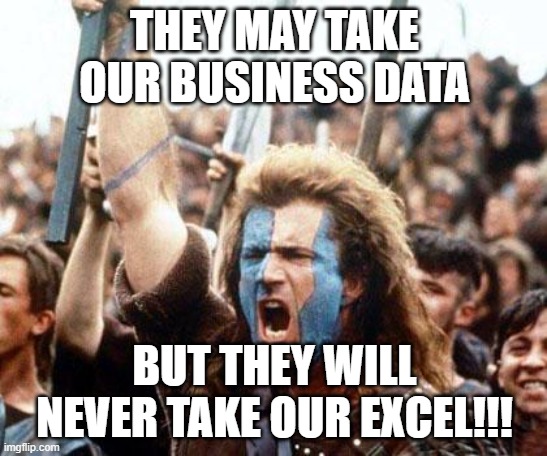
    Why do people want to go back to the world of spreadsheet after they have deployed a purpose built business application for the data in question? Because FREEDOM!!!
    Sure, the apps that are designed for specific business processes can give readymade views into the data that you can open with a click. They usually also offer automation that could perform actions like data updates, notifications, summaries, integration, and all sorts of tasks that would be much more laborious when working with spreadsheets.

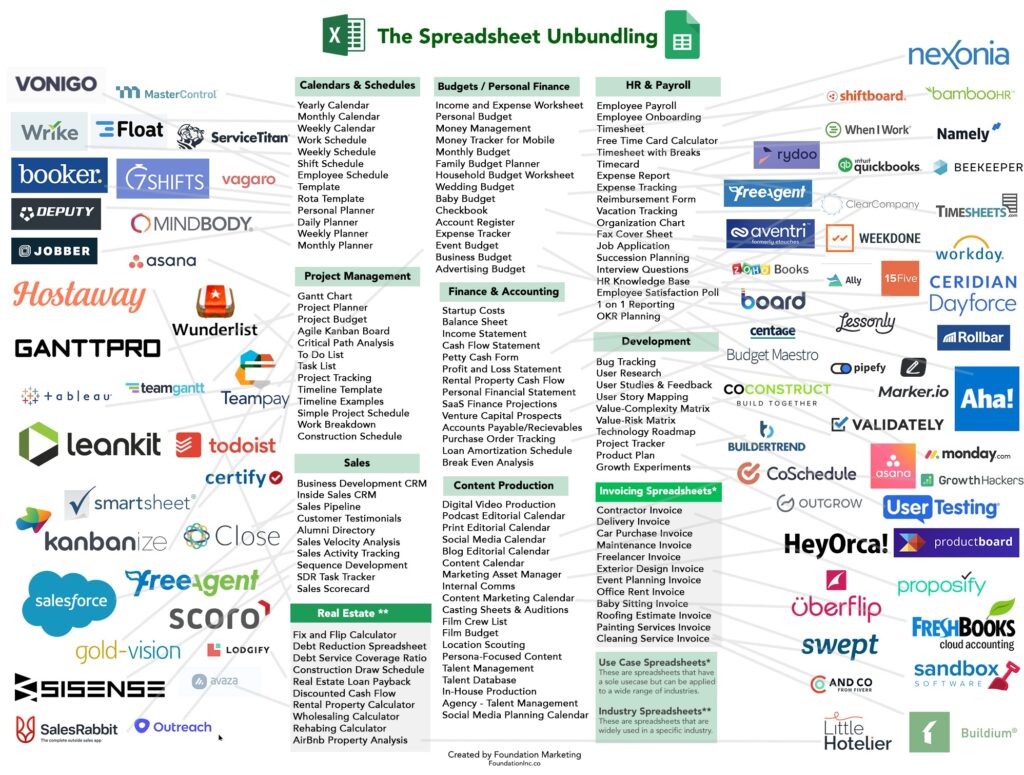
    It all sounds incredibly useful, especially before you have any such apps in place. The idea of being able to rely on a tool from developers that have already figured out what you’d want the computer to do is just beautiful. Everybody wants to spend less time thinking about “how do I do this” and would rather have “an app for that”. This has given birth to countless SaaS solutions that are simply unbundling Excel spreadsheets into dedicated apps:
    And yet none of the apps can escape the “I wish this worked like Excel” request from the users. Inevitably there will come a time when either the features of the app feel like a constraint that gets in the way – or the users just can’t figure out the intended process of how to do things in this specific, unique application that they’ve not used for this purpose before.

    Why Excel rocks

    For a business applications guy like me, it’s natural to see a process managed with Excel and immediately jump into thinking what data models, interfaces, automations and integrations could be put in place to make everything more efficient. Starting from CRM, the assignments I have been given usually always include the “M” – managing things. Not just for a single PC user but for a group of users, sometimes spanning to thousands of individuals.

    Business apps with a clear separation of the server-side database and logic from the client-side UI are indeed a better way to managing things involving many users. Yet we often forget that it’s not enough to cover 80% of the tasks with built-in features of our slick, modern web apps. The employees who are in charge of end-to-end processes must complete 100% of what their role requires. If our minimum viable product doesn’t have complete coverage, the users need to figure out a way to get the remaining work done.

    That’s where Excel is the hero. It adapts to the needs of the user unlike anything else available to typical information workers. Whereas Word documents are often just digital versions of paper docs, Excel introduces dimensions not found from the physical office tools. Its UI invites the users to model their problem domain in a 2D digital canvas – much like a box of Legos will invite kids (and grown ups) to build abstract plastic versions of real-world things.

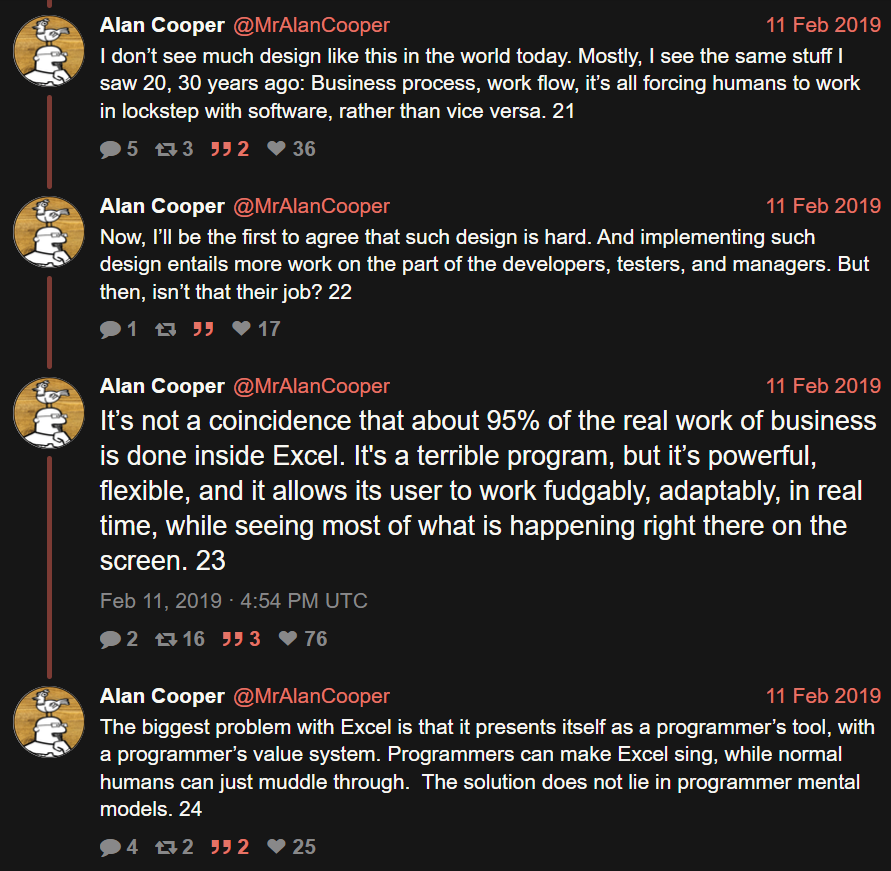
    Mr. Alan Cooper, the father of Visual Basic, calls this the fudgability of software. “[Excel is] a terrible program, but it’s powerful, flexible, and it allows its users to work fudgably, adaptably, in real time, while seeing most of what is happening right there on the screen.”
    Sometimes we need rigidity in business processes. We want to have repeatable outcomes that aren’t different based on who is operating the tools, or where & when. Business apps are excellent for facilitating a common way of working. At the same time, we must remember that a significant portion of information work consists of ad-hoc requirements and fuzzy processes adapting to incomplete data.

    That’s when we rely on the humans to understand what should be done. They, in turn, will rely on available tools that allow them to tackle data processing needs without unnecessary limitations. Meaning spreadsheets in most cases. Yeah, I wish more people were able to turn those repeatedly used Excel sheets into low-code solutions with Power Platform tools, yet that’s a bit too much to ask from individual workers most of the time. Most often, Excel is just a better fit.

    LLMs only wish they could be like Excel

    AI is supposedly eating the software world. It certainly is eating all of the available capital (and more) in trying to turn computers that used to be reliable into something that’s… not. The advantages of having the computer understand natural language and being able to respond to any question are of course huge. If only there wasn’t that minor inconvenience that we can’t know if the response is correct or not.

    Microsoft, a.k.a. The Copilot Company, has of course been fearlessly approaching the idea of combining creative large language models with software that is normally used for precise calculations. The result is news headlines like this: Microsoft launches Copilot AI function in Excel, but warns not to use it in ‘any task requiring accuracy or reproducibility’. Okay, cool, I only ever used Excel for fun and games anyway, so no worries about those accuracy gaps…

    The area where creativity and conceptual problem solving could be very useful is in designing how to get from an Excel into an app. I’m optimistic about the LLM-based Maker features accelerating and expanding the possible Power Platform solutions that can be built for varying types of business problems. If we don’t expect AI to work the same way every time, but rather use it as a force multiplier for fudgability, the risks of hallucinations breaking the business processes should be much lower.

    Let’s look at one case where I’d like to see AI replace Excel in my personal life. For 4 years now, I’ve been tracking the expenses related to my car using an Excel workbook. Fuel amount, cost, mileage are an example of what I’ve entered there after every visit to the gas station:
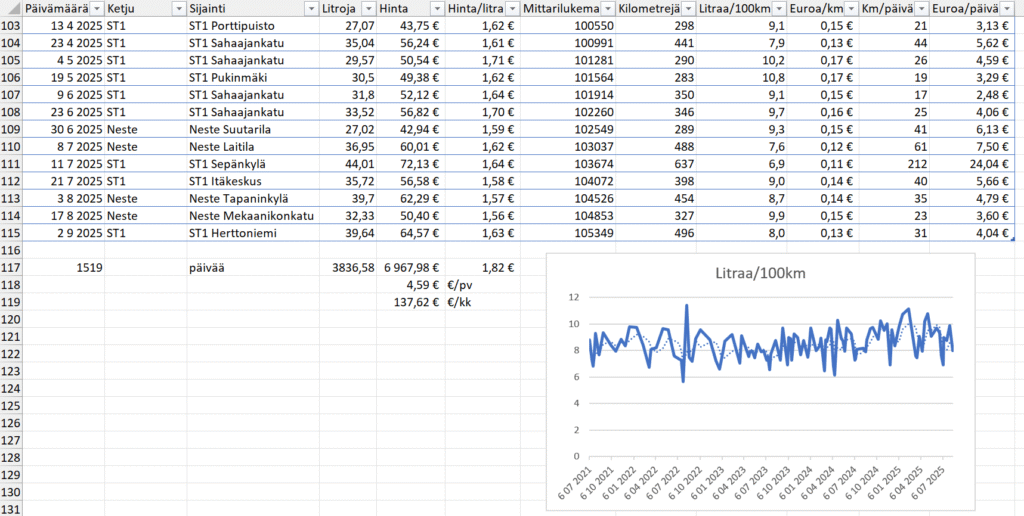
    Many, many times, I’ve thought to myself “I should turn this into an app”. After all, what kind of a Power Platform evangelist would just keep working on an Excel file for years without modernizing the process? Yet whenever I started to think about the details of what should be there to replicate everything my workbook provides (there are other sheets there, too), I realized it’s a heck of a lot of work to achieve parity with what Excel gives me. No rational reason ever existed for me to put in all the work to achieve something that I’d be happier using. It could have been a community demo, sure, but I always had other stuff to work on.

    Now, when we are living in the age of agentic AI, surely it’s about time to replace the Excel? Well, if I could just give that file to an AI tool and make the machine modernize it for me, why not. Last week, when Lovable announced their file uploads feature and claimed “you can now drop files directly into Lovable and turn them into apps and websites”, I decided to try it out. Sure enough, the vibe-coding tool was able to generate a web app from the .xlsx file:
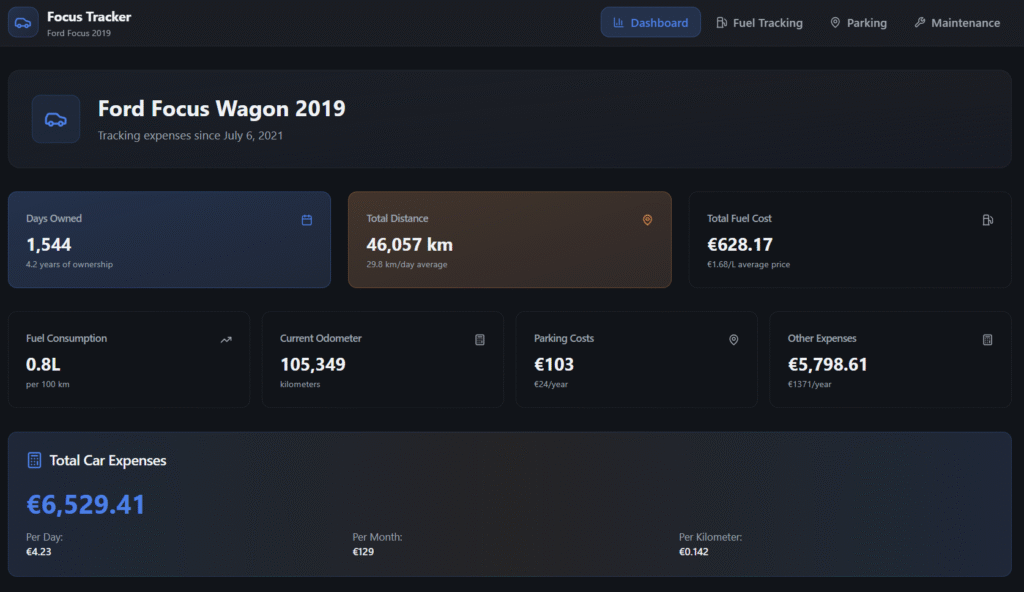
    The only problem? The data is not correct. Like, I only wish my 2019 Ford Focus 1.5 EcoBoost was able to run 100 km on 0.8L… In reality, the React app generated by Lovable was not able to handle the “big data” of around 200+ lines of data in the Excel workbook and instead chose to read only parts of it. The AI chatbot of course will claim this app has “real calculations from your Excel”, but we all should know at this point how LLMs are just manipulation machines that you shouldn’t spend time arguing with.

    I never have to worry if Excel is trying to manipulate me. It may not always understand what I’m trying to do, yet the machine never pretends that it did the work it promised to do while giving out a bogus number instead. The math is not based on vibes. Today, we have LLM-based AI features inside our spreadsheets that are sometimes able to call deterministic tools like Python to do real calculations. But we have no certainty that AI would always resort to such tools when needed, instead of just making shit up.

    That doesn’t stop companies from trying to make AI in Excel work. OpenAI has funded startups like Endex that develop Excel add-ins for injecting LLM magic into spreadsheets. Microsoft is also aiming beyond Excel Copilot with their recent preview launch of Agent Mode in Excel. Could these tools already replace a financial analyst creating Excel workbooks with formulas and business metrics? I decided to give Agent Mode a try on the day it came out:

    You can check out the experience and end results from the video. In short: Excel Agent Mode ain’t necessarily a tool you should yet rely on…

    If you can’t beat them, join them

    Instead of seeing Excel as something that should be replaced, perhaps a better strategy is trying to accept the fact that Excel files will always exist. Because people want to experience the control that Excel gives them, instead of limiting themselves to the GUI prison of your business app. Similarly, they’d prefer if the numbers that get shown to them would be based on verifiable math rather than on-demand hallucinations of “vibe working” tools.

    I’m somewhat biased here because this is the route we have taken when building FinModeler. A SaaS application that helps business founders or financial advisors to create detailed financial models with its simple web-based wizard UI. And then, producing an Excel workbook for you, complete with dynamic formulas that allow you to adjust the model with the tool you know and love.
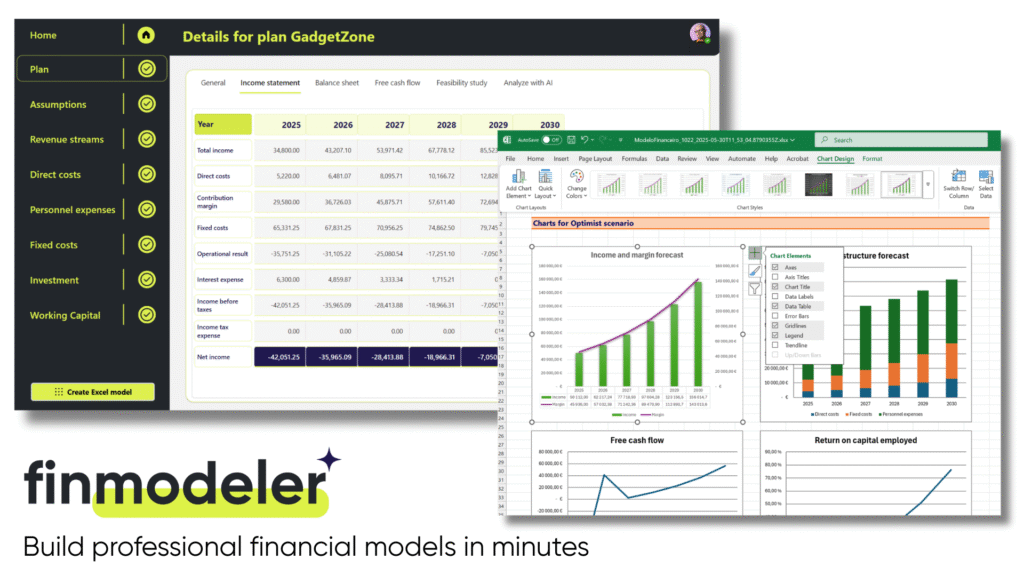
    It’s not your typical product built on Power Platform. Not simply because of the full-fidelity Excel workbook generator feature. But rather the whole SaaS delivery model of offering a canvas app that requires zero installation differs from the expected way of partners shipping products on Microsoft’s low-code platform. In many ways, this is not how business apps are supposed to work – but we’ve done it anyway!

    Today, anyone can check out how this combination of Power Platform + Excel works in practice by signing up for a free 14d trial of the FinModeler app. There’s a lot more that we can do in future versions of the product, besides just creating extensive Excel workbooks. The fact that the financial model data is stored in a structured Dataverse database is a much better position to build new features than if we’d need to rely on Excel files alone. Still, it’s essential that the users have the possibility to interact with the model that offers them the ultimate level of control and confidence.

    Spreadsheets are forever

    The moral of the story is: it’s not either/or. We are all better off when there are different types of tools available for working with business data and processes. Both structured apps and fudgable spreadsheets serve a clear purpose. Similarly, we have room for both deterministic, reliable software as well as creative and unpredictable AI. Trying to force people into choosing just one tool never works.

    Recent estimates say Excel is used by over a billion human users. In the near future, there will be countless AI agents built that will also try their best to learn how to work with Excel spreadsheets. What I’ve learned is that while you can (and often should) go beyond spreadsheets to evolve and improve your processes, it’s foolish to think that you could replace Excel entirely. Turn it around instead and think of all the data manipulation and calculation features you don’t have to build into your own software, thanks to Excel being there to handle it with ease.

    After 25 years of working professionally in the field of customer data and business applications, I’m proud to once again add a sticker onto my laptop that celebrates the magical powers of Excel:


  • Silence of the lambs

    Silence of the lambs

    I’ve been silent on this blog recently. At least compared to my historical pace of publishing posts.

    One explanation is that I’ve started writing my Perspectives on Power Platform newsletter. If you’ve been follwing my blog for the technology topics around MS BizApps, I recommend you to check out perspectives.plus and subscribe to receive the newsletter issues via email. (Why use a newsletter instead of a blog? That’s a subject for a future post to come.)

    Silencing your employees

    There are other types of silence. The one that got me reflecting on these thoughts is what has been written about the NDAs at OpenAI. In short, the organization has imposed very strict contractual terms on departing employees. The exceptional issue appears to be OpenAI claiming the right to claw back vested equity. This right would be triggered if the ex-employee would criticize their former employer – ever. With no end date.

    Reading about these reported policies has caused me actual physical discomfort. There is just something about the pre-emptive silencing of the people who work at an organization that rubs me the wrong way, in a big way. Can there be a more obvious way to state “we won’t really ever trust you” than imposing something like this?

    In this case, the executives have of course played the get-out-of-jail card of unawareness. From the Xeet of Sam Altman:

    there was a provision about potential equity cancellation in our previous exit docs; although we never clawed anything back, it should never have been something we had in any documents or communication. this is on me and one of the few times i’ve been genuinely embarrassed running openai; i did not know this was happening and i should have.

    Sam Altman, CEO of OpenAI

    Many will surely believe the explanation. That it has simply been some lawyers out there who’ve been zealously protecting and pursuing the client’s legitimate interests, within the bounds of the law. The corporate way: we’re doing all this just because it’s the way corporations work.

    Weapons of mass distrust

    The fact that OpenAI has never clawed back money from ex-employees is completely irrelevant. The impact of such contract clauses takes place regardless. The whole purpose of nondisclosure agreements is to stop something from happening. They are the corporation’s nuclear missiles.

    While there are perfectly legitimate scenarios in various business relationships where NDAs enable confidential discussions to take place (everywhere in consulting, for example), this one is very different. When you have a policy that forbids criticizing the company for the duration of the former employee’s lifetime (and also forbids them from acknowledging the existence of the NDA), this is not about establishing trust. It is a weapon against another party that you by default do not trust. Period.

    This model establishes a system of silence. Both before and after an employee leaves the organization. This is because it’s important to understand how the concept of criticism is defined. It is not something that the employee (subject) can evaluate. It is unilaterally defined by the corporation (object).

    From this situation arises the imbalance of power that can impact organizations in everything they do. If your employees must be continuously evaluating in their heads the question “could someone interpret what I’ve said as criticism”, they will only say out loud a small subset of what they really think. Self-censorship is a destructive pattern that can repress any initiatives for building trust among teams.

    As the information worker organizations increasingly become independent from physical locations, our communications start to become mostly digital. No matter if its emails, chat messages, online meetings – our modern multimodal AI algorithms will convert everything into text. Potentially storing it forever. Making it available for queries, in a whole different context than where the communication initially took place.

    In such an environment, where do you create room for the informal, uncensored discussions to take place? This is a very hard problem to solve in practice. That’s because the root cause isn’t the traceability of digital communications. The need for creating a separate space where people can express their thoughts and feelings is the problem. Such separation should not be needed to begin with.

    Choosing transparency

    Ever since the Web 2.0 era tools and techniques became available, I’ve been a vocal proponent of working out loud. The idea that you should be proactively making your work visible to the networks through which value can eventually be created. Not just reactively providing specific information when requested. Making everything you type as broadly visible as possible in the given context.

    Why bother? Because we ultimately should be conscious of not wasting the keystrokes we have left in us:

    Blogging is a communication pattern that optimizes for the amount of awareness and influence that each keystroke can possibly yield. Some topics, of course, are necessarily private and interpersonal. But a surprising amount of business communication is potentially broader in scope. If your choice is to invest keystrokes in an email to three people, or in a blog entry that could be read by those same three people plus more — maybe many more — why not choose the latter? Why not make each keystroke work as hard as it can?

    Jon Udell: “Too busy to blog? Count your keystrokes.”

    For someone like me who believes in the transformative power of radical transparency, any organizational barriers that encourage silence are a problem. Most of them are softer barriers, such as the general convention of how people around you behave. Others are technical barriers that results from the design of our information systems – be it intentional restrictions or unintended practical limitations. Finally, there are the contractual weapons mentioned earlier.

    I don’t believe there is a way to separate external transparency and internal transparency when it comes to company culture. By external I’m referring to communication that takes place out there in open communities and networks that connect professionals from several different organizations. The internal part is about all communication that takes place within the (fire)walls of an organization – voluntarily, without an explicit process to require such activities to take place.

    If internal transparency is not something that is organically allowed and encouraged to grow in the organization, you’ll likely have to try and force the external transparency. Meaning, it’s hard to get your experts to actively participate in community activities and share their knowledge with the outside world if it’s not a pattern that exists internally in the corporation. There will always be exceptional individuals, but it will not become a part of your culture. Thus you cannot leverage the network effects but rather have to pay to get people to notice your company.

    The excuses for silence

    Transparency can be a virtuous cycle for the business. Silence is often a vicious cycle. Why isn’t every organization then gravitating towards a more open and trusted culture of communication? Boy, that’s a big question that requires some serious investigation. Or maybe just throwing a quick question at ChatGPT – which provides the following reasons:

    • Fear of negative exposure
    • Control and power dynamics
    • Short-term focus
    • Lack of trust in employees
    • Cultural and structural barriers
    • Legal and regulatory concerns
    • Inertia and status quo
    • Risk aversion

    Going through the list and the more detailed explanations under each item (try it with your AI tool of choice), it’s easy to see why choosing transparency isn’t by any means easy for organizations. Individuals exist also in the leadership team, thus the choices made in managing a company aren’t made simply based on cold, hard logic. We all need to feel psychologically safe at work, among our colleagues as well as with our managers/subordinates. If we’re emotionally or physically drained, that sense of safety is really difficult to reach. And so the cycle begins.

    Transparency rarely just happens, yet silence is easy to achieve. Like in the example from OpenAI. The fact that the word “open” is included in the company name has been the source of ridicule for many reasons (closed source models, lack of respect for copyrights). Even though they’ve got the technical and financial resources in place to achieve top results in the global AI race (largely thanks to Microsoft), the company’s culture of silence can turn out to be a significant handicap in the long run. It’s certainly not a place for everyone to feel safe at.

    How you treat the employees who are moving on is a signal of whether you consider them to be a potential future asset or a liability. As the detailed report from Vox.com reveals, there’s not question what side OpenAI’s culture falls on:

    “We want to make sure you understand that if you don’t sign, it could impact your equity. That’s true for everyone, and we’re just doing things by the book.”

    Email from OpenAI to an employee asking for more time to review the employment termination agreement.

    “Just doing things by the book.” Just assuming that whatever the employees do in their professional lives from here on could not possibly be of value to the organization. As opposed to the clear and present risk of them talking with others and expressing their own thoughts. Talk about short-term focus in a networked world.

  • Life after CRM: farewell to SurvivingCRM.com

    Life after CRM: farewell to SurvivingCRM.com

    In 2008 I started a blog called Surviving CRM. Now in 2019, 11 years later, it’s time to move on.

    Don’t worry, I have no intention to stop blogging. Nor will there be a dramatic change in the type of content I’ll be posting or the topics I’ll be covering. This is merely a symbolic farewell to my blog’s original frame of reference, which was customer relationship management (CRM) and more specifically Microsoft Dynamics CRM as the technology for delivering solutions to bring the organization’s CRM strategy to life on a practical level.

    While there is a benefit in having an established three letter acronym to describe what exactly you do for a living, I feel that just “doing CRM” has not been my focus area for quite some time now. I have spent far more time and energy in educating Dynamics customers and professionals why they need to think outside the familiar CRM box. This shift towards a broader Business Applications story had of course started already earlier with the app explosion of Dynamics 365 and the product’s tighter alignment with Office 365, but it was Microsoft’s launch of Power Platform in 2018 that really drove through the message for the wider audience.

    What comes after CRM then? That’s a good question! Ever since I wrote about The End of CRM as Microsoft Software 3 years ago, I’ve been pondering what should be that new “thing” that I could comfortably associate myself with. “Customer Engagement” never felt like it was established enough to take CRM’s place, which has now also been acknowledged by Microsoft as they’ve essentially deprecated the CE term to refer only to the legacy on-premises software. Nor do I find myself embracing the Dynamics 365 concept very deeply (at least the CRM+ERP harmonization part of the story) since so much of the innovation coming from MS in the business applications space is actually not about the 1st party Dynamics products directly. As for all the “Power” products – well, we’ve already seen the branding changes happening over there, which should serve as a warning sign for anyone to not get too attached with the specific names of their tools.

    At the end, I decided that I’ll just have to be me.

    This is now simply a blog written by Jukka Niiranen, hosted on the jukkaniiranen.com domain. There’s also a shorter jukkan.com to align with my social media handle (which the non-Finnish readers might appreciate). As for the name of the blog, Thinking Forward is a reflection of the purpose that blogging about Dynamics 365 and Power Platform has had in my life.

    I’ve always considered the act of writing down my thoughts as a way to think out loud, to create new meaning from the fragments of information that are bouncing around in my head. Through this process I’ve often ended up producing my own forward-looking statements about where Microsoft and the broader business applications ecosystem are heading. That’s what Thinking Forward will continue to be: analyzing the signals from Microsoft’s own announcements, from my network, from the community, and hopefully producing insightful articles that help everyone make sense of Power Platform’s direction. Highlighting the new opportunities while also openly addressing the challenges.

    Earlier my blog content used to be also syndicated over on the Dynamics 365 Community site. Back in 2013 when I received my first MVP award, submitting the blog’s feed over there seemed very natural, to make it part of the global CRM blog content feed to be conveniently consumed via RSS readers. In 2018 Microsoft decided that also the community blog content would need to be split into sub-groups based on the Dynamics 365 Apps hierarchy. “Oh alright then, put it under Sales for lack of a better group” I thought. Looking back, my blog content has lately had so little to do with Dynamics 365 Sales that it truly doesn’t belong into such a bucket. Nor is there really any better alternative in the current community sites provided by Microsoft, so it’s time to end the content aggregation. From now on you’ll have to either visit my blog directly or subscribe to the updates.

    What about CRM then? Is it “over” for me? No, of course it isn’t. In this age of data driven business processes that require advanced automation, new interaction channels, complex data analysis, machine learning algorithms and all sorts of intelligence, the customer master records are at the heart of it all. Unless you’re working with processes that don’t involve the customer, it’s unlikely that we’d get very far at all in designing new solutions if the foundation isn’t built on a solid system of record – most often your CRM. There is no magic bullet that will allow you to skip building this first layer.

    The importance of a CRM system for businesses hasn’t diminished at all. It’s just that we need to go much further. With the no-code tools offered by Power Platform and the ready-to-consume APIs available on Azure, the kinds of value-adding layers that we can now build on top of these core systems are simply mind-blowing. The biggest shift is how accessible this technology is today. You don’t need enterprise scale budgets and development teams to dream about them anymore. In practice any customer organization to whom I’ve delivered Dynamics CRM based solutions during the past 14 years should be perfectly capable to leverage these cloud services and digitally transform their business. Turn it into something completely different than what it was when that CRM system was first brought in to support the as-is processes and ways of working. Experiment, analyze, adjust, innovate, expand. Put those wheels in motion!

    Yet so few are doing this. Both the customers and the consultants who have been involved in building the first layer, the CRM system, can so easily get stuck in maintaining the as-is. Where could you find the time for thinking outside the box when you’re responsible for keeping that crucial, ever growing CRM box operational? The real tragedy here is that those professionals who’ve been deeply involved with designing, developing and supporting the CRM processes and have intimate knowledge of the customer data and many related systems – they would be in a great position to build the next layers with the new modern tools. It won’t “just happen”, though.

    If you want something new, you have to stop doing something old.

    Peter Drucker

    To me, CRM is a classic. Classics don’t die, they’ll always be a part of the journey that got us into the world that exists today. Those shiny new objects in the cloud that we may occasionally get so very obsessed with might turn out to be passing fads. That’s just fine, it’s not a competition of this thing vs. that thing. We don’t have to forget about what we know, we just have to make room for growth – like in all areas of life. Just like I haven’t thrown away my precious CD collection of music from the 80’s, 90’s and 00’s, my daily dose of electronic beats is still mostly a stream of brand new music that is being created today. All of which is built on the heritage of artists that came before and gave inspiration, techniques and sounds to make it possible for the many productions of today to evolve from what was created before. That’s how I like to think of CRM, too.

  • 4 Stages of MS Cloud Business Apps Evolution

    4 Stages of MS Cloud Business Apps Evolution

    In the past I’ve written about the History of Microsoft CRM from it’s first 10 years. I’ve also explored how the platform evolution up until Dynamics CRM 2013 had changed the product and how we worked with it. This time I want to focus on specifically the Microsoft Cloud era.

    I started to think about the different focus areas that we’ve seen on the journey that’s taken us from the early CRM Online days into what the current roadmap for Dynamics 365 and the greater Power Platform look like. In my mind these “snap” into four logical stages that describe what the main ambition at any given time seems to have been for Microsoft’s product team:

    Why bother looking back? Well, I could insert a “those who cannot learn from history” quote here, but really it’s more about putting the present into perspective. There are still plenty of customers who’ve either stayed with Dynamics CRM on-premises (now 365 CE by name, too) or who are still viewing the online service as just a “CRM in the cloud”. Hopefully this post will help in understanding the magnitude of change that has taken place in the greater Microsoft cloud during the past few years and why it would be better for them to embrace it rather than just observe it.

    1. Parity

    The very first versions of Dynamics CRM Online in 2008 wasn’t exactly the same product that you could get by installing it on your own application servers. The limitations on features and customizability meant this was a “CRM lite” that saved you the effort of infrastructure investments and server management, but there were a lot of trade-offs. You gotta start somewhere, but obviously this wasn’t exactly up to the vision that Microsoft saw as what the cloud services should offer to their customers.

    Upon the global launch of Online we received the updated CRM 2011 version and most importantly the solution framework that after several iterations now powers the ALM story behind Power Platform. Closing down the gaps between Online and on-prem was the primary goal for product development, with the “Power of Choice” being a key selling point against server-only or cloud-only competition.

    While the customization capabilities in CRM Online were surprisingly powerful already in 2011, the gaps in actually managing the environments you had no direct access to took a longer time to close. For the enterprise customers to consider moving from fully controlled servers and databases to the MS hosted cloud, a lot of investment was needed in building self-service features for instance management – not to mention ensuring the cloud apps were reliably available and updated in a controlled manner.

    Today the flexibility of spinning up new instances, copying them for test & dev, taking backups, syncing data to Azure SQL for reporting, and many other self-service features available for admins make the cloud environment quite attractive. In exchange of giving up full control over your servers and databases, you have the luxury of not having to think about them at all. There are no servers to patch up and keep running. As for the updates, it’s now a continuous delivery of new & improved features that puts an end to the concept of an upgrade project altogether. Sure, you’ll still need to do your part to ensure customer specific customizations and integrations keep working – that’s just another service that needs a continuous delivery mindset.

    2. Integration

    Once the cloud version was sufficiently close to the on-premises Dynamics CRM server, the next stage was all about making it better than on-prem. This was the era in which Office 365 was really taking over the business productivity market, so you could say the low-hanging fruit was in tapping into these existing services in the MS Cloud and making Dynamics CRM a more attractive application through those.

    Sure, we had heard the “better together” story for Dynamics + Office already in the on-prem days, but this wasn’t exactly the way we today expect cloud apps to just work with one another. Complex server configuration tasks were surely a nice source of revenue for the IT consulting companies, since very few customers were able to know all the ins & outs of how to properly deploy an Internet Facing Deployment of your Dynamics CRM server and make it talk with other MS server products. From Microsoft’s perspective, having useful product features available for everyone in theory doesn’t scale into real world customer success if there simply isn’t enough skill out there to deploy everything the way MS engineers do it in their labs. Well, when it’s all run by MS from beginning to end, this made it a solvable problem.

    Making common online services like Exchange and SharePoint available for Dynamics CRM admins to click & configure on their own was one key part of this journey. What this Cloud + Cloud combo also meant was that new features from the latest versions of each service could be rolled out at a much faster pace than the server bits could ever follow. Oh, and since all the services were by default available via the public Internet, mobile clients became an everyday tool for accessing your CRM information.

    (more…)
  • Yes, XRM Is The New Common Data Service

    Yes, XRM Is The New Common Data Service

    In November 2016 I wrote an article on LinkedIn with the title “No, Common Data Service is not the new XRM”. This was my response to the speculation that had emerged from Microsoft’s announcement of a new cloud-native platform to store, model and integrate business data with other (cloud) applications. This platform called CDS was seen as a potential replacement to XRM that had been born into the good ol’ on-premises server world already back in 2003. Given the transformative power of SaaS and PaaS, it wasn’t such an outlandish thought to imagine the days of XRM bits being numbered, with a new Azure based alternative being prepared behind the scenes to take over.

    Well, today we had the public launch of the Dynamics 365 Spring Wave in the Microsoft Business Forward event, which I summarized in my previous blog post. The most significant piece of news from this announcement wasn’t perhaps articulated so clearly in official Microsoft materials, so I’ll try and clarify it here and give some perspective on the what/why/how behind this change.

    XRM = CDS v2

    The platform known as XRM, which has served as the foundation for Dynamics CRM and later Dynamics 365 Customer Engagement, is now reimagined as Common Data Service, CDS. Or more specifically, “CDS for Apps”, but more on that later. The key things to understand here are that A) nothing from the current XRM is being removed while B) existing CDS v1 environments are migrated onto CDS v2 that effectively is XRM.

    The adoption of CDS as a component of solution architecture for live customer environments has likely not reached a very high level up until this point. Originally introduced as a concept back at the time when the whole Dynamics 365 concept was launched in 2016, the purpose of CDS has remained too fuzzy for many customers to explore it further. At the same time, the feature set offered by CDS v1 hasn’t yet covered many of the scenarios that Microsoft partners would have likely used it in. You could say that in their noble attempt to connect many of the existing boxes in the business application architecture, Microsoft ended up inventing yet another box. Which is pretty much the fear I had in my first blog post covering CDS, which back in those days was still called Common Data Model (CDM):

    Being the giant corporation that Microsoft is, there’s bound to be both plenty of overlap between different products developed by different groups within the organization, as well as the occasional lack of alignment between the roadmaps to where each of their countless products is heading to. I’m sure there was a clear need for introducing a foundation for managing all that business data which the Power Suite tools (PowerApps, Flow, Power BI) had to intimately work with, instead of just relying on distant services via APIs. Viewed from this perspective, the idea of CDS must have seemed pretty awesome. When looking at the feedback coming from outside the MSFT firewall, though, it’s obvious that the V1 product didn’t quite manage to meet the mark:

    This Ain’t The XRM of 2011 Anymore

    A lot of work remained ahead if CDS was to be built into what the real world requirements from enterprise customers were. At the same time, the XRM cloud platform was being transitioned to run on Azure services and the new target architecture was to allow the separation of the built-in applications (Sales, Service etc.) from the core platform. The CRM “legacy” of XRM was about to become an optional component you could remove and not break things, with previously hard-coded features being re-engineered as either core platform capabilities or implemented as reusable pieces within the in-house apps’ solution packages, built with Custom Control Framework (CCF) and presented via the Unified Interface.

    The people at Microsoft who actually design and build the functioning technical product were sure doing all they possibly could to prepare XRM to take a bigger role than just that boring old sales pipeline management engine with Outlook integration we’ve seen since forever. The community that had worked with Dynamics CRM and seen its potential to deliver custom business apps time & time again in actual customer projects were always asking for MS to deliver a “Pure XRM” SKU, to make it a true platform. Whether it would ever happen, though, was not for either of those groups to decide.

    At the end, as we now can see with the announcement of PowerApps Spring Update, the leadership team at Microsoft ultimately came to the right conclusion. XRM was chosen as the platform that would power the further expansion of PowerApps becoming more enterprise ready with the support for building model-driven apps alongside the familiar canvas apps. From a licensing perspective, “PowerApps P2 officially becomes the new platform SKU, moving away from being a admin and maker focused plan to becoming THE plan for users of stand-alone model driven apps.” So, there we have it then: Pure XRM at last.

    So Long, XRM!

    A legitimate question that some of you might as at this point is:

    “If the CDS v1 platform is replaced with XRM, then why is everyone talking about Common Data Service still?”

    Are we seeing yet another marketing spin that tries to blur our vision from what the underlying technologies really are, like with the Dynamics 365 “it might be CRM or ERP and you’ll never figure out which one we’re  talking about” rebranding pains? Well, that was my initial though when I first learned about the plans for this platform merge, but I’ve later come to the conclusion that it is actually a fairly sensible decision to replace XRM with CDS.

    For those of you who have been in the Dynamics game for long enough time to recall the first moments when Microsoft started throwing around the term XRM, you might still remember the excitement that was collectively felt around that letter “X” for describing the bold journey of going beyond the standard CRM feature set. The thrill of creating your very first custom entity via the customization GUI – man, what a rush! This truly felt like the future of business application development at the time.

    Fast forward to where we are today and the excitement of data model and UI customization has been replaced by the anxiety to get as many different apps and services to talk with one another with as little effort as possible. It’s not that focused on the Relationship Management part anymore, and instead of “X” we have X^N different things we need to manage and connect with (some are even IoT enabled things). To describe what we’re actually trying to use XRM for today, the Common Data Service is a pretty fitting name in the end. We’re trying to bring some common sense into the sea of data that everyone is swimming in, and we’d of course prefer to consume it as a service like we already do with movies or transportation, for example. And as for the visible UI part of the application that user interact with – well, there just happens to be this concept called PowerApps out there already. So, “XRM Part 2” = CDS + PowerApps.

    I think we’re at a point where we really should look at the road we’ve traveled with our trust ol’ XRM Swiss knife, appreciate all those countless times that we were able to find a tool from it that got the job done, but accept the fact that from this point onward we’re going to need a bigger knife. Which we might as well call CDS for the server side & PowerApps for the client side.

    One More Thing…

    Just so things wouldn’t be uncharacteristically clear for Microsoft’s product naming tradition, what we’re seeing here is actually a bit of a “SkyDrive moment”. By this I’m referring to the episode where after renaming SkyDrive to OneDrive due to a lawsuit from BSkyB, Microsoft then proceeded with launching another product called OneDrive for Business. So, “One Drive, many meanings”…

    With CDS the scenario is that while the XRM platform has now been rebranded as Common Data Service for Apps, there’s already another product on the way, called Common Data Service for Analytics. Regardless of the word “common” in the name, these two platforms are unlikely to share many characteristics when it comes to the technology under the hood. Here’s how the MSFT Technical Fellow behind Power BI describes it:

    So, we’ll soon have two awesome products from Microsoft named according to the pattern “Common Data Service for X”, which we can easily distinguish from one another by using the terms CDS-A and CDS-… Oh. Right. Well, there’s always the next round of rebranding we can look forward to!

  • In Praise Of Code and No-Code

    In Praise Of Code and No-Code

    Two weeks ago Neil Benson wrote an excellent article on LinkedIn, as a response to a claim that everyone working as a functional consultant in a Dynamics 365 project team should also know how to write code. This really resonated with me and I shared the article, along with a bit of commentary of my own. My post, in turn, started to gain quite a lot of traction on the LinkedIn feed. It looks like we had touched upon a topic of great interest within the network of CRM professionals.

    If you read my post above, it pretty much summarizes the main points I wish to bring out in this discussion:

    1. There is much more to ensuring Dynamics 365 project success than being able to do hands-on software development.
    2. A big chunk of the value delivered by Microsoft’s cloud platform is not relying on custom code development.
    3. The remaining chunk that is custom code driven work should be left to professional developers and not copy-paste heroes.

    There have been some very good arguments written in the comments section of the LinkedIn post, so I urge you to also view them for gaining greater perspective on the topic. I see a lot of resemblance with the “should designers code” meme in the original assumption that functional consultants would be able to do their jobs better if they also were familiar with developing custom code. Much of what has been said in the heat of that debate between coders and non-coders probably applies here, too:

    Alan Cooper’s four part article covers the dilemmas in general software development teams with such great insights and depth that I won’t even attempt to dive in the same direction here. In practical terms of a CRM project, when it comes to the availability of skills and experience needed in carrying out the wide range of tasks during the project’s lifecycle, the manager in charge of resources is always going to need to do some juggling. The less you ask the team members to juggle between completely different kinds tasks, the more likely they’ll able to focus on actual customer value generating activities rather than keeping all the balls in the air simultaneously. Here’s how Neil Benson put it:

    “Asking a functional consultant, with no formal computer science education or experience as a professional coder, to find and copy someone else’s JScript from Stackoverflow and paste it into your Dynamics solution is asking for trouble.”

    I don’t touch code myself but I do try to get my hands dirty on a wide variety of technologies. For example, today I spent a few hours getting familiar with Azure Service Bus, testing how without writing a single line of code I was able to push plugin execution context data into a cloud based message queue and work with it via a GUI in Azure Logic Apps. Now, I would never recommend myself as a person you should hire to set up your production ESB, but I do feel like I need to have a deeper understanding of these technologies than I could gain just by watching through the flashy demos in Microsoft keynotes. Seeing the different sides and reading/hearing what those with deep expertise on a particular technology have to say about it, that is essential. Going and actually trying to step into the shoes of an expert for that technology – probably an unnecessary detour.

    Skimming the bits from the top without diving deep into the dirty details of writing real code might sound like being afraid of all the complexity that awaits beneath the surface. However, the lack of code in a solution doesn’t mean that the complexity of the solution couldn’t be high. The CRM Tip Of The Day post “The story of the small change” perfectly illustrates the way in which individual configuration items built entirely via the graphical tools provided by MS can have dependencies that require you to have a rigorous testing process in place. It’s not just the changes of a system either, since you can easily use workflows and business rules to build a level of complexity into your business logic that doesn’t reveal itself in the test scenarios the consultant behind the design might have thought of. Whether you’re delivering the end product via code or configuration, bugs will sneak in there and eat away a part of your life – be it before or after production deployment.

    The argument for doing things via point’n’click configuration “because it’s so much faster to build” shouldn’t be the one and only argument. Yes, it is often much, much faster to put together the first iteration of a solution via graphical tools. This in itself can be a huge value for the business because you can validate the proposed solution quickly with the relevant stakeholders. Often you’ll only get to the actual requirements when demonstrating live parts of what the initial requirements said. Now, the main reason why Real Developers are often afraid of what “citizen developers” might come up with when given quick tools for building no-code apps is that they may lack the experience of seeing the full lifecycle of a business application. They’ll mistake the first PoC as being equivalent to the final production solution, with little thought given to the work that still remains ahead. This experience isn’t something you must necessarily gain via writing code yourself – a no-code functional consultant just needs to gain sufficient exposure to the various stages of the process via working as a part of the CRM project delivery team.

    I think we all need to be able to see “beyond code” when building solutions on top of platforms like Dynamics 365 Customer Engagement. Going full-on no-code in your design approach is probably going to unnecessarily limit the value that could be gained from an extensible application platform, forcing you to unsustainable workarounds and resulting in poor UX for the system end users. At the other end of the spectrum, always resorting to your custom built components before having a thorough analysis of the configuration capabilities and complementary cloud services found within your ecosystem of choice will likely increase the solution’s TCO and put the long term reliability of your complex business application at risk as changes in related processes, personnel and technologies occur over time.

    Please feel free to leave comments on how you see the role of code & no-code work evolving in Dynamics 365 projects.

  • CRM Hindsight Is 20/20 – My Blogging Retrospective

    CRM Hindsight Is 20/20 – My Blogging Retrospective

    It’s the end of another year, which means the blogosphere is filling up with “looking back” type of articles that examine the various topics discussed during the year. Analyzing past actions is activity that we all should probably spend time on a bit more frequently, although one day out of 365 is a good start. Following this pattern, I also ended up having a look back at some of my earlier writings during the Xmas break.

    Conan_2010_appsSo, how was 2015 for Dynamics CRM? Beats me, because that’s not where I was looking at! Via a seemingly random navigation path that started with me exploring the brand new PowerApps announced by Microsoft a few weeks ago, I actually ended up reading some of my Surviving CRM writings from the year 2010. I’ll perhaps describe the events behind this abrupt jump back in time in a post covering the future of mobile business apps and CRM, but for now that’s not on the agenda. No, instead I found plenty of interesting material covering quite a wide spectrum of CRM related topics that in many ways are as relevant today as they were five years ago.

    My journey with Microsoft Dynamics CRM started almost exactly 10 years ago, when the MS CRM 3.0 version with Finnish language support was introduced and my then forward thinking organization decided to adopt this system instead of a proven, industry specific solution tailored for the Nordic markets. I did not start blogging about my experiences right from day one, since back in 2005 that wasn’t how any normal person would behave (today it would be something I’d encourage everyone to consider). As my focus gradually moved away from generic marketing and IT topics into a more tightly defined domain of business applications and the MS ecosystem in particular, more and more material started accumulating on my blog, on Twitter, on SlideShare and so on. By 2010 it looks like I had already sunk pretty deep into these waters, which makes it interesting (at least for myself!) to see how I envisioned the world around Dynamics CRM to evolve.

    I picked out a few topics from my 2010 writings and reflected back on what I thought was going to be their impact vs. what we now know five years later. In (mostly) the order of the original blog posts, the themes ended up being the following:

    • Cloud
    • Mobile
    • Portals
    • MS Office
    • Social
    • Business app development/XRM
    • Outlook
    • SharePoint
    • ISV ecosystem
    • Solution management
    • Charts & dashboards
    • MSFT organization

    Here’s a presentation that contains excerpts from the original blog posts and some notes 5 years later on the topic:

    Luckily I’m not in the habit of making bold, precise predictions like “by year N+2 the market size of technology X will have grown by 300%”, since those are better left for the industry analysts who are paid for such statements. I’m of course completely biased in evaluating how accurately my own writings matched with the future reality, but it’s easy to find a number of observations from there we one could arrogantly say “I told you this was going to happen” and “some things never change, now do they”. What’s not so apparent from looking at past articles are the things that actually did change at a blinding speed.

    Just think about it: only five years ago the big new CRM 2011 release was being developed for an “Internet Explorer only” world and the thought of MS favoring competing OS’s in their own apps over Windows would have been simply ludicrous. Getting new CRM versions released every 6 months instead of a 3 year upgrade cycle sounded like something the customers could never cope with, but here we are with CRM Online. Mastering the whole Dynamics CRM product in 2010 was a perfectly realistic goal for consultants, whereas in 2015 you’re not going to find a person who’s fluent in CRM, MDM, MSE, Parature, FieldOne, Adxstudio and the rest of the current MS product stack in this area. All these changes and more mean that a CRM project starting today may not have much in common at all with the one you were working on in 2010.

    The future isn’t ever exactly what you would think, but that doesn’t mean you wouldn’t benefit from the effort of trying to project the possible paths forward in your mind. I personally find the best way to build up clarity into your vision on where things are going is spending some time on connecting the dots between what information you’ve just recently acquired and what analysis you’ve performed earlier. It’s all too easy to just launch a news app or log into a social feed and start taking in new announcements of what someone else thinks is noteworthy right now, but those bits & pieces are fairly unlikely to carry significance to you in the long term – unless you’re able to put them into context with the knowledge structures built from prior pieces. That’s why it doesn’t hurt to recap the history of how the technologies you’re working with have evolved over time, when thinking about what might be coming next on the road ahead.

  • History of Microsoft’s CRM Software

    History of Microsoft’s CRM Software

    Happy_birthdayI recently read the news that Siebel had turned 20 years. Man, that is a respectable age for a CRM software product! Although its market share may have peaked 10 years ago already and today the discussion on the future of Siebel is now circling around the question of when will the last Siebel instance be turned off, you still have to the give credit to the CRM software grandfather. Here’s how Denis Pombriant puts it in his “Siebel at 20” article:

    “In many ways, though, Siebel still is the market. Go into a Global 2000 company and you will see a Siebel system; today Salesforce users might flank that system’s users too. For many of these companies, Siebel is a workhorse system that has been through some of the wars and continues to be serviceable.”

    Inspired by this, I decided to compile a few pieces of history around Microsoft’s CRM product, to provide some context on where it originates from and how the platform has developed over the years. After all, with the first version having been released in 2003, Dynamics CRM has also now reached the 10 years milestone. I’ve personally worked with Microsoft’s CRM only starting from 2005, but the story starts from much earlier than that. I’ve had to do a bit of software archaeology in digging up the events that took place before my first encounter with CRM 3.0, so not all the details may be accurate and you’re more than welcome to add your comments at the end to fill in the blanks.

    Alright then, let’s step onto the timeline and start our journey towards CRM 2013 right from the beginning.

    Before CRM

    A common belief that circulates out there in the wild is that CRM is just another product that Microsoft has bought and integrated into its business software portfolio, like the ERP products Great Plains, Axapta and Navision (nowadays Dynamics GP, AX and NAV). Well, that’s not entirely true, but we can trace back the origins of CRM to the year 2000 and a product by the name iCommunicate.net. Here’s an article taken from IThell.com:

    iCommunicate.net – the first IThell.com Halo Award winner!

    Without a doubt, this is the winner as the coolest (and most helpful) new product of the expo and is the first product to be awarded the Halo Award for providing a solution that can truly help folks in IT by making it easier than ever before to cost-effectively manage customers, customer solutions and resolve customer problems. iCommunicate.net is a web based, out sourced solution (ASP) for CRM with a tremendous feature set and a great pricing model.

    In 2001 Microsoft acquired iCommunicate, which had 10 employees at the time. The developers behind iCommunicate.NET moved to Redmond and started developing a modern, web based CRM application together with Microsoft’s team. Aaron Elder, the lead developer of iCommunicate, shares many wonderful bits of information about the project in his MSDN blog posts. Here’s an enlightening quote on what the starting point was for developing Microsoft CRM:

    When I first joined the team the “application” was literally a mess, this of course was “ok” because at the time the application was referred to only as the “reference app”.  The application that you all know and dare I say love, was originally only going to be an MSDN example of what you could build on top of the CRM Platform!

    There are not many screenshots of iCommunicate.NET available anymore and I’ve only managed to save these two from Google’s cache. According to Aaron, the Microsoft CRM 1.0 UI was simply a logical evolution of the UI he designed for iCommunicate.NET, so perhaps this is one of the more concrete heritages carried over from the pre-Microsoft era of the CRM product.

    Version 1

    Here’s the press release that marked the birth of Microsoft CRM: Microsoft announces new customer relationship management solution. Notice how Microsoft bCentral is one of the online services mentioned as a CRM solution. This service hosted by XO Communications apparently offered some basic contact management and email campaign functionality aimed at the SMB market.

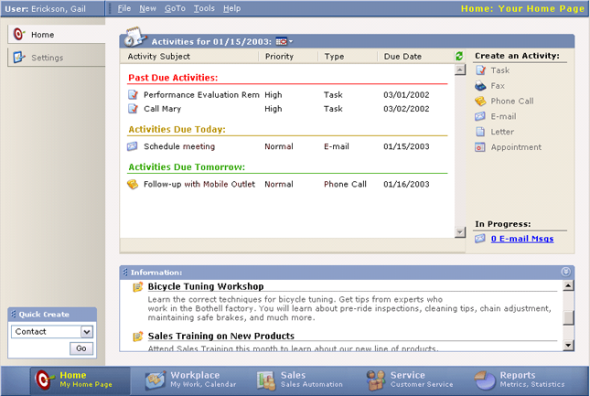
    Microsoft CRM 1.0 was released in January 2003, with the official name being the catchy “Microsoft Business Solutions Customer Relationship Management 1.0”. Here’s a screenshot of the home page that the system offered to the users for a quick glance of the open activities, alongside a Quick Create menu and an announcements list. The navigation bar at the bottom of the screen offered the familiar modules of Workplace, Sales and Service. The reports of CRM 1.0 were not built on SQL Server functionality yet but instead leveraged the well known Crystal Reports product (which was later acquired by Business Objects, which in turn was bought by SAP).

    Microsoft CRM 1.0

    Although it wasn’t possible to perform any advanced customization tasks on CRM in a supported manner, such as adding new entities, the Microsoft partners were already at the time finding good business in filling the gaps of CRM 1.2. Still, everyone was really putting their hopes on CRM 2.0 being an easier product to sell to customers, with more built-in features and improved reliability.

    V2/3.0 and The Birth of XRM

    What was first called Microsoft CRM 2.0 and later Microsoft CRM 2005 became vaporware, as after being delayed a few times the version was never released. In the meantime, Microsoft had revealed information about an ambitious initiative called Project Green in 2003, which aimed to to combine all the business products (CRM, Great Plains, Axapta, Navision, Salomon) onto a single code base. It wasn’t until 2007 that the project was announced as dead & buried, with each of the ERP products remaining separate platforms for the foreseeable future and CRM naturally carrying on with its own roadmap for primarily managing the customer facing interactions instead of financial transactions.

    Microsoft CRM 3.0 was released in December 2005. Or more precisely, Microsoft Dynamics CRM 3.0, as the Dynamics brand was launched in September 2005 to harmonize Microsoft’s ERP and CRM product offering. So even though we didn’t get a Microsoft Business Framework (MBF), at least product names were all aligned under the Dynamics umbrella. This branding update didn’t quite manage to cover all corners of the application and the name “Microsoft CRM” or “MSCRM” in short still carries on today as popular nickname for the product.

    The UI of v3.0 introduced the navigation paradigm that has been largely carried onward to the current CRM 2011 version. Imitating the Outlook modules, the product now had a “Wunderbar” in the bottom left corner of the screen, including the new Marketing module that introduced basic campaign management functionality into the core CRM offering.

    Microsoft Dynamics CRM 3.0

    Most importantly, with CRM 3.0 it was now possible to create brand new custom entities to expand the default data model to cover whatever business domain that the customer was working in. The term “XRM” was introduced into the Microsoft corporate lingo to describe these new scenarios for eXtended Relationship Management. A whitepaper from 2008 titled “Microsoft Dynamics CRM as a Business Application Platform” written by Jason Hunt and Aaron Elder, the original architects of the platform, goes into great depth on why Dynamics CRM should not be considered as “just CRM” but something much more formidable and powerful. (more…)

  • Thank You, Readers!

    Today Surviving CRM passed the 1,000 +1’s milestone on Google+. Wow!

    Surviving_CRM_Gplus_1K1

    Thank you to all of you who’ve been reading the post over here on the blog or following the latest Microsoft Dynamics CRM news and links shared over at the Surviving CRM Google+ page. Even though I think the most immediate benefit from publishing CRM related content is how you can yourself learn so much more about the topics you’re covering, the fact that other people out there can also benefit from this shared knowledge is what really makes it worthwhile in the end.

    Every post, comment, vote or click matters in the online communities. So, consider this my +1 to you:

    PlusOne


  • Making use of Dynamics CRM process automation capabilities

    You shouldn’t use Dynamics CRM only for storing and presenting data entered by users, otherwise you’re really missing out on much of the capabilities that a CRM system has to offer. Sure, the immediate need for a CRM system will often be establishing a single location for customer data, rather than having it spread out to hundreds of Excel sheets on everyone’s C-drives. Effectively managing information about who is doing what with which customers is a key benefit you should try to achieve with your CRM implementation project, but it’s just the start. You shouldn’t be happy with it and just stop there.

    Another reason why processes are crucial especially when going for the Microsoft Dynamics flavor of CRM is that there isn’t much business logic configured into the system right out of the box. It’s in many ways a blank slate that is waiting to be filled with the business rules of your operational customer facing processes. For example, there isn’t a default sales process built into the system, but it provides you the tools to configure one. The beauty of this approach is that no one is forcing you to adapt your business to the way how the software works, but the price of it is that you’ll need to invest adequate time and resources into the configuration work.

    Process automation doesn’t have to be something very complex or expensive, though. An example of an expensive route to take would be first arranging workshops with cross-functional business teams to discuss and define the business processes to be followed in high detail, then transforming those into functional specifications for the CRM system that the .NET developers will in turn use for designing, building and testing their custom code based solutions. While there’s nothing wrong with this traditional approach, it pretty much bypasses many of the strengths that Dynamics CRM has for a more rapid business application deployment.

    If you have a CRM power user or a trusted CRM advisor that knows how to make the most out of Dynamics CRM workflows and dialogs, not only can you cut down the costs involved in implementing process automation. You also gain a new level of agility in being able to respond to new or changing business needs as they arise from your operational customer relationship management work. You can have the solution up and running within hours, plus you’re able to see the results in action the next day instead of next month, allowing you to quickly adjust the system to better match the reality as you discover new facts about it through experimentation.

    Speed of iteration is something that can have a profound effect on success in business. Note that I’m not saying you should skip the requirements gathering and business process analysis steps completely, because that’s guaranteed to lead to failure. What you should however aim for is taking a step away from the traditional waterfall project flow and experiment with CRM’s capabilities already while in the analysis phase. Instead of an “all or nothing” attitude, meaning jumping from 0% system to a 100% system that meets each and every requirement, what if you could instead get 70% of the functionality into use in a fraction of time of what the delivery of 100% would take? Could it be that you’d actually find yourself in a better position to build that remaining 30% because of what the first 70% has already taught you?

    People don’t often know what they want before they see it. Remember that “faster horses” quote from Henry Ford? You’ll likely receive much more concise and practical requirements from the users if they can see a prototype of the system in action, before you ask them to define what exactly it is that they need. Using the configurable workflow and dialog processes together with Dynamics CRM’s flexible data model customization tools allows you quickly build the first draft of the proposed process automation functionality. You’ll also identify at a very early stage what features can be implemented with the built-in tools and which would require custom code.

    If you want to reduce the Time-to-Value of your CRM implementation, you really should look into the process automation tools that come with Microsoft Dynamics CRM and learn about their capabilities.

    Where should I start?

    The only right way to get familiar with Dynamics CRM workflow and dialog processes is to get your hands dirty by trying to build them in a real, functioning CRM system. If you don’t have a test environment available right now, just sign up for a 30 day trial account in CRM Online. (You can read more about how the new Office 365 integration affects the CRM Online provisioning process here.) You can bring in your own system’s customizations by exporting the solution files and importing them to the trial environment, which will allow you to test with scenarios related to your specific CRM data model. If you also need to have your actual CRM data available for testing instead of test records keyed in manually, read this article for one possible approach.

    Building workflow and dialog processes in Dynamics CRM doesn’t require any developer skills, but it does take a bit of courage from the CRM system administrator or power user to dig into the platform functionality and business logic that the process editor surfaces. The web is full of nice blog posts on how to perform a specific action with CRM workflows, but it’s perhaps not the most convenient method to learn about the process automation concepts on a higher level. If you ask me, a better way to ensure you’re using your time efficiently while getting to know CRM workflows and dialogs is to do it the oldskool way and buy a book. No, I don’t mean you have to get a physical book made of paper to sit on a table somewhere, an eBook will do just fine, too.

    Which book should you then get? I recommend this one: Building Business with CRM – Using Processes in Microsoft Dynamics CRM 2011. It really is the missing manual for workflow and dialog processes in Dynamics CRM. If you’ve ever searched the web for practical tips on “how to do X with Y in Dynamics CRM”, you may well have come across the website Richard Knudson’s Dynamics CRM Trick Bag.  Richard, happens to be the author of this book, has been publishing an incredible amount of in-depth articles on topics like CRM customization, dashboards and workflows during the past few years on his website, making his blog feed required reading for anyone working with Dynamics CRM. You can also find several excerpts of the Building Business with CRM book from the website, which give a good indication of the type of content you can expect to find in the full publication.

    While Microsoft does also have their own training materials for the course 80444A: “Workflow and Dialog Processes in Microsoft Dynamics CRM 2011”, I’d personally recommend you to get familiar with the process automation features of CRM through reading Richard’s book instead. The reason is that there is a wealth of gotchas when it comes to putting your newly acquired knowledge of available workflow and dialog functionality into practice. I personally found the Building Business with CRM book to be much more oriented towards helping the reader to navigate around the pitfalls, by highlighting not only what you can do with workflows & dialogs but also what you can’t. Understandably the courseware from Microsoft will need to have a more neutral tone of voice, whereas the CRMbizbook is able to talk about the real, everyday scenarios and explain how to work around some of the limitations that users will encounter sooner or later. What’s also great about the book (and Richard’s blog posts, too) is that you can really sense the level of enthusiasm the author has in explaining how to unlock the potential of the Dynamics CRM platform, which makes you want to go and build those example processes in your own CRM environment.

    Back when I first got to know the new workflow engine introduced in CRM 4.0, after having spent some time with the very limited CRM 3.0 workflow rules, I initially had difficulties in understanding how to build some of the common workflows that business users expected the system to deliver, such as notifications for expiring contracts & opportunities. Richard’s previous book, Building Workflows in Microsoft Dynamics CRM 4.0 (Second Edition), helped me a great deal in learning the practical applications of workflow rules and understanding why things worked (or didn’t work) the way they do. Sure, blogs, forums & Google are great for finding answers to detailed questions you will have later on, but for learning the basic skills it may be better to just concentrate on a well written book on the topic.

    Why the importance of CRM processes is on the rise

    Looking further into the distance, we’ve already been given a sneak peek of what the future holds for the Dynamics CRM application. In the WPC 2012 session Microsoft Dynamics CRM – Now and in the Future (you can watch the session recording on YouTube), we saw that one central investment area in the next three releases is going to be the new Process Driven UI.

    Previously the workflow and dialog processes have been accessible in the CRM user interface, but not really actively promoted to the user. Unless you have trained the CRM users to follow a certain business process that required them to click on a workflow or dialog, they probably have absolutely no idea what those menu items for “Workflows” or “Dialog Sessions” are doing in all the menus and ribbons found on pretty much any CRM entity form. That’s of course not such a big deal if you don’t currently (yet) utilize the process automation functionality, but it does make it somewhat complicated to introduce the concept to your users once you actually want to take them into use.

    The Process Driven UI is going to bring these processes into the forefront, by showing stage information right at the top of the entity form. In addition to the visual presentation, the new UI will also allow users to interact with the process related fields directly from the stage indicator, to enter values that would have previously required launching a separate dialog popup window. For a more in-depth look at the UI changes, please see my post on Dynamics CRM Fall 2012 “Refresh” UI first impressions.

    We don’t yet have details on all the planned functionality to be introduced in the Fall 2012, Winter 2013 and Spring 2013 releases, but one thing is for sure: the importance of process automation in Dynamics CRM is not going to decrease. On the contrary, there’s a good chance that these upcoming changes to the CRM UI will bring the process engine capabilities into the attention of a much wider audience. Instead of an optional feature, leveraging processes in common tasks like lead qualification or sales funnel management may even become “compulsory”, if the Dynamics CRM team decide to include some out-of-the-box workflows and dialogs into the future releases.

    Combine these changes in the presentation layer with the upcoming enhancement of supporting custom workflow activities also in CRM Online (originally scheduled for Q2 2012 but now delayed to the Q4 2012 / Fall 2012 release) and we’re about to have a powerful process automation machine at our hands. For those not familiar with the custom workflow activities concept, you could describe these as pieces of reusable code that you can reference in the graphical CRM process designer UI. What this means is that if a CRM developer has built a custom workflow activity like “add business days to date” (example below taken from CRM Manipulation Library available on CodePlex), this functionality will be available to be used in any workflow or dialog process rules in that CRM environment, without the need for touching any code if the business logic needs to be changed later on.

    Let’s say you’ve built a workflow process that sends out an order confirmation email to the customer. If you want to print out an estimated delivery date on the message, using a rule “order creation date + 5 business days”, you can’t do that with the standard workflows, but the custom workflow library mentioned above will help you to achieve the required output. “That’s nice, but we could have just as well written a plugin to store that date on the order form, right?” True, but then what happens when the business users discover that actually 5 days was optimistic and the printed value should now be “order creation date + 7 business days”? Well, someone will need to modify the plugin code and deploy a new version of the solution file where the plugin was delivered. How about then if the business discovers that actually orders from customers in region A should get a 5 day estimate and region B should see 7 days? Another round of changes to the code. With a custom workflow activity, all these changes could have been made by a CRM user with access to the workflow processes, by just modifying the business logic and parameters in the graphical user interface.

    If you’re the CRM superuser in an organization, which route would you rather take: 15 minutes of configuration changes in the workflow process editor vs. 15 days spent in scheduling developer resources and planning solution deployment schedules, to achieve a trivial change like this? The time required for the latter option is of course completely dependent on the kind of environment and organization you happen to be operating in, but my point is that workflow and dialog processes can sometimes allow you to take the power into your own hands and reduce the friction involved in applying changes to your business information system to better comply with the changes that occur in real life business processes. That’s the reason why you should always analyze new functionality or change request by first asking this question: “can this be done with a workflow or dialog process?”