Author: Jukka Niiranen

  • Your mental battery and the power of living

    Your mental battery and the power of living

    Earlier this year I wrote about how I became tired. I used the metafor of a mental battery in describing the ranges in which my battery charge level operated. Via the illustration below, I described how I had changed from a Zone A person into a Zone B person:
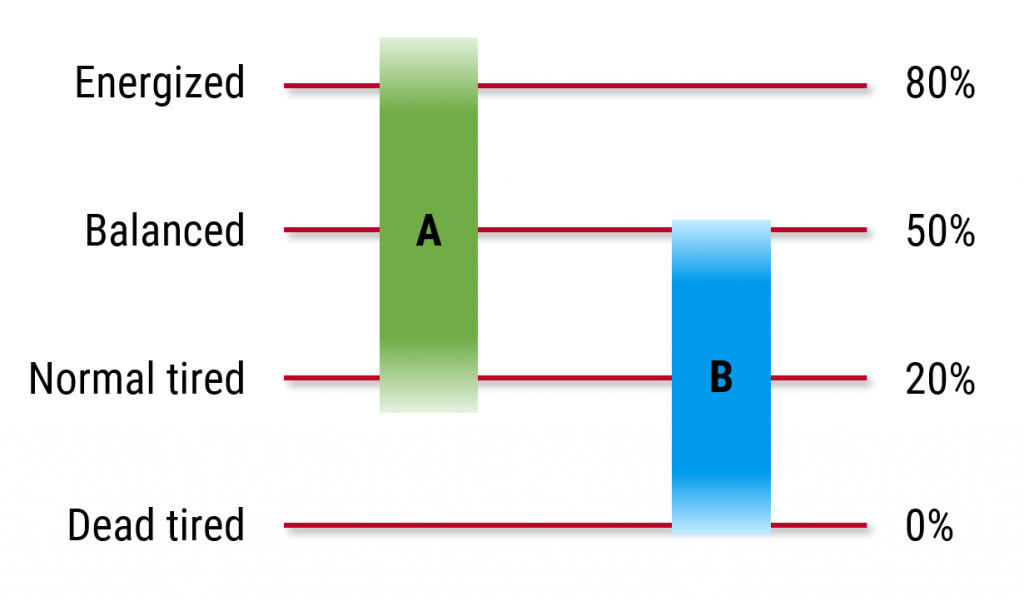
    Zone B means I now find myself unable to reach the same “Energized” level that I had earlier considered to be a normal state in life (when in Zone A). Instead, a new normal had formed, which included regularly experiencing a complete mental battery drain (0% charge). This was repeatedly pushing me into the “Dead tired” level, at which point normal mental and physical operations could no longer be sustained.

    Ever since that one February blog post I have resumed mostly my normal blogging agenda of covering tech topics from the Power Platform ecosystem. A few weeks ago my “On being tired” blog post was featured on Hacker News. My blog site gained 10k+ brand new visitors and there were also great comments posted on HN.

    Maybe that was a sign to keep exploring how my mental battery works, and what could be done to reduce the impact that tiredness has on my life. So, here we are half a year later with the next blog post on this topic.

    The mental battery can charge itself

    The battery in our phones today is a simple in/out system. Power flows in from the charger chord we attach to it. Power is consumed by the activities that you do on your phone, meaning in practice running different apps. Do them long enough and the battery is empty, at which point you must plug it in again for new power to flow in.

    The mental battery in my head is a bit more complex. Sure, there are actions that are clearly needed for charging it, like consuming nutrients and sleeping, which resemble the direct power input for a phone. But whereas with phones every app we use just consumes energy, my head also includes apps that generate new energy.

    Imagine if you had an icon on your phone’s start screen that said: “charge battery”. Then you’d just click on it and the power reading on the top of the screen would start growing instead of reducing.

    We’re not quite there yet when it comes to the gadgets us humans have built (kinetic charging would need to improve quite a bit). Nature, however, has built us in a way that makes this self-charging possible.

    In fact, from what I’ve observed, such apps i.e. human activities that both consume AND generate high amounts of energy are mandatory for living life to the fullest. I don’t think we can thrive via pure charging activities alone, nor by minimizing our energy consumption.

    Resting will make you less tired, but it will not take you to the top level of “Energized” in the mental battery scales (Zone A). To reach those heights, you must be ready to burn a considerable amount of energy first. This is what makes it so hard to recover from a state of deep tiredness.

    Energizing activities: reaching escape velocity

    When searching for ways to regain higher energy levels for my mental battery, I’ve come to the conclusion that the formula behind a successful charge isn’t simply A + B = C. It’s not like “do this then you’ll gain more energy”. The very same activity that can give you great joy in life and act as an invaluable mental energy source can equally turn into something that leaves you completely exhausted.

    Why can the results differ so wildly? Based on how I have personally experienced it in my life, the mental energy consumption/gain is not tied to a specific activity alone. It’s often not even about the surroundings, such as who you are with or where you are doing it. A critical variable in the formula is: how much battery do you have left right now?

    I drew the following illustration to explain the phenomenon to myself (and to you all) via the metaphor of escape velocity. Let’s say that the potentially energizing activity in life would be flying a rocket to outer space. To leave planet earth behind, the rocket must reach a speed that allows it to escape the gravitational influence of the planet.
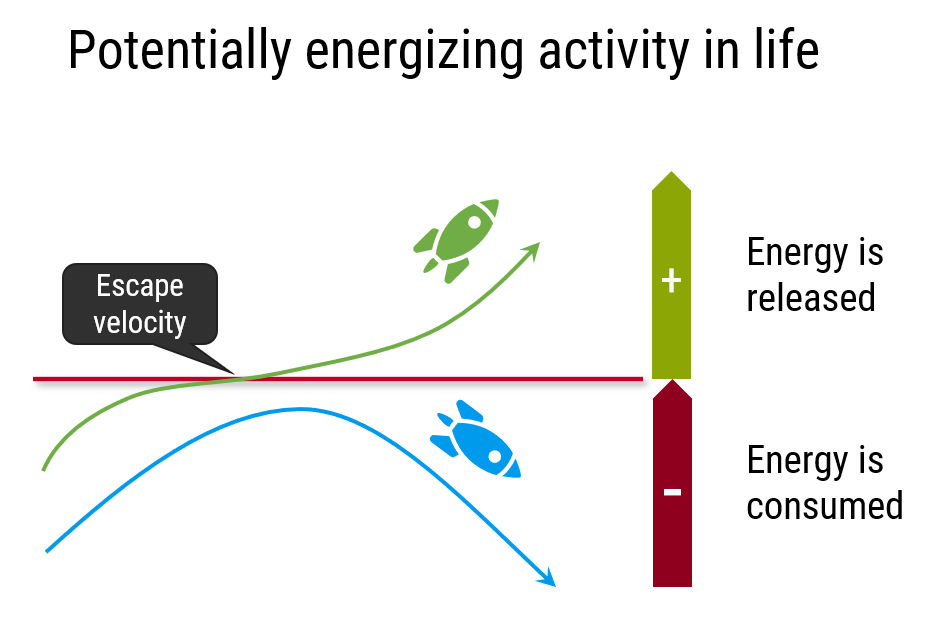
    If the rocket has enough fuel and a powerful enough engine to reach this speed, it can continue its journey to the final frontier. If the speed remains below the critical point, there’s no escape & it’s going to fall back to earth. (That’s my simplification of things – without understanding anything about astrodynamics.)

    The more power you’re carrying in your mental battery, the more confident you can be about succeeding in these potentially energizing activities in life. A Zone A person will often be ready to push him/herself far enough to escape the pull of the gravitational field.

    When you’re flying around in your life as a Zone B person whose battery can only achieve a 50% charge at max, the risks of not reaching that escape velocity are many times higher. It becomes a struggle to reap the benefits from potentially energizing activities. Gradually all activities start to resemble one another: just an endless pile of tasks, all demanding energy from you and unlikely to give back much.

    Pacing yourself with the mental energy spend that’s in right proportion to your current mental energy reserves is the key to survive under these conditions. You need awareness of the fact that you just can’t do what you used to be able to – not right now, not in the same quantities as before. Because you’re tired.

    Feelings of disappointment will be common – and justified. Yet it’s important to understand that this does not have to be permanent. All the activities in your life didn’t suddenly change from energizing into exhausting. What changed is the state in which you usually encounter them, as a result of having less mental energy reserves at your disposal.

    I find that this separation helps me in dealing with outcomes from activities that I might normally enjoy but now find difficult to carry out without a nagging feeling of stress. It allows me to have an internal monologue about expectation levels.

    If my body was physically ill, like having high fever, I obviously wouldn’t expect it to perform on the same level as in my normal daily duties. Today there isn’t a similar accurate measurement available on the mental battery charge level. This doesn’t mean it wouldn’t have just as big an impact on my abilities.

    You don’t need a data point like a temperature reading to know when things aren’t well. What I think you do need or can at least benefit from is having a concept that puts your feeling and wellbeing into words – like the mental battery level. You first use it for your internal discource, then eventually also for communicating to the world outside your head.

    Are you living or are you just alive?

    When I began my PowerPoint drawing exercises of exploring the dynamics of tiredness, I borrowed the famous model of the project management triangle and adapted it into the context of mental energy. In its original format, this triangle deals with the inherent constraints in project work: time, cost and scope. These three dimensions determine the total quality of the output that can be achieved, i.e. the size of the triangle.

    My version deals with the constraints of living. Not the entirety of life itself, rather the feeling of living life to its full potential. Just like in the realm of projects, if you’re happy with things being the way they are, you don’t need a project. Yet if you want to see change taking place and you want to achieve a particular aim, then a project is a common method to organize the effort required in getting to that new reality.

    Similarly, merely being alive is quite different from actively living your life with a sense of aim and purpose. We go through the act of existing from one day to another, yet all of us surely can recognize those moments or periods of time when we have truly felt alive instead of just being alive. To me that is the outcome from what I call living.

    The dimensions of the triangle that define how much of this living we are able to experience are quite similar as with projects. First of all, time is definitely a key constraint that we can’t escape while existing in this physical reality of ours. Second, there will always be constrains on the amount of resources that we can consume for our acts of living a life (considered as budgets in project management).

    The third constraint is unique. If resources reflect the amount of external energy that we have available for living a life, then there must be an internal counterpart to it in our equation. This is the mental energy we have at our disposal. Also known as the charge level of our mental battery.

    Here is the resulting triangle:
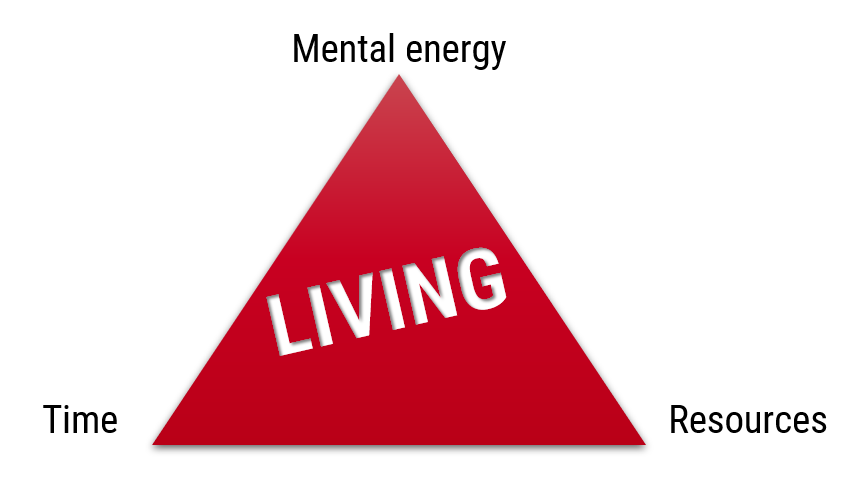
    Just like the battery metaphor, this triangle of living is useful as a tool to analyze what is holding us back. Where do the constraints come from that determine our ability to live life as we can, compared to the ideal state of how we would ultimately want to live it if no such constraints existed.

    As I’ve come to better understand the escape velocity concept, the way how achieving a high level of mental battery charge occurs via activity that initially consumes energy, it has allowed me to analyze cause and effect of tiredness. What it is doing to my triangle of living. Here’s the triangle that I drew half a year ago as a self assessment:
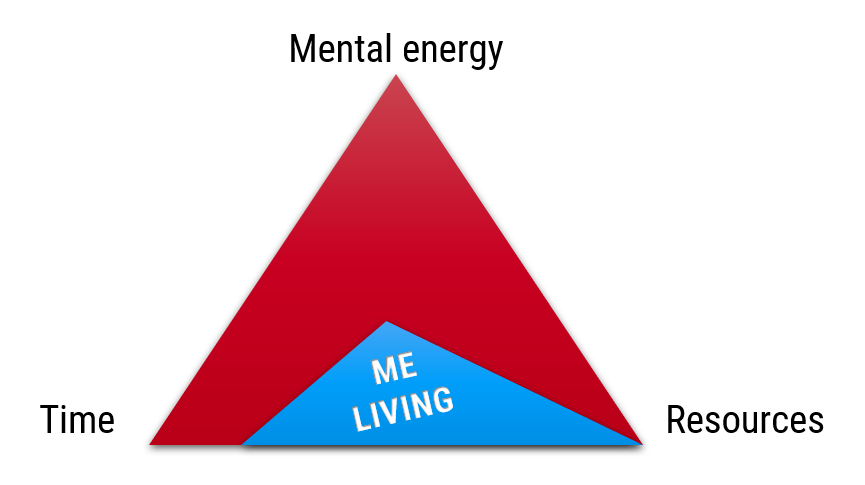
    First of all, I’m not experiencing any significant constraints to living by lack of resources (external energy). Sure, there has been recent tension on this dimension, too. The cost of living from having a new family member in the house, giving up the steady pay check and becoming an entrepreneur instead, the insecurities arising from the pandemics, the wars, the environmental crisis around us… There are valid reasons for financial cautiousness, yet I don’t feel this would be something radically different from the times before.

    Time is something most of us struggle to find in our daily lives. The maniacal search for higher productivity in modern business and modern society reflects upon us as a demand to optimize every bit of time we have to spare. Yet if we stop for moment to think about it, we may realize that we’re not actually short on time. Time is all we have. I can’t recall who said it but this thought has stuck with me: “people complaining about the lack of time in their lives is like fish in a tank complaining about the lack of water”. At the end, we’re both literally swimming in it.

    I do feel it, though. The relative change in how much time I perceive to have for me to spend on myself is considerably lower. There are now more things that come first, taking their cut of the daily 24h time budget, before I get to decide what I’d like to do with it. The amount of water in the tank is the same, there are just more fish swimming in it now. The state of things isn’t objectively better or worse now, but it is factually different. The space to maneuver is smaller and I feel it every single day.

    Which leads us to the final constraint in the triangle of living: mental energy. The internal ability for us as human beings to take charge of our destiny. To be the driver and not the passenger. We need it for achieving the inner goals we have set, to reach new heights. Even more importantly, we need it for keeping us rolling steady on the road, avoiding hazards. We must not fall asleep at the wheel – which is what mental exhaustion can easily cause.

    Constant tiredness can be crippling in many ways. Not only does it stop you from achieving the sensation of living your life to its full potential. It also weakens your grip on the wheel and makes it more likely for you to crash. Again and again. Like I wrote in the first post a while ago, there’s a real risk that instead of just being tired, tiredness becomes you. It starts to define what your life is and could ever be.

    The three constraints need to be treated not as the permanent boundaries of what your life can be but rather what is achievable today. By being more aware of the capacity of your mental battery, you can adjust the world around you to be enough instead of too much. The goals should be:

    • First of all, avoid ending up with a dead battery (0% mental energy).
    • Find energizing activities where you can realistically reach escape velocity and end up with a higher charge level after them.
    • Take steps back whenever needed (cut the looming energy drain), take steps forward when possible (well charged).

    That’s the balancing act. I’m not sure I’ve got the details figured out yet on how to maintain this balance in practice. I do think I understand the dynamics behind my mental energy a lot better now, though. Which is exactly the purpose for me to keep writing this blog.
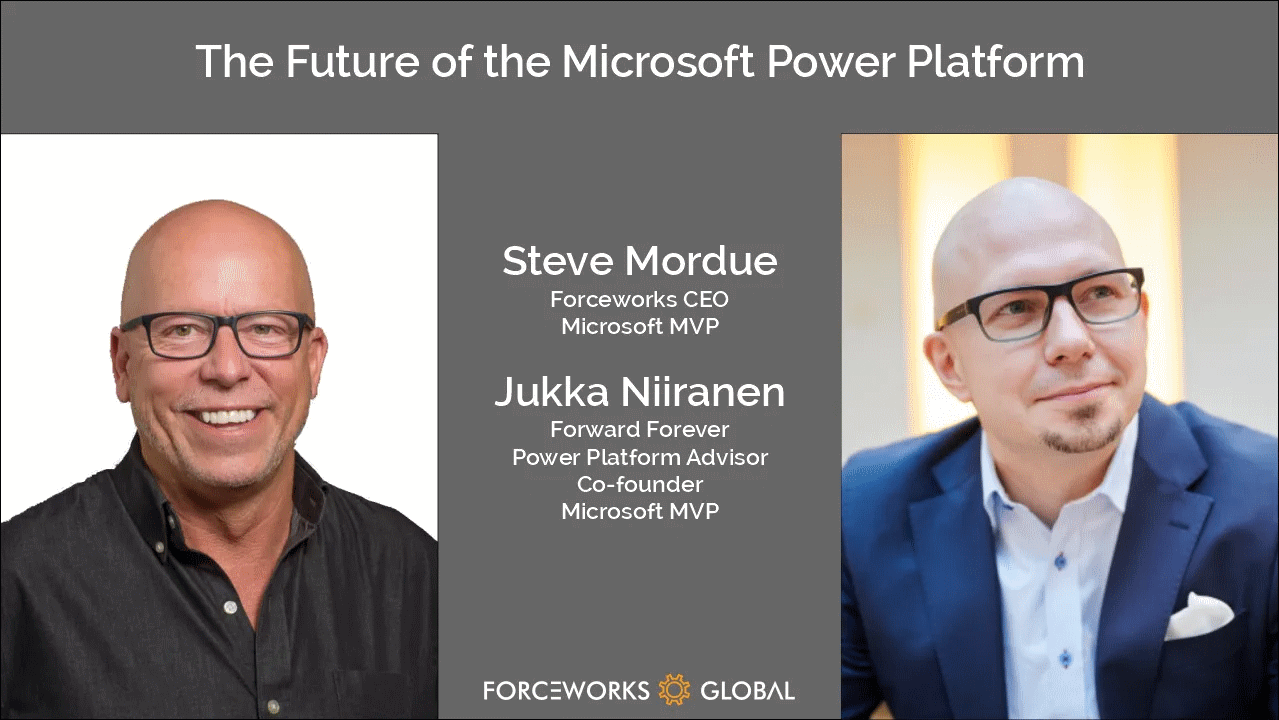

  • The future of Power Platform – Steve has a chat with Jukka

    The future of Power Platform – Steve has a chat with Jukka

    If I had to choose only one blog I could follow in the Microsoft Business Applications ecosystem, it would be Steve Mordue’s blog.
    Why this blog? Because you’ll learn more about the true business of BizApps in Steve’s blog than you would from reading all the partner channel materials MS puts out there.

    It’s not just the unfiltered opinions and provocative comments from Steve that make the content unique. He manages to get Microsoft leaders like Charles Lamanna or Ryan Cunnigham speak openly about product roadmap and business strategy whenever he has a chat with them. It’s the kind of material you couldn’t hear from anywhere else – at least not without an NDA.

    When MVPs used to get together

    One unfortunate impact that COVID has had on the Microsoft MVP program is that our annual MVP Summit events have gone virtual. Even though the world is slowly opening up to physical events again, at the same time the world economy is sinking. This has pushed even the biggest tech corporations like Microsoft to announce cuts on their internal travel, training and event budgets. This means the next Summit, which will be my 10th, is probably done over Teams again.

    It’s better than nothing, of course. The Microsoft product team members do put in effort to share their plans with the MVPs and are open to receiving feedback from us, since the protective shield of the NDA agreement covers both digital and physical worlds. Making things digital can also help scale the amount of tech content that can be made available as well as the means through which to consume it.

    What the virtual events cannot in any meaningful way compensate for is the lack of informal interactions between MVPs. When you can’t go grab a drink with the smartest people in the business together at JOEY Bellevue, a large part of the Summit is wiped away. Sure, the product group interactions are valuable, but the MVP-to-MVP interactions are priceless.

    No, you can’t replicate this in the virtual Summits. When you’re first sitting 6-8 hours alone in front of your computer, from 6pm onwards after your normal working day, staring at the Teams screen – trust me, you’re in no mood for “virtual drinks” after that.

    Events quickly turn into non-events due to the lack of any changes in the physical surroundings. No travel costs, no jetlag, only a little loss of billable work during the week – it’s all very productive, to the point where you start asking yourself: why did I ever consider this “fun”? It sure helps to contribute to the feeling of being constantly tired.

    Time to move forward again

    You shouldn’t become too bitter about things not being what they used to be. The older you get, the more stuff like this is going to come at you every single day. You don’t have to like it, and you certainly are entitled to feel what you feel about it. That’s where our entitlements pretty much end, though.

    Choosing how we react to change is pretty much the essence of life – and business as well. This is an area where both me and Steve seem to have similar ideology that drives our behavior. If you know the only certain thing in life (and business) is constant change, it’s better to be someone who’s pushing that change to happen instead of becoming the object that must endure the change pushed upon it.

    So that’s one thing we share in addition to our hairstyle. With nothing more as a prepared agenda, we opened up Teams and stated recording a session on Steve has a chat with Jukka. It’s as close to an MVP-to-MVP informal interaction you can get to without flying to Redmond.

    You can listen to the audio track on Steve’s website or on Spotify / Apple Podcasts. Alternatively, you can watch two BizApps MVP baldies on your screen for one hour via the embedded Vimeo clip below:

    https://vimeo.com/742784310/7101b864c1

    Some of the topics we discuss with Steve include:

    • How different the world looks like when you choose to go all-in on Power Platform instead of being a Business Applications generalist
    • The struggle of convincing customers that a $5 app can actually give them more value than a $95 app
    • How to get the IT on board with the citizen developer movement and turn governance into an enabler instead of a blocker
    • What would be the ideal support model for a platform-first business that would reduce the customer/vendor tension and get everyone on the same side
    • Why Dynamics 365 partners have very little financial incentives to move their capacity into true low-code business
    • The difficulties in making the Fusion Team story sound attractive enough for pro-devs to find their place in the low-code world
    • Why Teams is the most important platform Microsoft has and why it isn’t yet quite the right platform for wide scale business applications usage

    That’s just a few things I remember off the top of my head, after our awesome chat session. So, if you’re interested in hearing what us two loudmouths think the future of Microsoft Power Platform is – you know what to do.

    There’s no sponsors in any of these chats nor either one of our blogs, so I’ll just leave you with two commercial call-to-actions:

    • Check out RapidStart CRM to experience what you can do with just a $5 Power Apps Per App license (the CRM part comes free, courtesy of Steve).
    • To keep up with what our 100% Power Platform focused team of pretty amazing experts is doing, subscribe to the Forward Forever Monthly newsletter.
  • Is blogging worth it?

    Is blogging worth it?

    I saw this question posted on Hacker News a few days ago:

    Ask HN: Is having a personal blog/brand worth it for you?

    This topic really caught my attention. I read through tens of answers on the thread and that got me reflecting on my own journey as a blogger.

    I launched this blog as “Surviving CRM” back in 2008 and switched it to a more personal “Thinking Forward” blog in late 2019 (to say farewell to CRM and move towards the broader low-code theme with Microsoft Power Platform). These 14 years provide me some perspective on the topic of personal blogging and also building a personal brand along the way.

    There were three subquestions in the Hacker News post that I’m going to try and provide my answers to.

    Q1: Does the time spent writing feel worth it to you?

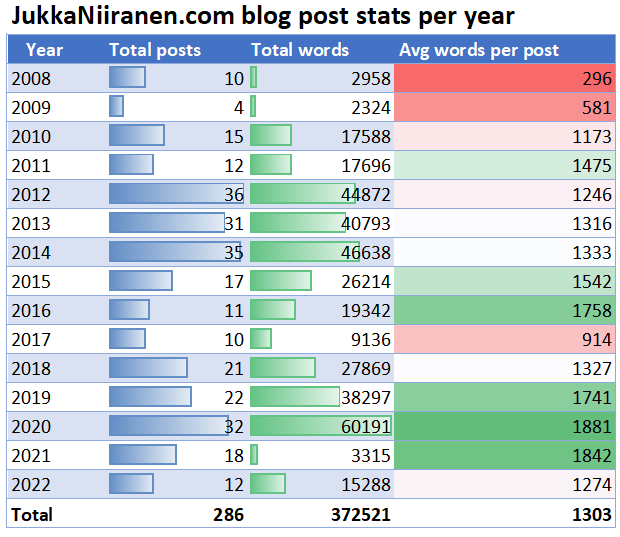
    I can never know the true time I’ve spent on blogging. Not in total, and neither on average per post. They only thing I can really measure is the amount of posts & words within these posts that I’ve written over the years. Here are the annual stats from my blog, up until July 2022:

    Looking at the total number of words I’ve posted in my blog and using 250 words per minute as the estimate for reading time: it would take you ~25 hours to read everything I’ve written in my blog.
    How about writing those words then – how long might that have taken? I won’t go to deep on the scientifical part here and instead use the first figure that Google gives me for writing in-depth essays or articles: 5 words per minute. This would be roughly 100h per year in my case.

    That’s only 2 hours per week. It goes nowhere near the time I’ve spent on doing the research required to come up with the final output for a blog post. Reading MS documentation/blogs and community content, testing the features in real live systems, connecting the dots in my head, having online discussions on the topics. The blog posts really are just a tip of the iceberg.

    Let’s just say that I may have spent one working day for each week of the year, for the past 14 years, to do all the work required to produce the output that you see here in my blog. Essentially a 6 day working week, to come up with content that has been posted online, for free.
    That may not immediately sound like such a great deal when illustrated this way, but let me tell you: that 6th day of the working week has always been the most rewarding one for me personally. Thinking about the total number of days, blogging with all the community work included comes pretty close to my longest employment relationship duration. I guess it’s obvious I wouldn’t have sticked around this long then if it wasn’t a whole lot of fun.

    Right at this moment, when writing this “meta” blog post, I’m on my 4 week summer vacation (the Nordic way), at a summer cottage in the middle of nowhere. I’m looking over a peaceful lake view, with a glass of rye stout from Amager Bryghus next to my laptop. Even in situations like these I sometimes choose to write on my blog because it brings me more joy than it consumes time. It’s a hobby that has grown into an element of life that sort of defines who I am. Well, not everything of course, but an important slice of me.

    Does blogging become faster the more you do it? Yes and no. Experience helps you in the areas that are repeatable, meaning the process around writing and publishing blog posts. Yet there’s no point in trying to minimize the time spent on the act of blogging itself.

    Working as a consultant who bills customers by the hour, you can sometimes get too wrapped up in the concept of productivity. More bang for the buck / value for the customer = more outputs in less time, right? That is often not true – even in billable work. Even less so when you are doing things for your personal growth.

    You see, when blogging for yourself (i.e. not because someone at marketing asked you to), it’s not a requirement to be very efficient in how you spend your time. I don’t have a budget for how many hours I can spend on this. Yes, the real world around me (family, friends, life) needs my time, too, but outside of my official working hours I don’t keep track of time. Things take as long as they need to take.

    To me, writing is thinking. Your thinking is likely to improve if you spend a bit more time on it, rather than just taking relying on your gut reaction and assuming that’s all your brains could ever achieve.

    In the long run, blogging has probably saved me time in more ways that I could ever measure. Not just by teaching me skills that would have been difficult to acquire otherwise, but by creating something that helps me on a daily basis: my network. Which leads us to the next question:

    Q2: Did it help you to get noticed/ find jobs or other opportunities?

    After the first few years of blogging, I’ve never had to look for a job. The opportunities always came to me, without my initiative. You could compare this to the commercial activity of inbound marketing. The effort is spent in advance, building up the audience, which in turn then reduces the need for outbound activities. So, the active work is still done, only in a different order than traditionally.

    None of what has happened to me in my professional life for the past decade would have ever become real if I didn’t start blogging. Through both writing my blog posts and amplifying the posts of other community members, I’ve succeeding in building an incredibly valuable professional network. Putting my words out there has been the single best career move I can think of.

    On year 6 of my blogging career, I received my first Microsoft MVP award. 2022 marks my 10th year in the program. Gaining access to not just the MS product team behind Dynamics 365 & Power Platform but more importantly, the other MVPs who are as passionate about their craft as I am – that has been undoubtedly a turning point for me.

    At the beginning of my blogging journey I wasn’t sure if this MVP role was a path I actually wanted to pursue, though. My top priority in personal blogging has always been to honestly write about both the good & the bad that I encounter in Microsoft’s product offering – so that others can learn from my real life experience. Fortunately, having an NDA with MS hasn’t resulted in me having to apply a filter on how I talk about things. Just the “what” when it comes to non-public info, of course.

    While writing your posts and reflecting on the lessons you’ve learned is an major part of blogging, I consider an equally important side of it to be the active participation in your community. A major reason why I originally started my own blog was because I wanted to give back to the community who had helped me get started on my career.

    Already back in 2005, the blogosphere around Microsoft CRM 3.0 was what really set this technology apart from many other CRM competitors at the time. A global community can truly be a force multiplier, allowing newcomers to challenge the more established players out in the market. I believe this very same phenomenon plays out in the area of citizen developers today, with the community helping each other to democratize technology and making previously impossible things possible to a whole new (and bigger) audience.

    Blogging may not be as trendy today as it was 14 years ago when I started. With today’s social media channels having replaced the old Web 2.0 era tools like RSS readers in how content gets consumed, aspiring new writers may well ask themselves: “will my posts on an independent blog site get me noticed anymore, or should I just use a platform where I already have a network”?

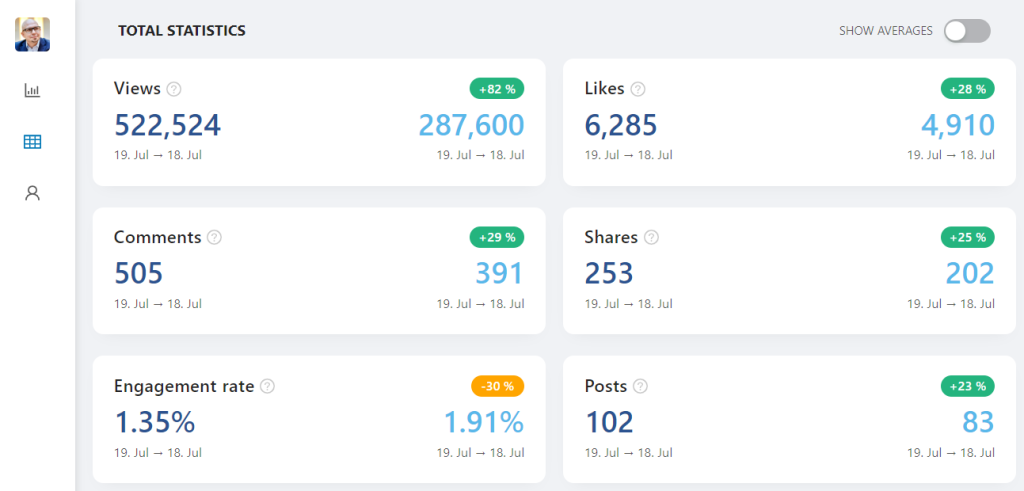
    I recently checked what my personal LinkedIn stats looked like for the past 12 months (using Shield Analytics). By making 102 posts during the past 365 days, I’ve received over 500k views for them on LinkedIn. In my WordPress blog I’ve tracked only 130k views during the same time period. While my blog traffic hasn’t been growing for a few years anymore, the year-on-year figures from LinkedIn are mostly green:

    The way I see it, a page view on a blog that you own & control is many times more valuable than what LinkedIn might track as a “view” of a single post that a user scrolls through in their endless stream. The impact is likely at least 10x higher when a visitor opens a web page dedicated to your writings and spends a minute or two on it.

    Besides, a fair share of the LinkedIn posts I’ve made have been to share a summary of my blog post. This site right here is the “read more” destination where I actually get to talk with the audience who finds the topic interesting enough.

    At the end, it’s not about the “likes”. Social media apps that gamify your clicks will always show you stats that are more compelling than a blog site like WordPress. Don’t get distracted by these. (I know I do, so I’m not saying it’s easy…)

    “Couldn’t you post longer content as LinkedIn articles, though?” While it might be tempting for authors without an existing blog to start with the social media platform, I’d encourage you to ultimately own your words. Don’t become a slave to a network that primarily thinks about its own algorithms and business models for making money from your content. Exploit them wherever they serve you, but don’t become merely a servant to them.

    Q3: Do you learn something new from it?

    All the time. Even when the blog posts I write are just about documenting a discovery that I have made during a customer project, it helps me go far beyond what billable work would justify. Instead of just solving this one problem and jumping straight to the next one in the queue, I can spend a moment actually connecting the dots in my head.

    Establishing links between the synapses in our brain is physically how learning happens. I find that the act of turning my thoughts into writing, arranging them on the screen and especially linking to related articles is the most effective way for me to learn. With this in mind, Q3 sounds a bit strange to me when rephrased: “do you learn something new from learning something new?”

    You see, writing the blog post is not the end result of a carefully planned process (for me at least). Quite often the act of creating a draft post is when you really start to think. If you’ve ever heard about rubber duck debugging, then the idea is exactly the same. By explaining a problem to someone else, be it an inanimate object like a rubber duck or virtual object like a blog, you can often solve that problem without anyone providing you the answer.

    Even the mere intent of “hey, I could write a blog about this” can start the mental process of organizing the details better in my head. Now, if blogging really would be such a magical formula to solve all problems, why not do it even more? Looking at my annual blog stats, why do I sometimes only write one post per month? It’s because all mental processes reserve cycles from your mental CPU (the brain).

    Having a blog challenges you to put your thinking in writing. It’s not all fun and games, though, as you will inevitably get stressed at times about “I should be blogging about X, Y and Z, why can’t I ever get these things done”. The sad part is: you’ll never get over this feeling, no matter how much you do blogging.

    Another fact of life is that you’ll continue to encounter other community members who write more posts, better posts, learn new things faster, get more readers, and so on. Spending years on writing blog posts on a specific domain topic doesn’t protect you from the impostor syndrome. A growth in the amount of exposure your writings get can even lead to scenarios that induce long term stress.

    The dark side of community leadership recognition programs like the Microsoft MVP award is that they are founded on metrics of your impact. When I said earlier that personal blogging is an act where I don’t track the hours spent on it, in reality I still do need to log the outputs as community activities into Microsoft’s system. If you don’t do enough measurable activities to prove your impact to the community, you will no longer get awarded on July 1st next year.

    Q: How much is enough? A: You won’t know, so nothing is ever enough.

    During the past couple of years, I’ve felt very tired at times. Going through COVID, starting a company, getting a kid – many factors around me have contributed to the low mental energy reserves. I’m certainly not the only one with such experiences. I’ve heard from many people in my network that they’ve recently been asking themselves the question “is the MVP Award worth it?” So have I.

    If the target would be to keep hold of the award, then maybe this type of blogging that I’m doing wouldn’t be the best choice. Lengthy articles that reflect on the state of the ecosystem, for example, aren’t exactly the type of material that will gain a lot of Google hits. Shouldn’t I rather be answering “how to” questions that some one is typing into the search bar? Why not just tell the audience “here’s how to do X with Y”, one feature after another?

    Also, shouldn’t I rather reuse my content in more than one context, to gain more entries I could list as my community contributions for Microsoft to see? Instead of publishing a single blog post, couldn’t I format it as a presentation that I could then recycle in multiple virtual events that exist in the global Power Platform community?

    Such a “shouldn’t I” list quickly becomes endless. It can turn your hobby into an energy drain rather than a source of energy. It is of utmost importance that you can be honest with yourself and identify why you should say no to things.

    • Should I do videos? No, I hate skimming through them for answers and would always read the text version instead.
    • Should I do more podcasts? No, I practically never listen to them since I love the sound of music, not the sound of someone talking.
    • Should I submit sessions to community events? No, I have no motivation for attending virtual events and my ability to travel to live ones is limited.

    How does all this relate to the original “what do you learn from blogging” question? It’s all about learning who you are and what you love doing. Knowing what separates you as an individual from the different crowds that you interact with.

    What this means is: I couldn’t ever give an answer on whether blogging is worth it to you. The reasons, the benefits and the price of blogging that I’ve talked about here are subjective and apply primarily to me. I would surely encourage you to give blogging a go if some of these experiences and thoughts resonate with you. At the same time, be sure to remain honest with yourself and stop writing on your blog if in the long run it takes more than it gives.

    Where I’ve found blogging to be an invaluable tool is in finding your own voice. It’s not quite the same as keeping a personal diary would be, but if you’ve ever found putting your thoughts into writing as an exercise you enjoy, there might be something here for you to gain.

    Who knows what your brain might say to you if you’d give it a brand new channel of communication. Such as a blog.
  • Forget static plans, use the Release Planner for Power Platform roadmap info

    Forget static plans, use the Release Planner for Power Platform roadmap info

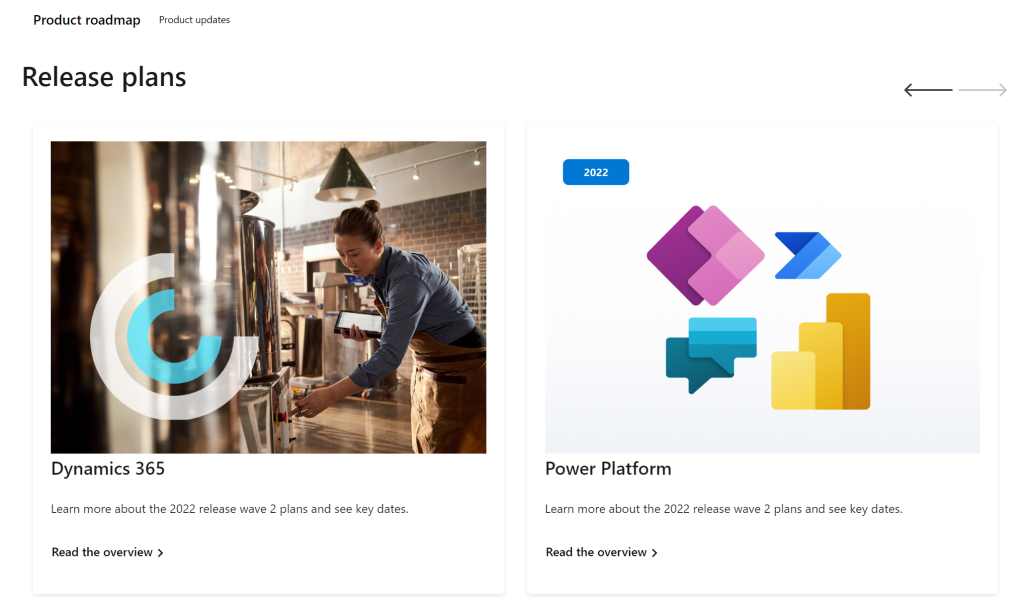
    It’s that time of the year again when Microsoft have published their plans for the upcoming 2022 Release Wave 2 for Power Platform and Dynamics 365. “How exciting! New PDF documents with hundreds of pages to read!”

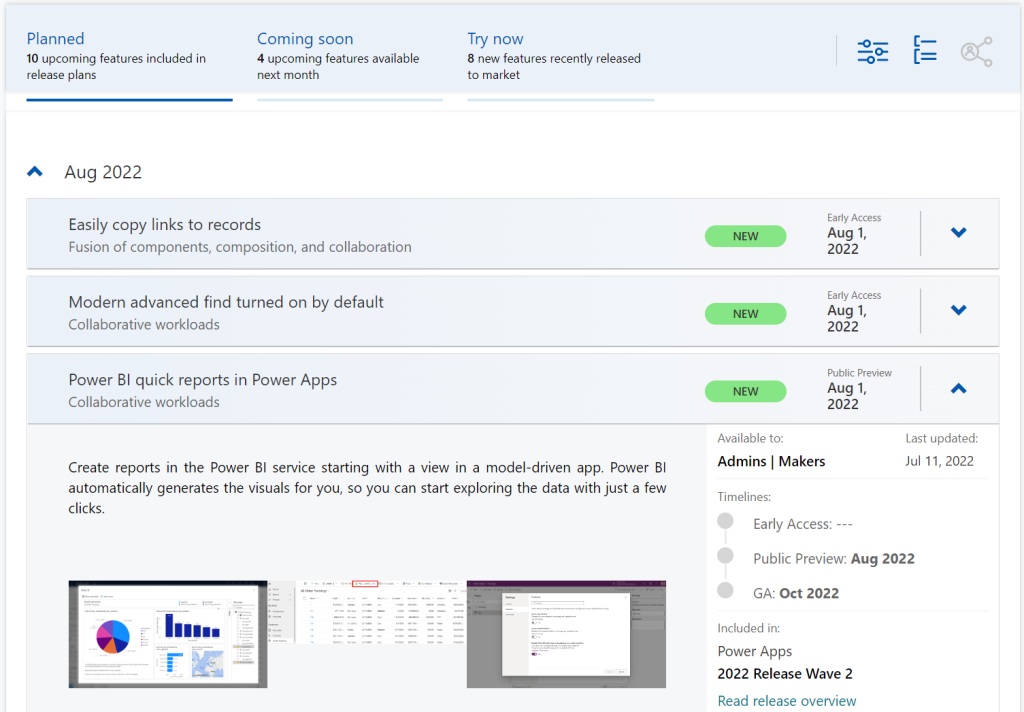
    I’m sure many of you have learned to skip the static PDF files by now and instead add bookmarks to quickly get to the online version of these plans. Like these:

    That’s much better, but it isn’t really optimal either. I don’t know about you, but personally I’ve had a hard time getting very excited about the new Release Plan drops for a couple of years now. There’s just something not quite right with this “wave” model.

    Everything changes, always

    Don’t get me wrong. It’s great that the Power Platform community members are curating their own top lists from these Release Plans twice a year. There’s plenty of value in seeing what items people are actually excited about, not just reading MS corporate style “excitement” on everything included in the Plan.

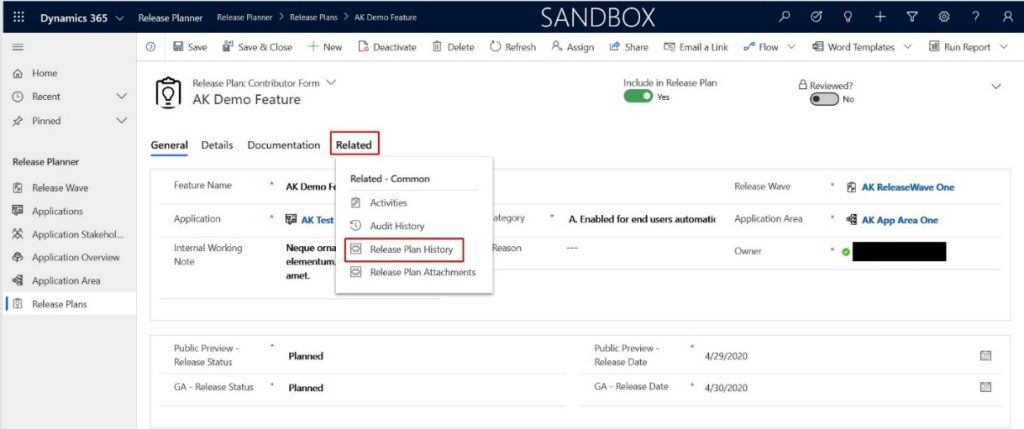
    Yet the reality is this: the contents of these Releases Plans is likely to reflect less than 50% of what will actually be delivered into the products over the course of the wave. If you need proof, then check out the most important page of the online Release Plans: change history.

    At any given time, Microsoft product teams are working on several new features and enhancements that they are not yet ready to disclose. They’ll get added to release plan later (or sometimes launched without it). As a very recent example, Managed Environments was announced as a preview feature on the same day as the 2022 wave 2 plans came out. The feature is not yet in either wave 1 or wave 2 documentation. It’s very natural that the product marketing’s need for making feature specific big announcements is a higher priority. After all, diligently maintaining the long list of similar release items won’t bring that much attention to any single feature.

    Then there’s the inevitable reality of planning / estimating in software development. Things can get delayed due to too optimistic estimates, dependencies to other items/products, changes in MS product strategy, acquisitions, and so on. Ultimately the Release Plans are just a publicly visible backlog of what the team is working to deliver. It’s better not to get too excited about any specific feature on the list – often those will be the ones that get eventually postponed / removed…

    While it’s kinda nice that we have a steady rhythm of 2 release waves per year that can be easily communicated to customers, the reality is more messy. These waves are forcing an artificial structure onto the ongoing product development work. Remember: the “wave” is not any actual release in itself. October 2022 will deliver a tiny fraction of the items listed in the 2022 wave 2 plan, as the wave lasts for 6 months.

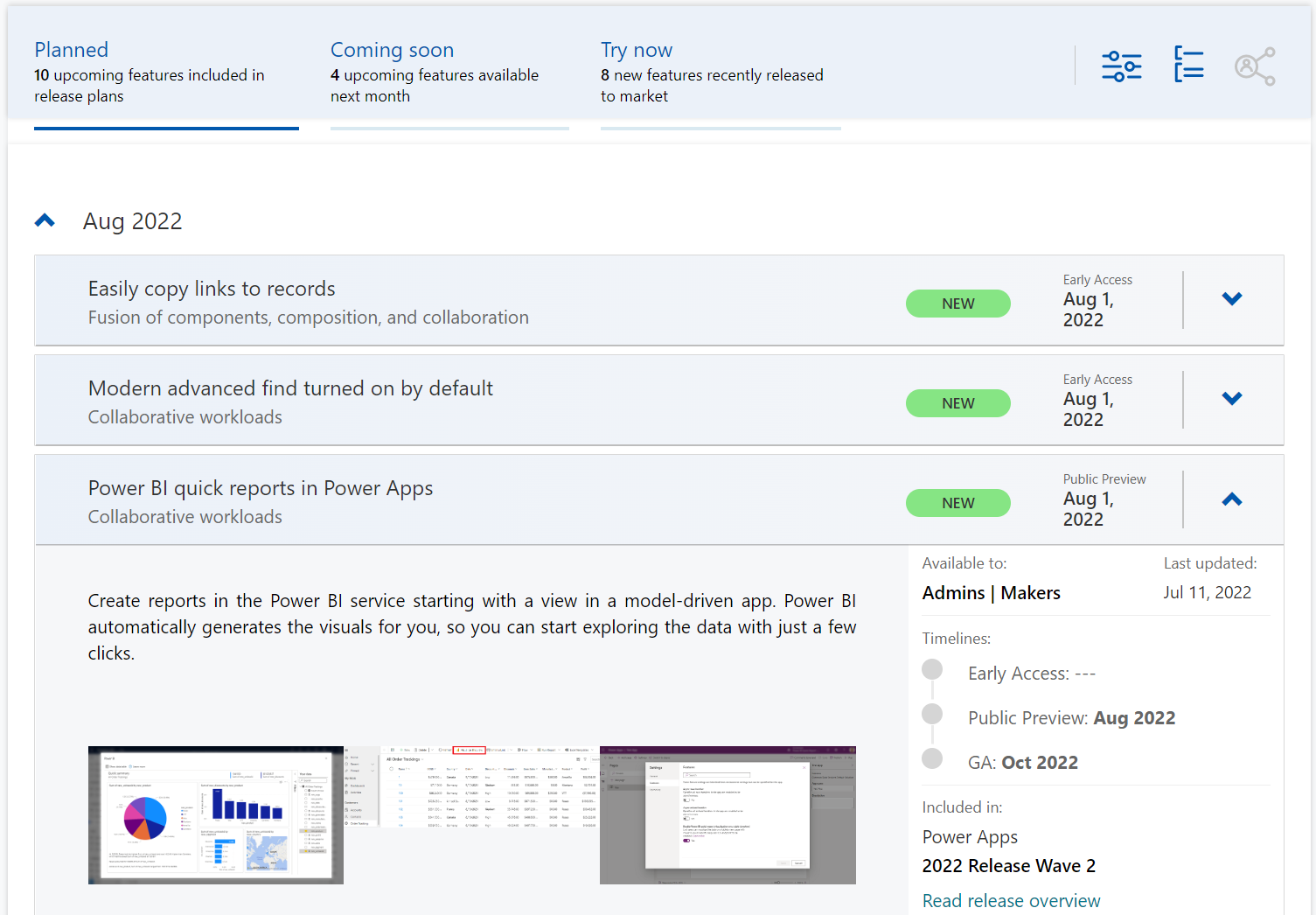
    While the waves themselves are sequential, Microsoft’s communication model has overlap for the waves. The fact that the wave 2 plans are first announced when there’s still 3 months worth of wave 1 to go (until end of September) can make it complex to keep track of items. You can’t tell whether a feature is in the product roadmap just by looking at the latest plan since it might be in the previous pipeline still. Here’s one example:

    If only we had a more dynamic view into the Power Platform and Dynamics 365 product backlog, without these artificial “waves” to confuse us…

    Say hello to the Release Planner website!

    Although it’s still a preview in itself, the Dynamics 365 and Microsoft Power Platform release planner is already a very worthy rival to the familiar Release Plans. If you’re familiar with the Microsoft 365 roadmap, then this a similar website that provides the current state of what features are being planned, rolling out or recently delivered.

    The data on release items is largely identical to what the official release plans already offer. However, it’s not wrapped within the wave concept, meaning everything can be found under a single site.

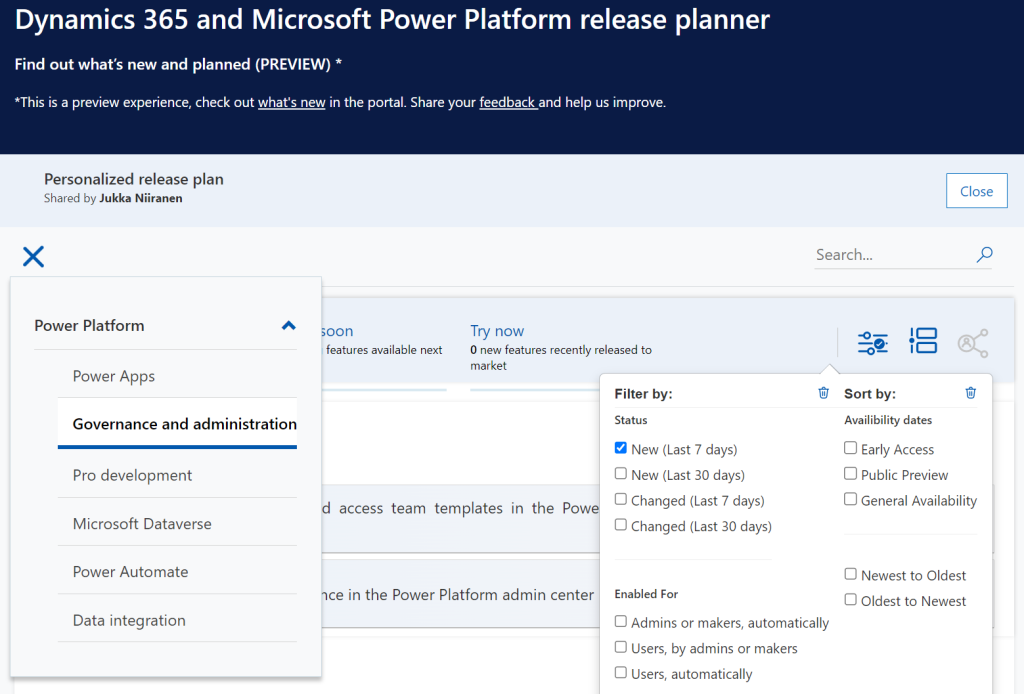
    There have been recent enhancements made to the Release Planner (listed here). Searching the release plan items with keywords is now possible. There’s a change history to reflect updates made to delivery milestones (i.e. delays in early access / preview / GA dates). Finally, filters and sorting options have been introduced, so you can view only the latest additions (7/30 days) or updated items across Dynamics 365 and Power Platform.

    Since the Release Planner is a Power Apps Portal Power Pages website instead of a Microsoft Docs site, it is much easier to implement such features that are intended for working with a list of records. Docs is great for documentation of course, as well as version control through its GitHub back end.

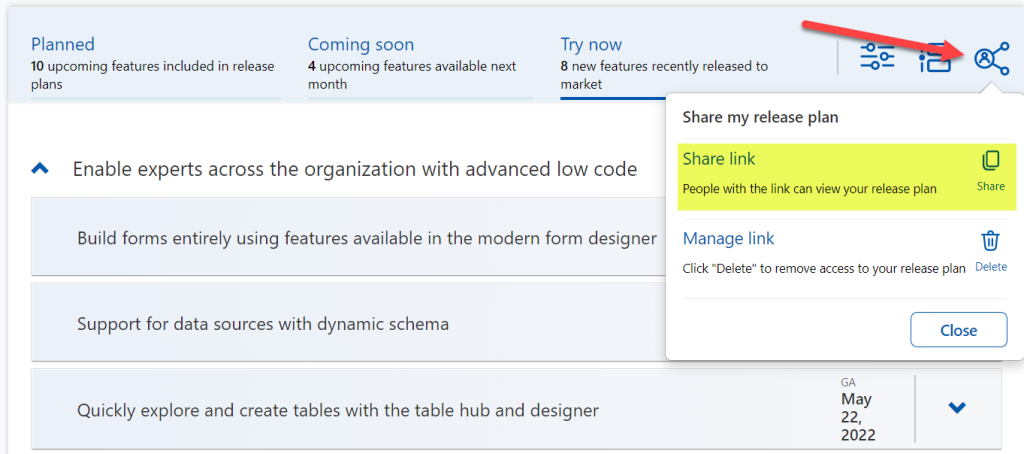
    One really neat feature in Release Planner is the personalization option. When I log into the site, I have the ability to pick items into “my release plan”. Essentially its a way to create a list of favorite items to follow. Because let’s face it: we all focus on some corner of Power Platform or Dynamics 365, not the entire MS BizApps cloud. Creating a personal release plan also provides an option to copy a public share link for it:

    Using a short URL service, I can now create an easy to remember link that will always take me to the list of Power Platform release plan items I’ve flagged for myself to follow. You can of course have a look at it, too:

    https://ff.tips/releaseplan

    With this link, I can now spend less energy on A) remembering if an item has been in wave 1 or 2, and B) stop hunting through the change history page for status updates. Oh, and it also works fairly well on a mobile device, whereas trying to navigate the legacy release plans on MS Docs seems to be impossible (at the moment at least, on Android/Chrome).

    Of course any dynamic website is only as good as the underlying data that is used for rendering it. At the time of viewing, there seem to be tens of release plan items from 2022 wave 1 that have not yet been updated to reflect the current status. The Release Planner site says they should be available/GA when in reality they’ve been delayed, postponed or even cancelled. This is something that technology in itself won’t fix. I hope as Microsoft’s release planning process matures beyond thinking about “waves” we’ll see more up to date information in the Release Planner site, too.

    Did you know?

    This Release Planner isn’t the first step for Microsoft to use the Power Platform to manage the product development of the very same platform. Already back in 2019 the process and tools used by the BizApps team for release planning was published in a blog post. There’s a sample app on GitHub that contains a solution with the tables, forms, plugins, PCF controls, cloud flows etc. for deploying your own copy of the release management tools.

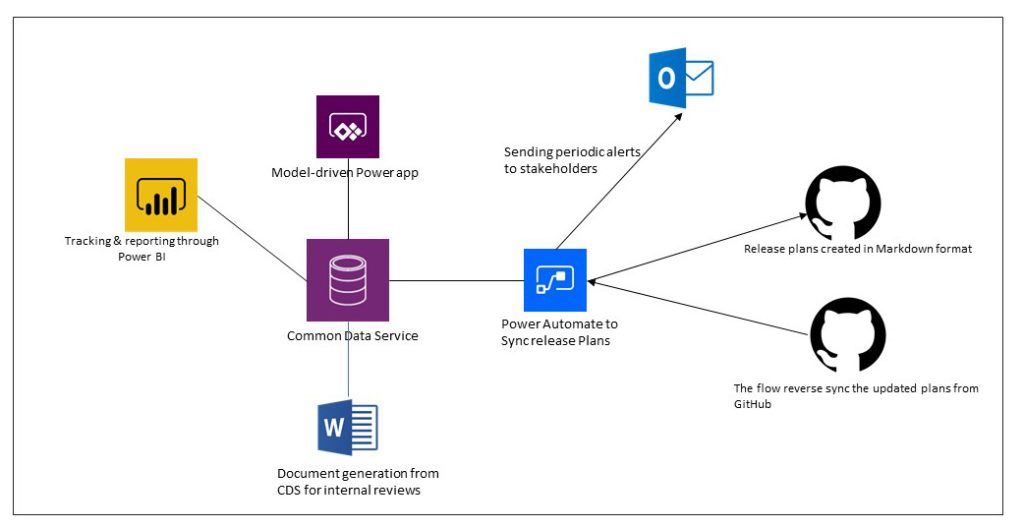
    This process was designed to dynamically produce outputs from the release items data managed in Dataverse. Both the release plan document as a Word output as well as the Docs pages as markdown files on GitHub were generated with Power Automate cloud flows:

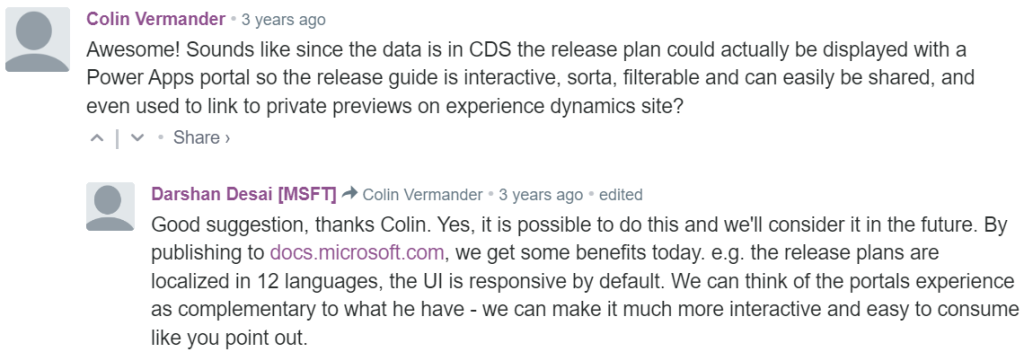
    Since the solution was built on top of a solid platform designed for managing business process data, there were of course other opportunities to leverage it. As was pointed out in the comments section of the 2019 blog post, by a certain ex-MVP (now at MSFT) with a long history on Portals in the form of Adxstudio:

    Which brings me back to an even more ancient blog post of mine, from 2015, called XRM Strikes Back. Inspired by Microsoft’s acquisition of Adxstudio, I argued why in the long term it would be a more successful strategy for MS to bet on the platform, rather than trying to integrate SaaS products from outside the ecosystem into the Business Applications portfolio.

    Success doesn’t happen overnight either way. Looking at the XRM based acquisitions, Adxstudio is now the 5th product in the Power Platform family, with the new name Power Pages. FieldOne Sky turned into Dynamics 365 Field Service that has quite a solid position in the market (from what I know). Mojo Surveys evolved into Dynamics 365 Customer Voice, which may not have an extensive roadmap right now, yet it’s still widely used by the customers we are working with at least.

    Back in 2011 when Dynamics CRM Online itself was used for managing the Dynamics CRM Online launch website, backed by (Windows) Azure, so might have considered that a crazy thing to do with a business application platform like XRM. Well, who’s laughing now?!?😁

    The journey up to this point has been long, but that’s exactly what such low-code application platform journeys are for customers, too. Microsoft is now in the process of also migrating their third party Ideas sites for product feedback into the Dynamics 365 Customer Service Community portal template (meaning Power Pages). The Power Automate Ideas site is moving there next week. Dynamics 365 Ideas already lives on this platform, so I’d imagine other products will soon follow. Another piece of the digital feedback loop coming together, through the power of the platform.

  • Podcast: Understanding Power Platform’s evolution

    Podcast: Understanding Power Platform’s evolution

    Recently I was invited to the Demystifying Enterprise Innovation podcast run by AgilePoint. The podcast host Sharjeel Sohaib is interviewing experts from the field of digital process automation technologies and low-code platforms.

    Our topics covered not only the Microsoft specific technology in Power Platform but also the broader market around low-code/no-code platforms. How are they impacting the lives of citizen developers? What should organizations do to drive the low-code tools adoption? Where is the technology underneath these platforms heading towards?

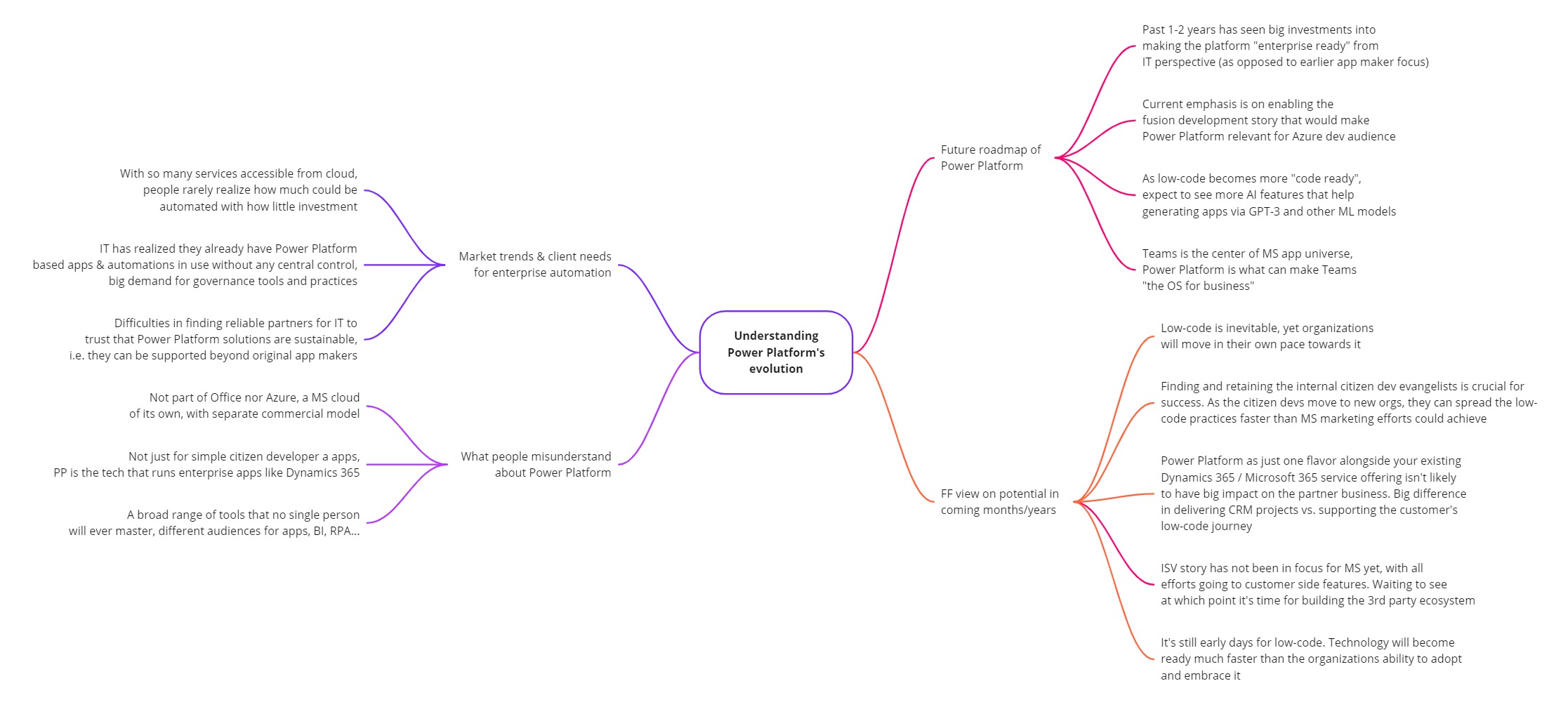
    This turned out to be quite a comprehensive “state of Power Platform in 2022” type of a discussion. I guess that’s just what tends to happen when someone asks me a question about it. Below is the mind map of what I planned to cover in the podcast episode (click for a bigger image):

    You can listen to the end result on your favorite podcast service – assuming it is either Spotify or Apple. The detailed show notes with a few quotes from me are available on the Transistor.fm page for the Demystifying Enterprise Innovation podcast.

    Notes and thoughts

    In the podcast episode we start by discussing my own journey as a citizen developer from 20 years ago, learning about CRM / marketing automation processes at a large B2C company (Nokia). This path then lead me to different Dynamics CRM consulting roles, and most recently going all-in with Power Platform in 2020.

    Being on the citizen side from day one instead of starting my career in formal IT projects has been undoubtedly one of the key reasons why I’ve found the low-code movement to be so close to heart. To me, the ability to democratize code is a much more worthy goal than just trying to get sales people to enter more information into the CRM database.

    Sure, such business apps may be the “what” but citizen development is the “why”. The way Microsoft has managed to infiltrate the existing toolkits of these citizens by bundling Power Apps and Power Automate into Office 365 is the prime reason why things have moved along so fast in this space. Merging PowerApps with XRM 4 years ago is what allows them to still keep moving fast today, even as more complex enterprise IT requirements now need to be met when the apps originally built by citizen devs are becoming more & more business critical.

    Despite of this move towards enterprise processes, bottom-up innovation is still what excites me the most. Grandiose digital transformation programs with their top-down agendas may have the big funding behind them, yet I believe the net impact from small apps built by citizens motivated to fix practical issues in their daily working lives is going to be greater in total. Teams as a platform is a story that may cause problems for us more experienced MS BizApps practitioners, and still this kind of simplification is definitely needed when you really want to scale low-code in practice.

    Power Platform governance topics are where I spend the majority of my working days on right now. When delivering our Power Platform governance advisory services, I’ve seen how difficult it can be for the IT organization to get a handle on citizen driven apps and automations – at least if no one was there to educate them on how Power Apps & Power Automate administration works in practice.

    This is not so much a challenge of the technology not being available. Rather it is the new roles and alignment of IT alongside the citizen developers that poses the biggest barrier for companies to feel safe enough to fully embrace what this corner of the MS cloud can offer them. The same gradual increase in maturity that has happened with Office 365, Azure, and also Power BI from the “power family” – all of it seems inevitable for Microsoft’s low-code products, too.

    This is why we’re now seeing less new maker focused features right now and a bigger push for admin & governance capabilities in Power Platform. The next big target for MS is in formalizing the fusion development story for low-code, to get the professional developers on board this new way how customer organizations address the growing demand for digital solutions that can’t all be met with custom code alone.

    The ISV opportunity in Power Platform has not yet been a true focus area for Microsoft. Their emphasis has been on the internal transformation of organizations via citizen developer solutions. Yet many MS partners are naturally interested in the huge opportunity of the low-code movement. They’d love to become a part of this new ecosystem where the number of low-code developers is growing by 40% every year. However, there’s a lot of work ahead before the mainstream wave of ISVs could be onboarded to Power Platform, both from commercial and technical perspective.

    We can’t just take the good ol’ Dynamics business model and apply it to Power Apps since the platform is designed to empower bottom-up innovation distributed all across the organization (who’s gonna do the top-down purchase decision on your project?). Neither can we make the Office style assumption that all these tools would be common to all information workers (justifying the premium licenses requires stepping outside the generic productivity story and quantifying the value from business specific processes). Experience from the other MS clouds is definitely a major advantage from an ecosystem insights perspective. At the same time, if you just sprinkle a bit of Power Platform technologies on top of your existing business model and projects, you can’t expect to see any radical growth or shift in how your customers are engaging with you.

    At Forward Forever we’ve been lucky to get the chance to educate several MS partner companies on the practicalities of developing apps for Power Platform in 1:1 coaching sessions over the past two years. It has affirmed our belief that this low-code movement is an infinite game where we aren’t competing against other players. There’s no sense in trying to be the winners once the final whistle blows. Rather we should do our best to keep the game going, helping the whole league around us to grow and build an audience (even a fan base) who wants to see us succeed.

    There are no winners or losers in an infinite game; there is only ahead and behind.

    Simon Sinek

    In addition to advising customers and partners on how to succeed with Power Platform, we’ve also invested resources into building products on top of it. Our offering in this field has recently reached a point where our Sustainability Action Pack is now listed on Microsoft AppSource for everyone to see. It’s a solution template that provides tools to drive environmental actions, make progress transparent and help organizations reach their social, environmental and climate targets (see SECAP).

    Power Pages, Power Apps, Power Automate, Power BI – the whole MS low-code stack is being used when we’ve delivered the solution to municipalities in Finland. The big difference compared to Azure based applications, for example, is that the end product truly runs on the customer’s platform. Modifying and extending our Sustainability Action Pack functionality can be done by business users – as long as they’ve got the willingness to learn how Power Platform works.

    This might have been just marketing talk a decade ago. Today the reality is that the persons who are willing and able to use these low-code tools to shape your business applications are likely to be among your most valuable employees. They probably haven’t been hired for this exact role, yet the organization should acknowledge the positive impact that they’re able to achieve by adopting Power Platform tools and thus adapting your tools to deliver better business outcomes. Otherwise they may quickly find a new place to work where such evangelism is appreciated.

    From the outside, as a consultant/advisor, we can only show you the direction to take. The real adoption journey for low-code relies on empowering internal personnel to build new things that create business value. Ownership of your own tools is the biggest difference in mindset when it comes to the traditional Dynamics business applications versus the new breed of Power Platform solutions. This is the revolution in low-code – the technology part is just evolution.

    For more of my thoughts on Microsoft Power Platform evolution / low-code revolution, go and check out the podcast episode:

    Demystifying Enterprise Innovation podcast
  • Dataverse results inside Microsoft Search in Office, SharePoint, Bing

    Dataverse results inside Microsoft Search in Office, SharePoint, Bing

    Whether you are configuring Dynamics 365 Customer Engagement apps from Microsoft or building custom applications with Power Apps, often the solution design and implementation focuses too much on the data entry experience and not enough on data discovery. Yet it’s the process of searching for information rather than entering new records that consumes far more time in the lives of information workers.

    Throughout the history of my blog (originally “Surviving CRM”), topics such as the Advanced Find feature or configuration of views in XRM/CDS/Dataverse have been the most popular ones. To put it another way: a lot of people search for information on how to make search better in Microsoft business apps.

    While they are nothing like Google, Microsoft still has a wealth of R&D budget spent on search related services. Just because Bing isn’t what you’re likely using in your private life, that doesn’t mean you couldn’t benefit from the Microsoft Search infrastructure. Today we’ll explore how data from Dataverse environments can now be exposed in Microsoft Search.

    Enabling Dynamics 365 results in Microsoft Search

    The feature for showing Dataverse results in Microsoft Search was originally promised at Ignite 2021 in November, but on the release plans it has been postponed a few times. Now the ability for enabling search federation has appeared and the roadmap item for it says “GA in June 2022”. The feature appeared in a couple of tenants, so it’s time for a test drive.

    First you should ensure that these prerequisites for configuration are met. The modern Dataverse search needs to be enabled for the environment you want to target. Second, the search admin user account that you’re using to run the configuration must have both admin access and a valid Dynamics 365 license for the environment.

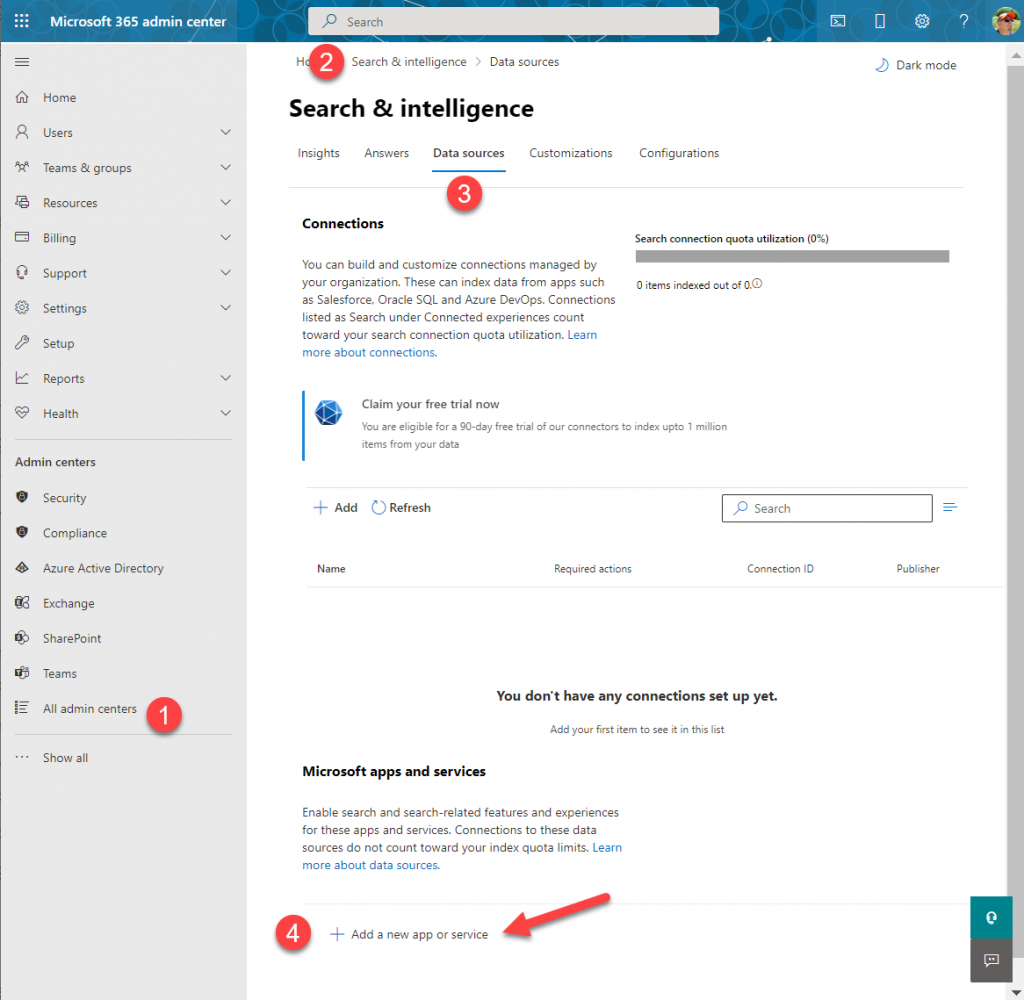
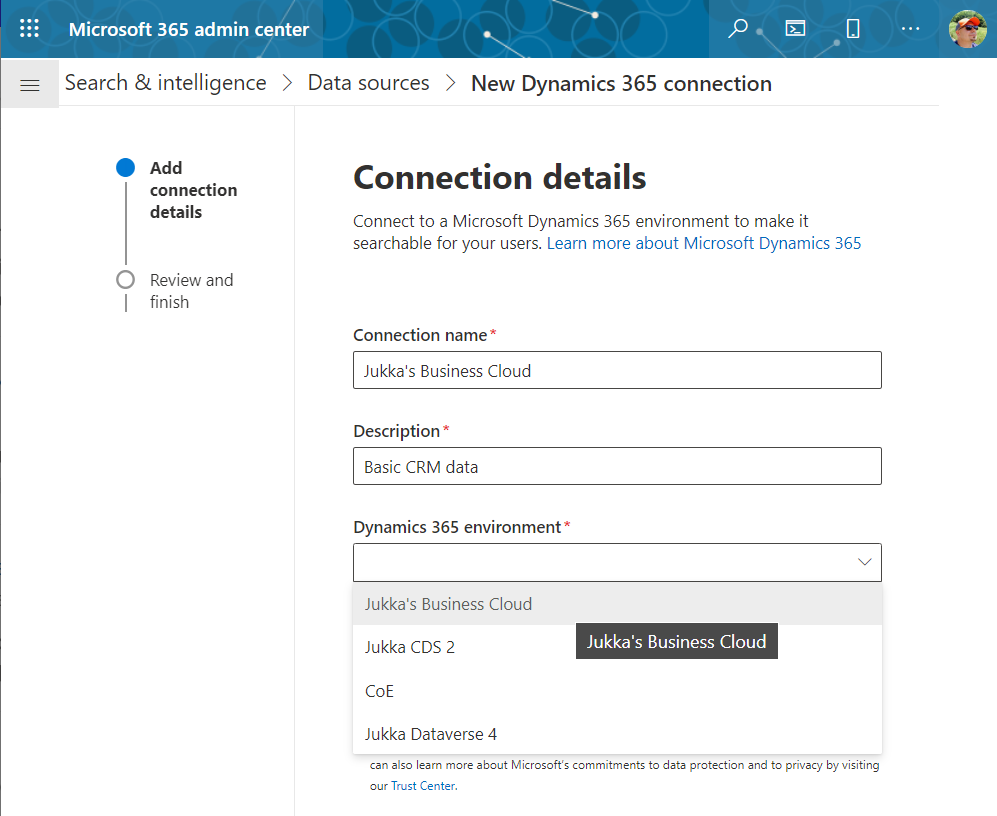
    Next you can proceed to Microsoft 365 Admin center. Go to “All admin centers”, choose “Search & Intelligence” and select the “Data sources” tab. You should see the section “Microsoft apps and services” that allows you to add a new app for search federation.

    What if that section does not appear? It may be that you don’t have a paid Dynamics 365 subscription in the tenant. The detailed requirements haven’t been documented by Microsoft yet, but based on my experiments, having just Dataverse with Power Apps premium licensing is not enough. Neither is a trial subscription for Dynamics 365.

    In the configuration section for Microsoft apps and services, it says that “connections to these data sources do not count toward your index quota limits.” If you’re not familiar with Microsoft Search, then the data sources accessible via Microsoft Graph connectors are indeed a paid service. With Dynamics 365 we’re seeing the search capability bundled into the product, but for things like Azure Data Lake, Azure DevOps or third party services like Salesforce or ServiceNow, you’ll need a Microsoft Search paid license.

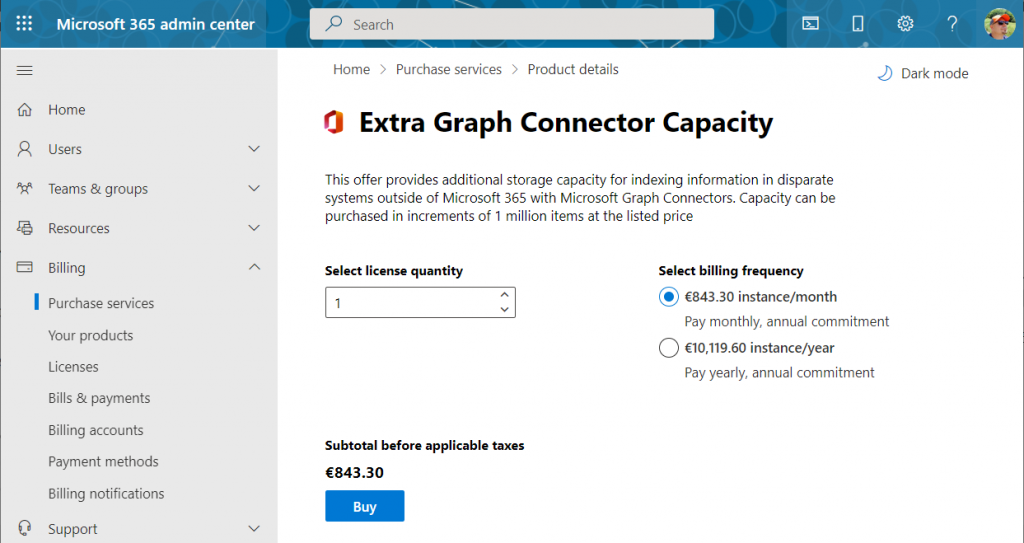
    If we were to use the paid features, how much would it cost? The required product can be found under “purchase services” in the M365 admin center – although not with any generic term like “search”, of course. You’ll need to know that SKU name is “Extra Graph Connector Capacity”. The minimum purchase is 1 million items and that would be around $1.000 per month, or in euro prices these sums below:

    If you had Microsoft 365 E5 or Office 365 E5 licenses, those would also accrue some index quota per each licensed seat, as shown here.

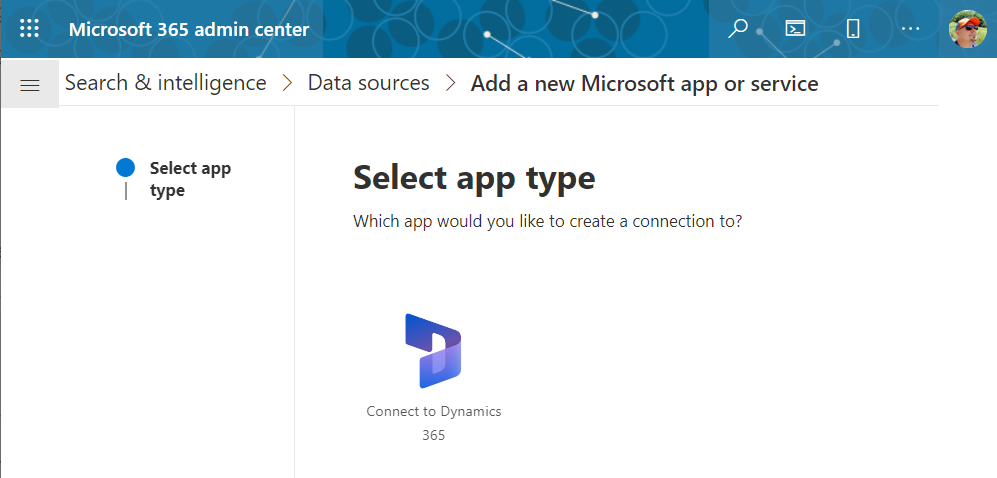
    Luckily we don’t need to make purchases since our tenant has Dynamics 365 Customer Engagement licenses in place. We can proceed to adding a new app under the Search & Intelligence data sources, by selecting the only supported MS app at this time: Dynamics 365.

    Next we get to choose the Dataverse environment. Except not all your environments may be listed here. Why? I did not discover a valid explanation for it in my initial tests. Neither the environment type (sandbox/production) nor existence of Dynamics 365 apps was the reason why environments didn’t always show up. Oh well, let’s proceed with what we’ve got and pick “Jukka’s Business Cloud” that contains the core CRM data in this tenant.

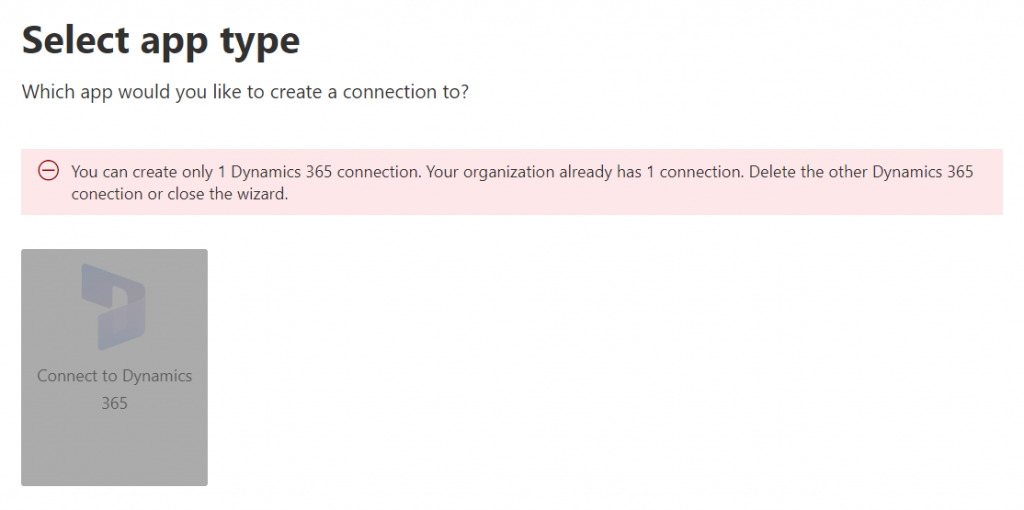
    If you’re wondering whether you could configure data from multiple Dataverse environments from your tenant to show up in the Microsoft Search results, the answer currently is: no.

    Once you’ve added the data source, it can take a while before the results will appear in the search experience. In our production tenant this took less than 30 minutes, in my personal tenant it’s been ~2h and nothing yet. MS says it can take 24 hours before the indexing is complete. Patience is a virtue – if you’ve got some to spare. I’ll just hop over to the production tenant now and explore the end user experience.

    How Dataverse records show up in Microsoft Search

    The users will discover the results from the previously configured Dynamics 365 connection when they access search either in Office.com, SharePoint Online or Bing. The UI to get to those results varies slightly, but the listed results from the Microsoft Graph connector seem to be identical.

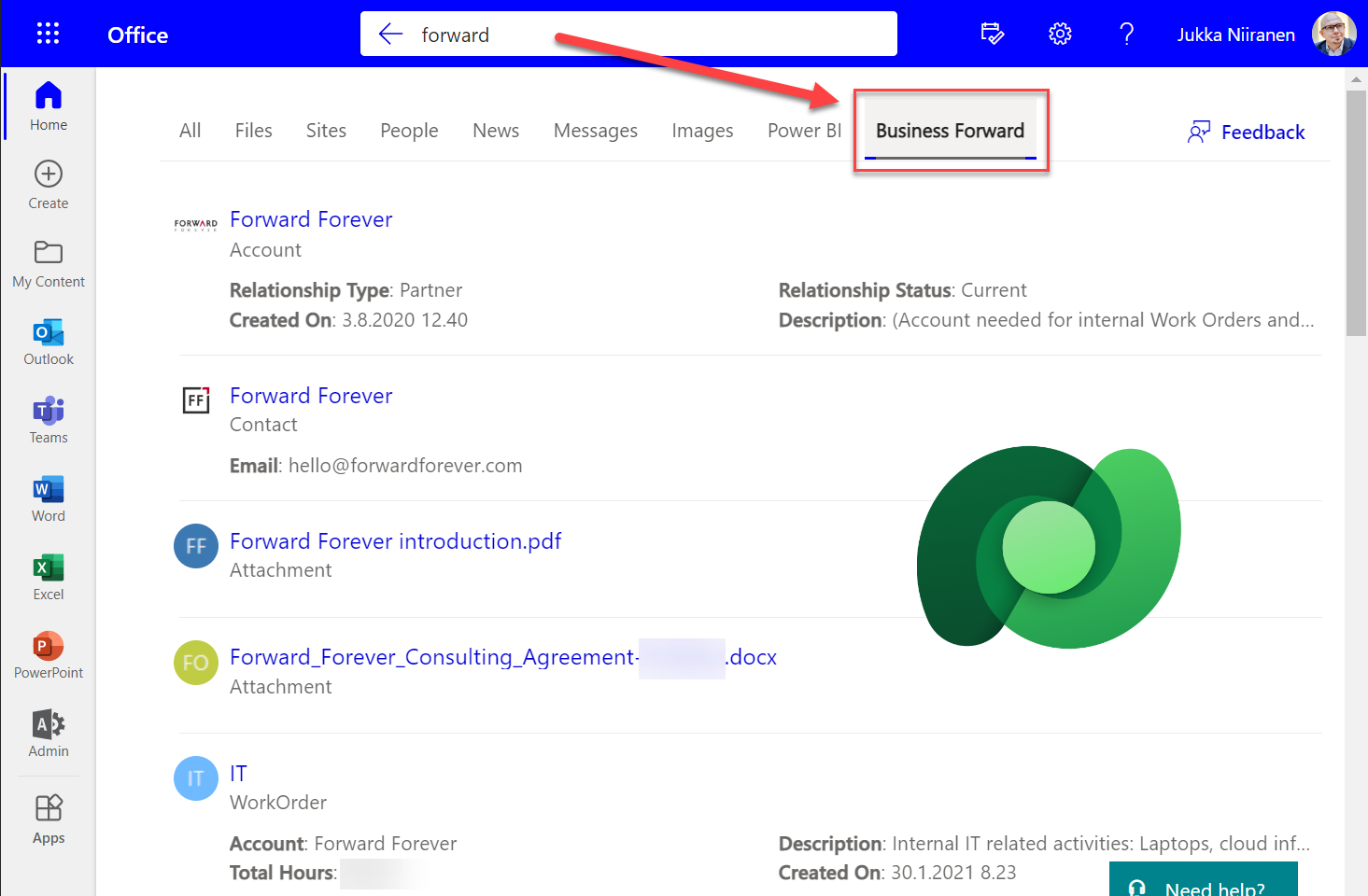
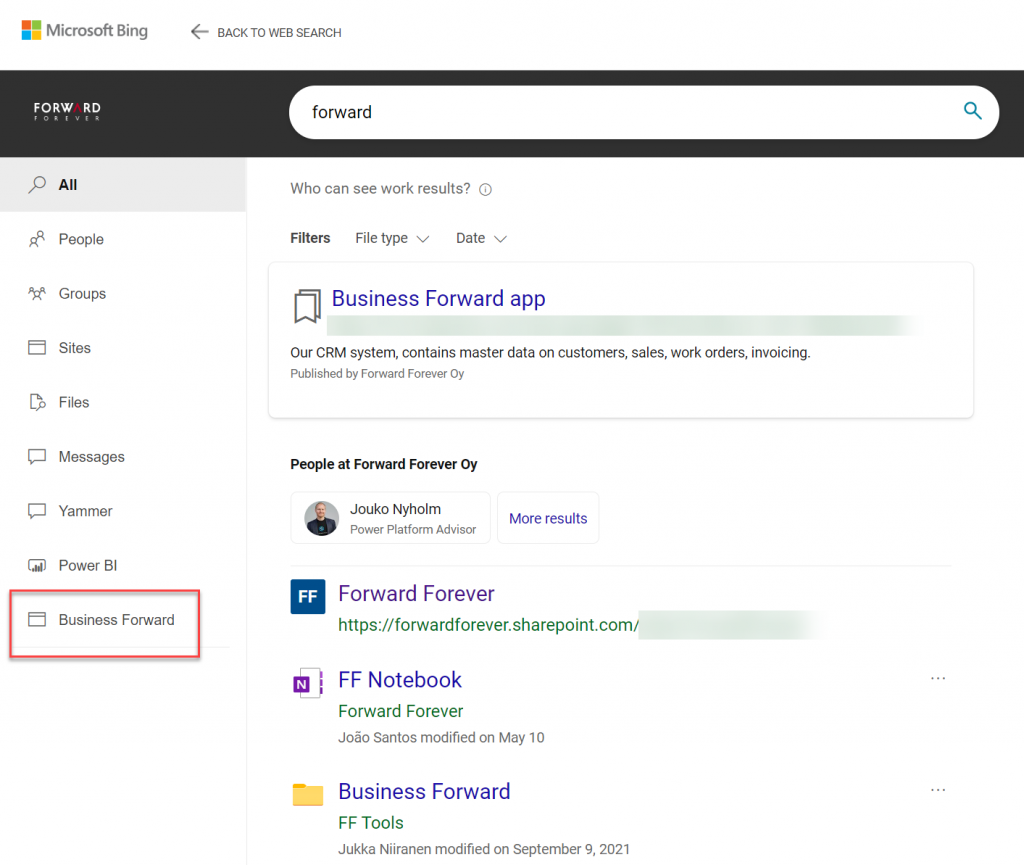
    Obviously in Bing you need to be signed in and access the Work tab that switches you from the public web search to the internal results from your work tenant. In addition to all the regular results, plus custom search bookmarks like the one you see below, there will be a new tab to represent the “search vertical”. In the case of our production tenant, I named it “Business Forward” as it is the primary app used in our production Dataverse environment.

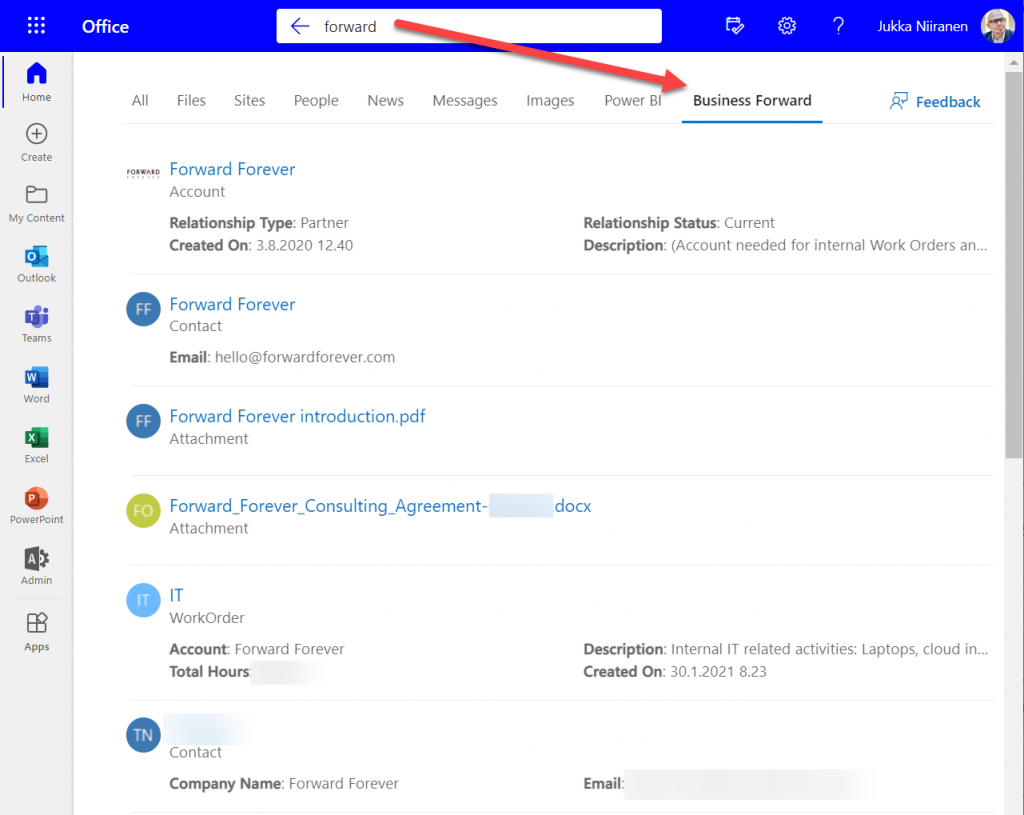
    I personally am more likely to leverage these search results from under Office.com. Here’s an example of what data is pulled from the Dataverse environment for a basic query term “forward”:

    We immediately see that the results cover both standard tables from CDM like accounts and contacts, but also custom tables like our work orders that are managed in Dataverse. We see a preview of fields from the matching records, which varies based on what columns are non-empty for each row in the corresponding Quick Find View.

    Configuration of the searchable fields is done in the Dataverse search settings, which the Microsoft Graph connector for Dynamics 365 then respects for each table. This means there’s very little to be configured on the Microsoft Search experience specifically. You really only decide A) which 1 environment to point it at, and B) what name do you want to show in the search vertical in Office.com, SharePoint, Bing.

    Dataverse in-app search vs. Microsoft Search experience

    Now that we have enabled the discovery of Dataverse data from within Microsoft Search, should that become the recommended entry point for all your business data searching needs? The answer to this is: through Microsoft Search you’ll only get a subset of search features that are available in a full model-driven Power App. Whereas with Microsoft Search you may well get close enough results, the detailed search capabilities are better within Power Apps native Dataverse search.

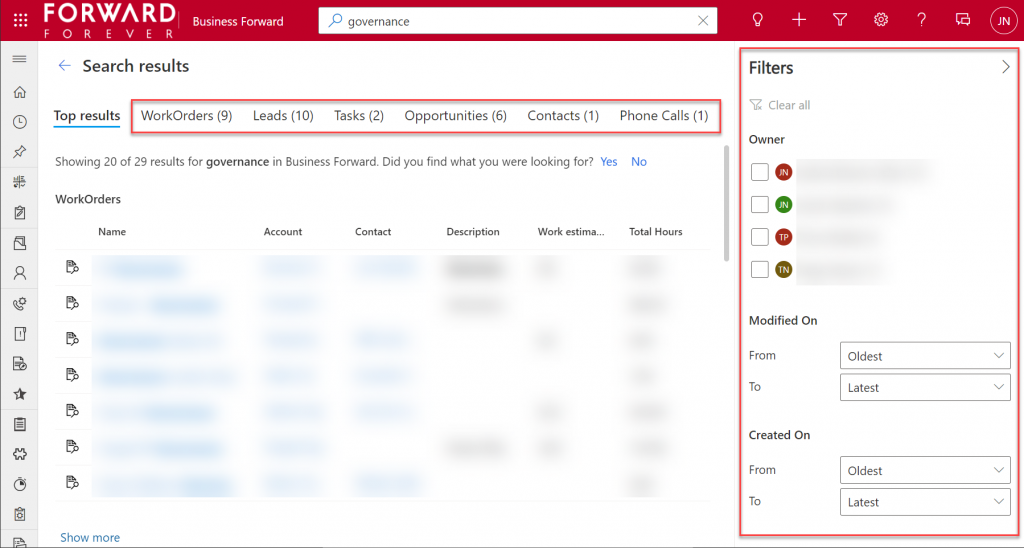
    If I enter a search term like “governance” into Office.com search bar, I’ll get a long list of results that I can not filter nor sort in any way. When I do the same search inside our Business Forward app (a model-driven Power App on Dataverse), I get the results tabbed per specific tables that allow me to narrow the query by record type. Also the filter pane gives access to owner and date filters, which get even more detailed as I select one specific table from the results.

    Another feature that can be a welcome addition is that the Dataverse search within the app UI covers only the tables included in that app. This can lead to search challenges in a larger Dynamics 365 environment that covers multiple different processes.

    For example, our production environment covers not only our CRM info on customers, sales etc. but it also hosts our internal IT Asset Management solution and its data. Now, if I search for “Nokia”, the results could include both the account management data related to Nokia Corporation as well as Nokia smartphones (from HMD Global) that our team members have registered as their IT assets. Sure, all results are filtered based on security roles and won’t reveal any data to unauthorized users, but anyone with broader access to Dataverse will also get broader, nonfilterable results with Microsoft Search.

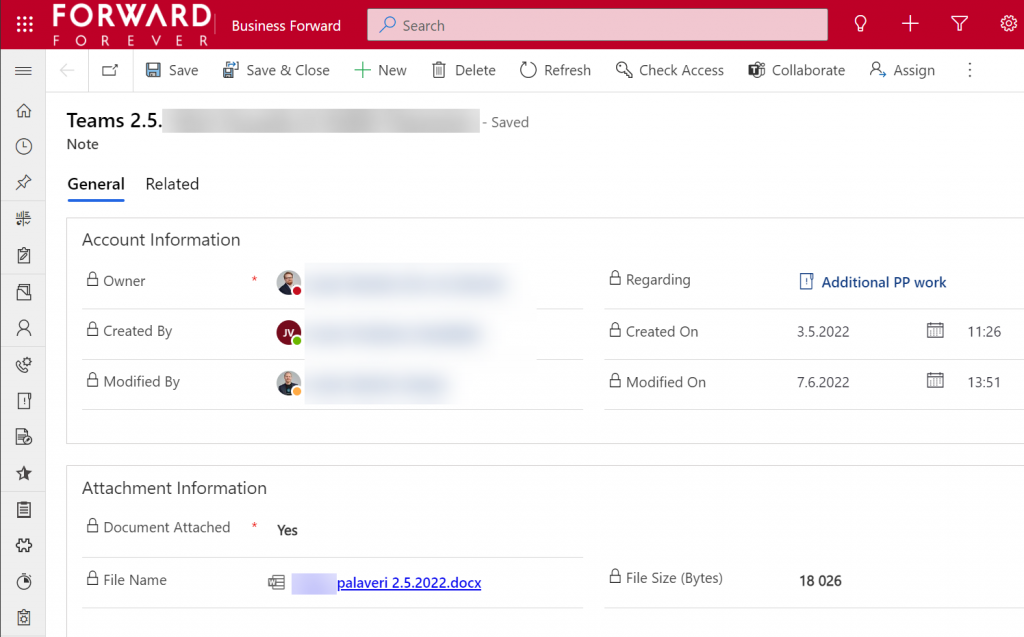
    Sometimes you may get more results from Microsoft Search than from within Power Apps, because of the way documents stored in notes and attachments get indexed. I even discovered that the note record (annotation) which traditionally hasn’t had any user accessible table form in the native UI can actually be opened independent of the parent record. The form of a note is very nice and readable, providing a link to the related document:

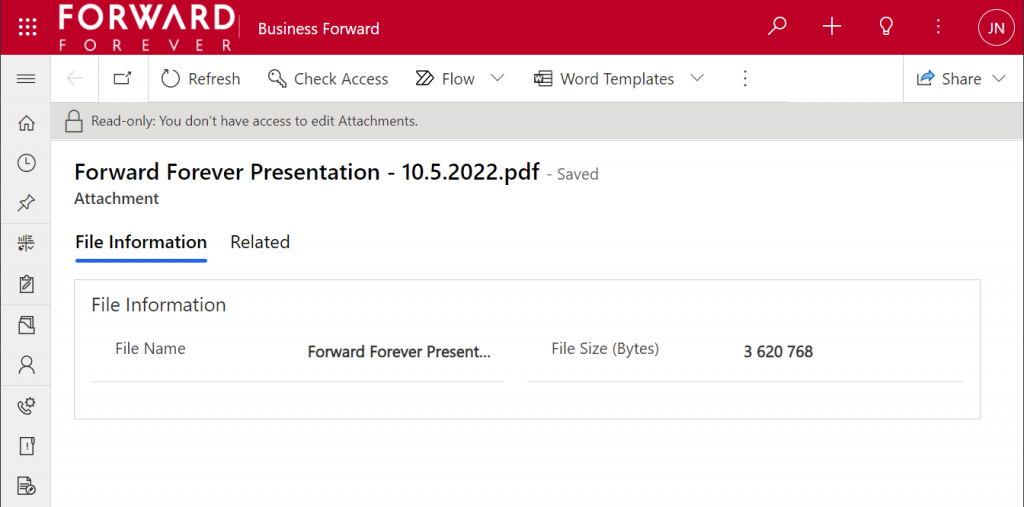
    Things aren’t quite as awesome when it comes to attachments of email records. While these also open a form within a model-driven app, the attachment table form doesn’t offer any link to either the document or the related email message from where the file could be opened.

    The many faces of Dataverse search experiences

    It’s really awesome that we’re now seeing the mainstream search capabilities in Microsoft cloud services reaching into the domain of business applications with these out-of-the-box capabilities. The investments that Microsoft has made into Dataverse Search as a service that isn’t just for doing freetext search inside your CRM system is starting to pay off. Just like makers can tap into Dataverse Search from within Power Automate actions, now information workers can do simple queries into enterprise systems from within Office experiences.

    In its current state, with support only for Dynamics 365 customers and only a single environment per tenant, the Microsoft Search experience isn’t yet as powerful as it could become. Covering the Power Platform use cases where business data is managed in various environments and via specific custom apps would be a logical direction to broaden Microsoft Search with a true low-code platform story.

    The way I see it, the search experiences for business data managed within Dataverse are being developed in three separate areas:

    1. Free text search: building search indexes that cover several sources/tables, with multiple entry points (in-app, Office, flow, APIs), evolving into support for natural language queries and supporting conversational UIs (Teams chatbots etc.). This is the area where Dataverse Search and Microsoft Search are operating.
    2. Structured queries: building complex query criteria to filter the rows in a specific Dataverse table. “Show accounts with orders in last X months and no activities from members of sales team Y”. The Advanced Find feature and the FetchXML query language have traditionally covered this front. The modern advanced find experience is making these filters easier for casual app users to approach, while FetchXML is still alive (now available for download in the UI) and can help flow makers design complex queries more efficiently, for example.
    3. References: the next generation of “set regarding” features are aiming to broaden the traditional scenario of associating emails in Outlook with records from CRM. If the MS vision for Context IQ comes to life, we should be able to at-mention basically any record from a Dataverse environment and collaborate interactively on it via Loop components. Similar to the Microsoft Search initial limitations, it will be interesting to see how the lookup field experience can be optimized with machine learning algorithms when all records in a large tenant are behind a single @ symbol…

    Returning back to what I mentioned at the start of this blog post, as a solution designer it’s very important to understand all these different means through which users can search for your business application’s data. There’s a lot you can do by configuring the settings in Dataverse views to make the experience enjoyable for the user.

    Studying the Dataverse search documentation is a good start. However, it’s all just theory until you have some actual data and real user interfaces to test the usability of your search configuration with. What this means is that you’re unlikely to ever get all the settings right in the V1 release of your app. In practice the user experience for business data search requires attention throughout the lifecycle of your app. Microsoft will continue to change and expand the ways in which search queries and results are handled, so you better keep up with these new features and explore what configuration options are being introduced in the future, too.

  • Share links with access to records in Model-driven Power Apps

    Share links with access to records in Model-driven Power Apps

    Microsoft has been working towards a unified sharing experience across their cloud products. The dialogs that many are using today in Microsoft 365 services like SharePoint and OneDrive for sharing access to files is also finding its way to Power Platform.

    The visible UI in a sharing dialog is only one part of the experience. Knowing what the traditional sharing experience for Dataverse records has been in Dynamics 365 and what the underlying security model consists of, the new direction can present a few surprises for app makers and admins.

    For example: did you know that a user without any visible security role may be able to read the data of certain Dataverse records? Wow! That goes against everything we’ve learned about security modelling in the good ol’ XRM era. Sounds like something worth investigating a bit deeper then.

    Enabling the sharing links

    Since the new sharing functionality can have a big impact on the security model of your business apps, this capability needs to be consciously enabled by the administrator. I haven’t yet come across the official Docs materials for the feature. Presumably this page is where the details will eventually be published. For now, this blog post is based on my experiments of what you need to have in place (by minimum).

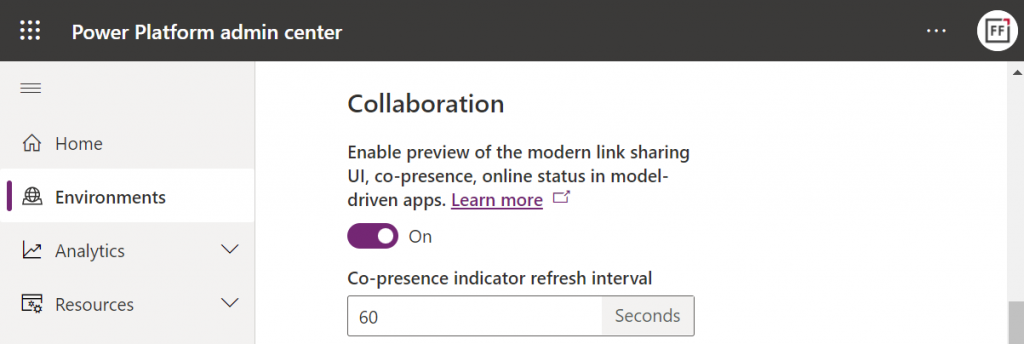
    First, you need to enable the collaboration feature in the environment settings via Power Platform Admin Center (PPAC):

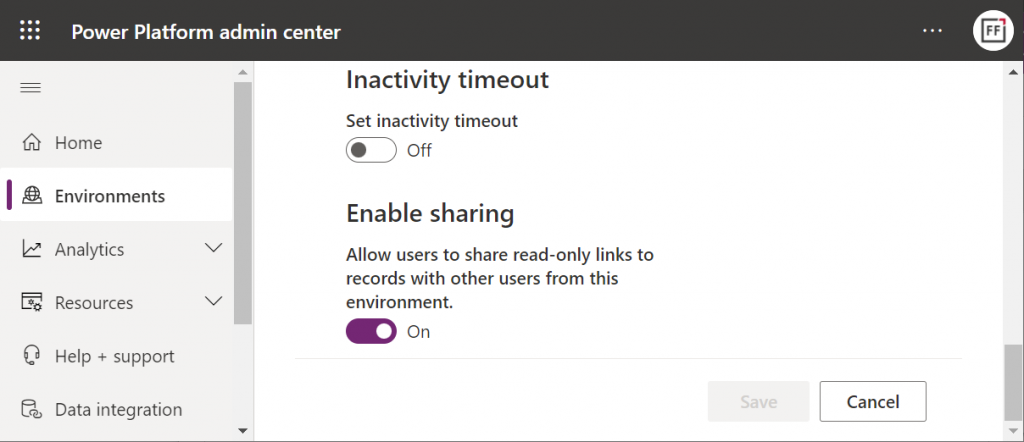
    Next, you should go to the Privacy + Security page of the same environment and switch “enable sharing” to on:

    As the message says, this should “allow users to share read-only links to records with other users from this environment.” I managed to get this working in a couple of different environments in our tenants, yet another demo tenant in the same European geo refused to co-operate. So, don’t be surprised if you see different results in your environments at this point.

    The link sharing experience

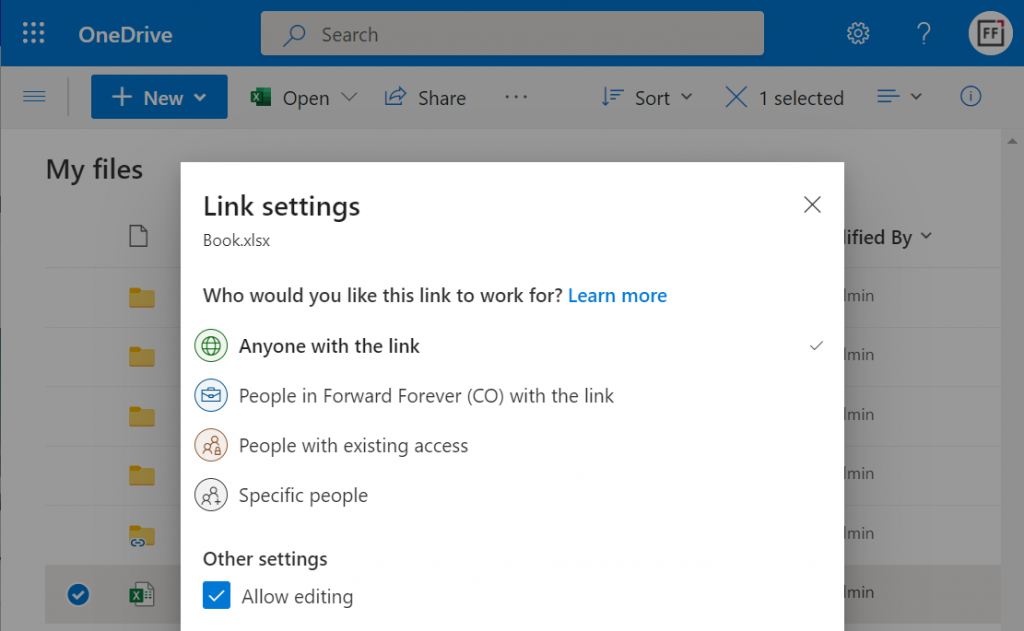
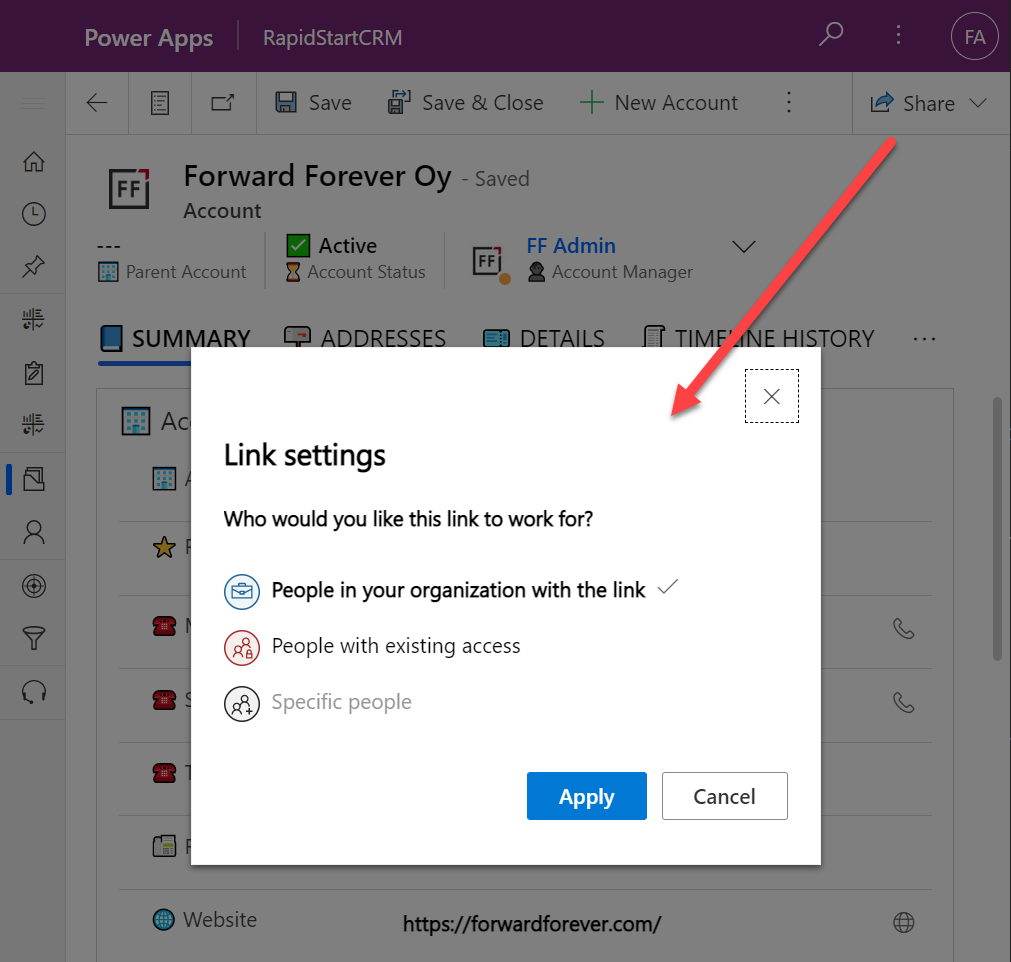
    Now that the features are turned on via PPAC, you should be able to go to a record like an account in a model-driven Power App and discover the new sharing menu in the top right corner of the form. Selecting “copy link” will give you a standard link that is the exact same URL as you’d get from the browser’s address bar. That’s because it’s meant for “people with existing access”.

    Once you click on the chevron and explore the link settings, there should be more options available (assuming the environment settings applied earlier have taken effect). Let’s select the “people in your organization with the link” option this time:

    Now we get a URL that is appended with parameters “shareLink” and “sig”. These are the magic keys to authorize someone who does NOT have existing access to the record in Dataverse.

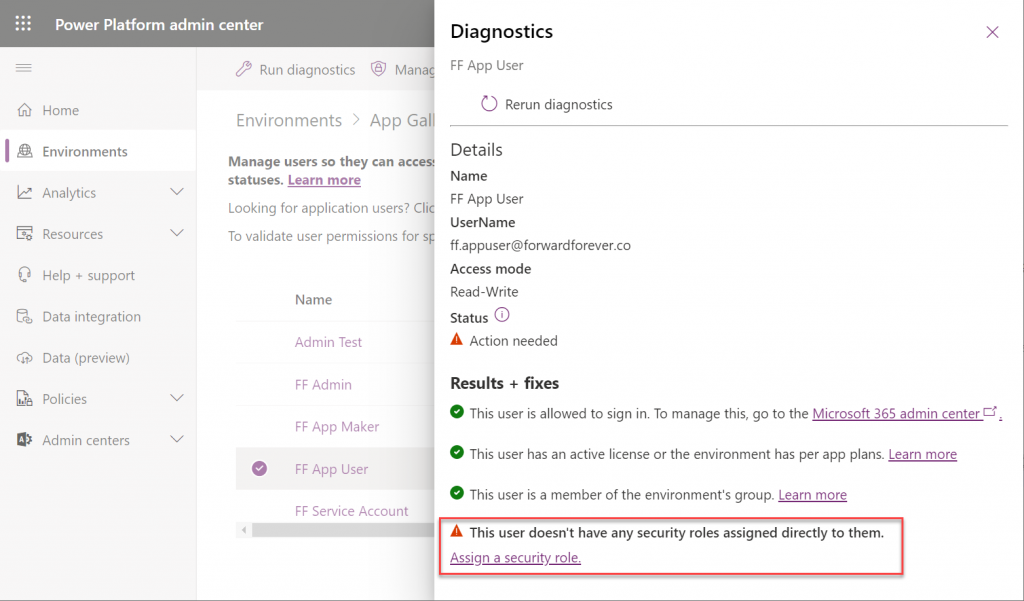
    To validate how the feature actually works, I used our sandbox tenant’s user account FF App User as the guinea pig. First, as an administrator I went and removed any existing security roles for this user from the environment. Then I ran the diagnostics test from the user list in PPAC. A warning was displayed, saying “this user doesn’t have any security roles assigned directly to them”. Looks perfect for our testing purposes.

    (I actually also removed the license, yet that didn’t get flagged in the diagnostics test. Oh well, we all know how mysterious the license assignment and validation in Power Platform can be, so let’s ignore it this time.)

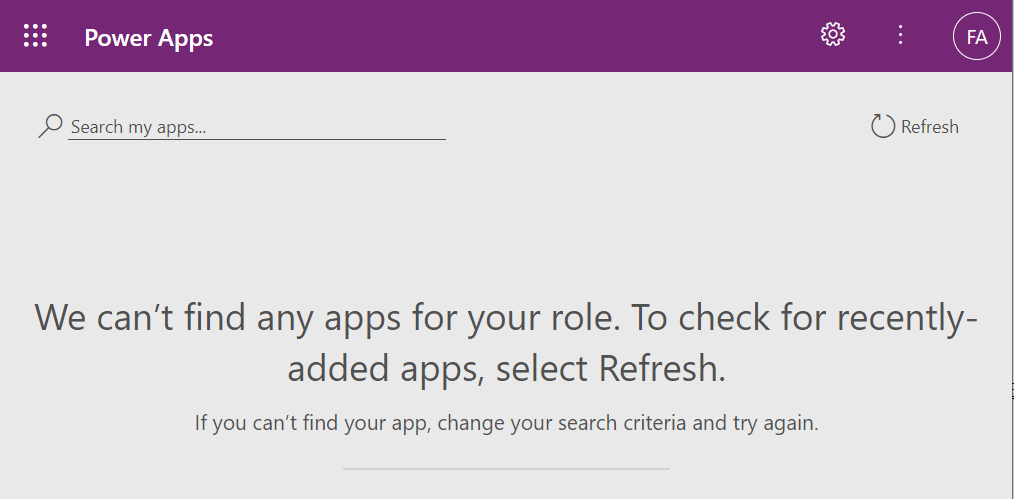
    Opening the naked URL of the Power Platform environment with this user account resulted in a screen saying “we can’t find any apps for your role”. Under normal circumstances, this would be the end of the road for a user.

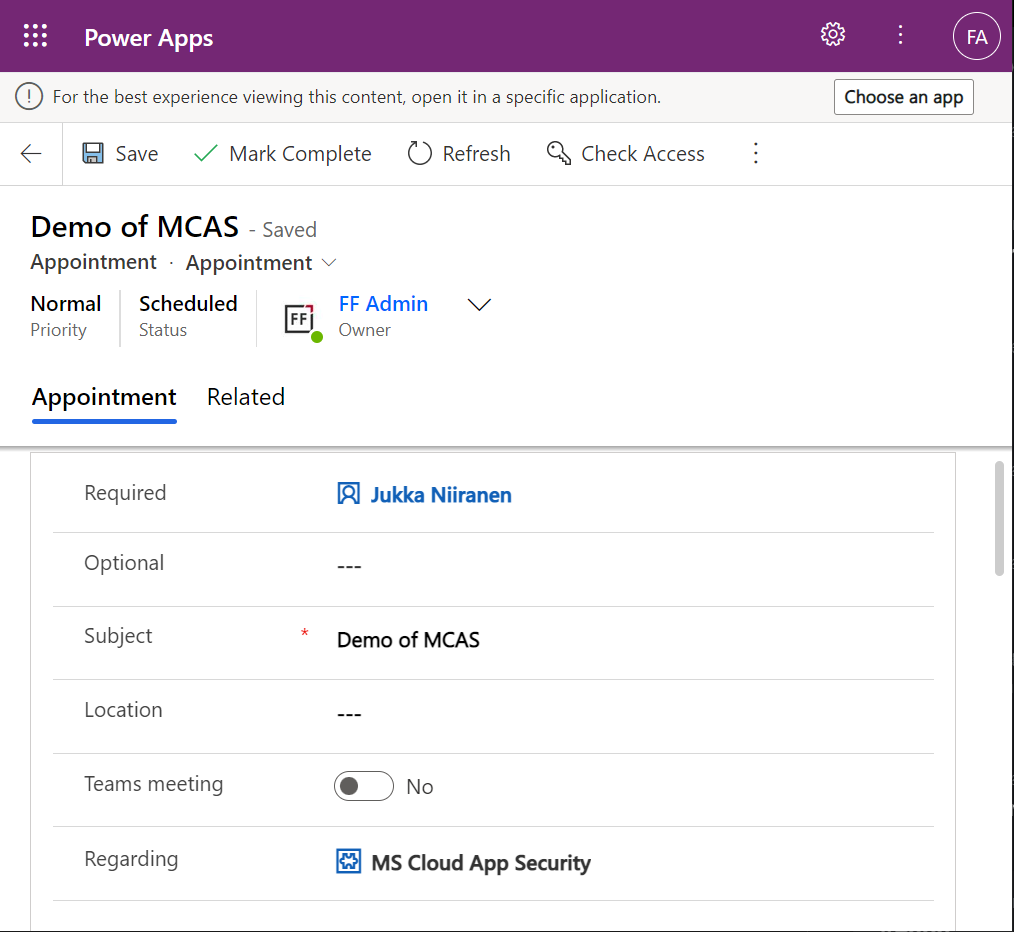
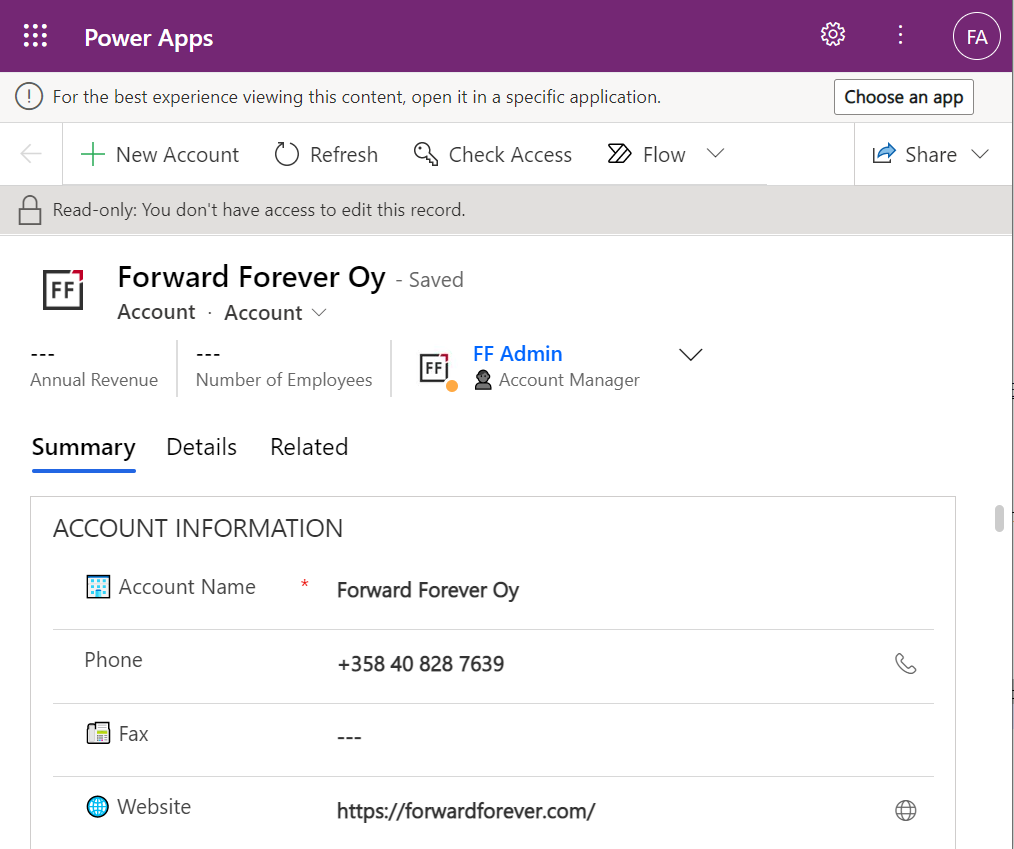
    This user has a special trick up his sleeve, though: the sharing link with the secret access code parameters. Using it allows us to open the account form outside any Model-driven app module. Yes, it’s read-only as the feature’s description text suggested, but from a viewing perspective this record form seems fully functional.

    How far do the sharing rights go?

    If we’d go back to our admin user’s profile and re-run the user diagnostics in PPAC, we’d see that there still aren’t any security roles assigned for the FF App User. Let’s visit the sharing dialog of the single record instead and go to “manage access”.

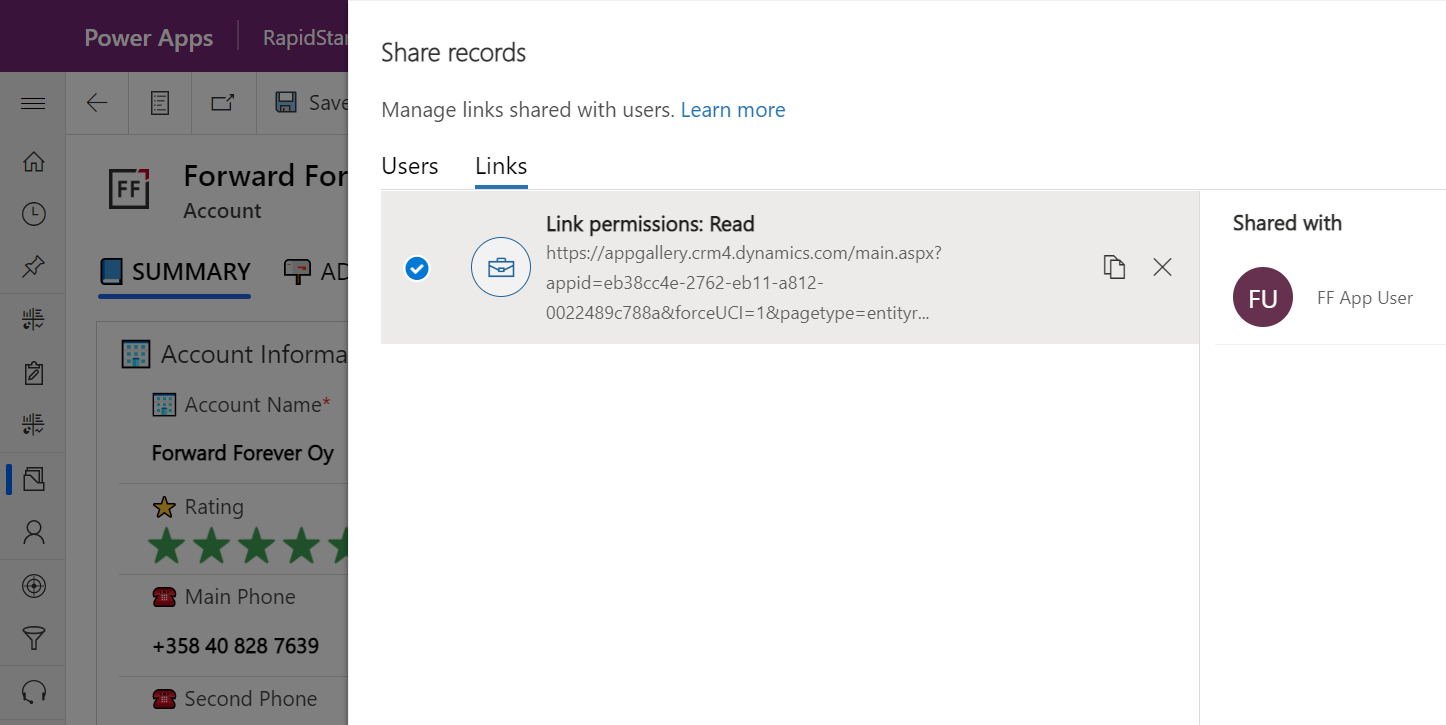
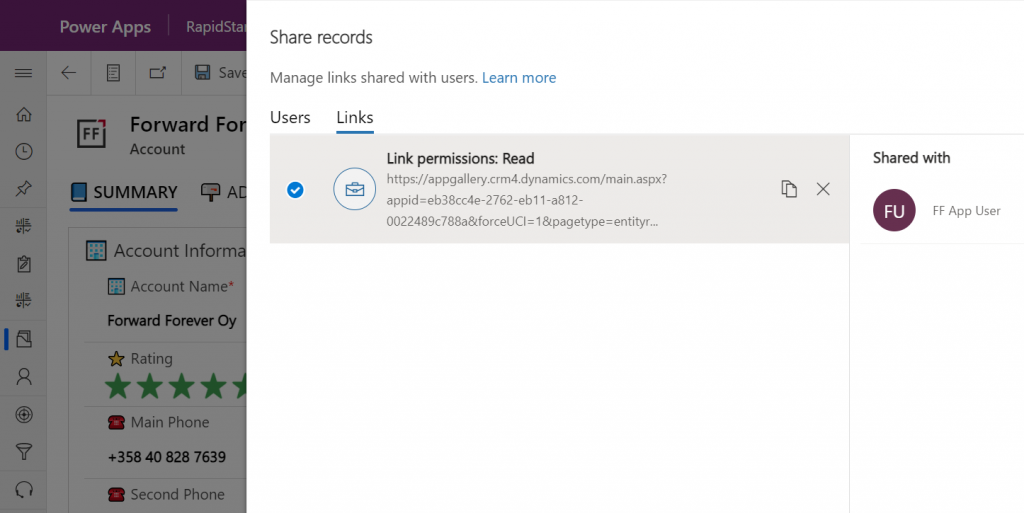
    This screen shows us that we have one sharing link generated for the account in question, with read permissions. Also, since FF App User has accessed the record via the link, the user account is listed under “shared with”.

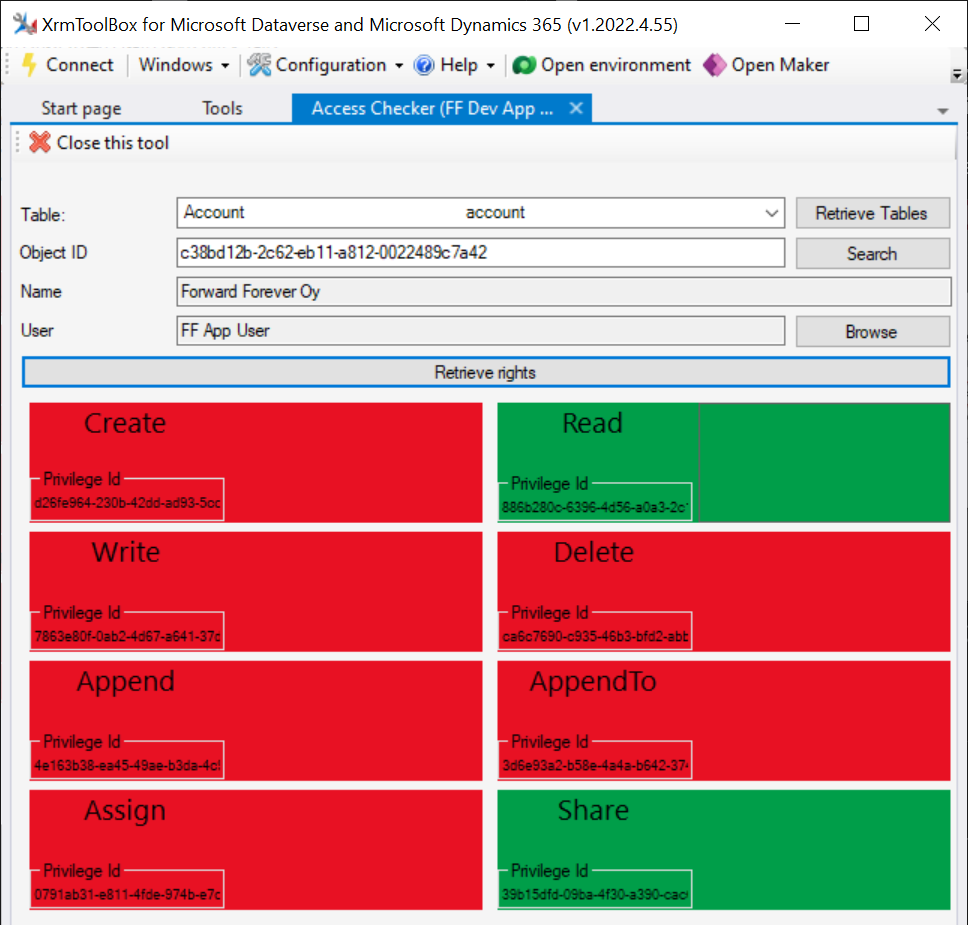
    Time to go deeper still, so let’s open XrmToolBox. Using the Access Checker plugin, we can run a test for the specific account record and the specific user account. We do indeed see that when called via the API, the user has both read and share privileges for this record:

    Could we find out even more about how the privileges are applied? Sure! Another plugin in XrmToolBox, “Your User Security – Magnified”, gives us a very interesting output for the FF App User account:

    As many of you know, there are plenty of system metadata tables (entities) that the user must be able to read for the application to function properly. Things like “attribute” or “user” are therefore understandably opened up for the FF App User account upon sharing the record.

    There are plenty of real business tables listed in that output, too. Contact and activity, for example. While the privileges are granted only in the user’s scope (meaning only records that the user is an owner of), this made me go back and think: what else did we see on the account form when we opened that one record?

    Activities related to the account show up on the timeline. In addition, we’re able to navigate to their forms. We do also see the primary field values of anything that’s in a lookup, such as the regarding opportunity name.

    Clicking on lookups, such as the contacts that are activity parties, will show an error message on missing read access rights. So, the security model is still enforced as expected, meaning we couldn’t just navigate via links to other records. It’s not just the lack of a surrounding app and its navigation that is missing from this user, there’s access checks also on the server side of course.

    It’s good to keep in mind that the modern collaboration features are currently enabled only for certain tables: account, contact, opportunity, case. There may be more configuration options ahead for how the sharing links work once the feature reaches general availability.

    Sharing within Microsoft Teams

    The primary scenario that these internal sharing links have surely been designed for is collaboration within Teams. Already back in July 2021 it was announced by Satya Nadella that “Teams customers will receive access to Dynamics 365 data within Teams at no extra cost.” We’ve been waiting for that possibility to arrive ever since.

    Given how the concept of sharing access to data has been radically different between a document world like SharePoint and a business record world like Dynamics 365, there has understandably been a lot of work needed to be done on the platform side. Now that the share links infrastructure appears to be in place, are we ready for the collaborative apps story to come to life?

    Although the sharing capabilities are a Power Apps feature, there doesn’t yet appear to be the needed pieces in place on the Teams side for any low-code apps to take advantage of record sharing. However, if we test the sharing links in a Dynamics 365 enabled environment and with the Dynamics 365 Teams app deployed for the user, things start to light up:

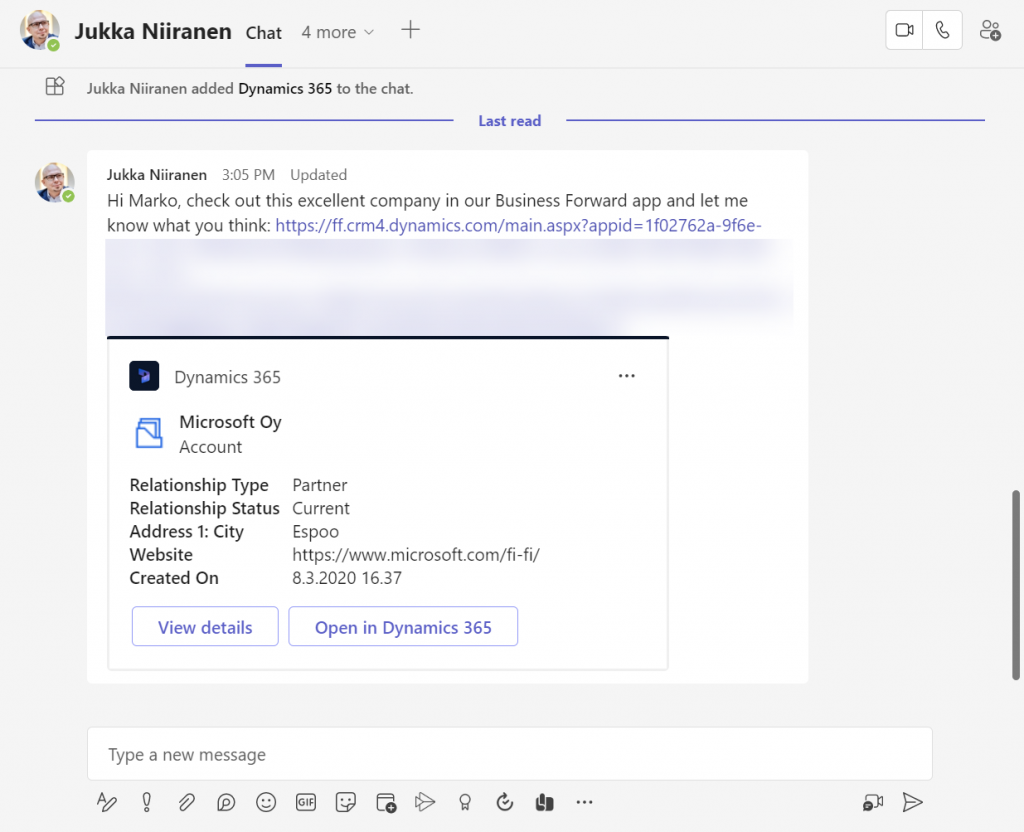
    Pasting the link into a Teams chat will now unfurl the contents and show an information card preview of the record. We also get the option to view the full record in the context of Teams, via the “view details” button. These are small yet important steps in allowing people to get work done within the platform that is Microsoft Teams, without needing to look for the details in another browser window.

    We’re still missing some of the elements showed by Microsoft as part of their collaborative apps story, like Context IQ for at-mentioning a Dataverse record or Loop components to embed live data into messages in Teams or Outlook. While we wait for a delivery timeline on those elements, at least this easy record sharing feature in Power Apps model-driven apps has a target GA date for September 2022.

  • Sharing Dataverse for Teams apps outside the team

    Sharing Dataverse for Teams apps outside the team

    When you’re building Power Apps within a Microsoft Teams based Dataverse environment, the most common target group of app users is obviously people who belong to that team. This is very logical when the purpose of the app is to collaborate as a team on something that might have otherwise been an Excel sheet shared with all team members.

    The simplified table security model of Dataverse for Teams with Owner/Member/Guest (“OMG”) levels instead of custom security roles makes things easy to manage when everyone is equal. But what about when you’d need to have more granularity on who gets to do what? What if in addition to the owners (app admins) and members (managers) you also need a level further down this hierarchy: the “normal” users?

    Colleagues with access

    This is where the concept of a “broad distribution app” comes in handy. It allows you to grant access to the app for users who are not part of the team that’s hosting the Dataverse for Teams environment. Here’s how the Docs on Dataverse for Teams table permissions describe this:

    “With Power Apps for Teams, you can share an app with Azure AD security group whose members need not be part of the Teams team where the app was built. This enables you to add users to the application without having to add them to the specific team, and opens up “Broad Distribution” scenarios. For example, you may want to build an app that is enabled for every accountant in the organization, or even every employee in that organization.”

    The ability to share an app with one Azure AD security group makes Dataverse for Teams quite an attractive platform for low-code apps that have a high number of potential users. Not many organizations have yet committed to covering all their employees with a Power Apps Per User license that unlocks premium features like Dataverse. Since every user who’s licensed for Teams via Office 365 / Microsoft 365 is allowed to use apps running on Dataverse for Teams, this option significantly lowers the barrier to start building apps on top of a true relational database designed for business applications – as opposed to running your complex processes on top of several SharePoint / Microsoft Lists.

    Sharing with colleagues in practice

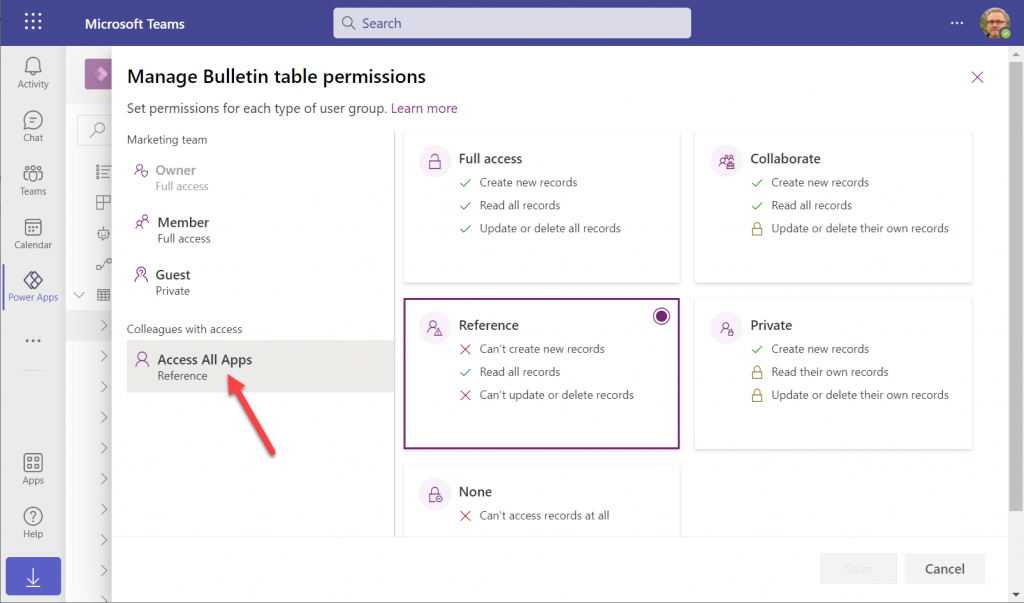
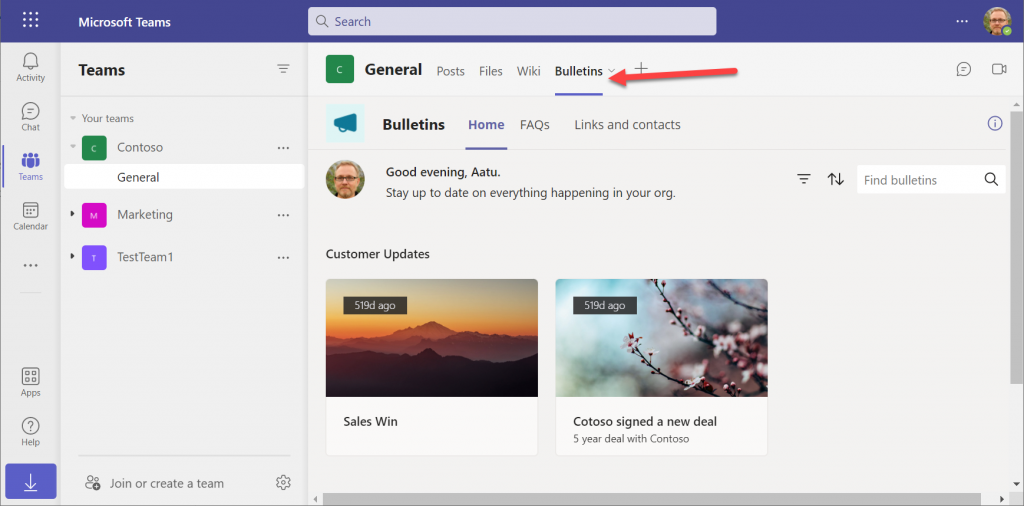
    Let’s say you’ve built an app within a Dataverse for Teams environment and are ready to publish it to the whole organization. In this demo scenario we are using the Bulletins sample app for Teams. We’ve created an Azure AD security group called “Access All Apps”. The first thing we need to do is go an add the necessary access rights to each table used by the app. For example, when it comes to the Bulletin table, users should be able to read all records but not create/modify/delete them, so we grant the “Reference” level to this group:

    You’ll need to do a lot of clicking for an app like Bulletins that has 11 tables, so be sure you’re selecting the “colleagues with access” section before assigning the permission level on each page.

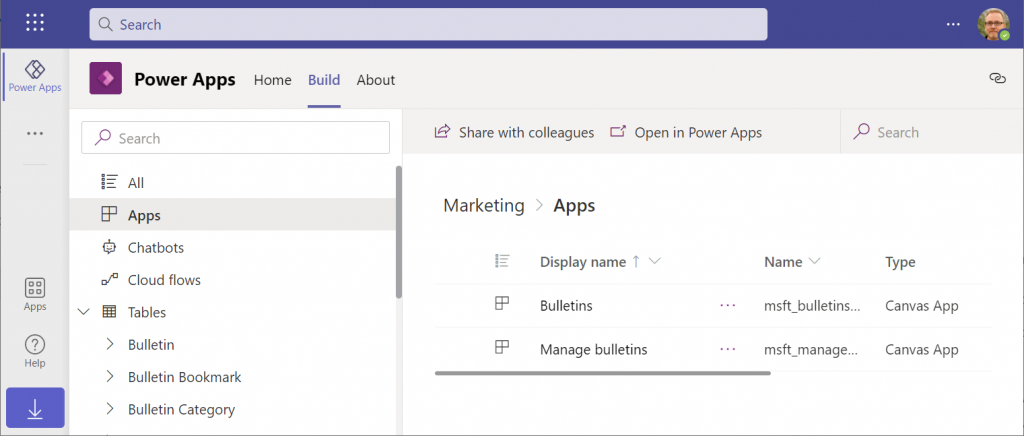
    Next, let’s share the Power Apps canvas app itself with this group. Again, you’ll need to be careful with where to click in the navigation maze that is the Power Apps for Teams app. Go to the Apps list of the Dataverse for Teams environment but don’t select the app. Otherwise you won’t see the “share with colleagues” toolbar button.

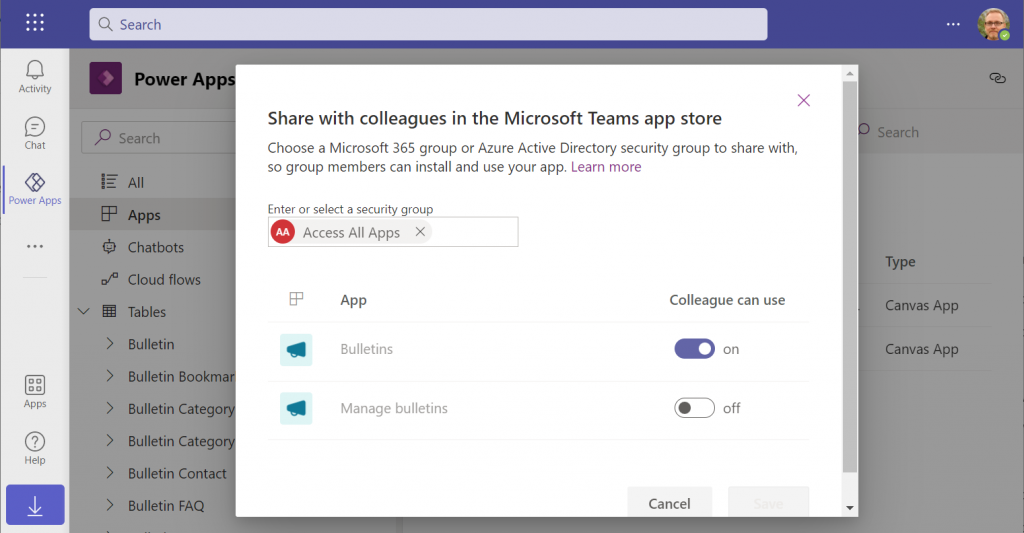
    In the modal dialog window, choose which apps from this Dataverse for Teams environment you wish to make accessible with the chosen security group. This is where you’ll notice that while you could have tens of different apps within on environment, there’s no ability to choose which Azure AD security group gets to see which apps – since there can only be one.

    Adding apps to Teams channels

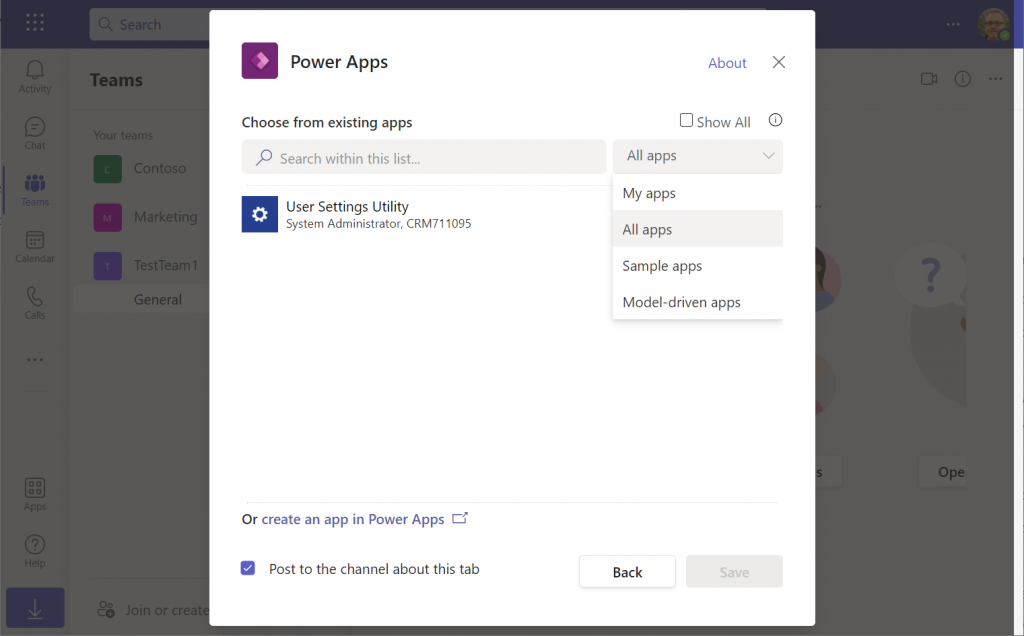
    If we were to now go to our target team and add a new Power Apps tab to the channel, we would not find our Bulletins app there. Nope, not even under that “sample apps” filter, since that actually shows a list of Power Apps sample apps like Asset Checkout that are part of all Power Apps environments. Dataverse for Teams sample apps like Bulletins are a completely separate thing, of course.

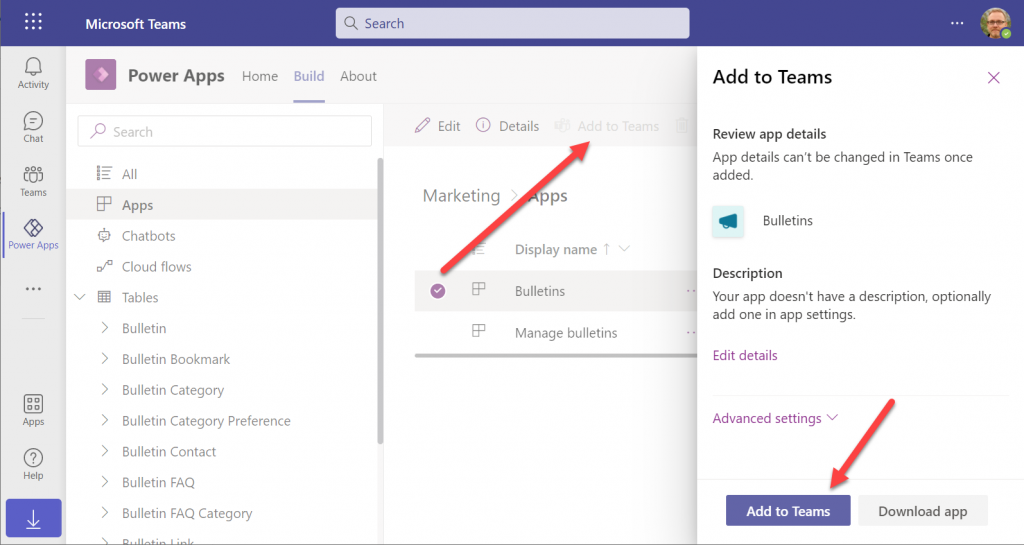
    The logic is different when it comes to Power Apps that have been built within Dataverse for Teams. You need to go back to the Power Apps for Teams app, i.e. the Maker experience. Click on the Build tab, choose your environment, find your app, select it for real this time, then choose “Add to Teams”.

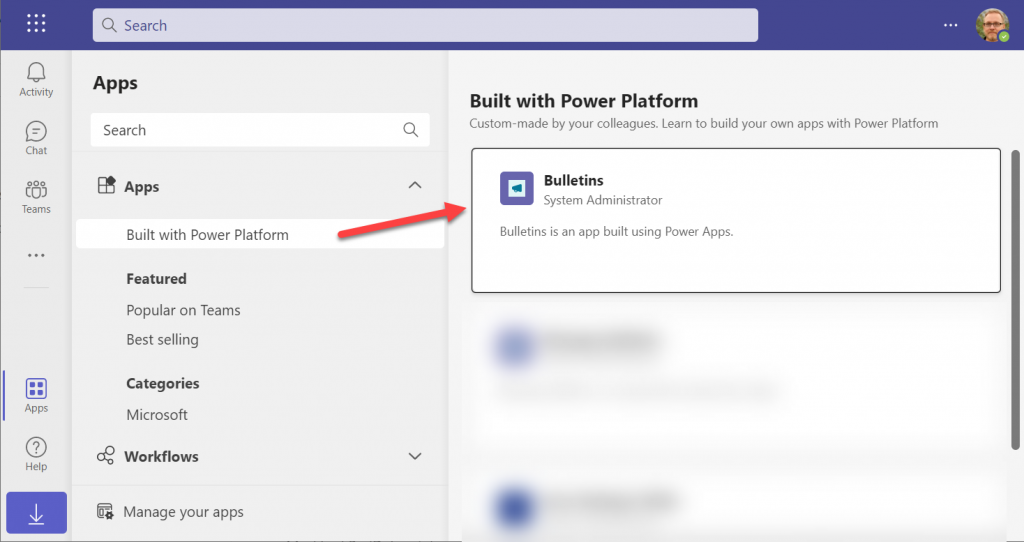
    You don’t get to choose a team or a channel, though. That’s because this process actually publishes your app into the Teams app store. It will become available under the “Built with Power Platform” section:

    OK, fair enough. It’s an app built within Teams, so it makes sense to use the same distribution mechanism as apps developed with custom code. The other Power Apps in your tenant are “external content” that you can freely pin to channel tabs. Dataverse for Teams apps are same but different.

    Blocked by Teams permissions

    This is actually the reason why I started writing this blog post in the first place. Ever since the broad distribution apps were announced in January 2021, adding them to a team from the app store worked without any additional hoops to jump through. Recently that has changed in a way that is not yet reflected in any MS documentation.

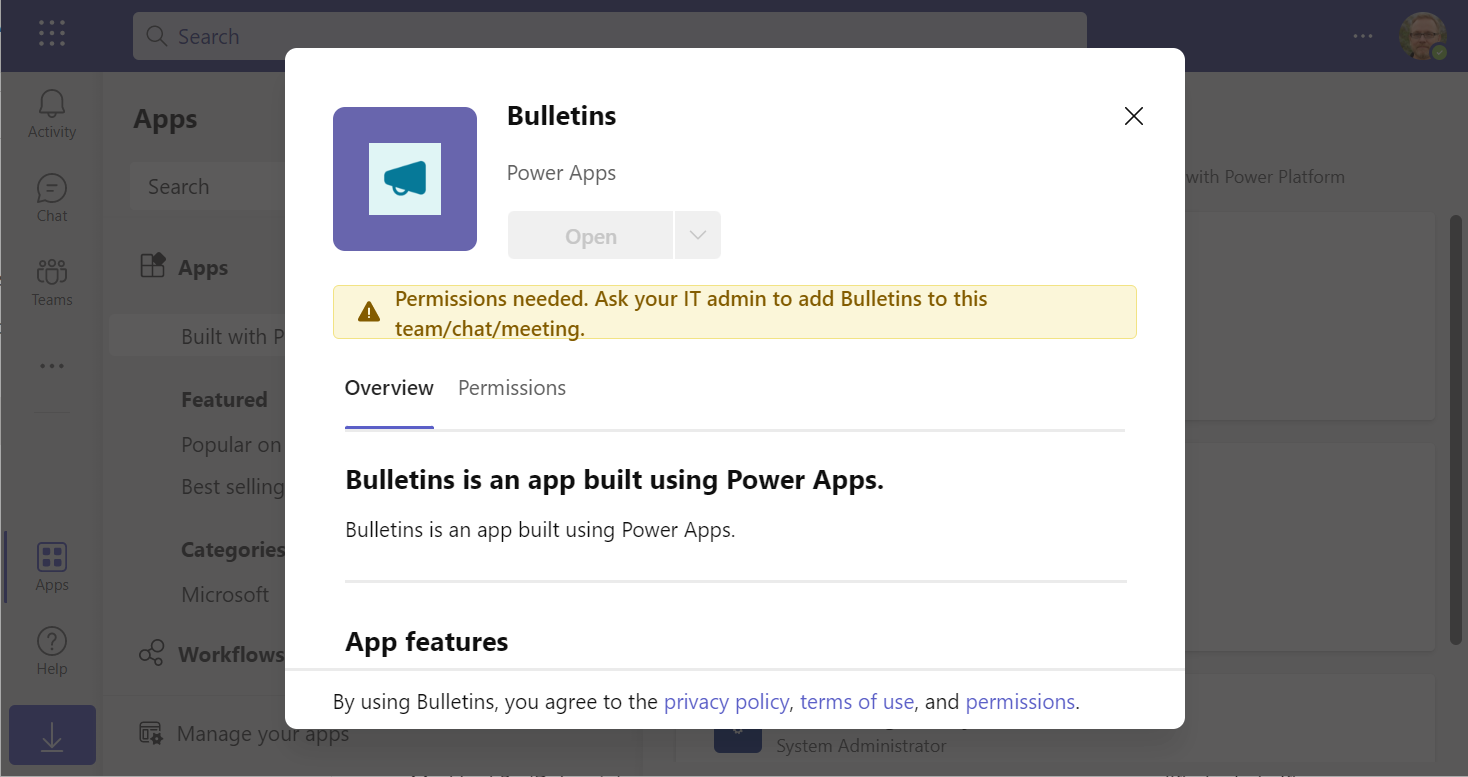
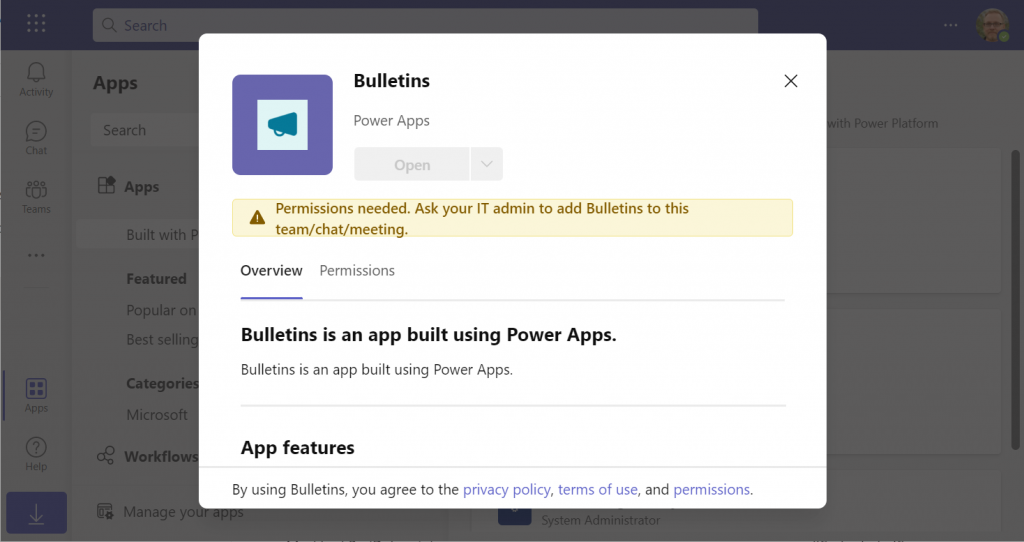
    In a new tenant with the default settings for Microsoft Teams, you may be blocked from installing the Dataverse for Teams based apps after doing the “Add to Teams” dance. Instead the app store may present you with the following error message:

    Permissions needed. Ask your IT admin to add [app name] to this team/chat/meeting.

    You will get this message even if you are the Global Administrator of the tenant, so it’s not about the user permissions. It is rather the Teams policies that are blocking the deployment of Power Apps created within Teams.

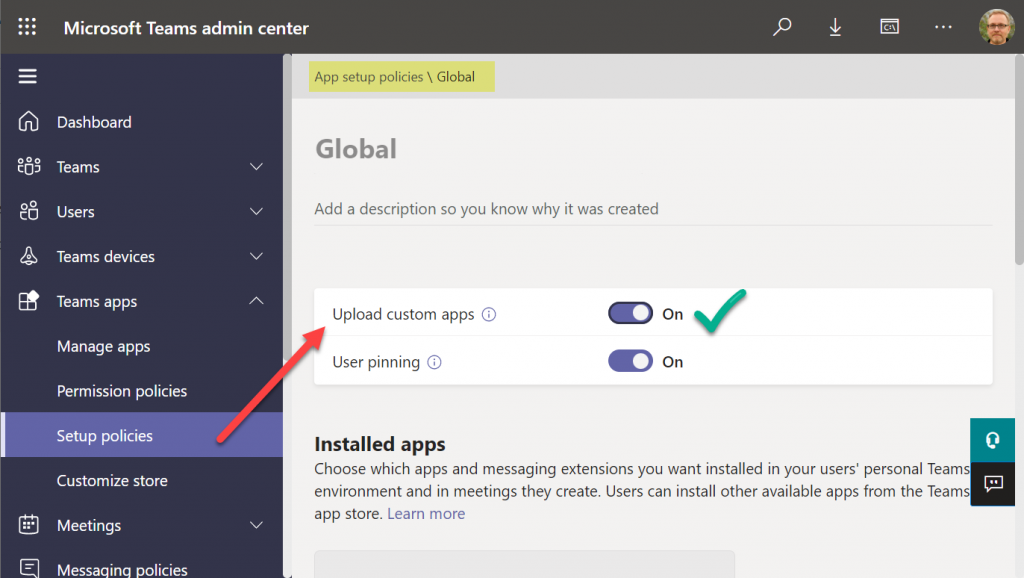
    To solve this issue, you’ll need to contact the Teams administrator of your tenant and ask them to verify that the following setting is turned on:

    Teams apps – Setup policies – Global (Org-wide default) – Upload custom apps – On

    After this change, you’ll be able to open the Bulletins app in the Teams app store, select “add to team” and create a channel tab in any team that you are a member of.

    I can tell for a fact that the requirement for the “upload custom apps” policy didn’t always used to be required (or it was enabled by default). In one of our demo tenants I had previously used the “share with colleagues” feature to add Dataverse for Teams apps outside the hosting team. The existing tabs worked just fine, but adding new apps became blocked until the apps policy in the Microsoft Teams Admin Center was modified.

    It’s a bit unfortunate if this will indeed become a permanent requirement for IT admins to grant the permission for “upload custom apps”, just to share the Dataverse for Teams app into a different team. Compared to normal Power Apps, there are a number of quirks like this that the app makers need to be aware of. Be sure to also check out my earlier blog post where I explore what it’s like to work with solutions in Dataverse for Teams.

    Update 2022-06-17: In case you’re wondering how the general approval process would actually work for Teams store apps where the approval request prompt is shown, check out this great blog post from Tony Redmond: “Users Can Request Access to Teams Store Apps”.

    Update 2022-08-11: there’s a new feature rolling out, called “Microsoft Teams user request configuration to external systems (URL redirect)”, allowing Teams admins to configure a custom URL + message for the app requests in the Teams app store. Read more here.

  • Dataverse environment administration mode and storage consumption

    Dataverse environment administration mode and storage consumption

    In November we had a situation where our production environment had records unintentionally deleted. This required us to restore a backup copy of production into a new environment and retrieve the missing records from it.

    Why didn’t we restore the environment backup directly over the production environment? There are many reasons which I’ve documented in the Forward Forever team blog. In short, if you’ve got any Power Apps canvas apps or Power Automate cloud flows in your environment, things can get seriously messed up if you restore the backup into the same environment. My recommendation is to avoid doing this in production if you have any workarounds at your disposal.
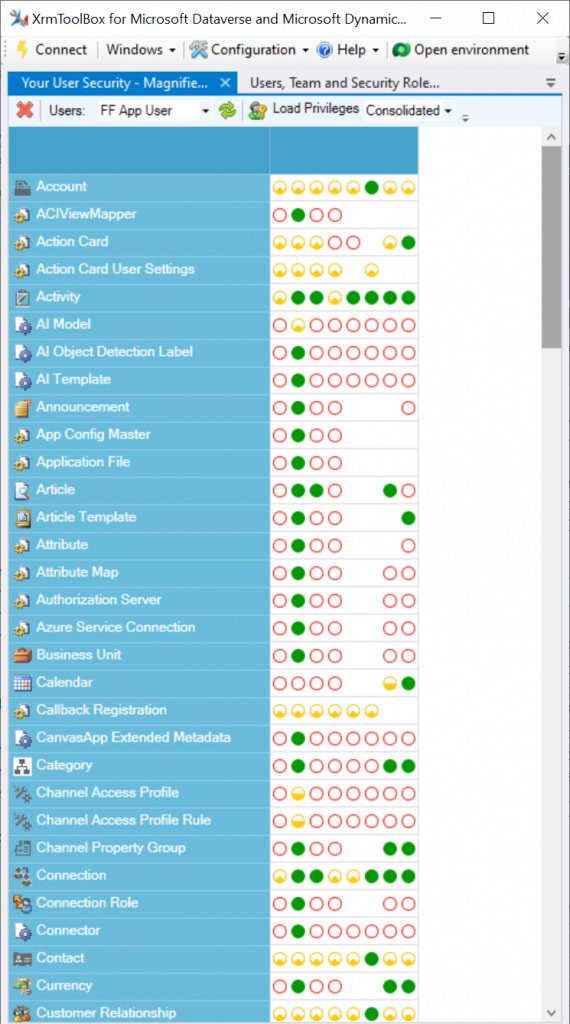
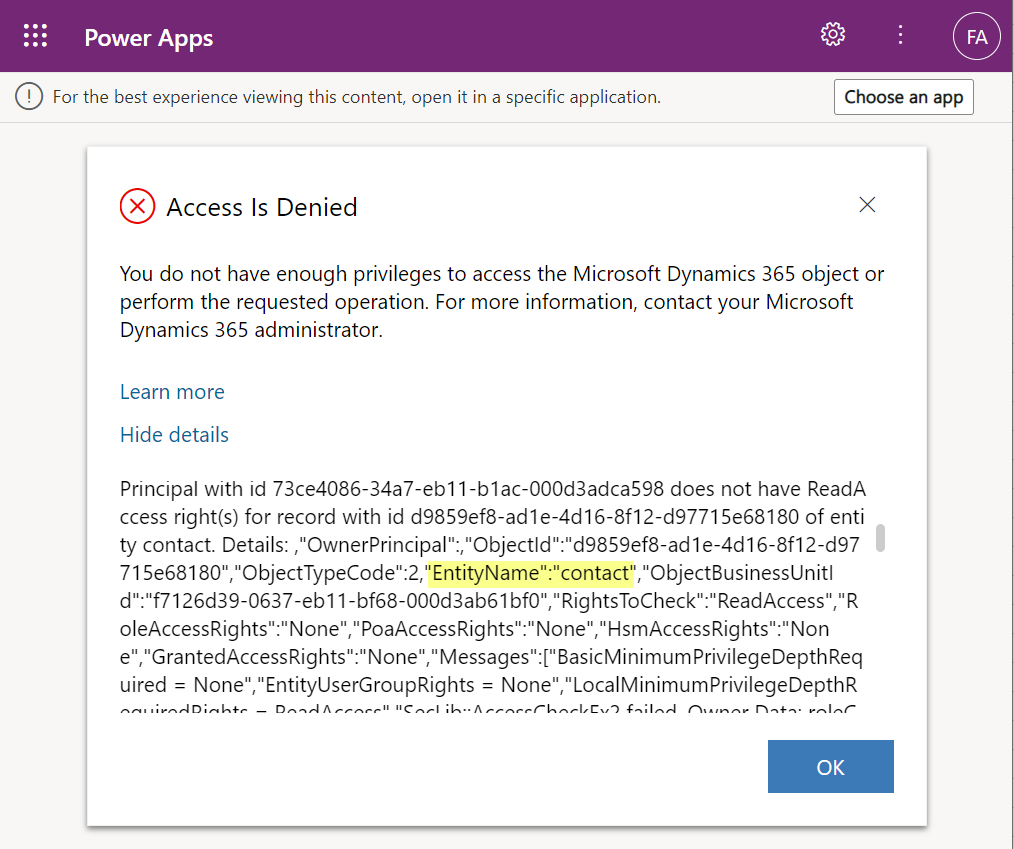
    After we had manually copied & imported the data back, we left that restore environment in place for a while. In this case, “a while” actually meant 6 months. We were in no rush to free up the capacity, so I decided to wait and see if there were any further lessons to be learned from this incident.

    What happens to the storage space of a restored environment that no one is using? You might expect it to remain roughly in the same size as the original backup. In our case, the restore environment grew to be over 2x the size of the original environment. Below is an illustration of the restore vs. production environment storage usage from Power Platform Admin Center reports:

    Our production today is at around 7 GB total Dataverse storage consumed, whereas the production restore environment had ballooned to 17 GB. What was consuming all that space? The AsyncOperation table:

    This is where all the Dataverse system jobs are stored. These jobs will keep running, even if no live users (nor outside integrations) touch the environment.

    Looking at the number of rows in that table (via XrmToolBox plugin Fast Record Counter), I saw that while our production environment had 8.4k rows, the restore environment had 51k rows in that table.

    Why are there more jobs in the dormant environment? This is because normally the completed system jobs are deleted by another scheduled job, known as bulk delete jobs. Only in this restore environment the jobs just kept piling up. I checked that the bulk delete jobs weren’t reporting any errors. However, the actual system jobs offered the explanation to the storage space growth:

    Switching to the suspended system jobs view revealed that there were 3.5k system events stuck. New batches seemed to be generated on a daily basis. With titles like “Microsoft.Dynamics.CDD.AuthorizationCorePlugins.RoleAutoExpanderPlugin”, it wasn’t immediately obvious what these jobs were related with.

    Upon inspecting the system jobs records, the column “message name” revealed that these are related to solution imports and updates. Yes, just because you stop using a Dataverse environment, that doesn’t mean Microsoft would stop from servicing it with the latest solution versions and new features.

    Why did the jobs get suspended then? The answer is in what happens after restoring tje environment from a backup. It gets put into administration mode by default. The intention here is quite sensible, since you wouldn’t want any integrations from the newly restored environment to be talking with the outside world. This could cause issues when you’d have multiple Dataverse environments connecting to the same target systems, potentially causing duplicate data and messages to be created.

    The challenge here is that in today’s Dataverse / Dynamics 365 environments there are first-party integrations that also rely on features that the admin mode by default disables. These will keep running as system jobs inside the environment, yet they can’t complete their tasks and are therefore put in the queue as suspended jobs.

    In a small CRM style environment like we have, this caused 10 GB worth of additional data to get accumulated into the Dataverse tables within 6 months. While system jobs are now stored in the cheaper file capacity rather than the expensive database capacity, it’s still quite a lot of unwanted storage consumption from built-in features.

    Obviously the administration mode is not designed to be a permanent state for any Power Apps or Dynamics 365 solution’s hosting environment. This does highlight the fact that it’s not possible to simply “freeze” a Dataverse environment and keep a snapshot of your data and configuration for a longer duration in the MS cloud. All live environments will get updates to system solutions sooner rather than later, thus altering the state of the database. While the business data in the Dataverse tables will be preserved as-is, the metadata and its surrounding maintenance processes will keep on living their lives.

  • Dataverse meets Teams: my presentation at #TeamsNation 2022

    Dataverse meets Teams: my presentation at #TeamsNation 2022

    I had the pleasure of attending the Teams Nation conference on March 23rd, alongside more than 4000 Microsoft Teams community members. Not only that, they also allowed a former XRM geek like me to do a presentation on the Power Platform track. So I did.😄

    Since I’ve recenly been working a lot with Dataverse for Teams, that was a natural topic to cover in a Teams related event. My session was titled “Dataverse meets Teams: low-code app opportunities for everyone”.

    I first explained the big picture of what Dataverse means, the demonstrated three different apps our team has built on top of DV4T. Finally, a few words on the known limitations of the Teams based Dataverse environments and how you need to take them into consideration in your solution architecture design.

    The slides are available for download on SlideShare, or you can browse through them in the embedded version below:

    The session recording from Teams Nation 2022 is also now available on YouTube:

    If you’re planning to build apps into a Dataverse for Teams environment, then be sure to also check out my earlier blog post on the solution management experience in DV4T.