Author: Jukka Niiranen

  • Microsoft Business Forward 2018 Event and Spring Wave for Dynamics 365

    Microsoft Business Forward 2018 Event and Spring Wave for Dynamics 365

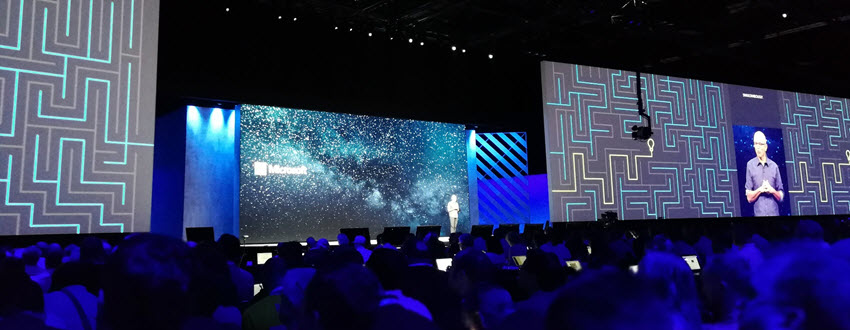
    The public launch of the Dynamics 365 Spring Wave was at the Microsoft Business Forward event in Amsterdam on March 21st, 2018. Here are some highlights from the event, shared over on Twitter with the #MSBusinessFwd and #MSDyn365 hashtags. (If you’re viewing this post on Dynamics Community page then you might want to visit the original post on Surviving CRM site to see the embedded content.)

    There’s A LOT to chew on in this release and there’s literally 10+ blog posts released today by Microsoft, spanning from traditional Dynamics 365 Customer Engagement team blog to PowerApps to even Power BI. You can start drilling down into this wealth of new information from the announcement by James Phillips: Accelerating digital transformation with the spring 2018 release for Dynamics 365 and Business Application Platform.

  • Trial & Error: Understanding Dynamics 365 CE Trials

    Trial & Error: Understanding Dynamics 365 CE Trials

    With SaaS products like Dynamics 365, getting the process of running a free trial right is crucial for the commercial success of products. This is why you may have seen Microsoft also perform a lot of changes into the process how you’ve been able to spin up trials of CRM Online instances, nowadays known as Dynamics 365 Customer Engagement. Or “Dynamics 365 for X”, with the “X” being an App like Sales, Customer Service, Field Service or Project Service.

    This App model is one of the reasons why the seemingly simple process of provisioning a new cloud database to host your CRM trial data has turned into a bit of a beast recently. It’s no longer a one-size-fits-all offering, rather Microsoft is trying to tailor the trial experience based on the business process that is most relevant for the potential customer. The intentions are good, but the results can lead to a lot of confusion when dealing with an inherently complex platform like XRM where users never follow just a single track through a few predetermined use cases. Here’s a few notes on what I recently learned about how the trials currently work.

    Classic Trials

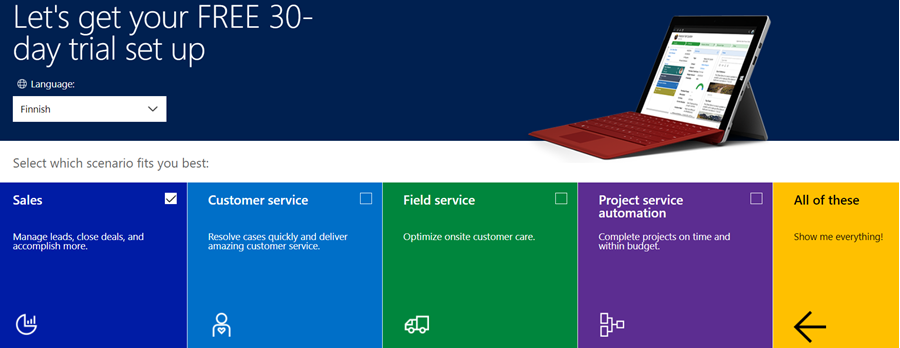
    If you’ve been working with Dynamics 365 recently, either by deploying it for customers, managing your internal instances or studying to become a certified Dynamics 365 professional, you’ve probably encountered this selection:

    Here you get an option to select either one of the Apps, go for the full suite of “all of these”, or if you’re really paying close attention, skipping the App selection by ticking the box “none of these, don’t customize my organization”. Today when I was in need of setting up a new trial to test the Sales related features specifically, I opted to install the Sales App via this provisioning screen.

    After a short while, I was able to access this new trial instance. That in itself can of course be a challenge, since there’s no guarantee that the Office 365 App launcher or the home.dynamics.com screen will refresh to show you the link to the Dynamics 365 instance. Knowing the direct URL of the instance picker (https://port.crm4.dynamics.com/G/Instances/InstancePicker.aspx in EMEA) speeds up this process, and soon I was faced with the Sales specific clean app list. My Finnish language “Myynti” app for the legacy web UI was there, as was the less elegantly named “Sales-keskus” hybrid of English/Finnish, which of course points to the Sales Hub based on Unified Interface.

    Since I needed to do some solution installation here, the first thing I had to do was to promote myself to the Admin role. That’s something you’d never need to do outside of the trial experience, as being the user who provisioned the Dynamics 365 instance you’d most likely have sufficient roles in the Office 365 administration side to see the admin menus directly here. But these are trials we’re talking about and the whole point of the tailored experience is that you DON’T see things that are not relevant to you, because that’s a scary UX for people not familiar with the platform.

    Now that I had the power to configure the instance to my liking, I proceeded to first checking out the default UI on the account form. Here I noticed that actually my nice’n clean Sales UX was cluttered with stuff that I didn’t ask for. Taken from the English UI here, you’ll notice that the account form tab actually has sections for Project Price Lists, Field Service and Scheduling. Not to mention the related records navigation that was at least 20 items long. Where did my sleek Unified Interface “Sales Hub” go?

    When going to the Solutions menu, it’s obvious where these items are coming from. The “Sales trial” in fact contains in total 16 solutions, which is equivalent to choosing the “all of them” option on the trial setup screen. It’s all here, even though you didn’t ask for it: Customer Service, Field Service, Project Service and their accompanying trial customizations. No, none of these will actually show up as installed solutions for the instance if you view them via the Dynamics 365 Admin Center. The same laws of physics obviously don’t apply for trial instances as they would for actual production or sandbox instances. (more…)

  • In Praise Of Code and No-Code

    In Praise Of Code and No-Code

    Two weeks ago Neil Benson wrote an excellent article on LinkedIn, as a response to a claim that everyone working as a functional consultant in a Dynamics 365 project team should also know how to write code. This really resonated with me and I shared the article, along with a bit of commentary of my own. My post, in turn, started to gain quite a lot of traction on the LinkedIn feed. It looks like we had touched upon a topic of great interest within the network of CRM professionals.

    If you read my post above, it pretty much summarizes the main points I wish to bring out in this discussion:

    1. There is much more to ensuring Dynamics 365 project success than being able to do hands-on software development.
    2. A big chunk of the value delivered by Microsoft’s cloud platform is not relying on custom code development.
    3. The remaining chunk that is custom code driven work should be left to professional developers and not copy-paste heroes.

    There have been some very good arguments written in the comments section of the LinkedIn post, so I urge you to also view them for gaining greater perspective on the topic. I see a lot of resemblance with the “should designers code” meme in the original assumption that functional consultants would be able to do their jobs better if they also were familiar with developing custom code. Much of what has been said in the heat of that debate between coders and non-coders probably applies here, too:

    Alan Cooper’s four part article covers the dilemmas in general software development teams with such great insights and depth that I won’t even attempt to dive in the same direction here. In practical terms of a CRM project, when it comes to the availability of skills and experience needed in carrying out the wide range of tasks during the project’s lifecycle, the manager in charge of resources is always going to need to do some juggling. The less you ask the team members to juggle between completely different kinds tasks, the more likely they’ll able to focus on actual customer value generating activities rather than keeping all the balls in the air simultaneously. Here’s how Neil Benson put it:

    “Asking a functional consultant, with no formal computer science education or experience as a professional coder, to find and copy someone else’s JScript from Stackoverflow and paste it into your Dynamics solution is asking for trouble.”

    I don’t touch code myself but I do try to get my hands dirty on a wide variety of technologies. For example, today I spent a few hours getting familiar with Azure Service Bus, testing how without writing a single line of code I was able to push plugin execution context data into a cloud based message queue and work with it via a GUI in Azure Logic Apps. Now, I would never recommend myself as a person you should hire to set up your production ESB, but I do feel like I need to have a deeper understanding of these technologies than I could gain just by watching through the flashy demos in Microsoft keynotes. Seeing the different sides and reading/hearing what those with deep expertise on a particular technology have to say about it, that is essential. Going and actually trying to step into the shoes of an expert for that technology – probably an unnecessary detour.

    Skimming the bits from the top without diving deep into the dirty details of writing real code might sound like being afraid of all the complexity that awaits beneath the surface. However, the lack of code in a solution doesn’t mean that the complexity of the solution couldn’t be high. The CRM Tip Of The Day post “The story of the small change” perfectly illustrates the way in which individual configuration items built entirely via the graphical tools provided by MS can have dependencies that require you to have a rigorous testing process in place. It’s not just the changes of a system either, since you can easily use workflows and business rules to build a level of complexity into your business logic that doesn’t reveal itself in the test scenarios the consultant behind the design might have thought of. Whether you’re delivering the end product via code or configuration, bugs will sneak in there and eat away a part of your life – be it before or after production deployment.

    The argument for doing things via point’n’click configuration “because it’s so much faster to build” shouldn’t be the one and only argument. Yes, it is often much, much faster to put together the first iteration of a solution via graphical tools. This in itself can be a huge value for the business because you can validate the proposed solution quickly with the relevant stakeholders. Often you’ll only get to the actual requirements when demonstrating live parts of what the initial requirements said. Now, the main reason why Real Developers are often afraid of what “citizen developers” might come up with when given quick tools for building no-code apps is that they may lack the experience of seeing the full lifecycle of a business application. They’ll mistake the first PoC as being equivalent to the final production solution, with little thought given to the work that still remains ahead. This experience isn’t something you must necessarily gain via writing code yourself – a no-code functional consultant just needs to gain sufficient exposure to the various stages of the process via working as a part of the CRM project delivery team.

    I think we all need to be able to see “beyond code” when building solutions on top of platforms like Dynamics 365 Customer Engagement. Going full-on no-code in your design approach is probably going to unnecessarily limit the value that could be gained from an extensible application platform, forcing you to unsustainable workarounds and resulting in poor UX for the system end users. At the other end of the spectrum, always resorting to your custom built components before having a thorough analysis of the configuration capabilities and complementary cloud services found within your ecosystem of choice will likely increase the solution’s TCO and put the long term reliability of your complex business application at risk as changes in related processes, personnel and technologies occur over time.

    Please feel free to leave comments on how you see the role of code & no-code work evolving in Dynamics 365 projects.

  • Getting Your MCSE Certification for Microsoft Business Applications

    Getting Your MCSE Certification for Microsoft Business Applications

    No matter if you’ve been in the Dynamics business for over a decade, there inevitably comes a time when you’re unqualified for your job. Not necessarily from a real life competence perspective, but by not having any valid certifications for the Microsoft product you’re working with. This was the fate that I was facing as the year was coming to an end and my CRM 2016 era certificates were about to become worthless in the eyes of MSFT.

    Not that there’s anything wrong with a fine product like Dynamics CRM 2016 yet, but if you’re working for a partner organization then the exams for that particular version no longer count towards your company’s competency eligibility. It’s Dynamics 365 all the way now, no more CRM. It shall be interesting to see how the validity of these certifications will be defined in the new world without any year numbers in the product name, but let’s not worry about that just yet. If like me you are in risk of becoming uncertified, then here’s a bit of information on how to turn things around.

    Welcome to Cloud Business Applications

    Since CRM isn’t a thing for Microsoft anymore, also the competency that MS partners now need to target is called Cloud Business Applications competency. Compared to the earlier and soon retiring Cloud CRM competency the requirements for number of certifications as well as certified professionals have gone up significantly. Silver requires 5 individuals with in total 15 exams passed, whereas Gold is a whopping 15 & 45.

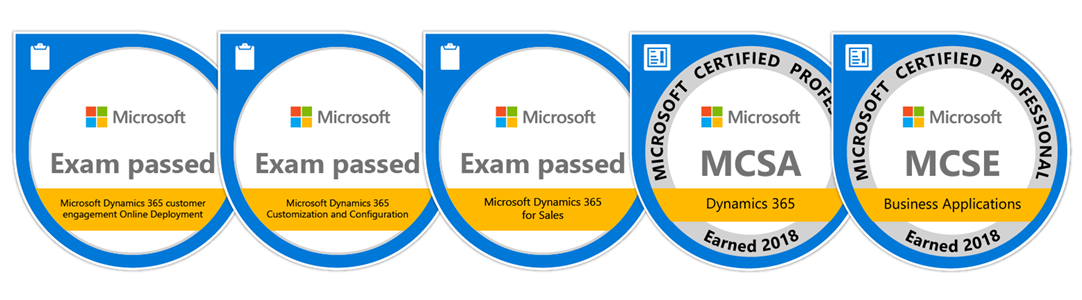
    Alongside this change there has also been a formal MCSE certification introduced for Business Applications. The way this works is that you’re supposed to first take the two required exams for MCSA: Microsoft Dynamics 365 certification: Online Deployment (MB2-715) and Customization & Configuration (MB2-716). Then you have a choice of completing one of the application exams, either Sales (MB2-717) or Customer Service (MB2-718). Now, this conveniently aligns with the Cloud Business Applications competency requirement, so you could simplify them by stating you need 5 (Silver) or 15 (Gold) MCSE’s working for your organization to qualify.

    I chose to complete the first three exams and was automatically awarded both the MCSA and MCSE during the process. Compared to the last time when I did Dynamics CRM exams, there’s now an integration between Microsoft’s exam records and the Acclaim badging platform (yes, that’s an actual thing in today’s world). This means you can easily set up a public profile page displaying all those Microsoft certifications you’ve earned. For example, if you for a second doubt that I might have Photoshopped the above image of my MCSE then HAH! There’s the proof!

    (It’s nice to discover that I now have bonus skills I didn’t even know about, like Dynamics AX.)

    Find Your Way Around DLP

    We now know the why (attain competency) and what (MCSE Business Applications) so let’s talk about how. Dynamics Learning Portal should be familiar to anyone who’s done any homework about how the Dynamics 365 training courses are offered these days. If not, read the friendly FAQ. Now, once your organization has arranged you to have access to DLP, the next hurdle will be how to find the relevant material from this ever growing maze of training content.

    Searching with the exam code like MB2-715 is one convenient way of finding what you’re after. Another nice shortcut is to use a Learning Plan that someone has built and shared with you. Here’s an example of a Sales based Learning Plan that contains the courses for achieving MCSE: click here to add it to your plans.

    Another route to MCSE would be to complete the MCSA foundation courses and choose the Customer Service track instead. That is also available as a shared Learning Plan built by me, which you can access via this link.

    One nice thing about those Learning Plans is that they also show the total duration of all the videos in all the courses that prepare you for the MCSE. In these examples the Sales track contains the Introduction to Microsoft Dynamics 365 course, the Service track doesn’t. The net weight of these packages are 34 and 37 hours. One week’s worth of just watching the course video materials. No practice included.

    Passing The Exams

    That’s probably what you’d really want to learn from this post, right? Unfortunately, no one can be told what the right path to MCSE is. You have to see it for yourself.

    Obviously if this is the first time you’re studying for the exam area there’s going to be a lot more to digest compared to just refreshing your certification to the latest version. If you haven’t even touched the features in an actual Dynamics 365 / CRM environment before, then be sure to reserve a lot of time for poking around the application UI, entering dummy data, changing configuration options and examining their impact, building brand new areas into the application via customization tools, managing user and environment settings, installing solutions, browsing through the documentation, and so on. That’s how you actually learn the skills, not via memorizing the course material contents.

    Even people who have extensive experience on working with the XRM platform are unlikely to do well in the exams just based on the customer projects they’ve worked on. There’s going to be questions about features so ancient and so rarely used that you may not have touched them for 10 years, like discount lists. Then there’s the new stuff that’s still in Preview mode but included in the exam area anyway, so you’ll also have fairly little experience on using it in real life projects, like Relationship Insights. Those are the areas where even an experienced consultant will have no choice but to spend time studying how the product actually works.

    I’ll admit that I didn’t watch the videos while studying for my MCSE, since the areas in my chosen path (that include the Sales certification) were something I’ve spent quite a lot of time with – both in Preview programs exploring and testing the new features as well as designing and implementing solutions to meet customer needs. This meant that I was able to collect the information I needed from reading through the slide decks of each course, as well as glancing over the companion guides providing the text from the videos. These documents can serve as a “refresh pill” for your mind to help you recollect the things you’ve already encountered earlier, but they are obviously not designed to be a full user guide. You cannot replace a healthy learning diet with these pills alone.

    There’s The Exams – Then There’s The Real World

    The application exams are always the ones where I find myself drifting furthest away from my everyday work tasks. The reason is that they sometimes describe an alternate reality where customers actually use the built-in CRM features in a very deep way, with no mention of the customizability limitations and user experience challenges that in reality will steer many organizations away from them. Well, actually it’s the implementation consultants that get burned by an OoB feature and then THEY steer the users away from ever even knowing it exists.

    Making these two worlds collide is actually a positive thing in the end. In the midst of busy project work you rarely get to explore the way that Microsoft designed the application to be used, so you’re likely to focus a lot more on the limitations and differences to the customer’s specifications, not so much on the opportunities hiding within the product. I bet if you never study for the certification exams with the DLP materials then you’re going to miss out many areas where standard features could be applied to solve a real life problem – even if a bit of creativity would be needed in crafting the end solution.

    With multiple choice questions to measure the amount of knowledge crammed into your head, there’s unfortunately going to be some questions in the exams that focus on details you’d normally have very little need to memorize. With a customizable platform it’s not very essential to know a list of default views included or the specific terms used in the (English language) UI – unless you want to get your MCSE certification. In that case you’ll be partially evaluated by how well you recall theses type of details, not only based on what’s your understanding of the big picture and the context in which these details appear in the XRM platform. Oh well, such is life. You’re only going to need a score of 700/1000 to pass the exam anyway, so perfect memory is not a requirement.

    Probably the biggest challenge with the certification system is the pace at which the cloud platform is evolving. There’s just no way that the exam content could target the very latest release available for Dynamics 365 with the way new functionality is rolled out. As the platform and the applications on top of it are further separated from one another (App/Plat separation), potentially leading to an ever more agile delivery practices for new features, this will very quickly make the DLP course content details in conflict with what’s the actual product functionality that (new) customers have available to them. Solving this dilemma would require Microsoft to also move to a more agile process in delivering training materials as well as measuring the skills of the MCSE candidates, since regardless of the DLP delivery channel the exam format still remains very much founded in the era of on-prem software. It remains to be seen if new innovations in this area could eventually transform the certification process in a more profound way than merely making existing the classrooms and test centers virtual via tools like DLP and online proctored exams.

    Imagine All The People, Sharing All The World ?

    If you’re working on the customer’s side of the business, then Dynamics Learning Portal won’t be accessible for you. Sorry, this is a private school that doesn’t accept just anyone interested in Dynamics 365. One reason behind this must be that DLP is also the primary portal these days for Microsoft to deliver partner presales training courses and product announcements.

    There is another way to get to many of the Dynamics 365 training courses, though. Not many people might have heard of the Microsoft Imagine Academy, but now that it’s been featured on the prestigious CRM Tip Of The Day blog, I’m sure eager students are lining up behind their login page door already.

  • Look Out for The End Of Outlook Client

    Look Out for The End Of Outlook Client

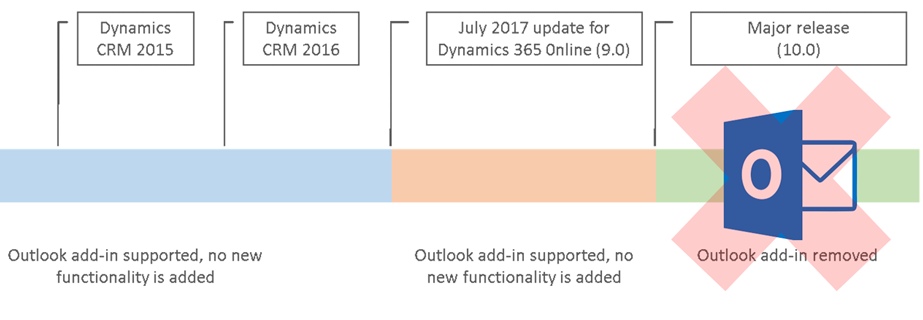
    It’s been a while already since Microsoft announced they were deprecating the Outlook Client for Dynamics 365. This announcement applied to the release formerly (and partially still) known as July 2017 Update, which everyone should rather be calling by its version number, i.e. v9.0. Since this version has only very recently become available for existing customers to schedule their CDU dates, it’s a good moment to remind everyone what this means in practice.

    You’ve Been Replaced By An App

    They all keep saying that robots will take away our jobs, but in the meantime it’s apps that are taking over Dynamics 365. Like I explained in my earlier blog post “What’s An “App” in Dynamics 365 Anyway?”, one of the many uses for the term “app” is now the way you integrate Outlook with your CRM system. Unlike the earlier COM add-in of Outlook Client for Windows PCs, this App will now work in any client environment – both in the browser and in mobile environments. That’s why the App is the future and the Client is the past. Well, actually that’s just one of the reasons, but let’s keep it simple for now, since the outcome remains the same nonetheless.

    So, if we’re just getting more of everything then isn’t this the easiest thing to sell in the world? It probably is a no-brainer for the IT guys who’ve had to struggle with the installation, configuration and updating of the locally installed Outlook Clients for years, as the administration overhead is reduced significantly. For the real end users of the CRM system, the perspective may differ, though. A user will immediately see the things that work differently with the App than they did before. Regardless of all the improvements, it will mean changes to their personal workflow, which is why you should pay attention to how the replacement is communicated and what support the users will need in this process.

    In your initial tests of the new features with a V9 environment and the App for Outlook, it’s good to keep in mind that this is still work in progress. The V9 Readme / Know Issues page has a list of technical glitches and unsupported environments for the App that is today still in Preview mode. It’s expected that by the time the current customers get their V9 updates the fully supported App version would also be available. Even with these hotfixes, you should prepare to see some usability gaps remain in the product for a while, as we’re dealing with a technology that’s fresh from the oven: the Unified Interface.

    In The Name Of Unification

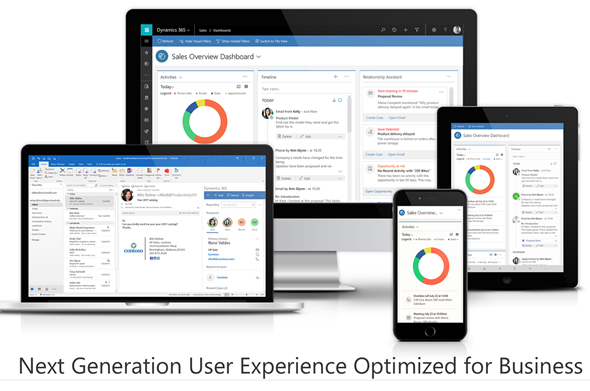
    The Dynamics 365 App for Outlook is one step on the long road towards a Unified Client Infrastructure. The earlier v8.x incarnation of the App was a limited side pane that would show information about records related to the email while browsing your inbox. The V9 App is a miniature app module built on the same Unified Interface that will power all the Dynamics 365 Customer Engagement UI’s in the future. This means that the feature set available is far greater, with the ability for you to scroll through the entire contents of a contact form while remaining in your inbox – or even navigate to related records. Similarly the commands at your disposal will allow completing tasks like adding new competitor records into your CRM database from within the single UI.

    For anyone who’s used the Outlook Client mainly for tracking items from their mailbox, calendar or contact list into the shared Dynamics 365 customer database, this will surely seem like a big step forward in terms of the new contextual actions being offered. These users will have gotten used to opening a browser tab whenever they’ve needed to actually view and search the contents of the CRM database in full screen mode.

    Then there is the group of users who’ve been in the Dynamics game for a longer time – at least from the CRM 2011 version. Back in those days the whole concept of Dynamics CRM might have been sold to them as “never leave your Outlook”. These people may not have actually seen a lot of the UX enhancements that have taken place in the browser and mobile clients in the past few years, since to them CRM has always looked like this:

    A “next generation Microsoft Outlook Experience” revealed seven years ago. Yeah, you probably wouldn’t buy a Customer Engagement solution today that looked like an ERP built into Office 2010. That doesn’t mean there wouldn’t be power users out there who still rely on the feature set of the trusty old Outlook Client to keep them productive, because they have mastered the Ribbon, the panes, the tabs, the whole shebang.

    The End Is Near …ish

    Microsoft has stated that by the time V10 rolls out, the client UI pictured above won’t work with Dynamics 365 anymore. That’s kind of understandable we consider that the Unified Interface will also replace the web client at some point in the future – possibly at the very same moment. If that is the case, we might not yet be all too close to the final removal of the Outlook Client yet.

    There’s going to be a lot of work needed before every last bit of legacy client infrastructure will have been replaced with the UCI based components. Microsoft remains committed to the guidance they’ve given to customers about the update schedule, which states there should be two new releases per year. However, we don’t really know much anything about at what point in time the next major release will arrive. Even things like rebranding Dynamics CRM to Dynamics 365 were handled over a minor update of v8.2, so who knows if we’ll see v9.1, v9.2, v9.3 etc. before the plug is finally pulled on the Outlook Client and (presumably) a whole bunch of other deprecated features in V10.

    It also remains to be seen whether Microsoft intends to evolve the desktop experience of using Dynamics 365 Customer Engagement. For example, at the moment the documentation states that the offline functionality is available via the phone and tablet apps. The table app for Windows 10 could of course be used on a regular PC as well, but it’s not completely unrealistic to expect some more targeted client applications appear for the desktop environments. When it comes to the App for Outlook on a PC, the current version still installs an add-in to manage your contacts, for example. So, just because the UI controls are being unified now, this doesn’t necessarily mean we’d be forced to use an “oversized phone app” on our big monitors.

    No More Updates – But Don’t Forget To Update!

    Even though the Outlook Client is now deprecated and there will not be any feature enhancements made to it, that doesn’t mean it would be completely left to rot. In fact, it is very important that once your Dynamics 365 Customer Engagement instances moves up to V9 also your Outlook Clients are using the latest version. This version is now the 8.2.2.137 Update for Dynamics 365 for Microsoft Outlook, available for download here. Yes, it’s V8 and not V9, but don’t let that mismatch distract you.

    You see, with V9 the XRM platform has moved up to using TLS 1.2 protocol for securing the connections between the clients and the server. The earlier Outlook Client versions do not support TLS 1.2 and the V9 server will not accept anything but 1.2 as the cryptographic protocol, which means you’re going to need the latest bits. If you have developed your own clients or code that relies on an earlier TLS version, then be sure to read this in-depth description provided by Matt Barbour of the possible errors you’ll encounter with V9 and the ways how you can avoid those by recompiling your code.

    Update on 2018-01-29: Deprecation of Deprecation

    Against all odds, Microsoft actually decided that they would reverse their previous decision to deprecate the Outlook Client. Read the following blog post and draw your own conclusions:

    Continued support for Outlook add-in (Dynamics 365 for Outlook)

  • From AppSource to Solutions to Dynamics 365 Apps

    From AppSource to Solutions to Dynamics 365 Apps

    In my previous blog post I presented the various different meanings that an App can have in Dynamics 365 Customer Engagement. Now that we’re aware of this jungle, let’s grab a machete and start making our way deeper into the heart of it, to understand how a system customizer can survive in there.

    Before there was Microsoft AppSource for Dynamics 365, the methods available for distributing apps in a generic sense were pretty basic: you downloaded a zip file (or several) from a location provided by some party, then navigated to the solutions menu in your XRM environment and started importing them. When there were updates to those apps, you needed to repeat the procedure. If there were some other configuration steps needed in getting the application properly set up, you had to read the friendly manual and complete those. In a more tech savvy environment the Package Deployer might have been used here, but that was hardly a task for the accidental CRM administrator.

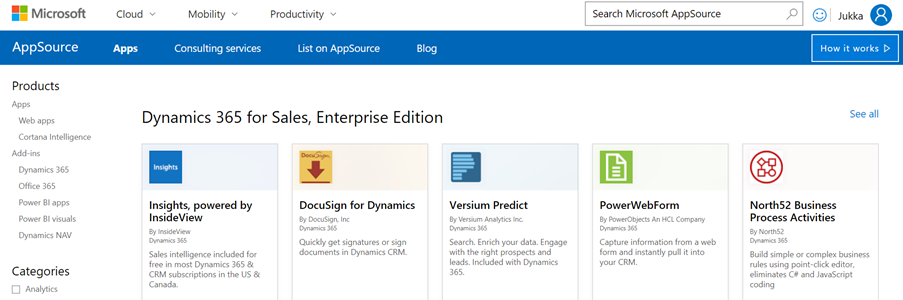
    What AppSource aims to change in the Dynamics 365 app distribution process is similar to what the smartphone app stores did a decade ago, i.e. simplify the steps for the customer and also provide a better channel for app developers to deliver their updates. When you go to AppSource and choose to either install a free App or start a trial on a paid one, the next screen will provide an instance selector to determine where in your Office 365 tenant you want to put this App in. Also presented are the checkboxes for agreeing on both Microsoft’s as well as the ISV’s legal terms.

    From here you’ll be taken into Dynamics 365 Administration Center. This part of the process nor the UI of the admin center isn’t very intuitive, so let’s pause here for a moment. While you’ll land on the Solutions view of an Instance after clicking on “Agree”, on the logical level we should be paying attention to the Applications tab instead. The chosen ISV (or MS) App will have been added as a row in the applications list, which applies to the whole tenant. In this example we see that North52 Business Process Activities is now available in our tenant. It doesn’t have any configuration options in this UI, but the Microsoft apps like Portal Add-on or Voice of the Customer both have an additional “Configure” button that is accessed via this Manage Applications screen.

    If we click back to the Instances tab in the admin center, select one of our instances and click the Solutions icon on the right side, we’re now presented with the list of solutions available to this instance via the AppSource delivery channel. It is not the same as going to your XRM instance and clicking Settings – Solutions, as there can be more solutions within that instance. For example, the organization specific solutions that you’ve created as a container for your own customizations. Not even the managed/unmanaged status of those solution has anything to do with what’s shown in the admin center, because whatever zip files you imported directly into your XRM instance as a solution is only visible from within the XRM UI.

    The solutions list in the admin center is also different in the way that it shows also the solutions you haven’t installed in the instance. These are applications that someone, either MS or your D365 admin, has made available in your tenant and possibly installed them into some other instance (a test sandbox, for example). To get them installed you don’t have to go to AppSource, rather you can start the process from here.

    What makes this view so relevant for the Dynamics 365 instance administrator is that here’s where you’ll see what solutions have upgrades available. In the above example, Microsoft has released a new version of the Relationship Insights solution. Since they don’t want to accidentally break your dev/test/production orgs by changing the solutions on their own, they are rather giving you the controls to click on the “Update” icon for the particular instance when you’re ready for it. This same process is applied also for third party ISV solutions to deliver updated versions of their apps.

    Now when we have deployed the app from AppSource and the Solutions view in the Dynamics 365 Administration Center for our chosen instance shows the status as “installed”, let’s use the Office 365 app launched to navigate to our Dynamics 365 start page, meaning home.dynamics.com. And… there’s nothing new here. Even if we click the “Sync” button to refresh the My Apps view, our AppSource app doesn’t appear. What gives?

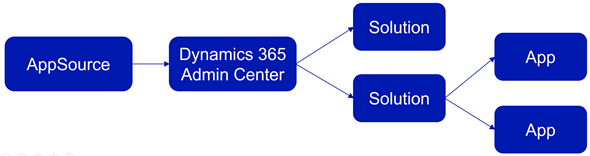
    At this point we need to take a step back from the UI and think about how these different components relate with one another. On the highest level we have AppSource, which is more of a marketing UI for products. From there we get Applications into our Dynamics 365 Administration Center. These manifest themselves as single solution rows for an instance when viewed via the admin center, but they can actually contain N separate solution files (look at Dynamics 365 Portals, for example). Finally, these solutions may or may not contain Apps – from 0 to N. This diagram illustrates these four conceptual levels and their relationships:

    In our example we’ve installed North52, which is an administrator/customizer tool designed for “building simple or complex business rules using point-click editor, eliminating C# and JavaScript coding”. In short, it’s an app for configuring apps, but it’s not a business app in itself. That doesn’t mean it wouldn’t need a UI, of course, but the Command Bar shortcuts and the dedicated home page web resource with navigation options quite frankly is much better suited for this type of a power user tool than the new Unified Interface apps that are supposed to work even on 4″ mobile phone screens.

    This brings us back to the App Module concept that was briefly mentioned in my earlier blog post. Before V9 and the Unified Interface there wasn’t so much benefit in building separate Apps for different functional areas of the XRM platform, as we had the one master UI for the instance available anyway. When the features are migrated over to the new Unified Interface, basically everything must be an App. In v9.0 we’ve yet to see how the more complex admin features will be implemented as Unified Interface versions, so currently it’s a somewhat jarring experience of 2011 meets 2018 for the system customizers.

    Even when all the actual business application functionality has moved over to Unified Interface, there will still be many scenarios in which presenting an AppSource app as a Dynamics 365 App Module App doesn’t necessarily make any sense. UI extensions like Checklists will not have much use outside the actual business entity in which they are used. Any app that connects to an external web service to enrich the contents of Dynamics 365 records mainly needs a configuration admin UI somewhere. Sure, there’s nothing stopping developers from using the App Designer to define an App for their solutions, since all you technically need is a single HTML web resource to publish an App with a single menu item. However, separating the tool from the XRM instance in which it lives isn’t going to make the UX of configuring features any easier, so I’m not really hoping for the app clutter to increase this way.

    Both the AppSource marketplace and the App Module in Dynamics 365 Customer Engagement provide significant improvement on how the business application features can be presented to business users and decision makers. What they don’t do is completely remove the need for Dynamics 365 system administrators to understand how the various layers and parts of the application platform are wired. XRM will likely remain an environment that’s just inherently more complex than an iPhone screen with its pretty app icons lined up just the way the single device user likes to see them.

  • What’s An “App” in Dynamics 365 Anyway?

    What’s An “App” in Dynamics 365 Anyway?

    Everywhere you look you see apps these days. Or more truthfully, you’ve been seeing them for ages already. Even in this blog I used the term “applification” over 2 years ago already, so it’s fair to say we’ve been living on the planet of apps for a long time by now. As catchy as those three letters are, the overuse of the term has some side effects that may lead to confusion when people refer to something as an “app”. With Dynamics 365 Customer Engagement (a.k.a. XRM), this danger is very real, since the term has been used in quite a carefree way when naming the different components found in the platform.

    In this blog post I’ll try to provide some clarity for those that are less familiar with the various dimensions that a Dynamics 365 app can have. I will go through the places in which apps can be found and explain their intended usage scenarios. Then in a follow-up post I’ll dig deeper into the architecture of how apps relate to solutions and the XRM customization capabilities in the latest V9 version.

    Mobile Apps

    Since smartphones are to blame for the app craze, we might as well begin by doing a search in the iOS App Store. With the term “Dynamics 365” on my iPad I get a list of various different apps I could install on the device. The top there results present a row of apps from Microsoft, but they are all built on completely different architecture.

    The first result named “Microsoft Dynamics 365” is the actual “CRM” app, meaning the one that’ll give you roughly the same features as you’ll find on Dynamics 365 Customer Engagement when accessed via a browser. Once the Unified Interface is fully developed, the mobile & the web will be almost identical, but currently it’s likely that you’ll see a somewhat different experience on mobile than what the browser UI looks like. You’ll find the app’s setup guide here.

    The seconds result is “Dynamics 365 Unified Ops”. Yes, it’s also by Microsoft, even though the name doesn’t include the corporate brand this time. Now, if you’re looking for the CRM capabilities then don’t get mislead by the app’s description talking about mobilizing your business processes. This is the mobile ERP application and you’ll need the “cloud AX” environment to use it for anything. No, Dynamics 365 isn’t “unified” on the level yet that you’d have just one client for CRM & ERP, but most people probably wouldn’t need a phone app that huge anyway. If you’re into ERP, read more about the Unified Ops mobile app here.

    The third result is “Field Service- Dynamics 365”. Although the app developer info on iOS says “Microsoft Corporation” this is actually the mobile app developed by Resco & licensed by Microsoft to be offered as a part of the Dynamics 365 for Field Service app license. It operates by connecting to the “CRM” instance and using its customer data, but the configuration is separate from the customizations you might have done to your Dynamics 365 Customer Engagement environment. The user guide for this app can be found here, while the customizers will find information about installing the Woodford solution for changing the app configuration here.

    App for Outlook

    For as long as Dynamics CRM has been around, the integration to Outlook has been one of its main selling points against alternative CRM products. The CRM Client for Outlook has served us well over the years but the time has come to lay it to rest and replace the Client with the App. The change is far more significant than what Microsoft’s product naming here would suggest, with “Dynamics 365 for Outlook” being the legacy client for your PC and “Dynamics 365 App for Outlook” referring to the lightweight app that will work on pretty much any device.

    Unlike the mobile apps, the App for Outlook isn’t something that a normal end user can (typically) download and configure for themselves. A system administrator or system customizer must take care of the deployment steps, which may include switching over to server-side synchronization, approving user mailboxes (with O365 Global Admin rights) and finally pushing the app to either selected or all eligible users under the menu Settings – Dynamics 365 App for Outlook.

    As of the first week of 2018, the Dynamics 365 App for Outlook in V9 is still in Preview mode, so a sysadmin needs to enable it from the System Settings – Previews tab. This is because the earlier app has been replaced with a completely new app in this release, built on UCI (Unified Client Infrastructure) that is used in the new Unified Interface. This will actually turn the previously feature limited Outlook sidebar app into a full Dynamic 365 Customer Engagement app that has similar capabilities as the mobile app mentioned above.

    Dynamics 365 App Modules

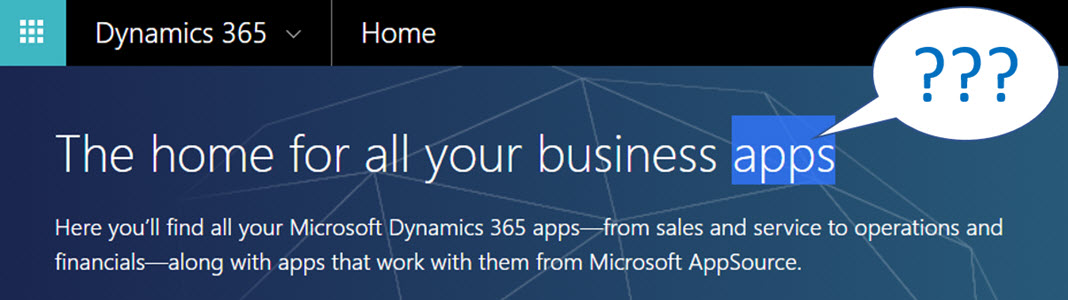
    When you’re logged in to Office 365 and you click on the Dynamics logo in the app launcher, you’ll be taken to the Dynamics 365 home page at home.dynamics.com. Depending on your environment’s configuration, you’ll see a few or a whole number of rectangular icons on this page. Those are all “apps”, but not like the previously described mobile or Outlook apps. More importantly, not all of them are necessarily Dynamics 365 Apps either. Huh?

    The explanation is that the Dynamics 365 home page lists also your Office 365 tenant’s PowerApps apps (which probably should be just called “PowerApps” to make my head hurt less while reading that). Aside from those, the list will include apps from all across your Dynamics 365 Customer Engagement instances, so if you have sandboxes for development and testing purposes, the very same app name & description may appear here multiple times. Furthermore, if you’re also using the ERP side of Dynamics 365, the home pages covers them as well.

    In the Customer Engagement world an app module is basically a subset of the components you can find within a single instance. It can include navigation, dashboards processes, entity views, forms and charts. Aside from a few app specific configuration items, it doesn’t really add anything that you wouldn’t have in the “full” XRM instance already. They are a way of controlling what contents of that particular instance is visible to the end user.

    Each XRM instance has by default at least one app, which will be called “Dynamics 365 – custom” unless you rename it in the System Settings menu. In addition to this, there can be N apps built and configured via the App Designer, or provided as readymade apps from Microsoft, like Field Service in the screenshot. Both the old web apps and the new Unified Interface apps will be present here if your instance is V9+. With so much going on here, I personally try to avoid ever navigating to the Dynamics 365 Home page and just store the direct URLs in my browser’s bookmarks bar where I’m in total control of how the apps are named and organized neatly into folders.

    Microsoft AppSource

    If you feel like you don’t have enough apps on your Dynamics 365 Home page, you can click the “+” icon that says “Find more apps that work with Dynamics 365”. This will open a modal window of AppSource, filtered down to the apps that are designed for, integrated with and some even built on top of the Dynamics 365 platform. Many of these will be built by partners (ISVs) but some of the content is authored by Microsoft themselves, either as officially supported solutions like the Social Selling Assistant, or as “accelerator” style solutions from Microsoft Labs with no warranty or promise of future support like Attachment Management.

    The AppSource apps are closest to the concept that the word “app” was associated with when the iPhone’s App Store was launched ten years ago. These may be small extensions to the common CRM feature set, like a Marketing Calendar component for visualizing campaign records, or integrations between Dynamics 365 and a standalone service like Adobe Sign. Just like in a smartphone app store, some items are completely free of charge while others will cost you dearly. Since we’re dealing with enterprise systems here instead of individual mobile devices, some services allow you to do a test drive in a sandbox completely isolated from your organization’s Dynamics 365 instances, like the CPQ solutions from Experlogix and PROS.

    What can be confusing about AppSource in the Dynamics 365 context is that probably the majority of the apps available in AppSource will not actually result in a new app icon being added to your Dynamics 365 home page. This is because up until V9 and the Unified Interface there wasn’t really a proper presence for the App Module in the XRM platform, so the world is only slowly adjusting to this new reality. I’ll delve into this very topic in my next blog post.

    Dynamics 365 App Licenses

    The concept of an app exists not only in the visible UI and logical platform component containers but also in the contractual world of software licensing. If you go to the Dynamics 365 Pricing page and download the Licensing Guide PDF, you’ll see the detailed way in which the rights of a licensed App user are defined in relation to the features provided by the XRM platform. There are in total 176 occurrences of the word “application” in this document, so don’t expect a quick answer. However, since XRM still largely follows an “honor system” where it’s up to the system administrator to limit the security roles of a user to match those to the rights given to him or her via the assigned Dynamics 365 license type, you’re going to have to understand the concepts.

    Even though you can purchase and assign a user a license for Dynamics 365 for Sales, i.e. an app license, this doesn’t mean that the only thing this user would see or would be legally allowed to access would be the Sales app icon on the Dynamics 365 home page. They can be allowed to view the entire contents of any XRM instance in that particular Office 365 tenant, thanks to the first row in the above table (“all Dynamics 365 Enterprise Edition data”). They could access the “Dynamics 365 – custom” app to look around the whole suite of features in Customer Engagement. They could leverage the Dynamics 365 App for Outlook to track emails to records. But if you misconfigure their security roles and allow them to track emails against case records (a Customer Service app feature), you are in breach of the licensing contract.

    Alright, that’s about as many “app” mentions as I can reasonably fit within one blog post. Next time I will take a look at Apps from a system customizer perspective.
  • Top 3 Themes for Dynamics 365 in 2017

    Top 3 Themes for Dynamics 365 in 2017

    The first day of the new year is a good moment to reflect on what 2017 gave us (or didn’t give) in the Dynamics 365 business. Here are the top 3 themes that came to my mind when I looked backed at the last 12 months of news, releases and overall directions coming from Microsoft.

    Business Applications

    A major theme that emerged this year and found its way into most of the communication coming from Redmond was Business Applications. Those two words on their own of course don’t mean anything very revolutionary, but it’s rather the way in which they were used to broaden the context of Microsoft’s business software beyond just Dynamics that’s of greater significance. If 2016 was the year when CRM and ERP were commercially bundled into Dynamics 365, then in 2017 the scope began to reach further beyond that. At the start of the year the XRM platform was given the Customer Engagement name, with the absolute minimum fanfare allotted for the occasion, so the true focus for product marketing was obviously somewhere else.

    Looking around at what specific software products sit alongside Dynamics 365 in the high level MS technology stack illustrations, it’s quite logical that we’re now seeing the “Power Suite” tied into pretty much every commercial narrative around Microsoft’s business cloud. More precisely, the technology grouped under this suite with no official name is very central to the story being told to both business and technical decision makers for one reason: its purpose is to connect the big three MS clouds. Office 365, Dynamics 365 and Azure are all equal beneficiaries from the toolkit that is provided by PowerApps, Flow, Power BI, CDS and their numerous connectors.

    On an everyday level it may still not be all that common for the real life CRM solutions to heavily rely on the Power Suite technology, like using MS Flow instead of D365 workflows. Because it was first rolled out as a power user focused set of tools for an individual information worker rather than something you’d deploy across a large organization, the practical as well as perceived maturity of this technology has formed a barrier of sort for full-on adoption. The long term outlook for it does look bright in my opinion, however. There’s only so much that Dynamics 365 as a platform can do on its own (be it the XRM, AX or NAV flavor), but if you can connect it with the outside world of MS and non-MS services without the traditional integration development effort, that opens up the door to a world of possibilities. I’m pretty sure customers will be interested in taking a step through that doorway and having a look around during 2018.

    App/Plat Separation

    Taking a few steps down from the higher level clouds and diving into the platform formerly known as XRM, 2017 was a busy year. This didn’t really come as a surprise to me, since I had a wonderful opportunity to get a peak at what the product team had planned for this calendar year already in the last MVP Summit in November 2016. My initial reaction to it was “are you guys SERIOUSLY going to push all of this out in the next release?” Well, a clear majority of the planned features and changes was indeed shipped during 2017 eventually, although the naming of V9 as the “July 2017 Update” didn’t turn out to be such a great idea.

    There were massive changes introduced to XRM (which I’ll continue to call for what it is), both above and beneath the surface. Rolling out Unified Interface initially to the mobile devices and eventually to every UI is going to change the client side of XRM in ways that are even greater than the previous user experience overhaul in CRM 2013. Opening up the client UI to custom extensions with the Custom Control Framework (CCF) sometime later (hopefully in 2018) is a major step in enabling and encouraging the reuse of configurable UI controls for data visualization. Finally, the App/Plat Separation that has moved the previously built-in application features of Sales, Service etc. into optional solution packages is now turning XRM into the type of generic application platform that it has earlier often been depicted as – in the technical decision maker slide decks from MS, at least.

    The combined effect of this transformation which materialized largely in V9 is that XRM should now be a lot more future proof. Having the individual applications as their own packages is a bit like how at one point in the late Windows Phone operating system’s lifecycle the Office apps needed to be separated from the OS, so that they could be serviced and updated without having to ship a new WP build. (Naturally I hope that the fate of D365 will be considerably more glorious than that of WP.) The new UI controls in CCF that now aren’t tied to a single app feature but can rather consume any data coming from XRM database or from external sources via Virtual Entities are bound (pardon the pub) to be more useful in delivering solutions to varying customer needs. Sharing the same client framework across different devices and embedded apps is going to reduce the amount of effort needed to get these solution features in the hands of different user groups.

    Licensing Model

    Sometimes the planned features take a little longer to ship than was originally estimated, which certainly is no surprise to anyone working in the business of software. Other times it turns our that what you initially promised to deliver isn’t actually going to meet the needs of the outside world after all. The delays experienced in getting V9 out to the customers represent the former scenario, while what happened to the Business Edition is an example of the latter.

    There’s no denying that with the growth of the platform and all the new cloud services attached to it, Dynamics CRM had grown from humble beginnings to enterprise scale in the recent years. Therefore the idea of labeling the suite as a true enterprise product and building a different lightweight offering for the needs of smaller CRM environments probably made a lot of commercial sense when MS announced the Dynamics 365 branding with the Enterprise and Business licensing plans to the world in WPC 2016. Only the practical problem remained of how to actually mold a new offering out of the big suite – at least without taking several shots at one’s own foot while setting up constraints for customization and expansion for those customers who’d initially start their exercise from the lower end of the license pool.

    Those 14 months from announcement to eventual cancellation of a separate Business Edition were filled with confusion on all sides – from partners to customers, and probably within Microsoft, too. Although this did leave an unfortunate stain on the year 2017 for Dynamics 365, the long term outcome from the decision to NOT roll out an artificially separated lower tier may turn out to be a better choice after all. It’s all still wide open on how the promised “lower price point” licenses and apps will be packaged, but at least it sounds to me like MS has acknowledged they need to build bridges instead of walls around the growing set of applications in Dynamics 365. For instance: just take a look at the documentation of the upcoming Dynamics 365 for Marketing application and tell me if it looks like an SMB only -product that no existing (Enterprise) customers would have any use for? Exactly. Sanity must prevail and customers be given a chance to license the technology that best fits their needs.

    Hello 2018

    What can we expect to see from Dynamics 365 in this new year then? There are no definite product roadmaps from Microsoft that would publicly disclose what’s planned for be released in which year, since the software business no longer operates on the type of schedule that we saw when products were shipped in shrink wrap every 2-3 years. It now looks more like a mesh of forever updating cloud applications and web services that move along according to their own backlogs and team velocity. Given that the real business applications that customer organizations deploy are a combination of several products that in turn use a variety of back end services, who can actually tell when a certain feature will be “ready”? For example, Dynamics 365 for Marketing utilizes Customer Insights, which in turn relies on the following Azure services:

    • Azure Data Lake Store
    • Azure Data Lake Analytics
    • Azure HDInsight (Spark, Phoenix, HBase)
    • Azure SQL Database
    • Azure Key Vault
    • Azure Secret Store
    • Azure Event Hub
    • Azure Stream Analytics
    • Azure Redis Cache
    • Azure Service Fabric
    • Azure Active Directory
    • Azure Monitoring
    • Azure Metrics
    • Azure Websites
    • Azure Service Bus
    • Azure Storage

    That’s what the future is made of, and that’s why it is so unevenly distributed. We may well see MS announce the next Dynamics 365 Customer Engagement capabilities before existing customers are even able to update their instances to V9. The specific points in time where a particular capability is 1) announced, 2) in private preview, 3) in public preview, 4) available for new environments and 5) deployed for live customer environments may therefore be spread out over a time period that makes even assigning a proper year to it challenging at times – let alone a calendar month like “July 2017”. In this light, I’m personally mainly expecting to see how the above three themes from 2017 will play out as they get closer to impacting the real life scenarios of customer organizations all over the globe that get to put it all into action in their digital business processes.

  • Configuring Custom Controls for Views in Dynamics 365 CE V9

    Configuring Custom Controls for Views in Dynamics 365 CE V9

    The new Unified Interface that launched in v9.0 of Microsoft Dynamics 365 Customer Engagement gave us all the possibility to try out the next generation CRM user experience in new trial orgs or sandboxes. While the CDU process for upgrading existing customer environments to V9 has not yet been made available by Microsoft (which gives them some time to iron out the remaining wrinkles with a steady stream of Service Updates), now’s a good time to explore what’s new and what’s changing with the imminent arrival of Unified Interface.

    One of the most exciting platform enhancements from a developer perspective is surely the arrival of the Custom Control Framework. Known as CCF for short (no, not that Microsoft CCF you senior members of the community might recall), this is essentially the mechanism through which all of the data visualization in the XRM platform will be handled in the Unified Interface. Not just the custom developed UI components from partners but also everything that Microsoft builds. Take a look at the default solution of a V9 org and you’ll already see a wealth of these components listed in there:

    The bad news is that as of now there’s no documentation nor API available for developers to build new or extend existing controls via CCF. It’s coming, but it just ain’t ready quite yet. In the meantime, us system customizers can get familiar with the concept by tinkering with the configuration options that ship with V9.

    Custom Controls for Views

    Back when the Editable Grid first launched, the feature was rolled out in an “all or nothing” style. What this meant was that you were able to enable it on the entity level, but then it was the only view type that any user would see in the UI (at least in the specified client type). Sure, they were given the option to switch from editable to classic read-only grid if they spotted the option, but the system customizer wasn’t able to target the powers of Editable Grid to only views that actually benefited from this feature.

    V9 has taken this a step further and introduced a Custom Control setting for each individual entity view. This gives us the option to set that only a specific view like “Edit Account Details” would only present the grid in the editable format with all the pros and UX cons that this particular control introduces over a read-only view. This doesn’t apply in the classic web UI (or the “Refreshed UI” as the V9 release refers to it) but on the Unified Interface side we can now see the power that this granular control over controls has on the user experience.

    New View Controls in V9

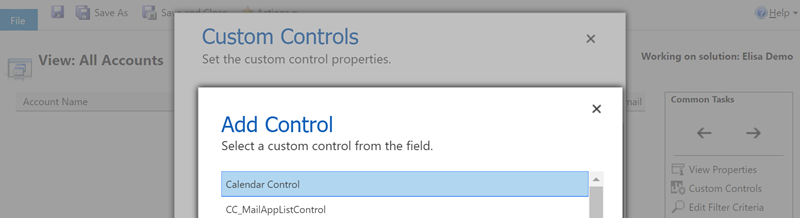
    In addition to the Editable Grid, there are a number of other grid types that a V9 org presents as options for the system customizer. In the screenshot above you’ll see the Calendar Control having been chosen as the data visualization type for the view. This opens up a number of configuration options that can be set right in the UI, like the date field data sources, description label, colors and so on. What we see here is essentially an example of the point & click configurability that a CCF based control can offer when used in the Dynamics 365 CE solution.

    The Calendar Control is also responsive to the client type. When access via a browser app using the Unified Interface style (in this case a custom Subscription Management app), you’ll see a somewhat ugly legacy calendar with the week days presented horizontally. When viewed via the Dynamics 365 for Phones app it will render in a the above format of vertically stacked records per day. (Yes, those day of the week and month texts are presented in Finnish regardless of the app language setting being English, because that’s how Microsoft prefers things to be).

    There are also other control types available for views in V9 currently, such as Timeline Control. That specific control appears to require quite a specific format of source data that fits the scenario of the Company News Timeline solution, so you might not find it useful in your own customization work. What might be worth noticing is that there are in fact two separate read-only grids available in the current release: the default one and the Read Only Grid with settings to control the entity card form and data reflow behavior.

  • Postcards from Microsoft Ignite 2017, part 2

    Postcards from Microsoft Ignite 2017, part 2

    Back to Florida again – at least on a mental level. In part 1 of my Microsoft Ignite conference diary I described the overall setting of Dynamics 365 in the context of the Business Applications story. This time let’s have a look at some of the details on what the XRM platform can do now and in the near future. The live tweet content can be found from my #MSIgnite Storified collection part 2, but here’s the story behind those social posts.

    The GA (general availability) target of Dynamics 365 Customer Engagement V9 was set to the week after Ignite. This was indeed the case, as I didn’t even have a chance to arrive back home from Ignite before I had my first V9 trial instance running the in the cloud. People who had participated in the Dynamics 365 Insider program were already granted access to the preview instances of this major release but now each and every new trial is provisioned with the V9 bits. A few days later there also was an official blog post that announced the availability of “Dynamics 365 October service update”. The naming of course is a bit confusing, since up until this point Microsoft had stuck to the “July 2017 Update” name – and that’s what still shows up in the D365 Admin Center UI. Don’t you agree that life would be much simpler if we’d all just use the version numbers instead of marketing names? Oh, and if we had the KB article already available for the 9.0.0.1103 GA build, that would be even sweeter.

    After the initial Preview Executive Briefing sessions for V9 that were conducted before the summer holiday season, Ignite was the place where the next big presentation on Unified Interface took place (at least to my knowledge). Oren Ryngler and Linda Simovic took us through a detailed demo of all the UX goodies that V9 has to offer. Unfortunately the slide deck is not available for download even for Ignite attendees, but you can view the full recording of the presentation on YouTube. I bet that even if you participated in the preview program, you’d be hard pressed to recall all the wonderful details packed into the Unified Interface. Principles like “Gradual exposure to complexity”, AI capabilities like Grid Recommendations or the new chart types are something you can expect to discover in the video.

    There was another excellent session where Linda discussed what the underlying motivations behind the Unified Interface initiative (or “Unified Client Infrastructure” / UCI) were. Even more interesting was the quick peak at the Custom Control Framework (CCF) that is a significant benefit unlocked by UCI. Described as “extensibility framework for building UI components that visualize data”, we’ve already heard that Microsoft has been busy rebuilding everything in the default app UI as Custom Controls (“but if it’s default then how can it be custom?” Ah, never mind the semantics…). What we don’t yet have is a definitive date for when the APIs for building true Custom Controls will be opened up to customers and partners. What’s REALLY interesting is that the product team’s roadmap includes a “Control Gallery” marketplace for viewing and purchasing these as solutions. If it all works out, then the Unified Interface in V9 is just the start of the true transformation of XRM UI into something more than fields and grids on an entity form.

    While the UI story is always going to get far more social media coverage due to fancy screenshots from the visible application, there’s a lot more bubbling under in V9 than just the promise of a Custom Control Framework. Matt Barbour presented the Microsoft Dynamics 365 CE Platform Update for Developers, delivering a concise “what you need to know” package for people working with XRM solutions or API based extensions. Now that everything in the OoB apps has been separated from “system” into actual solutions, managing the dependencies via solution segmentation is actually a big deal. Why it’s even a bigger thing from application maintenance perspective is that the next V10 major version will ONLY accept V9+ solutions – so start getting used to them right away. In addition to the earlier announced V9 platform enhancements of Virtual Entities and Multi-Select Option Sets, we also received a “one more thing” with Auto Number fields! Thousands of custom numbering solutions can finally be put to rest, at least after you install the Auto Number Manager for XrmToolBox to access the configuration options for this new native field type.

    There were several shorter sessions in the Expo area of Ignite that offered practical tips for how to do more with less when it comes to Dynamics 365 Customer Engagement. While I remain firmly in the no-code territory myself, the PowerShell scripting capabilities available in the new Online Management API or the more familiar Microsoft.Xrm.Data.PowerShell module demonstrated by Shwan Dieken and Sean McNellis from the PFE team open up automation capabilities even I can easily relate to. Don’t forget to check out this huge link list put together by Shawn & Sean for the latest admin tips & tricks you need to be aware of. Over on the MVP powered sessions of Ignite, George Doubinski also showed a wealth of automation tips to reduce manual labor for Dynamics pros. What I bet you didn’t know how easy the integration of Dynamics 365 Customer Engagement with a WordPress website can be, thanks to the plugin developed by George & Co at AlexaCRM.

    Like I wrote on the back of my first Ignite postcard, the Business Applications story that Microsoft wants to tell us consists of a lot more than just Dynamics 365 these days. While it’s been all too easy to disregard the earlier sales pitch for PowerApps and Flow as just a citizen developer fable that doesn’t apply when working on Real Projects, they are gradually gaining the types of ALM capabilities that put them higher up on the list of tools to consider for solving customers’ business problems. While there were some disappointments, like the continuing non-story of Adobe Marketing Cloud + Dynamics 365, you could easily find yourself thinking “hmm, that’s actually pretty cool” while watching the demos for this “Power platform” of non-XRM business tools. Even though CDS still largely is “a box to connect other boxes on a PowerPoint”, the added features like embedded PowerQuery and the accompanying new data sources give us a sign that progress is being made.

    As always, the big questions is about when’s the right time to jump in to the new technology if you want to deliver successful customer projects with it. Events like Microsoft Ignite are great for calibrating your own perceptions and expectations, not just via the official product demos but also the community response to them. I know I walked away from the conference with a far better understanding of what Microsoft is pursuing with their latest product development investments – even though I’ll need to review a bunch of the session recordings to actually grasp the finer details of each individual technology.